Safe iPhone Charging Accessories Guide
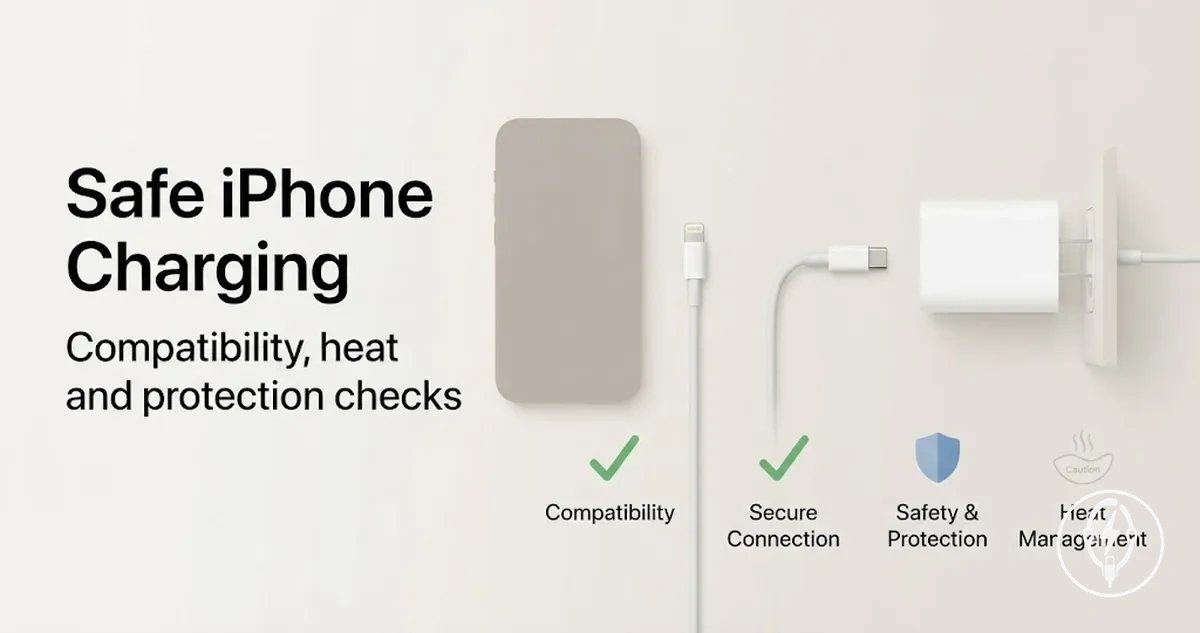
Safe iPhone charging accessories are charging cables, charging adapters, and wireless chargers that deliver power to a compatible iPhone while maintaining safe electrical operation, controlled heat generation, and protective electrical safeguards during normal use. According to Apple, charging accessories should be compatible with the iPhone model, used in well-ventilated locations, and kept free from physical damage to reduce charging risk. Compatibility, heat behaviour, and protection features are the primary safety dimensions when evaluating safe iPhone charging accessories.
Compatibility, heat behaviour, and protection features are the primary safety dimensions when evaluating safe iPhone charging accessories.
Charging safety depends on four measurable criteria: correct connector compatibility, good physical condition, appropriate power handling, and a suitable use environment. According to Apple, USB-C iPhone models support USB Power Delivery (USB-PD), while Lightning models require a compatible Lightning cable and adapter. When selecting iPhone charging accessories, verify that the charging cable, charging adapter, or wireless charger matches your iPhone's charging interface and supports the intended charging standard before considering charging speed.
- Compatibility: The charging cable, charging adapter, or wireless charger should support the correct connector and charging protocol for the specific iPhone model.
- Heat: Apple advises charging on a hard, well-ventilated surface because excessive heat during charging can trigger protective temperature management or interrupt charging.
- Protection features: Safety-oriented accessories commonly include overcurrent, overvoltage, short-circuit, and temperature protection circuits that disconnect or limit power during abnormal electrical conditions.
- Physical condition: Replace accessories with frayed insulation, bent connectors, exposed conductors, cracked housings, or loose connector fit because visible damage increases electrical and charging risk.
Unsafe accessories create uncertainty because outward appearance cannot verify electrical safety or protocol compatibility. For example, the USB Implementers Forum specifies that certified USB Power Delivery accessories negotiate charging power electronically rather than supplying maximum power continuously, while Apple recommends discontinuing use of damaged charging cables or adapters immediately. Using recognised compatibility and protection criteria provides a more reliable safety assessment than relying on appearance or marketing claims alone.
Accessory safety and battery health are related but remain different topics.
Accessory safety and battery health are related but remain different topics. A safe charging accessory helps reduce avoidable charging risk, whereas long-term battery health is also influenced by battery age, charging patterns, ambient temperature, and iPhone battery-management software, according to Apple.
Table of Contents
What Makes an iPhone Charging Accessory Safe
A safe iPhone charging accessory is a charging cable, charging adapter, or wireless charger that fits the device, manages power correctly, limits heat-related risk, and shows no obvious physical damage during normal use. According to Apple, charging accessories should be compatible with the iPhone model, used in a well-ventilated location, and replaced if they become damaged or show exposed conductors. Safety is therefore conditional on compatibility, power behaviour, physical condition, and the use environment rather than on any single feature or brand.
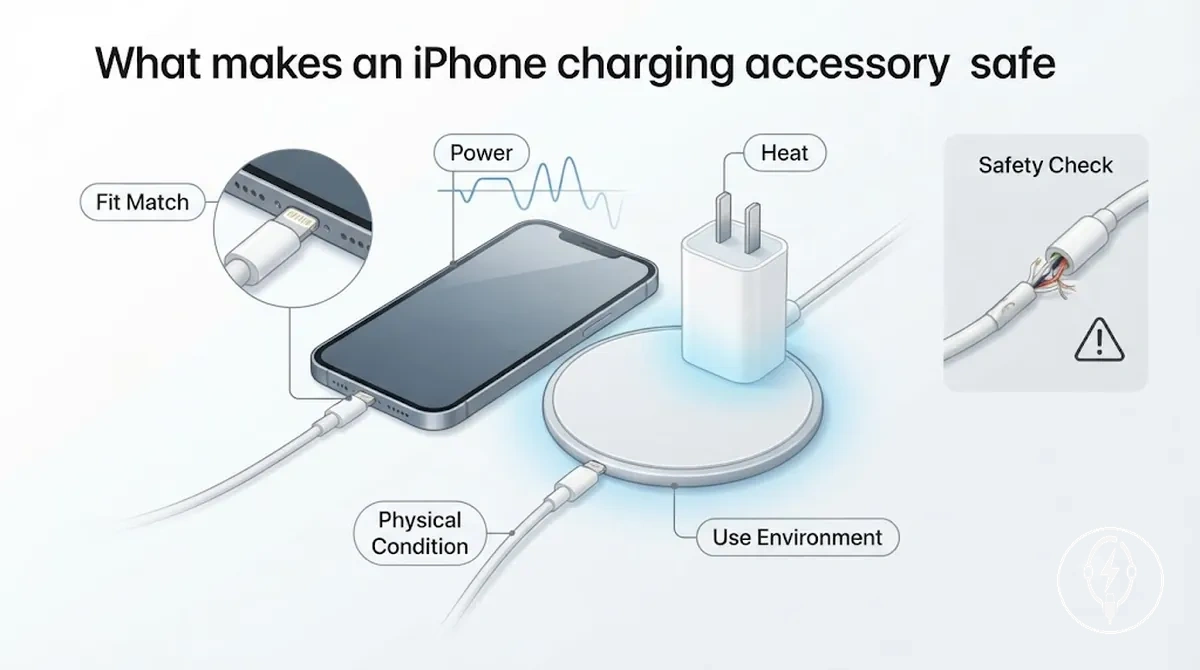
The main safety criteria are connector fit, correct power negotiation, controlled heat behaviour, physical condition, and credible safety signals. According to Apple, USB-C iPhone models support USB Power Delivery (USB-PD), while wireless charging uses the Qi standard on compatible models, and charging should occur on a hard, well-ventilated surface. The following criteria organise the practical checks that determine whether a charging accessory is suitable for everyday use.
- Fits the device: The connector and charging path match the iPhone model, such as USB-C or Lightning, and the connection remains secure without excessive movement.
- Manages power: The charging accessory correctly negotiates power with the iPhone, including USB Power Delivery on supported USB-C models, instead of supplying uncontrolled output.
- Limits heat-related risk: Mild warmth during charging can be normal, but repeated overheating, charging interruptions, or unusually hot surfaces indicate that the accessory should be inspected or replaced.
- Physical condition: The charging cable or adapter has no frayed insulation, exposed wire, bent connector, cracked housing, or loose connector fit.
- Credible safety signal: Certification programmes such as USB-IF compliance for USB products or Apple's MFi programme for Lightning accessories indicate that an accessory has been tested against defined compatibility requirements, but neither certification guarantees safe operation under every use environment.
No single certification signal, wattage rating, material, or brand proves that a charging accessory is safe in every situation. For example, Apple's 20 W USB-C Power Adapter supports USB Power Delivery for compatible iPhone models, but the same adapter should not be used with a damaged cable that has exposed conductors because physical damage increases electrical risk despite the correct power rating. A safe charging accessory can support safer charging, but long-term battery health is also influenced by battery age, charging patterns, ambient temperature, and the iPhone's battery-management system rather than the accessory alone.
Safety Scope Across Cables, Adapters, and Wireless Chargers
Safety scope differs across charging accessories because each accessory type has a different primary risk source, although all require compatibility, good physical condition, and correct use. According to Apple, damaged charging accessories should no longer be used, and safe charging depends on using compatible cables, adapters, and wireless chargers in suitable operating conditions. The main safety checks therefore vary between cables, adapters, and wireless chargers.
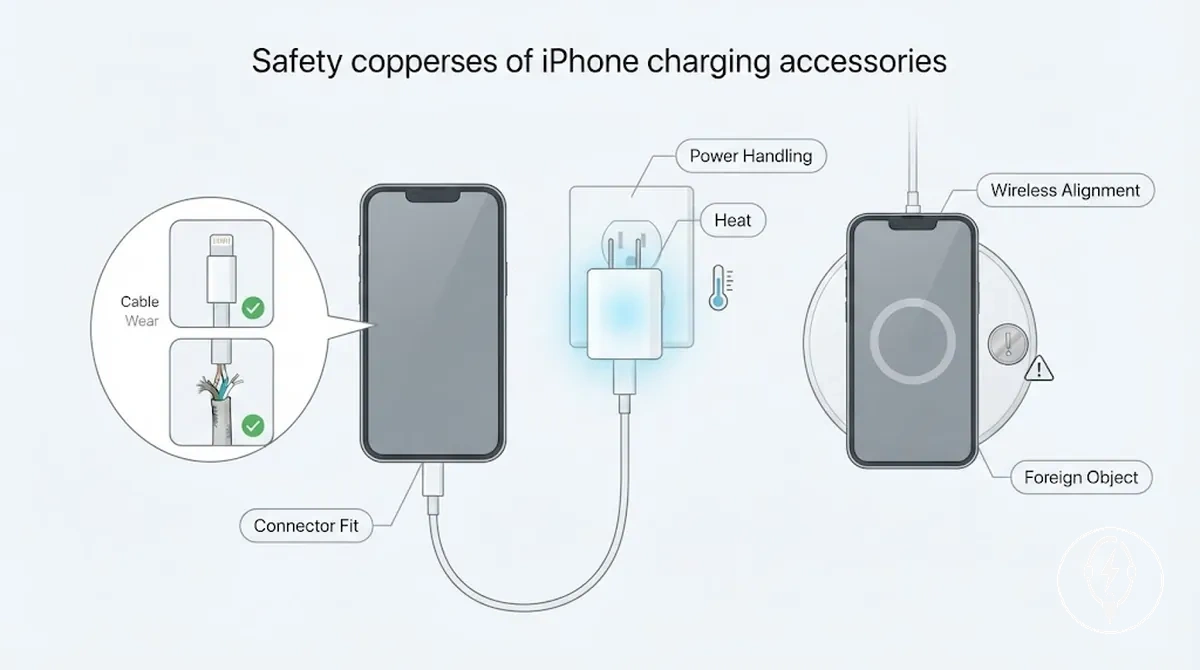
Cables should be inspected mainly for cable wear, fraying, and secure connector fit, whereas adapters should be checked for proper power handling and signs of overheating. Wireless chargers depend on correct wireless alignment and a charging surface free from foreign metal objects because, according to the Wireless Power Consortium, Qi-certified chargers incorporate Foreign Object Detection (FOD) to reduce heating caused by unintended metallic objects. The comparison below highlights how the safety scope changes by accessory type while keeping the shared safety checks consistent.
| Accessory type | Main safety check | Risk if ignored |
|---|---|---|
| Cables | Check cable wear, fraying, exposed conductors, and secure connector fit before every use. | Damaged insulation or loose connectors can interrupt charging, expose live conductors, or increase electrical risk. |
| Adapters | Verify compatible power handling, inspect the housing for cracks, and discontinue use if excessive heat or burning odour develops. | Damaged or incompatible adapters can cause unstable charging, overheating, or automatic charging interruption. |
| Wireless chargers | Maintain correct wireless alignment and remove coins, keys, or other metal objects from the charging area. | Poor alignment reduces charging efficiency, while foreign objects can trigger Qi Foreign Object Detection or increase heat buildup. |
Certification and Standards Signals to Check
Certification signals and standards signals are evidence cues that help evaluate the credibility of an iPhone charging cable, adapter, or wireless charger, but no single marking guarantees safe operation by itself. According to Apple, the MFi (Made for iPhone) licensing programme identifies Lightning accessories that have been tested for compatibility with Apple devices, while recognised regional safety markings indicate evaluation against applicable electrical safety requirements. Certification should therefore be treated as one evidence category alongside product condition, manufacturer information, and correct use.
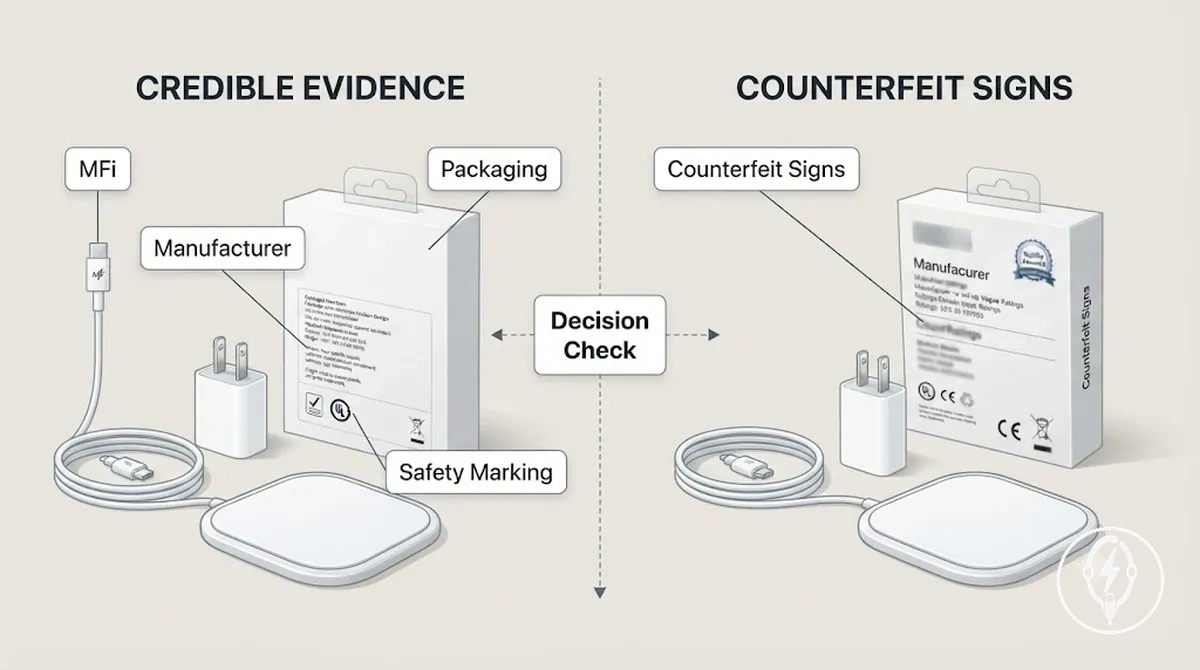
Counterfeit products often copy familiar logos while omitting reliable manufacturer information or presenting inconsistent packaging details. Regional compliance marks are meaningful only when they match the market in which the accessory is sold, and vague badges such as "Premium Quality" or "Safety Tested" without an identifiable testing body provide little verification value. Evaluate multiple certification and standards signals together before deciding whether an accessory appears credible.
- MFi: Helps verify Lightning accessory compatibility with Apple devices through Apple's licensing programme, but it does not verify physical condition or long-term durability.
- Regional safety markings: Appropriate compliance marks help indicate testing against applicable electrical safety requirements, but they should correspond to the country or region where the accessory is marketed.
- Manufacturer information: A clearly identified manufacturer, model number, and contact details improve product traceability, although they do not eliminate every safety risk.
- Packaging consistency: Consistent specifications, professional printing, and complete documentation support authenticity, whereas spelling mistakes, missing specifications, or inconsistent branding are counterfeit warning signs.
- Counterfeit warning signs: Generic quality badges, missing manufacturer information, or conflicting product markings increase uncertainty and justify additional verification before use.
- Decision signal: Treat certification signals together with physical inspection, connector quality, and charging behaviour because no individual label proves that an accessory is safe in every operating condition.
When certification evidence is incomplete or contradictory, treat the accessory as having unresolved safety uncertainty instead of assuming it is either safe or unsafe. Assessing certification signals, standards signals, packaging consistency, manufacturer information, and the accessory's physical condition together provides a stronger basis for judging credibility than relying on a single logo or marketing claim.
MFi, Regulatory Compliance, and Safety Markings
MFi, regulatory compliance, and safety markings support confidence only when they are authentic, relevant to the specific accessory, and accompanied by identifiable manufacturer information. According to Apple, the MFi (Made for iPhone) licensing programme identifies authorised Lightning accessories that have been tested for compatibility with Apple devices, while recognised regulatory compliance and safety markings indicate evaluation against applicable regional electrical safety requirements. These markings are conditional proof signals rather than a guarantee that an accessory is safe under every operating condition.
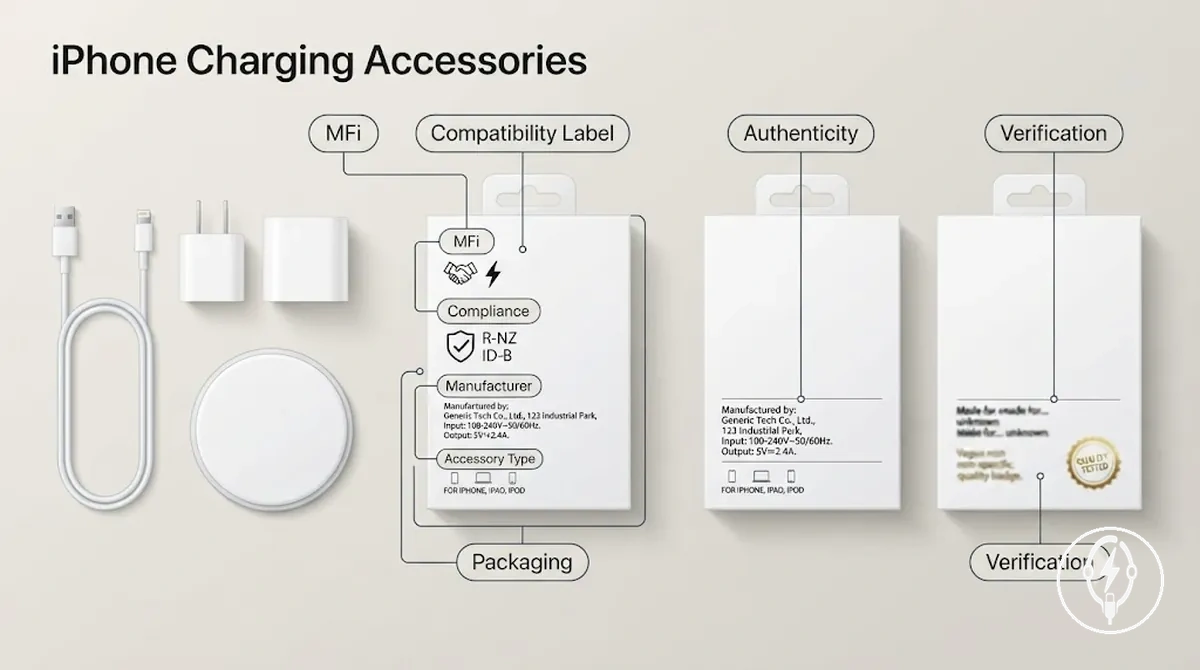
Weak proof signals include generic quality badges, missing manufacturer information, inconsistent packaging, or compliance markings that do not match the accessory type or sales region. For example, a cable displaying an MFi compatibility label but lacking a manufacturer name or model identification should be treated as uncertain rather than trusted automatically. Use the verification checklist below before relying on any marking as meaningful evidence.
- Authenticity: Verify that the MFi or other safety marking appears consistent with the accessory packaging and is supported by identifiable manufacturer information.
- Accessory relevance: Confirm that the regulatory compliance or safety marking matches the specific accessory type, such as a charging cable, wall adapter, or wireless charger, and the region where it is marketed.
- Manufacturer information: Check that the packaging includes a readable manufacturer name, model identifier, and contact details to improve product traceability.
- Packaging consistency: Compare specifications, printing quality, and product details across the packaging because conflicting information is a common authenticity warning sign.
- Vague badge risk: Treat generic labels such as "Premium Quality" or "Safety Tested" without an identifiable testing body or manufacturer as weak proof signals that require additional verification.
Uncertified and Counterfeit Accessory Warning Signs
An uncertified accessory or counterfeit accessory can appear to charge an iPhone normally while still presenting safety uncertainty because important trust signals are missing or inconsistent. According to Apple, users should stop using charging accessories that are damaged or appear unsafe, while identifiable manufacturer information improves product traceability and accountability. A charging accessory that functions normally should still be checked for warning signs before continued use.
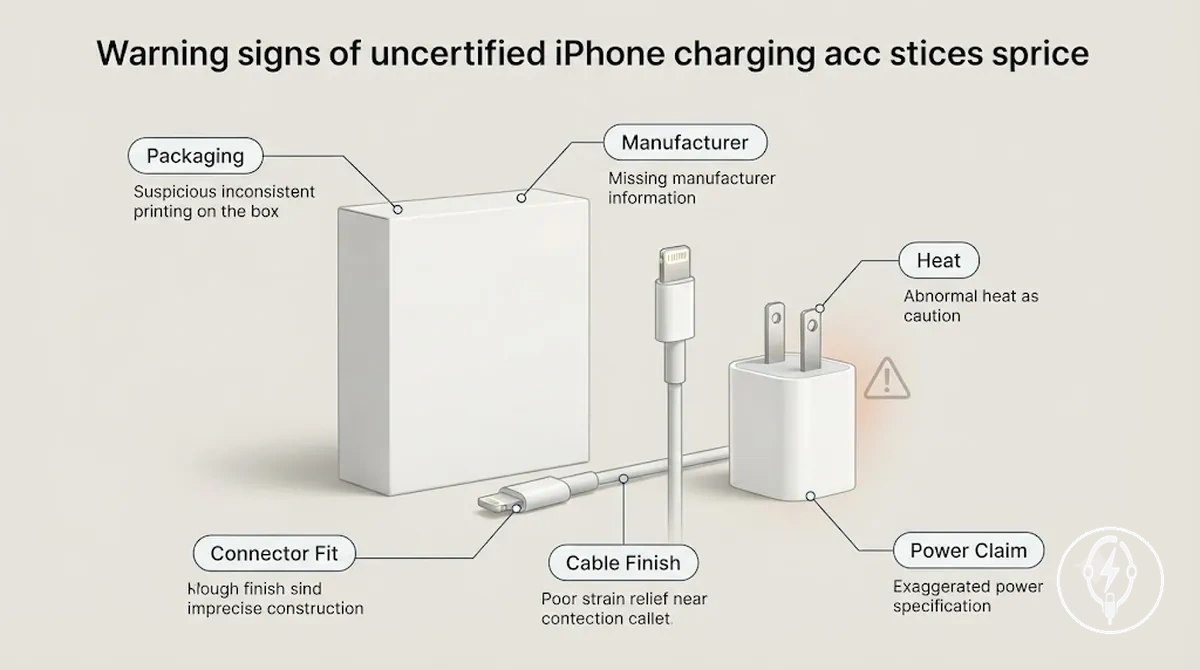
A charging cable or adapter may appear to work during everyday charging yet still provide weak evidence of safety if it lacks reliable trust signals. Instead of relying on appearance or charging performance alone, inspect the warning signs below before deciding whether the accessory is suitable for continued use.
- Suspicious packaging: Poor print quality, inconsistent specifications, missing documentation, or conflicting product information reduce confidence that the accessory can be traced to a legitimate manufacturer.
- Poor connector fit: A connector that feels excessively loose, unusually tight, or does not insert smoothly can indicate manufacturing defects that increase connector wear or charging interruptions.
- Missing manufacturer details: Packaging without a manufacturer name, model number, or contact information makes it difficult to verify product origin or identify the responsible manufacturer.
- Poor cable finish: Uneven moulding, weak strain relief, rough insulation, or exposed seams can indicate lower manufacturing quality and increase the likelihood of premature cable damage.
- Abnormal heat: According to Apple, charging accessories that become unusually hot during normal operation should no longer be used because excessive heat is a recognised warning sign of an electrical or hardware fault.
- Unrealistic power claims: Packaging that advertises exceptionally high charging performance without identifying the supported charging standard, compatible devices, or manufacturer specifications should be treated as an unresolved warning sign rather than reliable evidence.
Scenario: For example, a charging adapter advertised as delivering 240 W while providing no supported charging standard, manufacturer details, or compatible device information should be treated with caution because the wattage claim alone does not verify safe operation. If that same accessory also develops abnormal heat during ordinary iPhone charging, stop using it until its authenticity and condition can be verified.
Compatibility Checks That Reduce Charging Risk
Compatibility checks reduce iPhone charging risk when the connector type, cable rating, adapter output, and accessory condition all match the iPhone and its charging method. According to Apple, safe charging requires a compatible charging cable, power adapter, or wireless charger that is free from visible damage and suitable for the specific iPhone model. Physical fit is only one compatibility criterion because electrical compatibility and accessory condition must also align before charging. :contentReference[oaicite:0]{index=0}
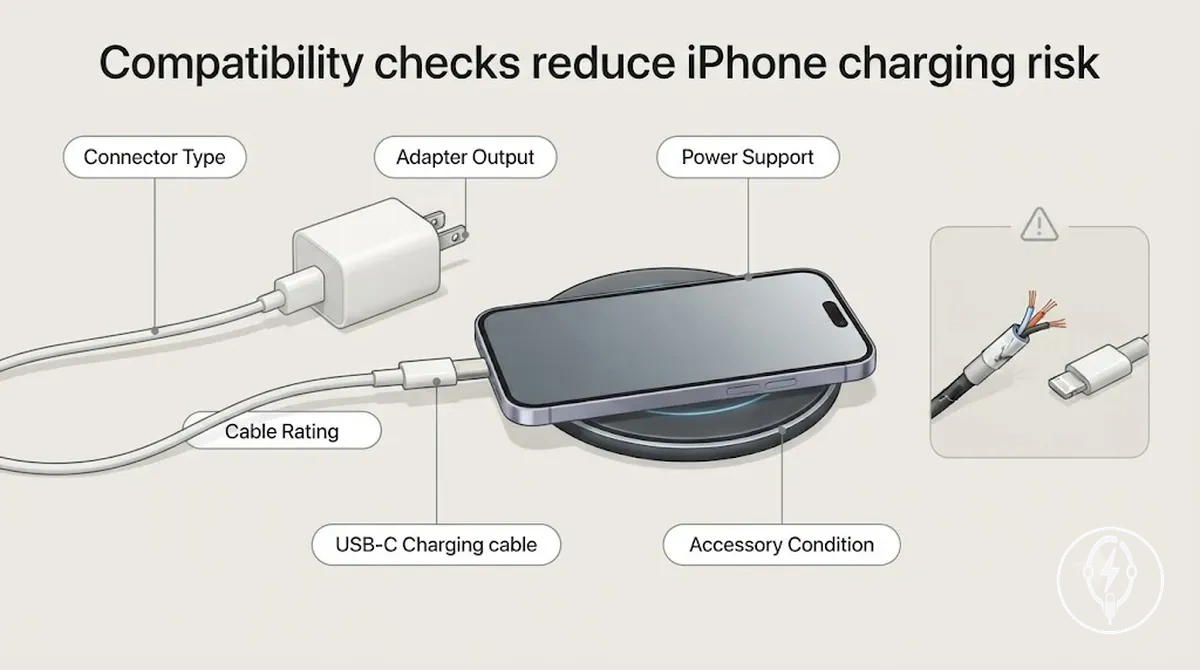
A charging connector that fits the port does not confirm that the charging path is electrically compatible. Apple specifies that USB-C iPhone models support USB Power Delivery (USB-PD) for fast charging when paired with a compatible USB-C cable and a compatible USB-C power adapter of 20 W or higher, while compatible wireless charging requires a Qi or Qi2 charger with correct device alignment. For example, connecting a USB-C iPhone to a 20 W USB-PD adapter with a compatible USB-C cable enables fast charging under Apple's supported conditions, whereas a damaged cable or incompatible adapter can interrupt charging despite fitting correctly. :contentReference[oaicite:1]{index=1}
| Entity/part | Attribute/criterion | Value/condition | Effect/risk/decision |
|---|---|---|---|
| Cable | Cable rating | Supports the required charging standard and has no fraying, exposed conductors, or visible damage | Helps maintain reliable power transfer and reduces charging interruption risk |
| Connector | Connector type | Matches the iPhone charging port and fits securely without excessive force or looseness | Provides correct physical connection but does not alone confirm electrical compatibility |
| Power adapter | Adapter output | Compatible with the iPhone charging requirements; USB-C models support USB Power Delivery with adapters rated at 20 W or higher for fast charging | Supports correct power negotiation and reduces incompatible charging behaviour |
| Wireless charger | Wireless standard | Compatible Qi or Qi2 charger with correct alignment between the charging pad and iPhone | Improves charging stability and helps reduce charging interruptions |
| iPhone fit | Device fit | Correct connector, compatible charging path, supported power delivery, and good accessory condition | Provides the strongest compatibility check before charging begins |
Effective compatibility checks combine physical fit, power support, and accessory condition instead of relying on connector shape alone. For more detailed selection guidance, see safe compatibility checks before choosing an iPhone charging cable, adapter, or wireless charger. :contentReference[oaicite:2]{index=2}
Cable, Connector, and Adapter Match
A charging cable, connector, and adapter reduce iPhone charging risk only when they match both physically and electrically. The connector must fit the iPhone port securely, the cable type must match the adapter port, and the adapter must support the required charging method while all components remain free from visible wear or damage. A secure physical and electrical match is the safe operating condition before charging begins. :contentReference[oaicite:0]{index=0}
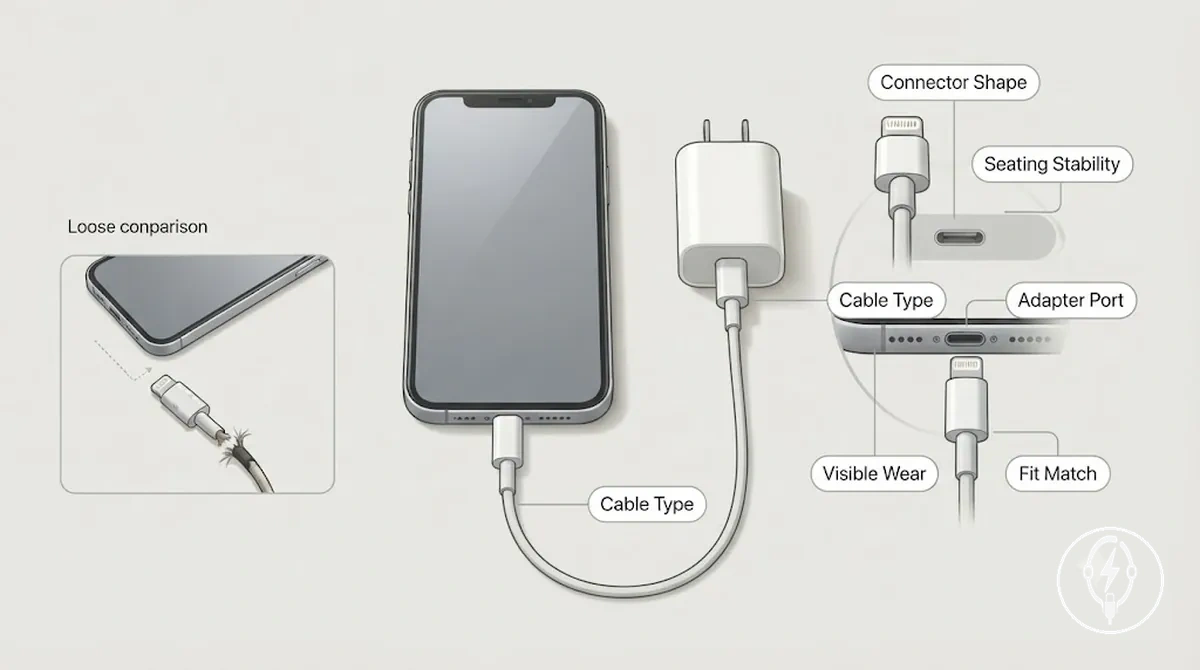
For example, intermittent charging caused by a loose connector usually appears as repeated connection and disconnection when the charging plug is moved slightly, even though the connector shape is correct. A cable that fits loosely, an adapter port that no longer holds the connector firmly, or visible wear such as frayed insulation or bent contacts increases charging risk and should be treated as a stop-check before further use. Use the checklist below to confirm that the charging path remains physically stable and electrically suitable. :contentReference[oaicite:1]{index=1}
- Connector shape: Verify that the charging plug matches the iPhone charging port exactly without forcing the connection.
- Seating stability: Confirm that the connector remains fully seated, does not wobble, and does not disconnect during normal handling.
- Cable type: Check that the cable type matches both the iPhone connector and the adapter port used for charging.
- Adapter port: Inspect the adapter port for debris, looseness, bent contacts, or physical damage that could interrupt power transfer.
- Visible wear: Stop using the accessory if the cable has frayed insulation, exposed conductors, cracked strain relief, or bent connector pins because these are visible indicators of increased charging risk.
Wattage and USB-C Power Delivery Fit
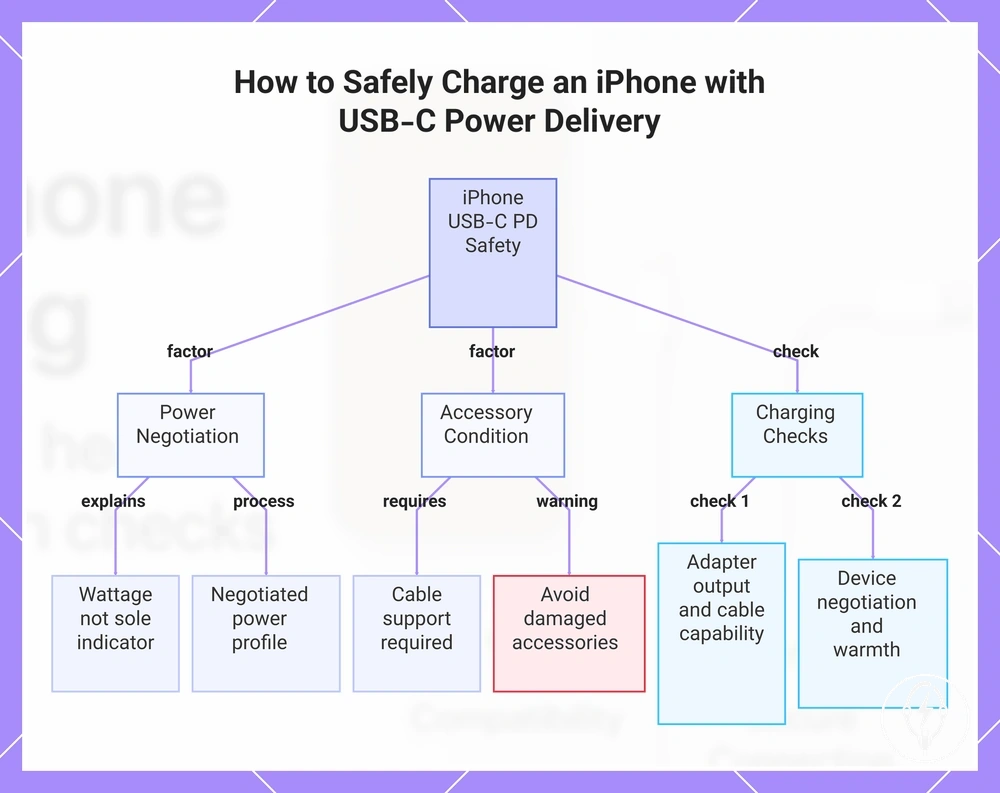
Wattage and USB-C Power Delivery (USB-C PD) fit affect safe iPhone charging because a compatible iPhone negotiates the amount of power it accepts from a compatible USB-C PD adapter rather than continuously drawing the adapter's maximum rated output. According to the USB Implementers Forum, USB Power Delivery uses negotiated power profiles between the power source and the connected device, while Apple specifies that compatible USB-C power adapters and cables are required for USB-C charging. Adapter wattage should therefore be considered together with USB-C Power Delivery compatibility, cable support, and successful device negotiation rather than as a universal indicator of charging safety. :contentReference[oaicite:0]{index=0}
Power fit remains only one safety factor alongside overall compatibility and accessory condition.
Heat response and charging speed depend on cable support, accessory condition, and successful device negotiation during charging. A compatible USB-C cable that supports the required charging capability helps maintain stable power transfer, whereas damaged cables or incompatible accessories can reduce charging speed or interrupt charging even when the connector fits correctly. For example, if two USB-C adapters both support USB-C Power Delivery, the iPhone negotiates an appropriate charging profile with each compatible adapter instead of continuously drawing the adapter's maximum rated wattage. Power fit remains only one safety factor alongside overall compatibility and accessory condition. :contentReference[oaicite:1]{index=1}
- Adapter output: Confirm that the adapter supports USB-C Power Delivery when charging an iPhone that supports USB-C PD.
- Cable capability: Use a cable that supports the required charging mode and has no fraying, bent connectors, or exposed conductors.
- Device negotiation: A compatible iPhone and USB-C PD adapter negotiate an appropriate power profile before sustained charging begins.
- Expected warmth: Mild warmth during charging can be a normal operating condition, but persistent excessive heat or repeated charging interruptions indicate the charging setup should be inspected.
- Condition check: Verify that the adapter, cable, and connectors are compatible, securely connected, and free from visible damage before charging.
This chart shows the key factors and verification checks for safe iPhone charging using USB-C PD, explaining that wattage alone is not sufficient.
Heat and Overheating Risk in iPhone Charging Accessories
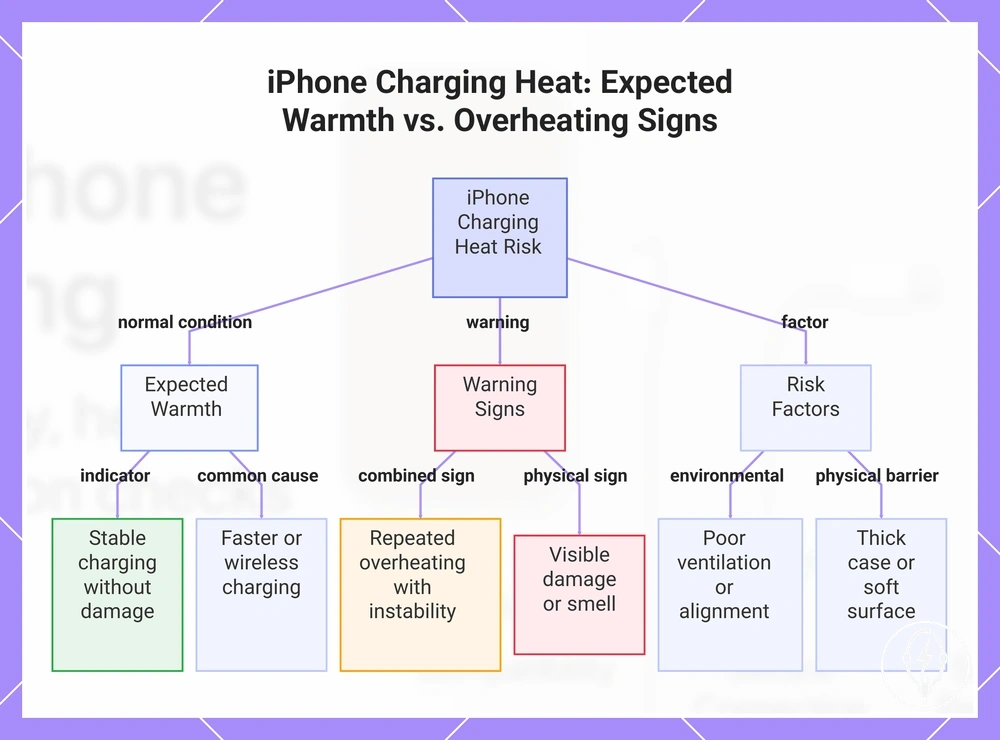
Heat during iPhone charging is not automatically a sign of an unsafe accessory because expected warmth can occur during normal charging, particularly during faster charging or wireless charging. According to Apple, charging accessories should be used in a well-ventilated location and discontinued if they become damaged, operate abnormally, or show signs of overheating. Repeated overheating or heat accompanied by charging instability, visible damage, or unusual smell should be treated as an accessory warning sign rather than normal operation, and the accessory should no longer be used until it has been inspected. :contentReference[oaicite:0]{index=0}
The diagnostic checklist below separates expected warmth from conditions that increase overheating risk and require a different response.
The key distinction is whether the heat pattern remains consistent with normal charging conditions or progresses into repeated overheating. Charging speed, restricted ventilation, charging on soft surfaces, thick protective cases, and poor wireless alignment can all increase heat buildup without necessarily indicating an internal device fault. The diagnostic checklist below separates expected warmth from conditions that increase overheating risk and require a different response. :contentReference[oaicite:1]{index=1}
The key distinction is whether the heat pattern remains consistent with normal charging conditions or progresses into repeated overheating.
Stop using the charging accessory if repeated overheating occurs together with visible damage, deformation, a burning smell, or repeated charging interruptions because these combined conditions indicate unsafe accessory behaviour rather than expected warmth. This guidance helps distinguish accessory-related heat patterns without diagnosing the iPhone battery or other internal hardware components. :contentReference[oaicite:2]{index=2}
- Expected warmth: A warm cable, adapter, or wireless charger during normal charging, particularly when using higher charging speeds, can be an expected operating condition if charging remains stable and the accessory shows no physical damage.
- Repeated overheating: Heat that becomes uncomfortable during repeated charging sessions under similar conditions or progressively worsens over time should be treated as a warning sign and the charging setup should be reviewed.
- Visible damage: Cracked housings, melted plastic, bent connectors, frayed insulation, or accessory deformation are clear stop-use signals because physical damage increases electrical safety risk.
- Smell: A burning or unusual electrical smell is not part of expected charging behaviour and the accessory should be disconnected immediately and not reused until inspected.
- Charging instability: Repeated charging interruptions, intermittent connection, or frequent charging restarts occurring together with excessive heat indicate the accessory should no longer be used until the cause has been identified.
- Poor ventilation or wireless alignment: Charging on beds, sofas, cushions, or other soft surfaces, using a thick case that traps heat, or placing the iPhone incorrectly on a wireless charging pad can increase heat buildup; moving the charger to a hard, well-ventilated surface and correcting wireless alignment helps reduce overheating risk.
This chart helps distinguish normal charging warmth from overheating warning signs and risk factors.
Normal Warmth Versus Unsafe Overheating
Normal warmth during iPhone charging means the charging accessory becomes warm while charging remains stable and no abnormal warning signs are present, whereas unsafe overheating is identified by repeated heat together with touch discomfort, burning smell, deformation, charging interruption, or device warning behaviour. According to Apple, charging accessories may become warm during normal use, but accessories that become damaged or operate abnormally should no longer be used. Distinguish normal warmth from unsafe overheating by evaluating both the heat pattern and accompanying warning signs rather than warmth alone. :contentReference[oaicite:0]{index=0}
The comparison below summarises the practical distinction.
Unsafe overheating requires action when warning signs recur under similar charging conditions instead of appearing as a single brief warming event. For example, if an adapter repeatedly becomes uncomfortable to touch, charging disconnects more than once during the same charging session, or a burning smell develops, stop using the accessory and inspect the cable, adapter, and charging setup before charging again. The comparison below summarises the practical distinction. :contentReference[oaicite:1]{index=1}
| Normal warmth signals | Unsafe overheating signs |
|---|---|
| Warm to the touch during charging without progressing to touch discomfort. | Heat progresses to clear touch discomfort or becomes increasingly hotter during repeated charging sessions. |
| Warmth is limited to the charging period or a short duration after charging. | Repeated heat returns under similar charging conditions. |
| No burning or unusual electrical smell is present. | A burning or unusual electrical smell develops during charging. |
| No visible physical changes to the cable, adapter, or wireless charger. | Deformation, melted plastic, cracked housing, or damaged insulation becomes visible. |
| Charging completes normally without interruption or device warning behaviour. | Charging interruption, repeated connection loss, or device charging warnings occur together with excessive heat. |
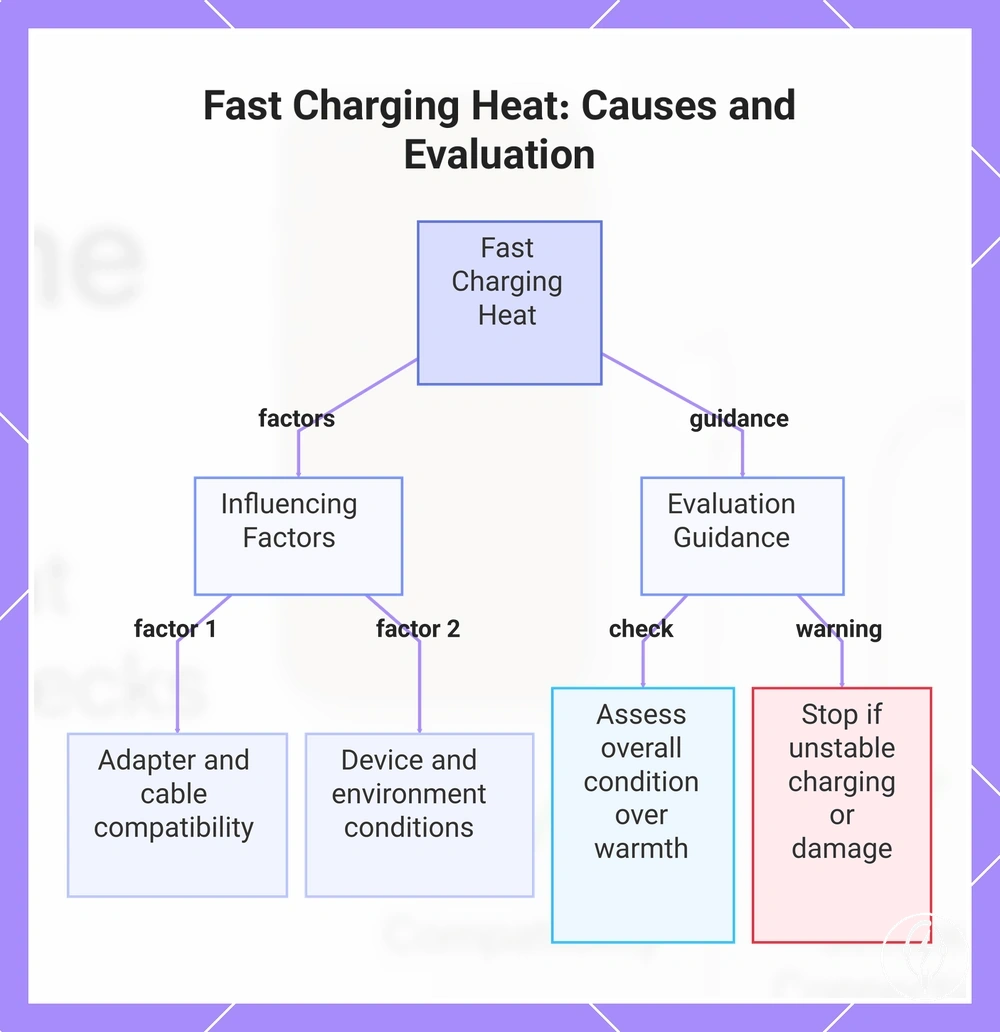
Fast Charging Heat Conditions
Fast charging can produce more noticeable heat conditions because a compatible iPhone and USB-C Power Delivery charger transfer more power during the initial charging phase than standard charging, but this increase in warmth is not, by itself, evidence of an unsafe charging accessory. According to Apple, iPhone, the charging cable, and the power adapter can become warm during normal operation, while charging should remain stable and the accessories should not show abnormal behaviour or physical damage. Evaluate fast charging by the overall charging condition rather than warmth alone. :contentReference[oaicite:0]{index=0}
Evaluate fast charging by the overall charging condition rather than warmth alone.
The amount of heat generated during fast charging is influenced by local operating conditions rather than a single factor. Adapter wattage, cable support, device state, ambient temperature, case thickness, and the charging surface all affect how efficiently heat is dissipated during charging. If repeated warmth is accompanied by unstable charging or charging interruptions, reduce unnecessary heat sources and review the charging setup; additional guidance is available in fast charging safety. :contentReference[oaicite:1]{index=1}
- Adapter wattage: Use a compatible USB-C Power Delivery adapter because the iPhone negotiates an appropriate charging profile instead of continuously drawing the adapter's maximum rated output.
- Cable support: Use a charging cable that supports the required charging capability and has no frayed insulation, bent connectors, or other visible damage.
- Device state: Charging immediately after processor-intensive activities, such as gaming, navigation, or extended camera use, increases existing device heat and can make fast charging warmth more noticeable.
- Ambient temperature, case thickness, and charging surface: Warm environments, thick protective cases, and charging on beds, sofas, or other soft surfaces reduce ventilation and increase heat retention compared with charging on a hard, well-ventilated surface.
- Repeated heat response: If repeated warmth occurs together with charging interruptions, a burning smell, or visible accessory damage, stop using the charging accessory until the cable, adapter, and charging environment have been inspected.
This chart explains the normal heat conditions during fast charging, the key factors that influence heat generation, and how to evaluate whether the warmth indicates a problem.
Wireless Charging Heat and Foreign-Object Risk
Wireless charging heat depends primarily on alignment, surface contact, and foreign-object conditions rather than wireless charging itself. According to Apple, the iPhone and a compatible wireless charger can become warm during normal charging, but charging should remain stable and the device should be positioned correctly on the charging pad. Misalignment or metal objects between the iPhone and charger increase foreign-object risk by reducing charging efficiency and generating additional heat, so they should be removed before charging. :contentReference[oaicite:0]{index=0}
Wireless charging heat depends primarily on alignment , surface contact , and foreign-object conditions rather than wireless charging itself.
Charger design, case interference, ventilation, and automatic temperature control determine how effectively wireless charging heat is managed. A thick protective case, magnetic accessories that prevent proper surface contact, or restricted airflow around the charging pad can increase heat and cause charging interruptions. Wireless charging heat should therefore be assessed using wireless-specific conditions rather than the behaviour expected during wired fast charging; for additional guidance, see wireless charging heat. :contentReference[oaicite:1]{index=1}
- Alignment: Place the iPhone centrally on the charging pad so magnetic alignment and charging-coil alignment remain correct, reducing unnecessary heat from inefficient power transfer.
- Metal objects: Remove coins, keys, magnetic plates, credit-card holders, or other metal objects from between the iPhone and charging pad because they increase foreign-object risk and can generate excess heat.
- Case interference: Remove a thick protective case or attached accessory if it prevents close surface contact or repeated charging interruptions occur during wireless charging.
- Ventilation: Operate the wireless charger on a hard, well-ventilated surface instead of beds, cushions, or other soft materials that trap heat around the charging pad.
- Temperature control: Compatible wireless chargers automatically reduce charging output when operating temperatures rise, helping limit charging-pad heat under normal operating conditions.
- Charging interruption: If charging repeatedly stops together with excessive warmth, verify alignment, remove foreign objects, improve ventilation, and discontinue use if abnormal heat or visible damage continues.
Protection Features Worth Checking Before Choosing
Protection features are meaningful selection criteria only when they address a specific charging risk and are supported by identifiable technical evidence rather than promotional wording. According to USB-IF guidance and manufacturer safety documentation, protection features such as overcurrent protection, overvoltage protection, short-circuit protection, and temperature control are intended to respond to defined electrical or thermal fault conditions instead of serving as marketing labels. Evaluate protection claims by the charging risk they address and the evidence supporting them, not by the number of feature names listed. :contentReference[oaicite:0]{index=0}
Protection features can be grouped into electrical protection, heat control, charging stability, and physical durability.
Protection features can be grouped into electrical protection, heat control, charging stability, and physical durability. Electrical protection addresses abnormal current, voltage, or short-circuit events, while temperature control manages excessive operating heat and charging stability supports consistent power delivery. Physical durability depends on cable durability, strain relief, and connector housing design, which help reduce mechanical stress during repeated use. The table below separates these feature groups by the risk they address and the evidence that supports a purchasing decision. :contentReference[oaicite:1]{index=1}
| Feature | Risk addressed | Evidence to look for | Decision value |
|---|---|---|---|
| Overcurrent protection, overvoltage protection, short-circuit protection | Electrical faults caused by excessive current, abnormal voltage, or direct short circuits | Published technical specifications, recognised safety documentation, or manufacturer documentation describing the protection circuitry | Meaningful protection claim when the protection function is explicitly identified and supported |
| Temperature control | Heat buildup that could reduce charging stability or trigger thermal protection | Documented thermal management behaviour or manufacturer description of temperature control | Supports charging risk reduction when used under compatible operating conditions |
| Charging stability | Output interruption, unstable charging, or inconsistent power delivery | Clear charging specifications and documented output consistency rather than undefined marketing claims | Provides stronger evidence that charging performance remains stable during normal operation |
| Cable durability and connector strain relief | Mechanical wear, cable fatigue, connector stress, and premature cable failure | Reinforced strain relief, durable connector housing, and documented construction features | Demonstrates physical protection through observable design evidence instead of appearance alone |
Protection claims should identify a specific protection function together with the charging risk it addresses and the evidence supporting that claim. Generic wording such as “advanced protection” or “multi-protection” without technical specifications, documented safety circuitry, or other verifiable evidence is a weak decision signal and should not be treated as proof of improved charging safety. :contentReference[oaicite:2]{index=2}
Overcurrent, Overvoltage, and Short-Circuit Protection
Overcurrent protection, overvoltage protection, and short-circuit protection are electrical protection functions that each target a different unsafe condition in an iPhone charging accessory. Overcurrent protection is intended to limit excessive current, overvoltage protection is intended to respond to output voltage above the intended operating condition, and short-circuit protection is intended to respond to a direct electrical fault. According to the retained evidence, these protection claims contribute to risk reduction only when supported by identifiable specifications or a recognised compliance context, rather than marketing wording alone. :contentReference[oaicite:0]{index=0}
The table below summarises the practical meaning of each protection claim.
Protection claims should therefore identify both the unsafe condition they are designed to control and the evidence supporting the claim. For example, a charger that explicitly lists overcurrent protection, overvoltage protection, and short-circuit protection in its published technical specifications provides a stronger proof cue than packaging that simply advertises "advanced safety protection" without describing the electrical protection functions. The table below summarises the practical meaning of each protection claim. :contentReference[oaicite:1]{index=1}
| Protection claim | Unsafe condition | What it may reduce | Proof cue |
|---|---|---|---|
| Overcurrent protection | Excess current flowing through the adapter or charging path beyond its intended operating condition | Risk associated with excessive current when the protection function operates as specified | Published technical specifications or recognised compliance documentation identifying overcurrent protection |
| Overvoltage protection | Output voltage exceeding the intended operating condition for the charging accessory | Risk associated with abnormal output voltage when the protection function responds correctly | Manufacturer specifications or compliance documentation describing overvoltage protection |
| Short-circuit protection | Direct electrical fault caused by a short circuit in the cable, connector, or charging accessory | Risk associated with sustained fault current when the protection function is implemented | Technical specifications or recognised compliance context confirming short-circuit protection |
Temperature Control and Charging Stability
Temperature control and charging stability support safer iPhone charging by helping maintain controlled heat management and output consistency, but they do not eliminate normal charging warmth. According to the reviewed evidence, compatible charging accessories may become warm during normal operation while maintaining stable power delivery, whereas repeated charging interruptions, abnormal heat, or unstable output are stronger indicators that the charging condition should be reviewed. Temperature control therefore reduces charging risk signals only when the charging accessory continues to operate consistently under normal conditions. :contentReference[oaicite:0]{index=0}
The checklist below summarises the stability signals to verify.
Charging instability is indicated by recurring symptoms rather than a single warm charging session. For example, if the same charger repeatedly disconnects three or more times during one charging session under unchanged conditions, or charging speed repeatedly drops and recovers without reconnecting the cable, those repeated events provide a stronger stability warning than normal operating warmth alone. The checklist below summarises the stability signals to verify. :contentReference[oaicite:1]{index=1}
- Heat management: A charger that becomes warm while charging remains continuous can still be operating normally; repeated abnormal heat together with other warning signs should be investigated.
- Charging interruptions: Repeated disconnects or charging restarts during the same charging session indicate reduced charging stability and justify checking the cable, charger, and charging setup.
- Output consistency: Stable power delivery is indicated when charging continues without repeated speed fluctuations, unexpected pauses, or connection loss under the same operating conditions.
- Wireless temperature control: A compatible wireless charger should automatically regulate charging output as operating temperature rises, while correct device alignment and adequate ventilation help maintain charging stability.
- Adapter behavior under load: A compatible adapter should maintain consistent output during normal charging; repeated overheating, unstable charging speed, or recurring interruptions under the same load condition indicate that the charging accessory should be inspected.
Cable Jacket, Strain Relief, and Connector Durability
Cable jacket, strain relief, and connector durability improve charging safety when they prevent exposed wiring, reduce loose fit, and limit damage caused by repeated bending. According to the reviewed evidence, an intact cable jacket, secure connector housing, and undamaged strain relief support safe charging, whereas exposed metal, severe fraying, or a connector that moves relative to the cable are visible stop-use conditions. Reinforced covering contributes to durability only while it remains structurally intact and undamaged. :contentReference[oaicite:0]{index=0}
Reinforced covering contributes to durability only while it remains structurally intact and undamaged.
For example, a cable with light surface marks or minor discoloration on the outer covering, but no fraying, exposed conductors, loose fit, or charging interruption, can represent cosmetic wear rather than structural damage. In contrast, if repeated bending causes the strain relief to split, the connector housing to separate from the cable, or exposed metal becomes visible, the accessory should no longer be used because the damage affects electrical safety. Use the visual inspection checklist below to distinguish cosmetic wear from damage that requires replacement. :contentReference[oaicite:1]{index=1}
- Cable jacket condition: Inspect the cable jacket for cuts, cracks, missing insulation, or compression damage. An intact cable covering protects the internal conductors, while damaged insulation is a stop-use indicator.
- Reinforced covering: Reinforced or braided covering can improve resistance to everyday wear, but it does not guarantee safety if the cable jacket, internal conductors, or strain relief are damaged.
- Strain relief: Check the bend-protection area where the cable enters the connector housing. Splitting, stretching, or separation indicates damage from repeated bending.
- Connector housing: Inspect the connector housing for cracks, twisting, gaps, or movement relative to the cable, because these conditions reduce connector durability and can contribute to a loose fit.
- Fraying and exposed metal: Severe fraying or any exposed metal outside the intended connector contacts is a clear stop-use condition because conductive parts are no longer adequately protected.
- Loose fit: If the connector no longer seats securely in the iPhone or repeatedly disconnects during normal use, inspect both the cable and connector for visible wear before continuing to charge.
Accessory Protection versus iPhone Battery Protection
Accessory protection and iPhone battery protection are different protection layers with separate functions during charging. Accessory protection applies to the charger, cable condition, connectors, and heat exposure during power delivery, while iPhone battery protection refers to the iPhone's built-in device charging management that manages charging behavior to support battery health. A safer charging accessory can reduce accessory-related electrical and thermal risks, but it cannot guarantee battery-health outcomes or prevent normal battery aging. :contentReference[oaicite:0]{index=0}
| Accessory-level protection | iPhone battery-health behavior |
|---|---|
| Influences charger protection, cable condition, connector integrity, charging stability, and heat exposure during power delivery. | Controls device charging management, charging optimisation, and battery-health behavior inside the iPhone. |
| Can reduce charging interruptions and accessory-related electrical or thermal risks when compatible, undamaged accessories are used. | Can optimise charging behavior but cannot repair damage caused by defective charging accessories or unsuitable charging conditions. |
| Cannot guarantee battery longevity, prevent normal battery aging, or control the iPhone's internal charging algorithms. | Cannot compensate for damaged chargers, poor cable condition, excessive heat exposure, or unsuitable user conditions. |
Accessory protection influences the quality of external power delivery by supporting stable charger operation, secure cable condition, and controlled heat exposure during charging. These protection features help reduce charging-related risks when the charger and cable remain compatible and undamaged. They do not replace the iPhone's own charging management because battery-health decisions remain controlled by the device. :contentReference[oaicite:1]{index=1}
These protection features help reduce charging-related risks when the charger and cable remain compatible and undamaged.
The boundary between these protection layers helps explain what a safer accessory can influence and what it cannot guarantee. For guidance about charging optimisation, battery-health behavior, and long-term battery management, see battery health and safety, while this section remains focused on charger protection, cable condition, heat exposure, and user conditions during charging. :contentReference[oaicite:2]{index=2}
Safe Use Conditions That Affect Charging Risk
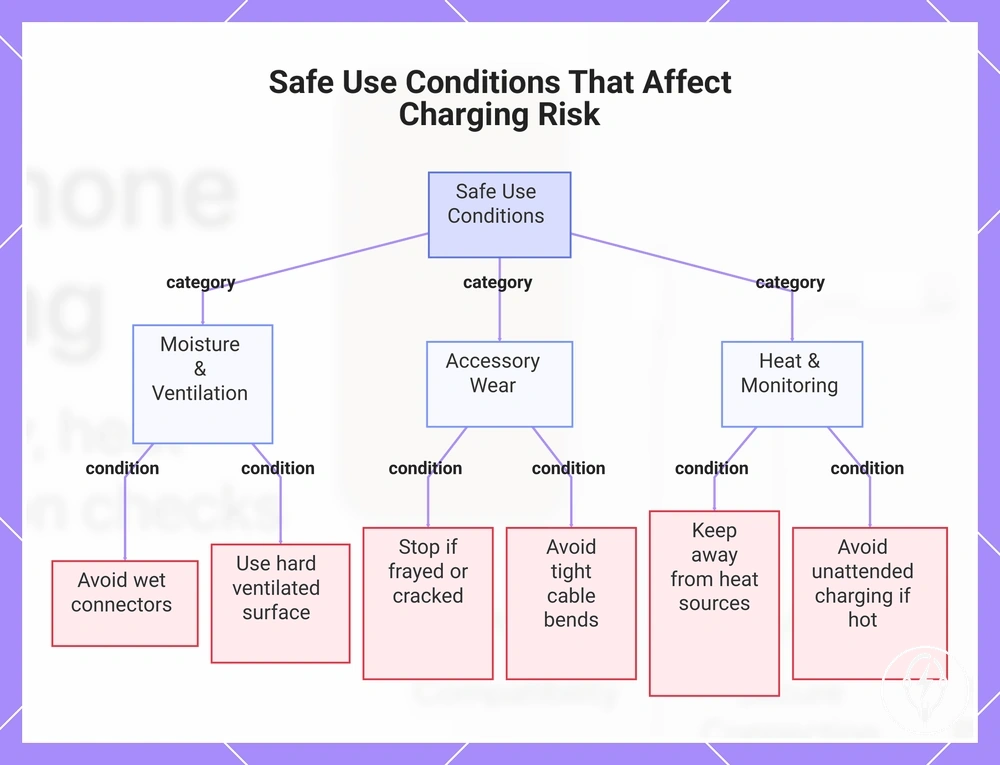
Safe use conditions directly affect the charging risk of an iPhone charging accessory because the charging environment and user handling conditions determine whether the accessory continues to operate within its intended operating conditions. According to Apple, charging accessories should be used in dry, well-ventilated locations and should no longer be used if they become damaged or operate abnormally. Safe charging therefore depends on both accessory quality and the conditions in which the accessory is used. :contentReference[oaicite:0]{index=0}
Everyday handling conditions can increase charging risk even when the charger and cable are compatible.
Everyday handling conditions can increase charging risk even when the charger and cable are compatible. For example, charging on bedding, cushions, or other soft surfaces restricts ventilation, while moisture around the connector or repeated sharp cable bending increases the likelihood of accessory damage. The practical checklist below summarises the most important safe-use conditions to review before and during charging. :contentReference[oaicite:1]{index=1}
- Moisture: Do not use the charger if the connector, charging port, cable, or surrounding area is wet. Stop use until every component is completely dry.
- Blocked ventilation: Charge on a hard, well-ventilated surface instead of under blankets, pillows, inside bags, or in other enclosed spaces that trap heat.
- Surface choice: Place the charger on a stable, flat surface that allows normal airflow around the adapter and cable during charging.
- Damaged accessories: Stop using accessories with frayed insulation, exposed conductors, cracked housings, bent connectors, melted plastic, or repeated charging interruptions.
- Unattended charging: Avoid leaving charging accessories unattended when unusual heat, visible damage, or unstable charging has already been observed because these conditions increase charging risk.
- Cable bending: Avoid repeated tight bends near the connector or strain-relief section because mechanical stress can shorten cable service life and increase the likelihood of failure.
- Heat exposure: Keep chargers away from direct sunlight, heaters, or other external heat sources that increase operating temperature during charging.
These safe-use conditions explain how the charging environment and handling decisions influence accessory risk without replacing broader guidance on everyday charging habits. For detailed guidance about routine charging practices and safe handling behaviour, see correct charging use. :contentReference[oaicite:2]{index=2}
For detailed guidance about routine charging practices and safe handling behaviour, see correct charging use .
This chart groups the key safe-use conditions that influence charging risk for iPhone charging accessories into three categories: moisture and ventilation, accessory wear, and heat monitoring.
Moisture, Damaged Cables, and Blocked Ventilation
Moisture exposure, cable damage, and blocked ventilation create local charging risks because moisture can increase the likelihood of electrical faults, damaged accessories can expose conductive parts, and restricted airflow can trap heat during charging. According to Apple, charging accessories should be used only when dry, in well-ventilated locations, and should no longer be used if they become damaged or operate abnormally. Visible moisture at connectors, serious physical damage, or repeated overheating are clear stop-use conditions. :contentReference[oaicite:0]{index=0}
Visible moisture at connectors, serious physical damage, or repeated overheating are clear stop-use conditions.
Inspect the charging accessory before every charging session by checking the connector, cable, charger, and surrounding charging environment for visible moisture, physical damage, or restricted airflow. The inspection points below identify local conditions that require stopping use instead of continuing to charge. :contentReference[oaicite:1]{index=1}
- Moisture exposure: Wet connectors, visible liquid, or condensation on the cable, charging port, or adapter create a charging risk. Safe response: Stop using the accessory until every affected component is completely dry.
- Cable damage: Frayed cables, exposed wire, split insulation, or separated connector housings indicate a damaged accessory. Safe response: Stop using the cable when these visible signs are present.
- Adapter damage: Crushed adapters, cracked housings, bent electrical contacts, or melted plastic indicate structural damage. Safe response: Stop using the charger immediately.
- Blocked ventilation: Covered chargers operating beneath blankets, cushions, clothing, or inside enclosed spaces trap heat and increase overheating risk. Safe response: Stop charging if repeated overheating or abnormal heat occurs.
- Soft surfaces: Charging on soft surfaces such as beds or sofas restricts airflow around the charger and increases heat buildup. Safe response: Stop charging if ventilation remains restricted or overheating develops.
- Heat-trapping cases: Heat-trapping cases that contribute to repeated excessive warmth together with charging interruptions indicate an unsuitable charging condition. Safe response: Stop using the charging setup until the cause of the overheating has been identified.
Overnight Charging and Unattended Charging Conditions
Overnight charging and unattended charging increase accessory-related charging risk only when the accessory condition, surface ventilation, or charging environment is unsuitable. According to Apple, charging accessories should be used only in dry, well-ventilated locations and should not be used if they become damaged or operate abnormally. Overnight charging should therefore be considered appropriate only when the charger, cable, and surrounding environment remain in a suitable condition throughout the charging period. :contentReference[oaicite:0]{index=0}
Review the checklist below before leaving an iPhone charging unattended.
Risk is reduced by using an appropriately certified charger, an undamaged cable, adequate surface ventilation, and a setup that prevents heat accumulation and cable strain. For example, an unattended setup on a hard, open surface presents a lower accessory-related risk than the same charger operating beneath bedding or with a tightly bent cable because airflow remains unobstructed and mechanical stress is reduced. Review the checklist below before leaving an iPhone charging unattended. :contentReference[oaicite:1]{index=1}
- Certified accessory: Use a charger with recognised charger certification or manufacturer approval. Safe condition: Do not leave uncertified charging accessories operating unattended.
- Undamaged cable: Confirm the cable has no fraying, exposed conductors, cracked insulation, loose connectors, or other visible damage. Safe condition: Do not leave damaged accessories connected overnight.
- Ventilated surface: Place the charger on a hard, open surface instead of bedding, cushions, or other soft surfaces that restrict airflow. Safe condition: Adequate ventilation helps reduce heat accumulation.
- No cable strain: Ensure the cable is not tightly bent, trapped beneath furniture, or supporting the weight of the power adapter. Safe condition: Reducing cable strain lowers the likelihood of mechanical damage during unattended charging.
- No heat buildup: If repeated excessive warmth, charging interruptions, unusual odours, or visible deformation occur, discontinue unattended charging. Safe condition: Repeated overheating is a stop-use signal.
- Damaged accessories: Stop using chargers or cables with cracked housings, melted plastic, exposed metal, or loose connectors rather than leaving them connected during overnight charging. :contentReference[oaicite:2]{index=2}
When Charging Accessories Become Unsafe to Keep Using
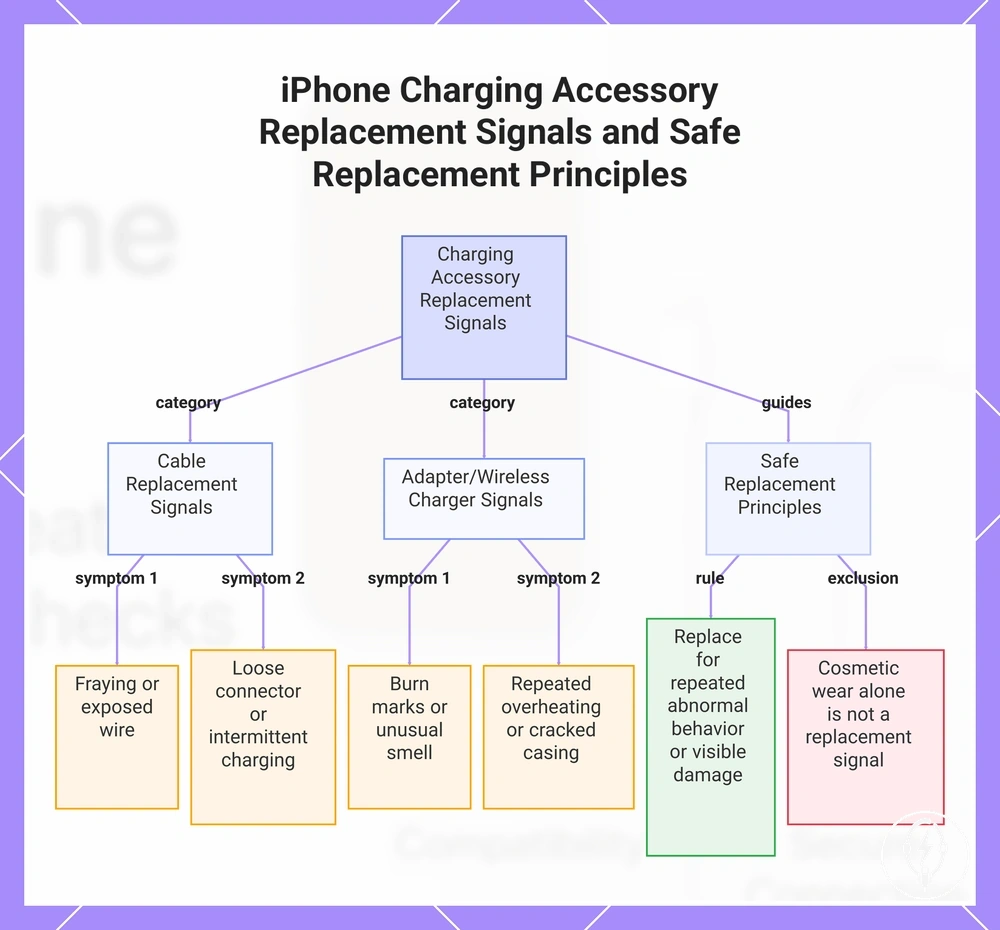
iPhone charging accessories become unsafe to keep using when visible damage, abnormal heat, an unusual smell, or charging instability appears or repeats during normal use. According to Apple, charging accessories that are damaged or operate abnormally should no longer be used because these conditions indicate an increased electrical or thermal safety risk rather than normal operation. The accessory should be stopped immediately when these replacement signals are present. :contentReference[oaicite:0]{index=0}
The accessory should be stopped immediately when these replacement signals are present.
Cable-specific replacement signals include fraying, exposed wire, and a loose connector fit because these conditions reduce insulation or mechanical stability. Intermittent charging that continues after testing the cable with a compatible charger and device is also a replacement signal. Cosmetic marks without exposed conductors or charging faults are not, by themselves, evidence that a cable must be replaced. :contentReference[oaicite:1]{index=1}
These conditions indicate the accessory should be stopped and assessed instead of being returned to service.
Adapter and wireless charger replacement signals include burn marks, an unusual smell, repeated overheating, a cracked adapter casing, or wireless charger instability that repeatedly interrupts charging. These conditions indicate the accessory should be stopped and assessed instead of being returned to service. If these stop-use signs are confirmed, follow the guidance to replace unsafe accessories rather than continuing to use the damaged charger. :contentReference[oaicite:2]{index=2}
The decision checklist below organises replacement signals by risk severity so each condition leads to a clear next action.
The decision checklist below organises replacement signals by risk severity so each condition leads to a clear next action. Use it to decide whether the accessory should be stopped immediately, the charging setup should be inspected, or the accessory should be replaced. :contentReference[oaicite:3]{index=3}
- Fraying or exposed wire → Likely risk: Loss of insulation and exposed conductive material. Action: Replace accessory.
- Loose connector fit or intermittent charging → Likely risk: Unstable electrical connection or connector wear. Action: Inspect setup; if the condition repeats with compatible equipment, replace accessory.
- Burn marks or unusual smell → Likely risk: Electrical or thermal damage. Action: Stop using.
- Repeated overheating → Likely risk: Persistent thermal instability. Action: Inspect setup; if overheating continues under normal charging conditions, replace accessory.
- Cracked adapter casing or wireless charger instability → Likely risk: Structural damage or unstable charging operation. Action: Replace accessory.
Safe replacement decisions should be based on repeated abnormal behaviour or visible physical damage rather than cosmetic wear alone. When an accessory shows repeated overheating, intermittent charging, an unusual smell, burn marks, exposed wire, or structural damage, the safe next step is to stop using it, inspect the charging setup where appropriate, or replace the accessory. :contentReference[oaicite:4]{index=4}
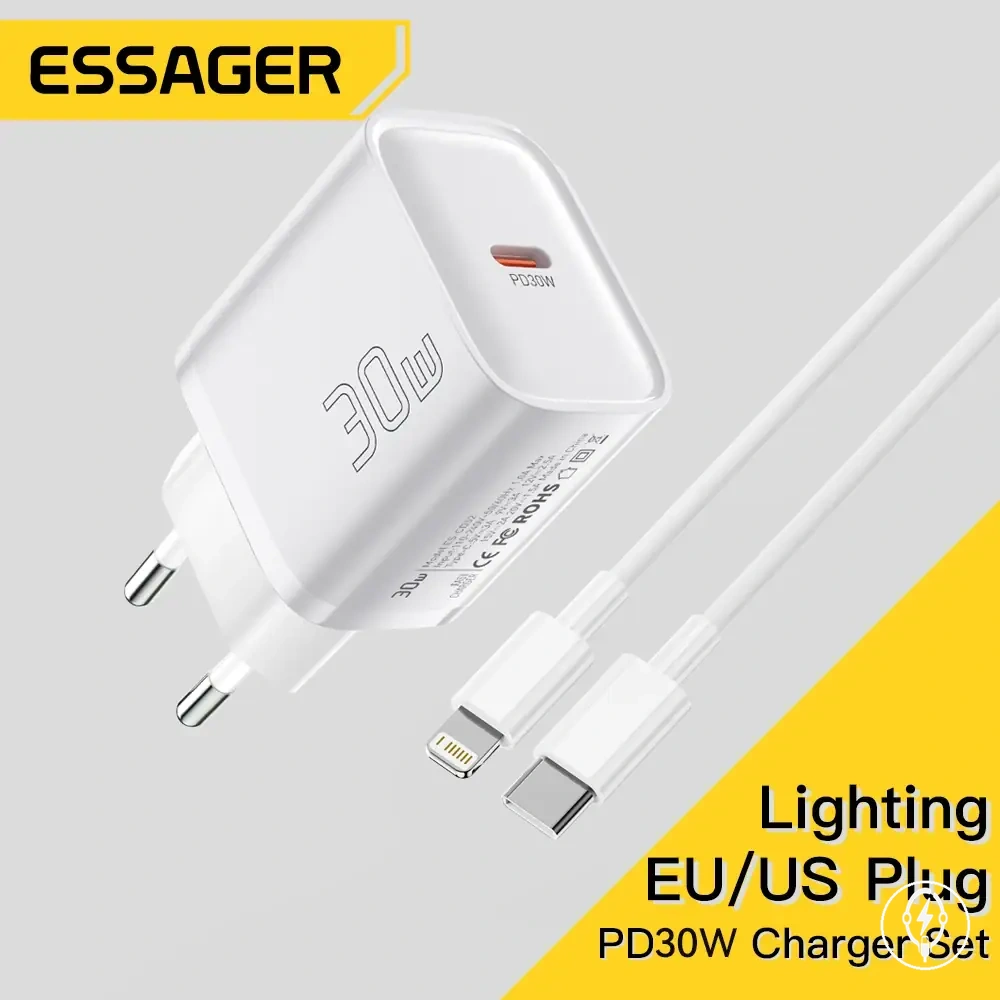
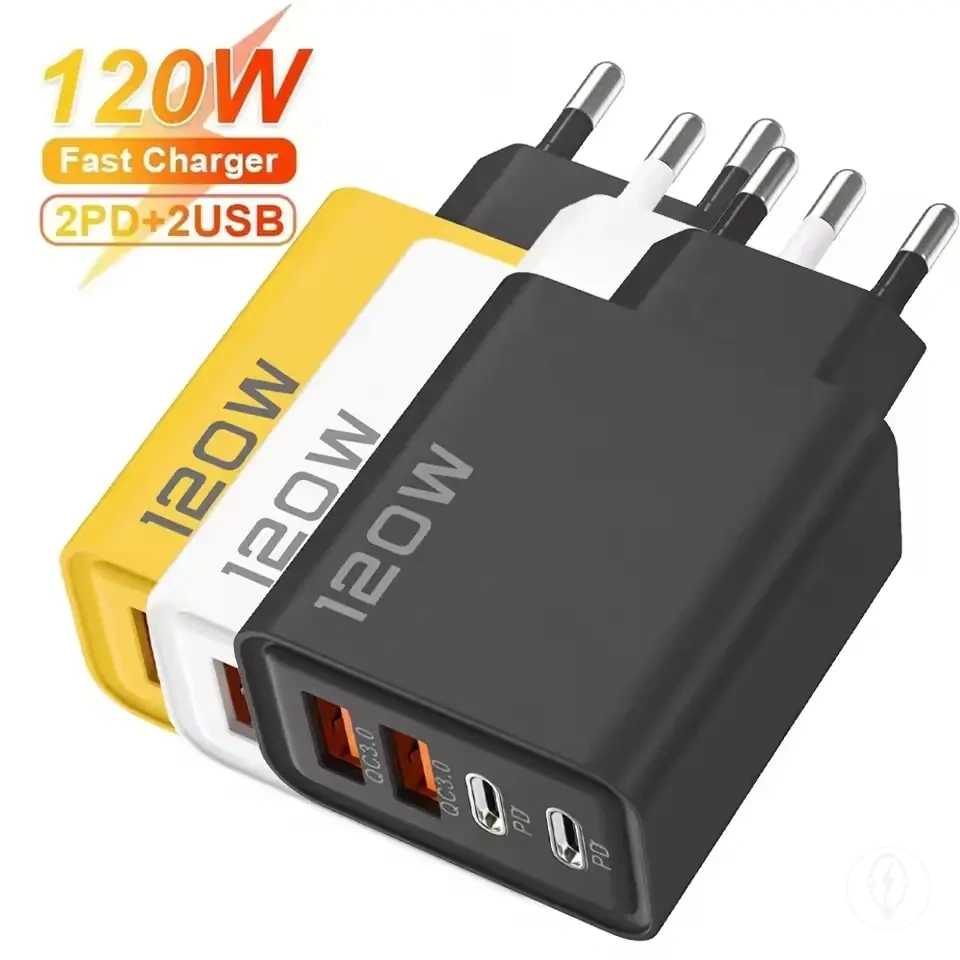
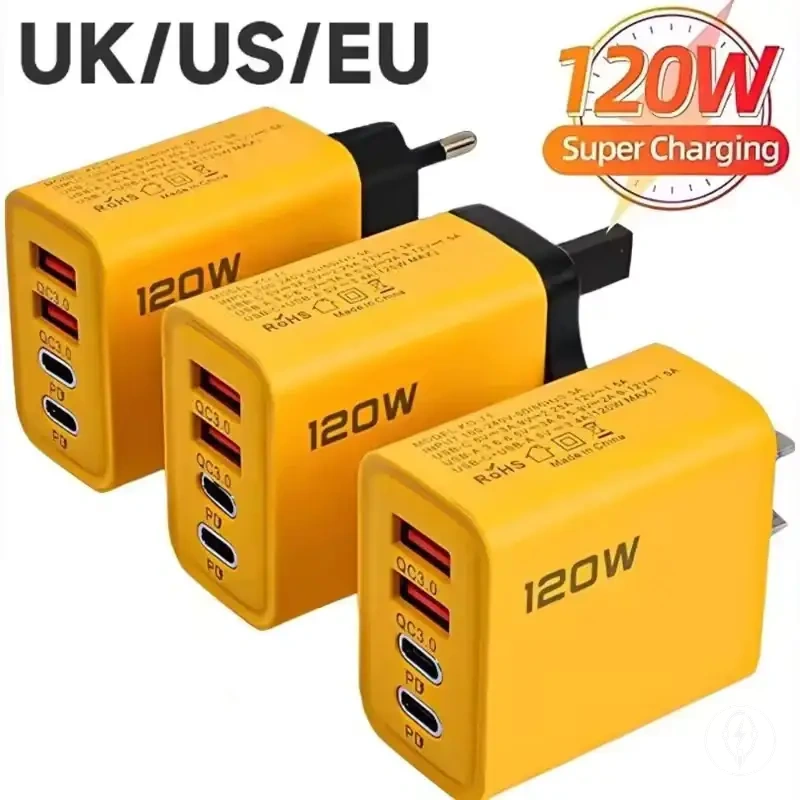
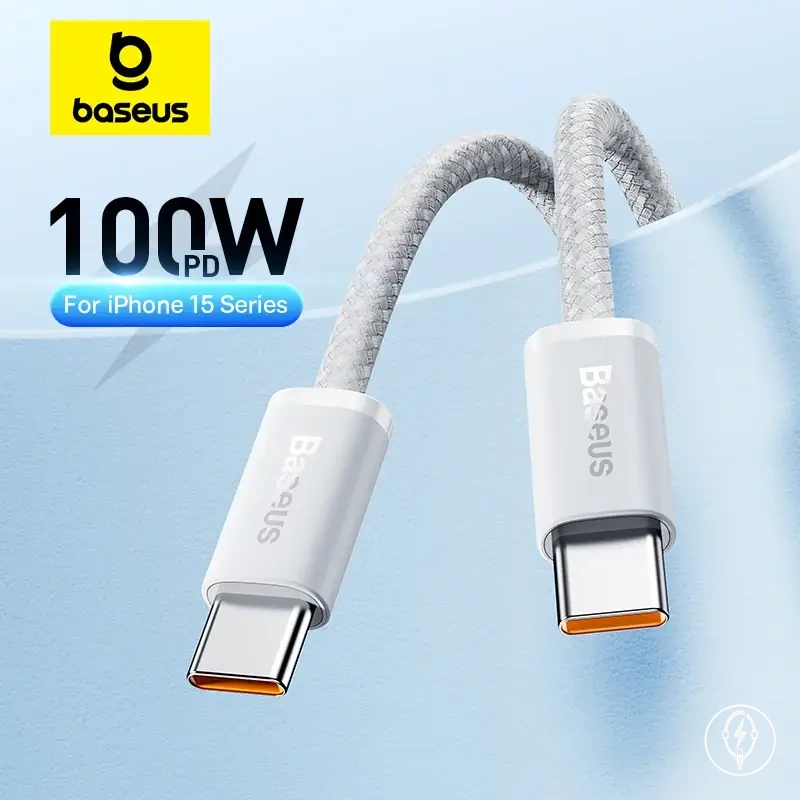
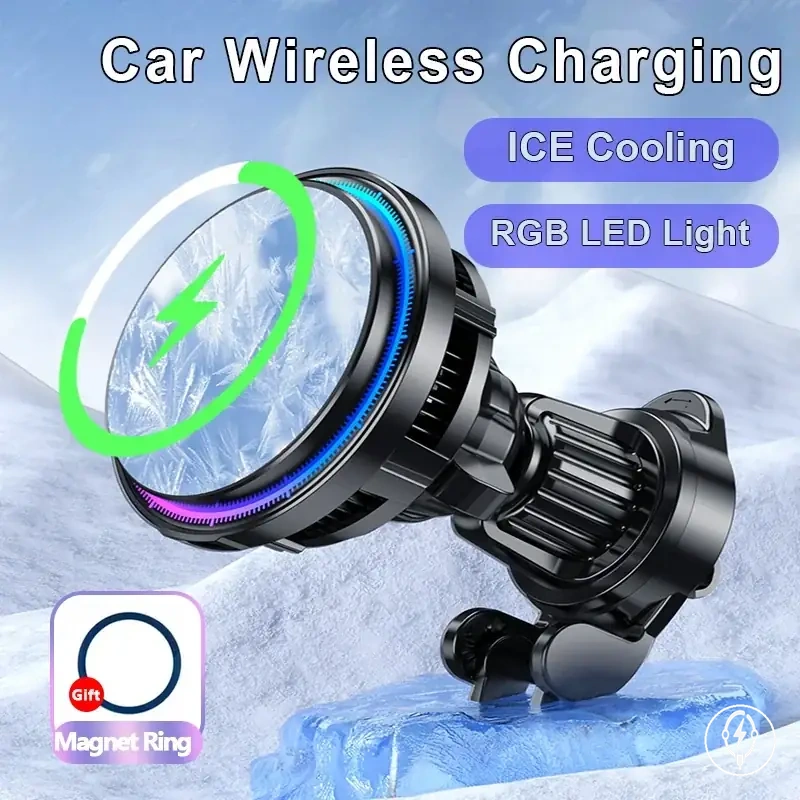
The products below are useful examples for comparing available options.
The products below are useful examples for comparing available options. Before buying, check that the compatibility criteria, key features, and product details match your needs.
This chart shows the cable and adapter/wireless charger replacement signals and the principles for deciding when to stop using or replace an unsafe accessory.