iPhone Charging Accessories Selection Checklist
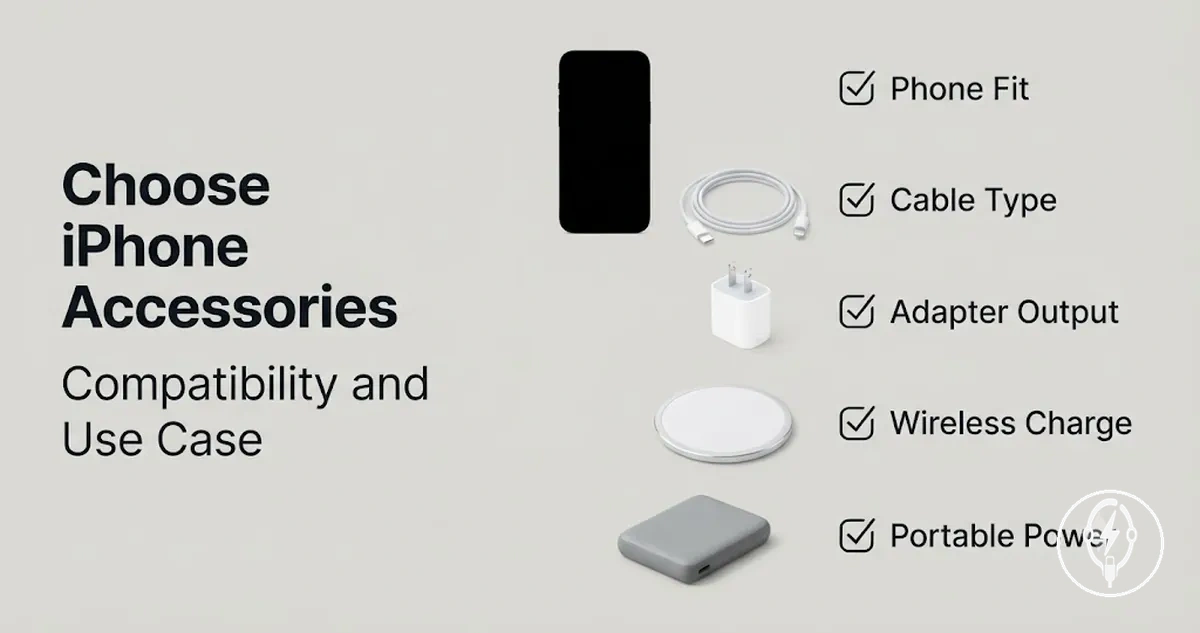
iPhone charging accessories should be selected by verifying compatibility, connector type, charging method, safety, intended use, and budget before comparing individual products. According to Apple Support, compatibility depends on matching the iPhone model with the correct USB-C or Lightning connector, a compatible charging cable, and a supported power adapter, while fast charging also requires USB-C Power Delivery and a compatible iPhone model. Compatibility and use case should therefore be the first decision criteria because they determine whether the charging setup can deliver the intended charging experience.
Before comparing accessory categories, review the available iPhone charging accessories to understand which accessory types match your device and charging routine.
If you charge mainly at a desk, a charging cable and power adapter may provide the simplest setup, while frequent travellers often benefit from a compact travel charger and backup cable, and households charging multiple devices may prefer a charging station or wireless charger. According to Apple Support, supported iPhone models can fast charge to approximately 50% battery in around 30 minutes when paired with a 20 W or higher USB-C Power Delivery power adapter and a compatible USB-C charging cable under suitable conditions. Before comparing accessory categories, review the available iPhone charging accessories to understand which accessory types match your device and charging routine.
The checklist below provides the main decision criteria before comparing individual accessory categories.
Select accessories only after confirming the iPhone model, connector type, charging method, portability requirements, and safety expectations all align with the intended charging setup. For example, according to Apple Support, using a supported iPhone with a 20 W USB-C Power Delivery adapter and a compatible USB-C cable can reach approximately 50% charge in about 30 minutes under suitable charging conditions, whereas replacing one compatible component with an unsupported alternative can prevent fast charging from being available. The checklist below provides the main decision criteria before comparing individual accessory categories.
- Verify whether your iPhone model uses a USB-C or Lightning connector.
- Match the charging cable to the power adapter port and USB-C Power Delivery support where applicable.
- Choose between a charging cable, wireless charger, or charging station according to where you normally charge.
- Select a travel charger or charger set only when portability is part of your regular charging routine.
- Check for recognised safety certification, good build quality, and cables without visible damage, overheating, or excessive wear.
- Compare price only after compatibility, charging performance, safety, and intended use have been confirmed.
Table of Contents
Accessory Scope Before Choosing a Charging Setup
Accessory Scope Before Choosing a Charging Setup defines which charging accessory categories should be considered before selecting a complete iPhone charging setup. The accessory scope includes a charging cable, power adapter, wireless pad, wireless stand, charging station, portable charger, and charger bundle because each category supports a different charging method or use case rather than serving the same purpose.
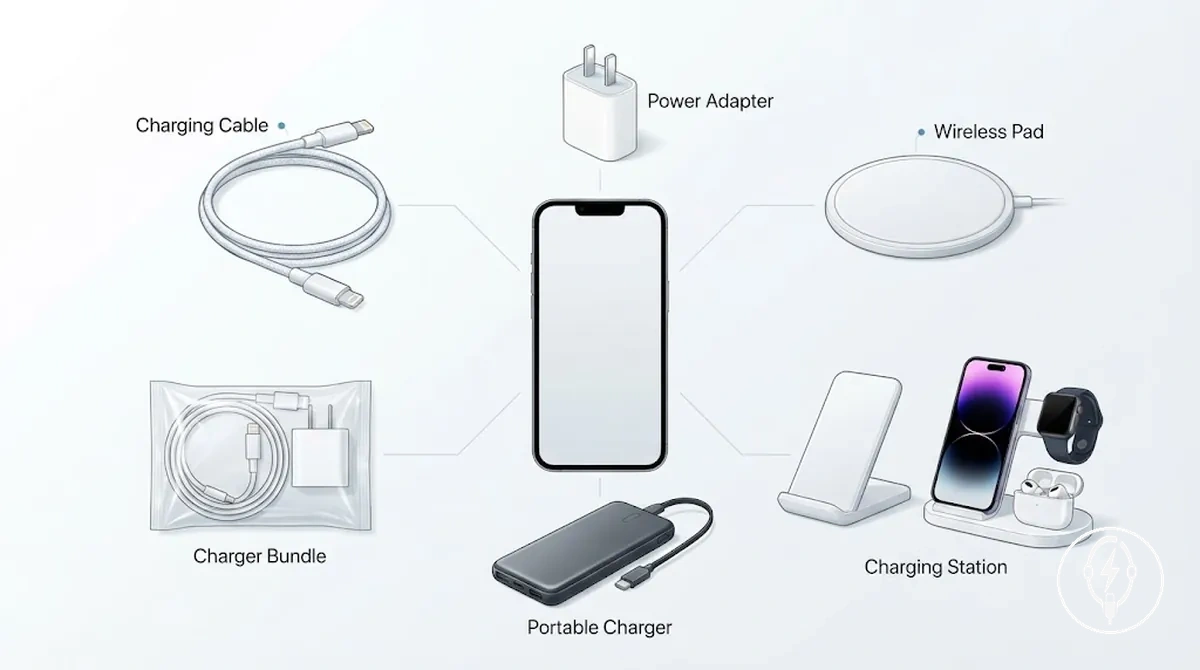
A charging setup frequently combines more than one accessory to match where and how the iPhone is used. According to Apple Support, supported iPhone models can reach approximately 50% battery in around 30 minutes when using a compatible USB-C charging cable with a 20 W or higher USB-C Power Delivery power adapter, while wireless charging instead requires a compatible wireless pad or wireless stand. This selection checklist defines which accessory categories belong inside the decision process, while detailed setup, compatibility, and wireless guidance is handled by dedicated pages.
A charging setup frequently combines more than one accessory to match where and how the iPhone is used.
Review the accessory scope before comparing individual products so every required charging component is included in the intended charging setup. Use the checklist below to identify the relevant charging accessory categories, then continue to the dedicated guide covering charging accessory types for category-specific details beyond this selection scope.
- Charging cable for transferring power from a compatible adapter or computer to the iPhone.
- Power adapter that matches the cable connector and supports the required charging standard.
- Wireless pad or wireless stand for cable-free charging on compatible iPhone models.
- Charging station for powering multiple compatible devices from one location.
- Portable charger for backup power when wall outlets are unavailable during travel or commuting.
- Charger bundle containing compatible charging components packaged for a complete charging kit.
iPhone Model and Connector Compatibility Checks
iPhone Model and Connector Compatibility Checks require the iPhone model, connector type, cable end, adapter port, and charging method to match before a charging accessory is considered compatible. According to Apple Support, iPhone 15 models and later use a USB-C connector, while earlier compatible iPhone models use a Lightning connector, making the iPhone model the primary compatibility criterion before comparing charging speed, convenience, or cost. Verifying these physical and functional fit conditions first reduces the risk of selecting an accessory that cannot connect or charge correctly.
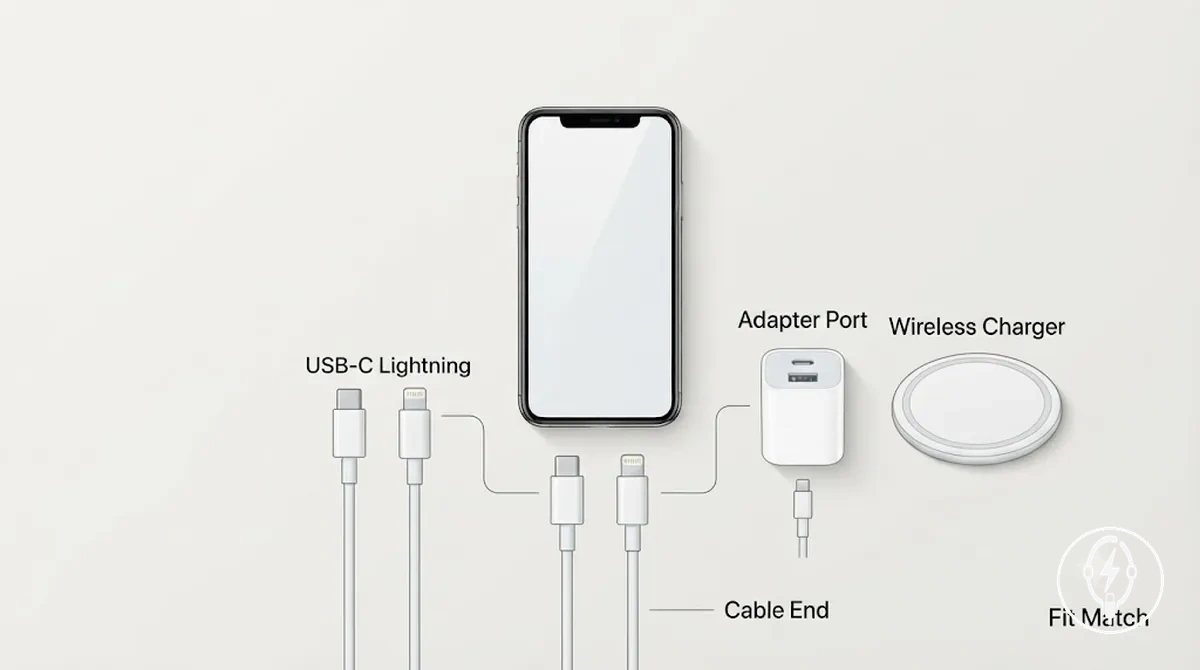
A complete compatibility decision requires every connection point to satisfy its intended fit condition. The cable end must match the iPhone connector, the opposite cable end must fit the adapter port, and the charging method must be supported by both the iPhone model and the selected accessory. According to Apple Support, identifying whether the device uses USB-C or Lightning is the first compatibility step, and these compatibility checks should be completed before evaluating charging performance or accessory value.
Use the checklist below to confirm accessory fit before comparing charging speed or purchase options.
If you are choosing between a charging cable, power adapter, and wireless charger, verify each accessory separately rather than assuming one compatible component makes the entire charging setup compatible. For example, according to Apple Support, an iPhone 16 uses a USB-C connector for wired charging, whereas an iPhone 14 uses a Lightning connector, while a wireless charger instead depends on proper alignment and a case that does not interfere with the charging method. Use the checklist below to confirm accessory fit before comparing charging speed or purchase options.
- Confirm whether the iPhone model uses a USB-C or Lightning connector.
- Match the cable end to both the iPhone connector and the adapter port.
- Verify that the selected power adapter provides the correct USB-C or USB-A port for the chosen cable.
- Check that the wireless charger supports iPhone wireless charging and allows proper alignment during charging.
- Complete all iPhone Model and Connector Compatibility Checks before comparing charging speed, charging method, or accessory price.
USB-C, Lightning, and Cable End Fit
USB-C, Lightning, and Cable End Fit requires the cable end to match the iPhone phone connector before the cable is physically compatible for wired charging. According to Apple, iPhone 15 models and later use a USB-C connector, while earlier compatible iPhone models use a Lightning connector, so the phone-side cable end must match the connector type. The adapter-side connector must also match an available USB-C or USB-A port on the charger or computer to complete the physical connection.
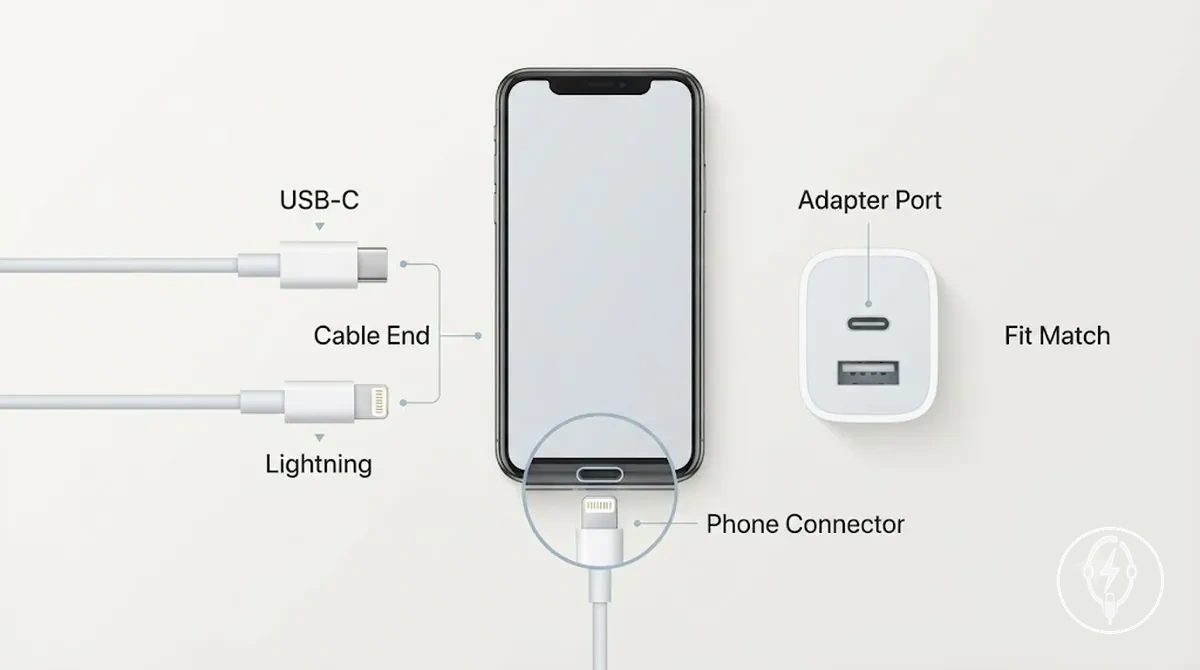
A physical mismatch prevents the cable from connecting even if the charging standard is otherwise supported. For example, Apple specifies that a USB-C to Lightning cable has a Lightning phone connector and a USB-C adapter-side connector, so it physically fits a Lightning-equipped iPhone and a USB-C charger, while it cannot plug directly into a USB-C iPhone. Complete the USB-C, Lightning, and Cable End Fit checks below before comparing charging performance.
- Match the USB-C or Lightning cable end to the iPhone phone connector.
- Confirm that the adapter-side connector matches the available USB-C or USB-A port.
- Reject any cable with a physical connector mismatch, regardless of its charging specification.
- Verify physical fit before evaluating charging speed, power delivery, or other performance features.
Cable-to-Adapter Port Match
Cable-to-Adapter Port Match requires the cable end to match the corresponding adapter port before a charging setup can establish a physical connection. According to Apple, a USB-C cable end connects to a USB-C port, while a USB-A cable end connects to a USB-A port on a compatible power adapter or computer. If the cable end and adapter port do not match, the pairing condition is physically incompatible and the charging setup cannot be connected as intended.
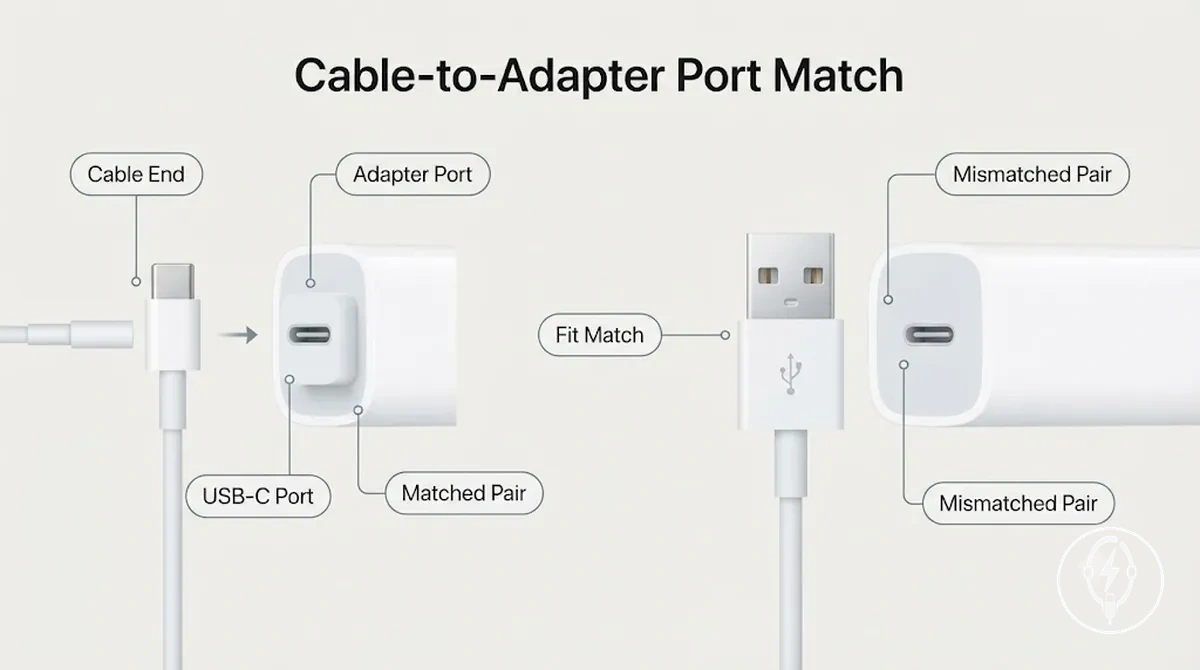
For example, a USB-C cable paired with a USB-C port creates a matched pairing condition, whereas a USB-A cable presented to a USB-C-only port is a mismatched pairing that prevents direct physical connection. Apple specifies connector compatibility by interface type rather than interchangeable fit, so Cable-to-Adapter Port Match should be confirmed before assessing charging performance, charging speed, or other accessory characteristics.
| Pairing condition | What it means |
|---|---|
| USB-C cable end + USB-C port | The cable end and adapter port share the same connector interface, allowing the charging setup to establish a physical connection. |
| USB-A cable end + USB-C port | The cable end and adapter port use different connector interfaces, so the mismatched parts cannot be connected directly and create a compatibility risk. |
| USB-A cable end + USB-A port | The cable pairing is physically compatible, allowing the charging setup to proceed before charging behaviour is determined by the connected devices and charger specifications. |
Power Adapter Requirements for Expected Charging Speed
Power Adapter Requirements for Expected Charging Speed depend on whether the power adapter provides sufficient wattage, a USB-C Power Delivery (USB-PD) charging standard, a compatible adapter port, and matching cable support for the connected iPhone. According to Apple, supported iPhone models can use fast charging with a 20 W or higher USB-C power adapter that supports USB Power Delivery when paired with a compatible USB-C charging cable. A power adapter that lacks USB-C Power Delivery or uses an incompatible connection can still provide standard charging but cannot support the expected fast-charging capability specified by Apple.
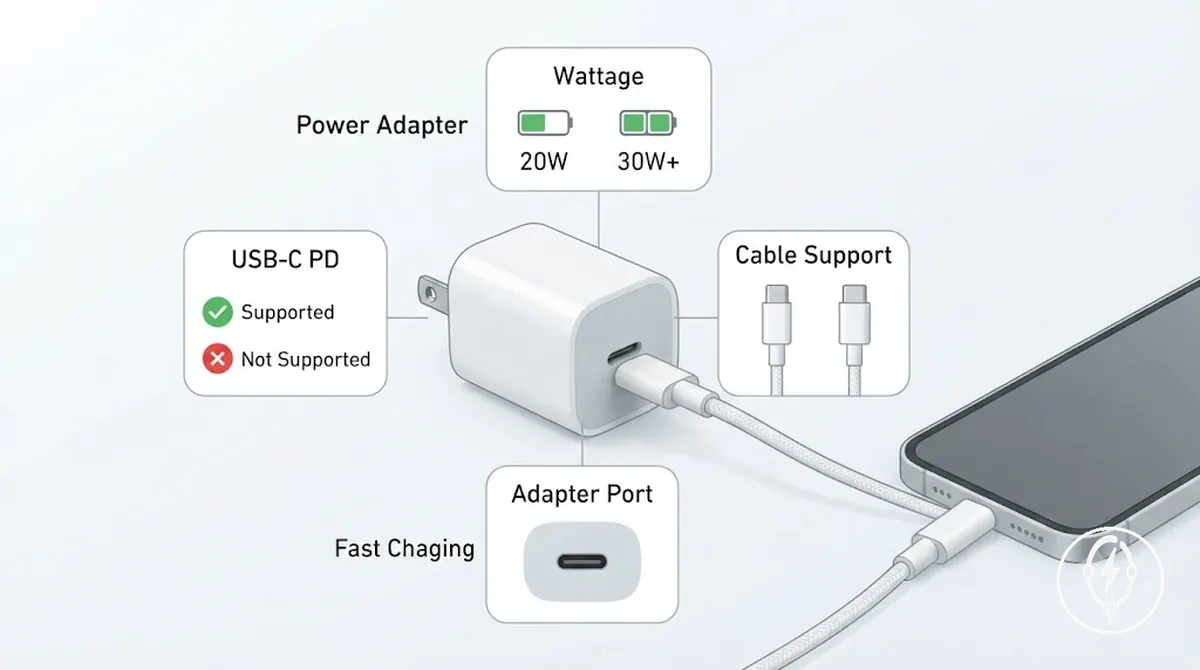
Wattage is the maximum electrical power a power adapter can deliver, measured in watts (W), while USB-C Power Delivery is the USB-IF charging standard that allows compatible devices to negotiate higher charging power safely. According to Apple, supported iPhone models require a USB-C Power Delivery adapter rated at 20 W or higher to achieve Apple's recommended fast-charging configuration, provided that a compatible USB-C cable is also used. Choosing a higher-rated adapter than the iPhone can accept does not force additional charging power because the iPhone negotiates the supported power level with the adapter.
If overnight charging is your normal use case, a standard charging adapter may be sufficient because charging time is usually less critical.
If overnight charging is your normal use case, a standard charging adapter may be sufficient because charging time is usually less critical. If you regularly need extra battery before leaving home or travelling, select a power adapter with USB-C Power Delivery, a compatible adapter port, and matching cable support to meet your fast charging needs. For example, according to Apple, a supported iPhone paired with a 20 W USB-C Power Delivery adapter and a compatible USB-C cable can charge to approximately 50% in around 30 minutes under suitable conditions, demonstrating the combined effect of the adapter, cable, and device compatibility.
The table below summarises the main Power Adapter Requirements for Expected Charging Speed so you can compare adapter criteria before selecting an accessory.
The table below summarises the main Power Adapter Requirements for Expected Charging Speed so you can compare adapter criteria before selecting an accessory.
| Entity/part | Attribute/criterion | Value/condition | Effect/decision |
|---|---|---|---|
| Power adapter | Wattage | 20 W or higher for Apple's recommended fast charging on supported iPhone models | Supports Apple's recommended fast-charging configuration when other compatibility requirements are satisfied. |
| Power adapter | Charging standard | USB-C Power Delivery (USB-PD) | Allows compatible iPhone models to negotiate higher charging power. |
| Adapter port | Port type | USB-C output matched with a compatible USB-C charging cable | Provides the required connection for USB-C Power Delivery charging. |
| Charging setup | Cable support | Compatible USB-C charging cable paired with the supported iPhone model | Completes the charging path required for Apple's recommended fast-charging setup. |
| Use case | Expected charging speed | Standard charging for routine overnight charging; USB-C Power Delivery for shorter charging opportunities | Select the adapter according to your charging routine rather than choosing the highest available wattage. |
Wattage and USB-C Power Delivery Support
Wattage and USB-C Power Delivery Support determine whether a power adapter can support the expected iPhone charging speed only when the adapter rating, USB-C Power Delivery (USB-PD) support, cable support, and iPhone acceptance all match. According to Apple, supported iPhone models can use Apple's recommended fast-charging configuration with a 20 W or higher USB-C power adapter that supports USB Power Delivery and a compatible USB-C charging cable. A higher adapter wattage alone does not increase charging speed because the iPhone accepts only the charging power negotiated through USB-C Power Delivery.
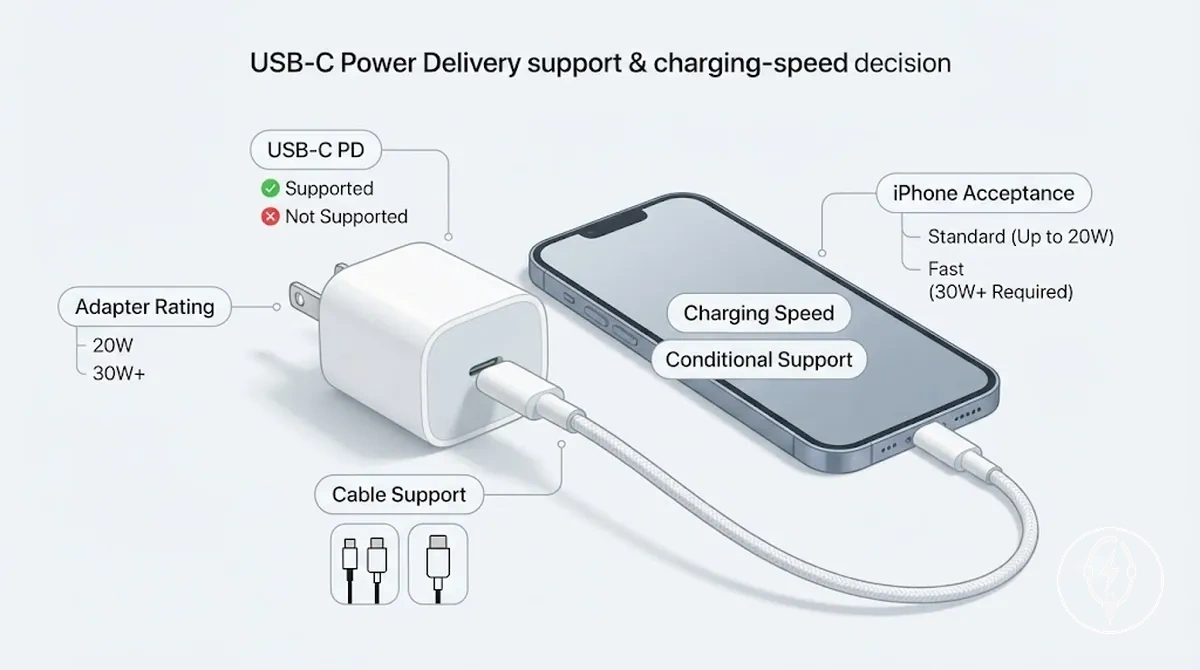
The charging-speed decision depends on both adapter capability and device acceptance rather than adapter wattage alone. According to the USB Implementers Forum, USB Power Delivery is a negotiated charging standard that allows compatible devices to agree on an appropriate power level, while Apple specifies that cable support and iPhone acceptance are required before a supported 20 W or higher USB-C PD adapter can deliver its intended charging capability. For example, pairing a 45 W USB-C PD adapter with a supported iPhone does not force the phone to charge at 45 W because the iPhone accepts only the negotiated power level defined by its hardware and charging system, making higher wattage a capacity margin rather than a guarantee of higher charging speed.
Fast Charging Need Versus Standard Charging Use
Fast Charging Need Versus Standard Charging Use depends on whether your normal charging routine leaves enough time for the iPhone to recharge. According to Apple, supported iPhone models can use fast charging with a 20 W or higher USB-C Power Delivery power adapter and a compatible USB-C charging cable, while standard charging remains appropriate when charging time is not limited. Judge the charging speed choice against your daily charging routine rather than assuming fast charging is necessary for every situation.
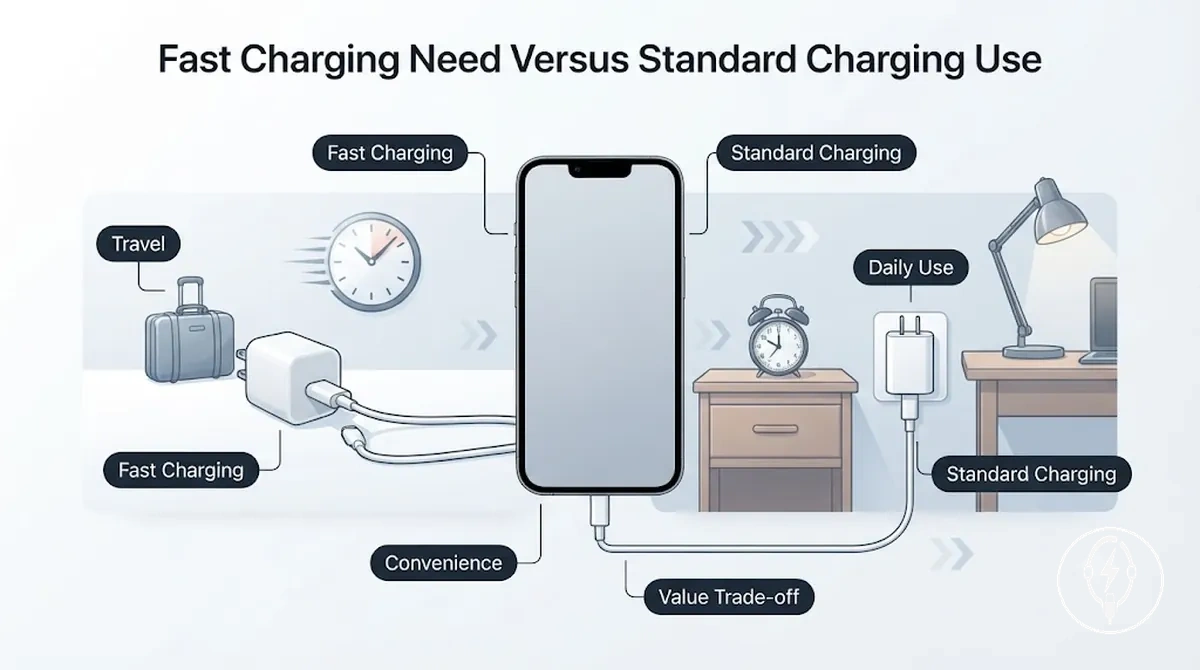
Choose the charging method that matches how and when you normally recharge your iPhone.
| Charging need | Better-fit situation |
|---|---|
| Fast charging | Daily charging includes short charging sessions, travel urgency, commuting, or limited access to power. Apple specifies that supported iPhone models require a 20 W or higher USB-C Power Delivery adapter and a compatible USB-C cable for its recommended fast-charging setup. |
| Standard charging | Daily use includes overnight charging, desk charging, or long charging periods where convenience is more important than recovering battery quickly. |
If your iPhone normally charges overnight for 7 to 8 hours, standard charging usually provides sufficient time to reach a full battery before the next day. For example, Apple states that a supported iPhone paired with a compatible 20 W USB-C Power Delivery adapter can charge to approximately 50% in about 30 minutes under suitable conditions, making fast charging more useful when travel urgency limits available charging time. Consider charging speed, heat expectation during higher-power charging, adapter size, and overall value trade-off together so the selected charging setup matches your routine instead of simply choosing the fastest available adapter.
Charging Method Choice for Daily Use
Charging Method Choice for Daily Use should be based on your daily routine, balancing speed needs, convenience, device count, and charging placement. According to Apple, supported iPhone models can achieve fast charging with a compatible USB-C Power Delivery adapter and cable, making wired charging the preferred charging method when shorter charging sessions are important, while wireless charging and multi-device charging prioritise convenience and organisation rather than maximum charging speed. Selecting the charging method according to where and how the iPhone is used usually provides a better daily experience than choosing a single charging method for every situation.
| Charging method | Useful when | Main trade-off |
|---|---|---|
| Wired charging | Short charging sessions, commuting, travel, or whenever charging speed is the main priority. | Requires a cable-and-adapter setup and plugging the iPhone into an outlet each time. |
| Wireless charging | Desk charging or bedside charging where convenience and simple placement are more important than charging speed. | Requires correct alignment on a wireless pad or wireless stand and generally charges more slowly than a comparable wired charging setup. |
| Multi-device charging | Charging an iPhone together with compatible accessories, such as AirPods or Apple Watch, from one charging station. | Requires a dedicated charging station and is most practical when multiple devices are charged in the same location. |
If the iPhone is normally charged overnight at a bedside or remains on a desk for extended periods, a wireless pad or wireless stand provides convenient placement without connecting a cable each time. According to Apple, supported iPhone models can charge to approximately 50% in around 30 minutes when paired with a compatible 20 W or higher USB-C Power Delivery adapter and a compatible cable, making wired charging more suitable when available charging time is limited. A charging station becomes more practical as the number of devices increases because it centralises charging and improves cable management.
A charging station becomes more practical as the number of devices increases because it centralises charging and improves cable management.
Use convenience, speed needs, placement, and the number of devices as the primary decision signals when selecting a daily charging method rather than assuming one option is appropriate for every routine. If cable-free desk or bedside charging is your priority, compare the available wireless charging options; if rapid charging before leaving home is more important, a cable-and-adapter setup is usually the more suitable daily charging option, while a charging station is better suited to consistent multi-device charging.
Cable and Adapter Setups
A cable-and-adapter setup is the practical daily charging method when you have reliable outlet access where you normally charge your iPhone, such as a desk, bedside table, or work area. It supports consistent plug-in charging because the cable remains connected to a power adapter and is ready whenever charging is needed. This setup is most suitable when your charging location is fixed and easily accessible during the day or overnight.
This setup is most suitable when your charging location is fixed and easily accessible during the day or overnight.
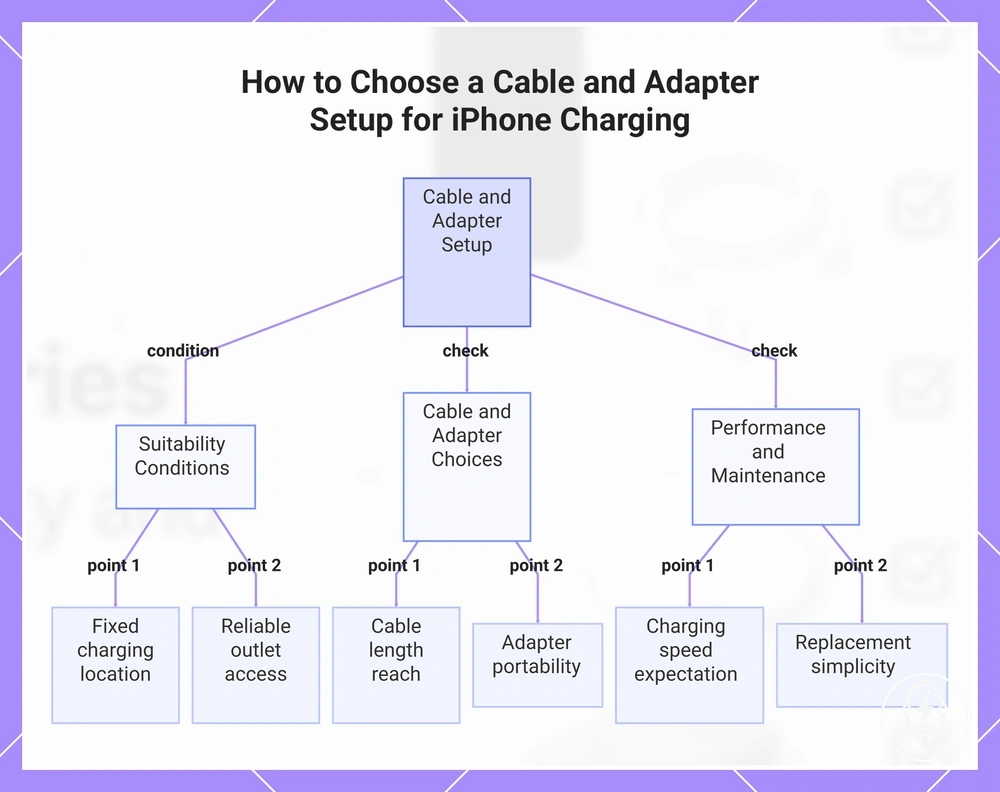
If a cable-and-adapter setup fits your routine, choose it according to outlet access, cable length, adapter portability, charging speed expectation, and replacement simplicity. For example, a 2 m charging cable provides approximately twice the reach of a 1 m cable, making it more practical when a bedside power outlet is farther from the phone, while a shorter cable often keeps a desk charging area tidier. Use these local criteria to determine whether a cable-and-adapter setup suits your daily charging routine:
- Select a cable length that comfortably reaches the charging location without placing unnecessary tension on the cable.
- Choose a compact adapter when adapter portability is important for commuting, travel, or carrying a backup charger.
- Match the cable-and-adapter setup to your charging speed expectation so the charging routine fits the available charging time without assuming guaranteed charging performance.
- Prefer commonly available replacement cables and adapters when replacement simplicity is important after normal wear or accidental damage.
This chart shows the suitability conditions and key selection criteria for a cable-and-adapter iPhone charging setup.
Wireless Pads and Stands
A wireless pad is most suitable when your iPhone is normally placed flat on a desk or bedside table, while a wireless stand is better suited when you want the screen to remain visible during charging. The main daily-use difference is the charging position: a wireless pad requires flat placement, whereas a wireless stand supports an upright stand angle for easier viewing. According to Apple, wireless charging requires the iPhone to remain correctly aligned with the charger throughout the charging session.
The comparison below helps match each wireless form to its most practical daily-use scenario.
If charging is inconsistent, improve alignment first, then check for case interference before changing your speed expectations. Apple states that thick cases, metal objects, or other materials between the iPhone and the wireless charger can interfere with charging, so removing these obstructions and repositioning the phone can restore normal charging. The comparison below helps match each wireless form to its most practical daily-use scenario.
| Wireless form | Daily-use fit |
|---|---|
| Wireless pad | Fits bedside use or flat desk use where the iPhone can remain stationary on the charging surface with correct alignment. |
| Wireless stand | Fits desk use when the viewing angle is important for notifications, video calls, or the StandBy display, provided the iPhone remains aligned and the case does not interfere with charging. |
Charging Stations for Multiple Devices
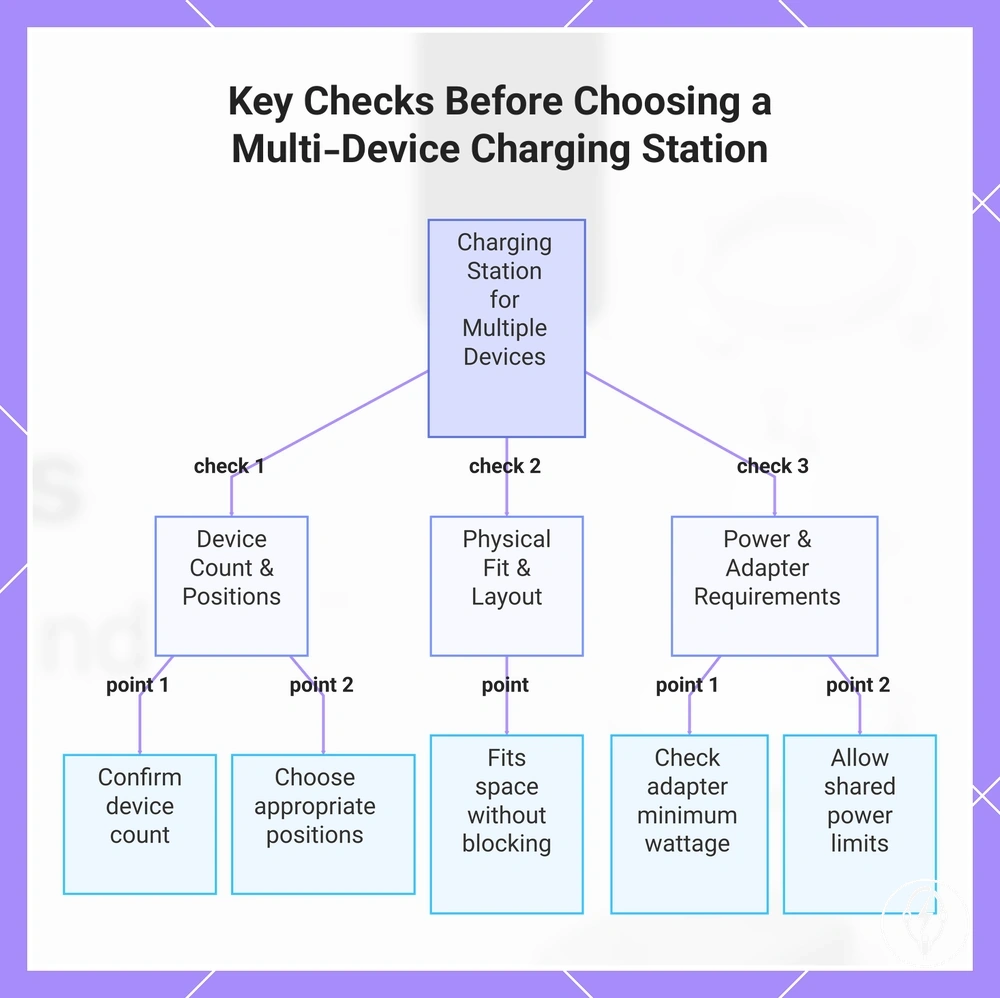
A charging station is useful when you regularly charge an iPhone with multiple devices in one place and need organised charging positions instead of separate cables and adapters. Its usefulness depends on the number of devices, the available station footprint, the required adapter requirement, and any shared power limitations. According to Apple, each connected device must still use a compatible charging method and power source, and the charging station cannot provide more total power than its connected power adapter supplies.
Its usefulness depends on the number of devices, the available station footprint , the required adapter requirement , and any shared power limitations.
If you charge multiple devices at the same desk or bedside location, a charging station can improve cable management while reducing the number of individual chargers, but check the following before choosing one:
- Confirm the number of devices you want to charge simultaneously so the charging station provides enough charging positions.
- Verify the station footprint fits the available desk or bedside space without blocking normal use.
- Choose a layout with appropriate charging positions, such as separate stand or pad locations that match your devices.
- Check the adapter requirement specified by the manufacturer because many multi-device charging stations require a dedicated USB-C power adapter with a minimum wattage to deliver their advertised charging functions.
- Allow for shared power limitations because the station distributes its available power across connected devices, which can reduce charging speed when more devices are charging at the same time.
This chart shows the main checks to consider when selecting a charging station for multiple devices, including device count, physical fit, and power requirements.
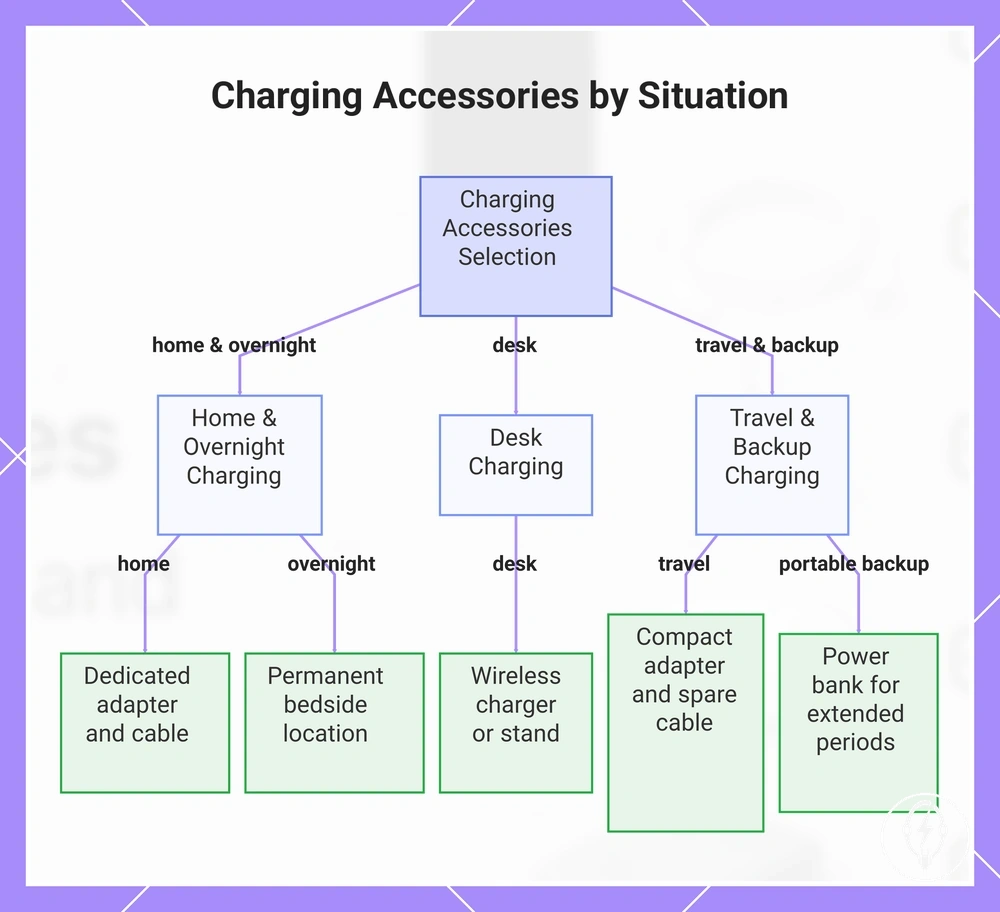
Charging Accessories by Situation
Charging accessories should be selected according to the charging situation rather than using the same accessory in every environment. The most suitable combination depends on your charging routine, outlet access, travel frequency, and the number of devices you charge. For example, a fixed home location usually benefits from a permanent charging setup, while frequent travel places greater value on portability and compact accessories. :contentReference[oaicite:0]{index=0}
Charging accessories should be selected according to the charging situation rather than using the same accessory in every environment.
If your charging environment changes during the week, choose accessories that match each situation instead of carrying a single setup everywhere. Use the checklist below to match your charging setup needs to the appropriate charging situation:
- Home charging: Choose a dedicated USB-C power adapter and charging cable when reliable outlet access is available and portability is not the priority.
- Desk charging: Select a charging accessory that keeps the iPhone accessible during work, such as a wireless charger or charging stand, when the phone is repeatedly placed on and removed from the desk.
- Overnight charging: Use a permanent bedside charging location where consistent outlet access allows the iPhone to remain connected throughout the night.
- Travel charger: Carry a compact power adapter and a spare charging cable when travelling frequently or moving between locations with limited luggage space.
- Portable backup: Carry a power bank when outlet access may be unavailable for extended periods, such as during flights, outdoor activities, or long commuting days.
Choose the accessory combination that fits the charging environment instead of treating every charging situation the same. If you alternate between home, work, and travel, maintaining a permanent home charging setup while carrying a compact travel charger or portable backup reduces unnecessary packing and keeps charging available when outlet access changes. :contentReference[oaicite:1]{index=1}
Choose the accessory combination that fits the charging environment instead of treating every charging situation the same.
This chart shows the recommended charging accessories for three main charging situations: home/overnight, desk, and travel/backup.
Home, Desk, and Overnight Charging
Home charging, desk charging, and overnight charging are most effective when the charging accessories remain in a consistent location with reliable outlet access, an appropriate cable length, suitable adapter location, and stable stand placement where applicable. A shorter cable is generally better suited to desk charging when the outlet is nearby because it reduces excess cable on the workspace, while a longer cable is more practical when the bedside outlet is farther from the charging position. A consistent daily setup also helps reduce unnecessary cable movement during routine charging. :contentReference[oaicite:0]{index=0}
A consistent daily setup also helps reduce unnecessary cable movement during routine charging.
If your iPhone is normally charged in the same place, keep the charging accessories permanently positioned and match them to the routine using these practical placement criteria:
- Home charging: Position the adapter location close to a permanent power outlet so the cable reaches the iPhone without unnecessary tension.
- Desk charging: Select a cable length that allows comfortable device visibility while keeping the charging cable clear of the normal working area.
- Overnight charging: Choose stand placement or bedside placement that keeps the iPhone connected without placing strain on the cable if the phone is moved during the night.
- Cable durability: Avoid repeated sharp bends near the connector because reducing mechanical stress helps minimise normal cable wear over time.
- Heat-aware placement: If the power adapter becomes warm during routine charging, leave open space around the adapter and avoid covering it with bedding or other insulating materials so normal heat dissipation is not unnecessarily restricted.
Travel and Portable Backup Charging
Travel charging should prioritise portability, reliable outlet access, cable durability, and appropriate portable backup power for the length of the trip. A compact adapter is the preferred charging accessory when wall outlets are expected, while a power bank supports iPhone charging between charging locations. According to the International Air Transport Association (IATA) Dangerous Goods Regulations and the U.S. Transportation Security Administration (TSA), spare lithium-ion power banks with a rating of up to 100 Wh are generally permitted in carry-on baggage, while power banks rated between 101 Wh and 160 Wh require airline approval. :contentReference[oaicite:0]{index=0}
According to the International Air Transport Association (IATA) Dangerous Goods Regulations and the U.S.
If travel charging involves changing locations or uncertain outlet access, prepare the charging accessories according to the checklist below so the charging setup remains compact while providing practical backup readiness:
- Compact adapter: Carry a compact adapter when reliable outlet access is expected because it reduces luggage space without limiting normal wired charging.
- Travel cable: Pack a durable travel cable and, for longer trips, consider a backup cable because repeated packing, bending, and connector movement increase the risk of cable damage.
- Power bank: Include a power bank as a portable backup when charging opportunities may be unavailable for several hours instead of relying only on wall outlets.
- Charging kit: Store the compact adapter, travel cable, and power bank together in one charging kit so essential charging accessories are easier to locate while travelling.
- Outlet access: If charging availability is uncertain, prepare one spare cable and one charged power bank before departure to improve backup readiness without assuming guaranteed emergency power.
Safety, Certification, and Build Quality Checks
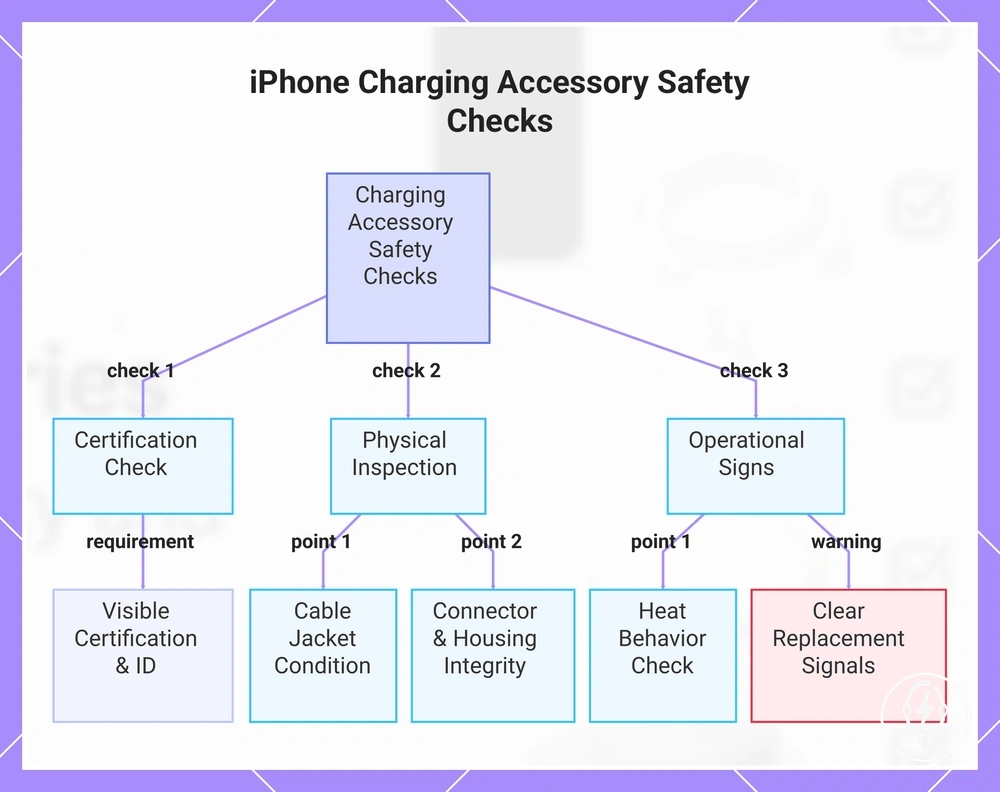
If you are selecting an iPhone charging accessory, prioritise safety by choosing products with recognised certification signals, sound build quality, and no visible physical damage before comparing convenience or price. According to Apple, charging accessories should comply with applicable safety standards and use appropriate charging technology for the device, while recognised certification programmes such as USB-IF certification verify compliance with USB specifications for compatible USB products. These selection signals reduce avoidable compatibility and reliability risks but do not guarantee fault-free operation. :contentReference[oaicite:0]{index=0}
These selection signals reduce avoidable compatibility and reliability risks but do not guarantee fault-free operation.
If a charging accessory lacks clear certification information or shows abnormal operation, inspect its protection features before continuing to use it. According to the USB Implementers Forum, certified USB products are tested for compliance with USB specifications, while Apple advises discontinuing use of accessories that become damaged or operate abnormally. For example, a USB-C power adapter that remains warm during charging can operate normally, but repeated overheating, a burning smell, visible housing damage, or frequent charging interruptions are practical signs that the accessory should be replaced rather than reused. :contentReference[oaicite:1]{index=1}
If your charging cable or adapter has been used daily for an extended period, inspect its physical condition before relying on it again.
If your charging cable or adapter has been used daily for an extended period, inspect its physical condition before relying on it again. Use the checklist below to identify common wear and build-quality concerns:
- Check that recognised certification signals and product identification remain visible and readable.
- Inspect the cable jacket for cuts, splits, exposed conductors, crushed sections, or severe kinks that weaken durability.
- Verify connector integrity by confirming the connector is straight, securely attached, and free from corrosion, looseness, or bent contacts.
- Inspect the adapter housing for cracks, burn marks, loose parts, or other signs that reduce build quality and reliability.
- Observe heat behavior during normal charging and discontinue use if overheating, repeated charging interruptions, or unusual odours occur.
- Replace accessories showing persistent signs of wear because damaged insulation or connectors increase the risk of unreliable charging.
This section helps identify practical selection criteria rather than providing complete electrical safety guidance or battery diagnostics. If your charging accessory shows persistent replacement signals, replacing the damaged cable or adapter is a more reliable choice than continuing to use visibly worn equipment. :contentReference[oaicite:2]{index=2}
This section helps identify practical selection criteria rather than providing complete electrical safety guidance or battery diagnostics.
This chart shows the key safety checks for iPhone charging accessories, including certification verification, physical inspection, and operational signs that indicate replacement is needed.
Price, Bundle Value, and Accessory Completeness
If compatibility, charging method, safety, and intended use already match your requirements, judge a charging accessories bundle by its bundle value rather than its price. A charger set offers better value when it includes the components needed for your charging routine and reduces additional purchases, while a lower-priced bundle with essential omissions may cost more overall after missing accessories are added. Compare completeness before comparing price. :contentReference[oaicite:0]{index=0}
Missing components reduce bundle value because they require separate purchases before the charging setup is fully usable.
Accessory completeness is the extent to which a charger set already contains the essential components required for its intended charging method. A complete charging accessories bundle typically includes an included cable, a compatible power adapter when required, and, where appropriate, a wireless stand or charging station. Missing components reduce bundle value because they require separate purchases before the charging setup is fully usable. :contentReference[oaicite:1]{index=1}
Accessory completeness is the extent to which a charger set already contains the essential components required for its intended charging method.
If you regularly travel or charge in multiple locations, assess travel usefulness, redundancy, and missing components before deciding whether the bundle price represents good value. For example, a charging accessories bundle containing one power adapter, one included cable, and one backup cable provides two charging cables instead of one, improving redundancy if the primary cable is lost or damaged during travel. By comparison, a charger set that includes only a power adapter but no charging cable requires at least one additional accessory purchase before it can be used for wired charging. :contentReference[oaicite:2]{index=2}
Use the checklist below to evaluate bundle value using bundle-to-attribute-to-decision logic, then compare those trade-offs against your daily charging routine.
If two charging bundles have similar prices, compare the included components before making a decision because the more complete bundle often reduces later accessory costs. Use the checklist below to evaluate bundle value using bundle-to-attribute-to-decision logic, then compare those trade-offs against your daily charging routine.
| Bundle element | Attribute/criterion | Value/condition | Decision effect |
|---|---|---|---|
| Included cable | Accessory completeness | Compatible charging cable supplied | Reduces the need for an immediate additional purchase |
| Power adapter | Bundle value | Adapter included for wired charging | Completes a cable-and-adapter charging setup |
| Wireless stand or charging station | Charging method | Included only when it matches the intended charging routine | Adds convenience without unnecessary accessories |
| Travel accessories | Travel usefulness | Compact accessories with practical portability | Improves charging flexibility away from home |
| Backup cable | Redundancy | Second charging cable included | Maintains charging availability if the primary cable cannot be used |
| Missing components | Completeness | Essential charging accessory omitted | Reduces overall bundle value because extra purchases are required |
Select the charging accessories bundle that provides the required components for your charging routine instead of focusing on price alone. After completing this value check, compare the best accessories to compare so your final decision reflects compatibility, accessory completeness, durability, travel usefulness, and long-term bundle value.:contentReference[oaicite:3]{index=3}
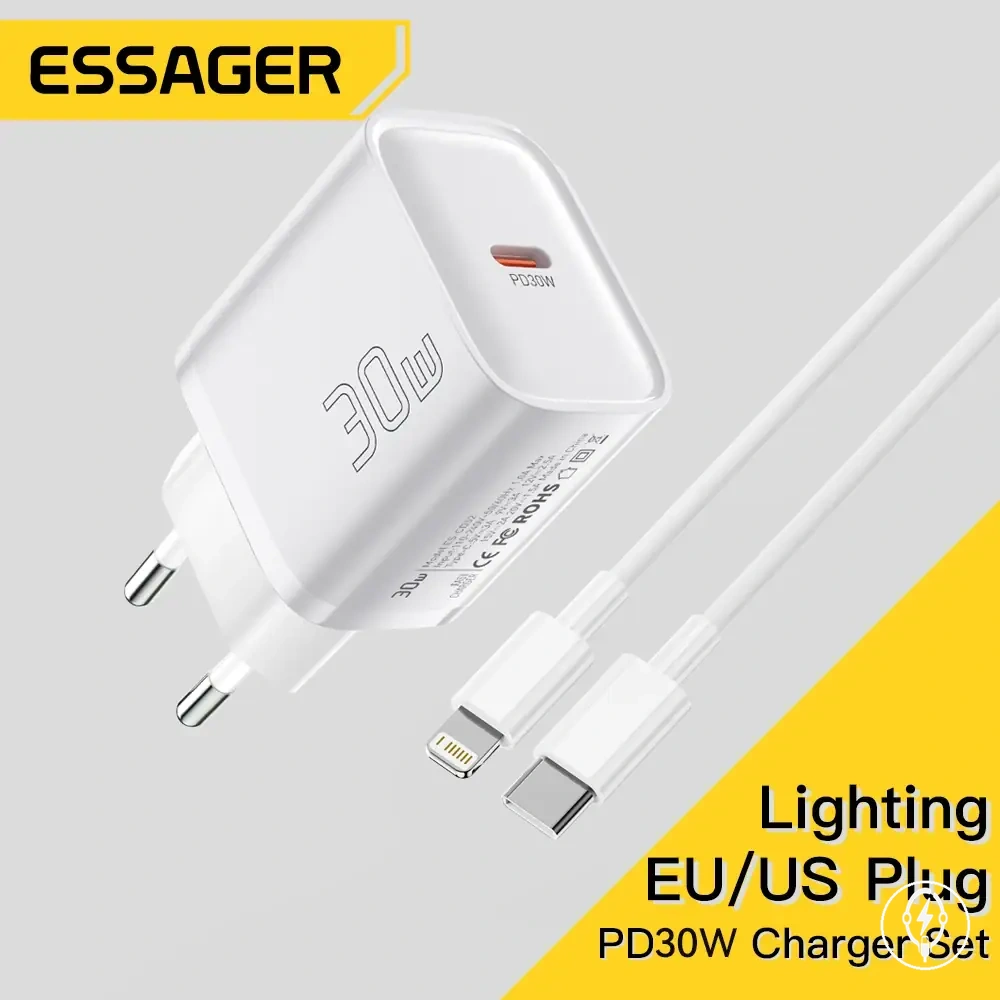
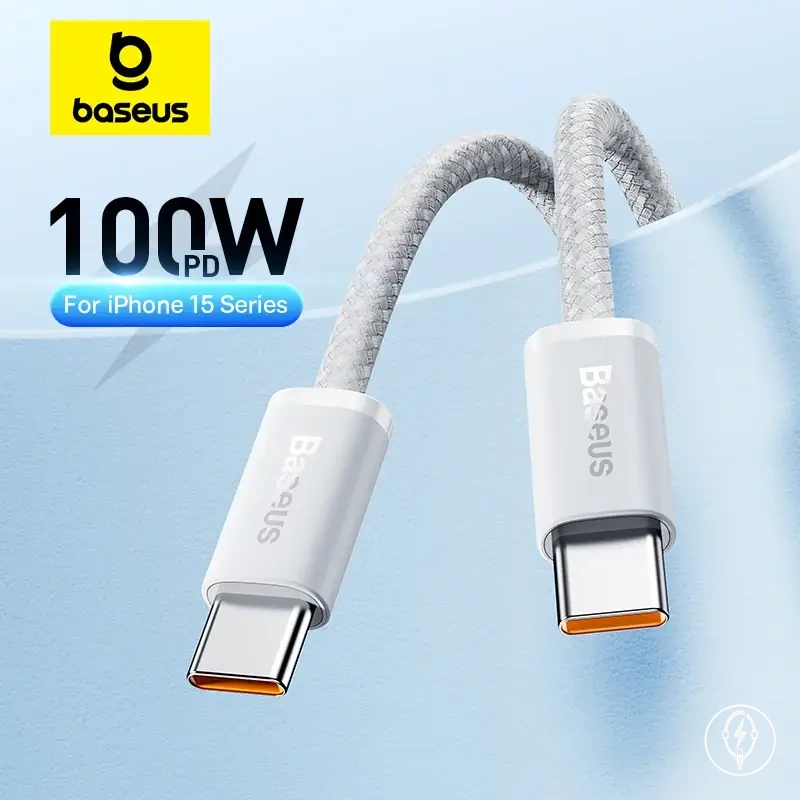
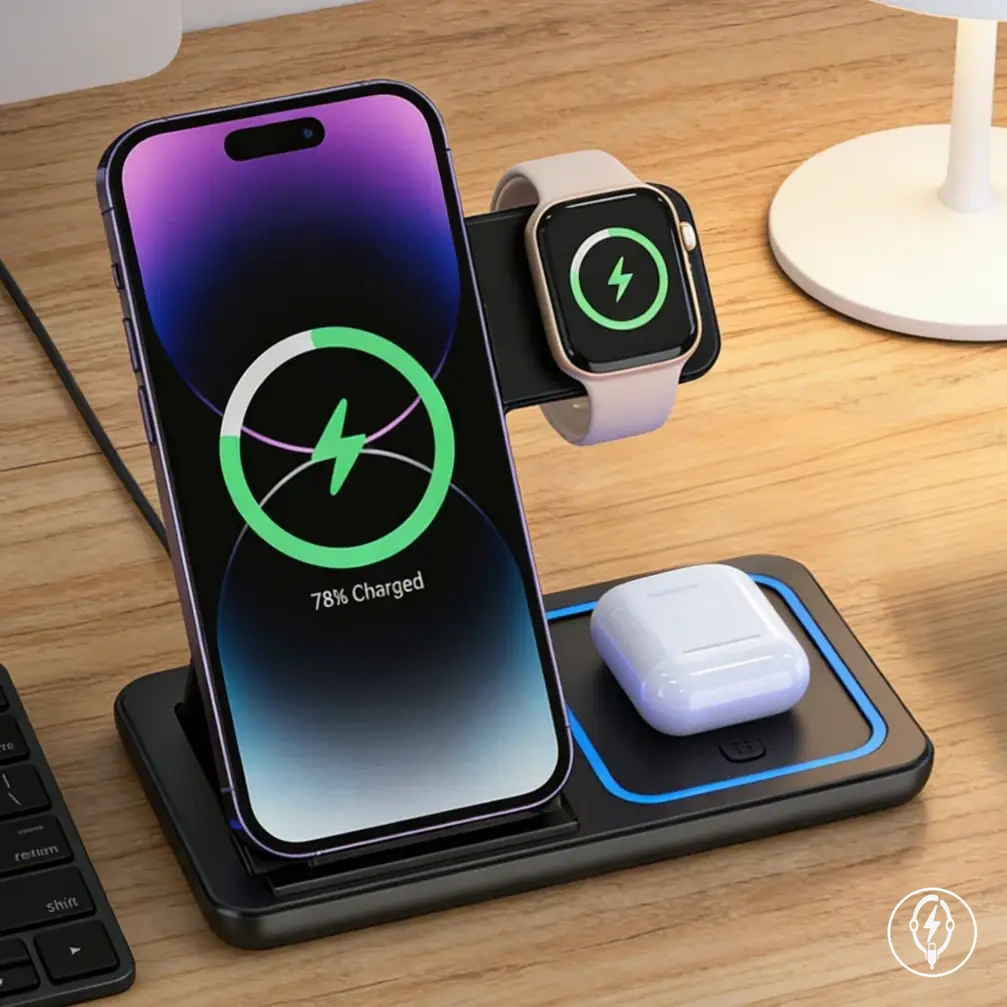
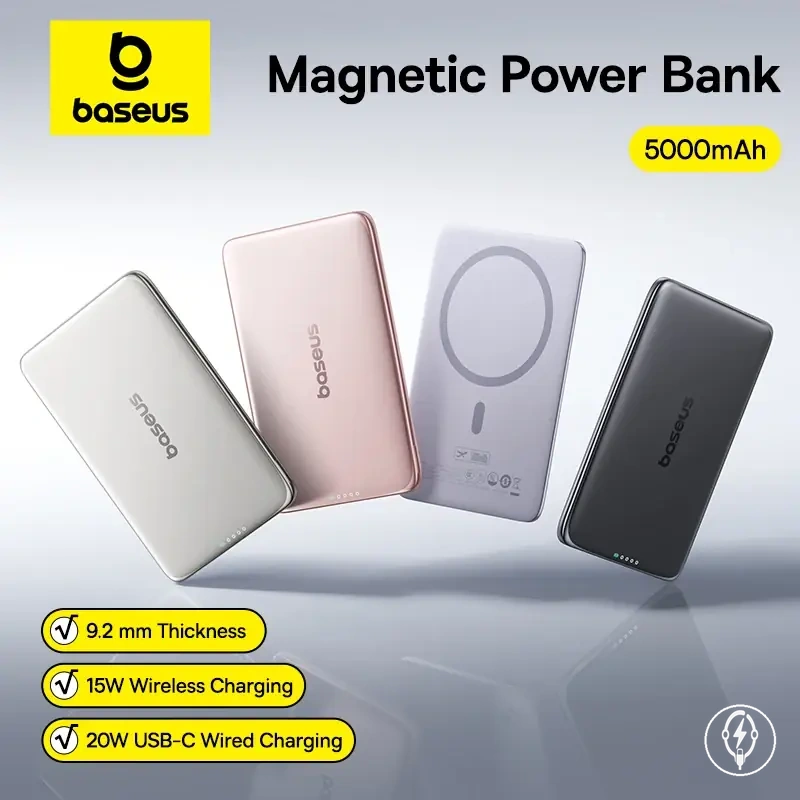
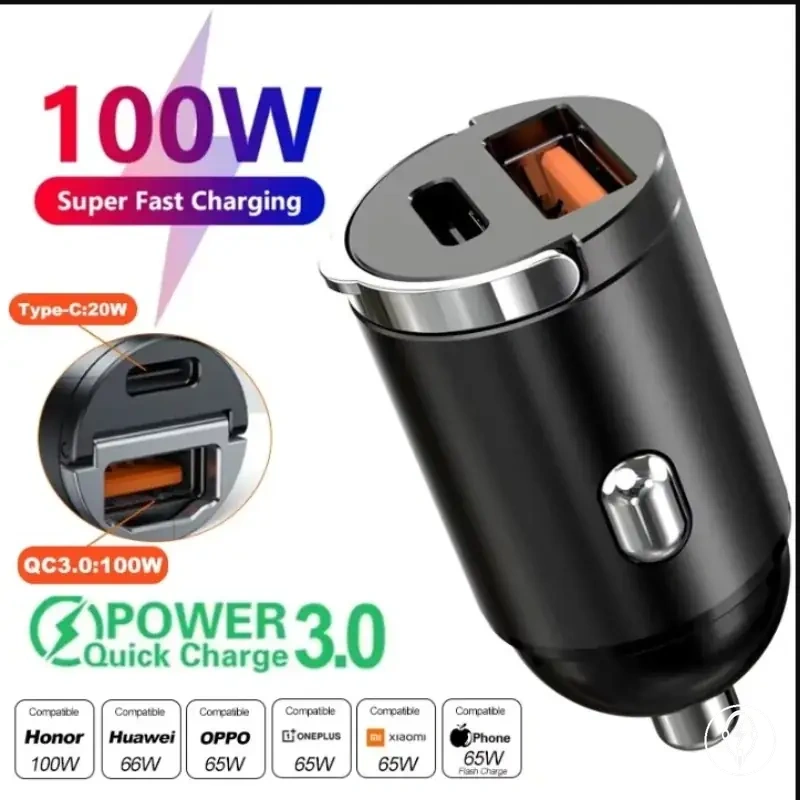
Here are product examples that may make comparison easier.
Here are product examples that may make comparison easier. Before buying, always review the compatibility criteria, essential features, and product details.
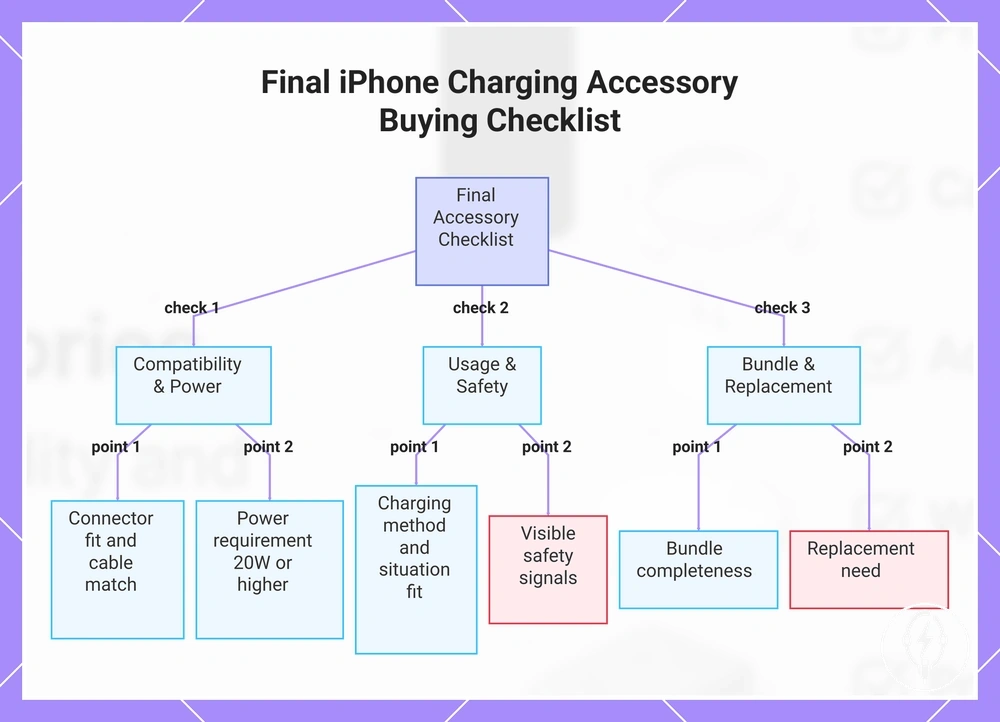
Final iPhone Charging Accessory Buying Checklist
If you are ready to compare charging accessories, use this Final iPhone Charging Accessory Buying Checklist to verify compatibility, charging method, situation fit, safety signals, and bundle completeness before making a final accessory decision. The final check consolidates the selection criteria covered throughout this guide into one verification sequence. Complete each item before comparing charging accessory options. :contentReference[oaicite:0]{index=0}
Complete each item before comparing charging accessory options.
If compatibility or charging speed has not been confirmed, resolve those checks before evaluating value because later decisions depend on them. According to Apple, supported iPhone models require a compatible USB-C Power Delivery power adapter rated at 20 W or higher together with a compatible charging cable for fast charging, making connector fit, cable-to-adapter match, and power requirement the first pass-or-fail criteria. :contentReference[oaicite:1]{index=1}
If compatibility or charging speed has not been confirmed, resolve those checks before evaluating value because later decisions depend on them.
If your charging routine includes both daily use and travel, confirm that the selected charging method matches the intended situation fit before comparing accessories. Apply this buying checklist to complete the final verification:
- If the accessory supports your iPhone model and the connector fit matches the device, continue; otherwise, exclude it from consideration.
- If the cable-to-adapter match is correct and the adapter satisfies the intended power requirement, proceed; otherwise, replace the incompatible component.
- If fast charging is required, confirm the accessory supports a compatible 20 W or higher USB-C Power Delivery charging setup; otherwise, standard charging remains suitable for longer charging sessions.
- If you intend to use a wired or wireless charging method, confirm the selected accessory supports that charging method under your intended conditions.
- If the accessory will be used for daily use or travel, verify its situation fit, portability, and charging location before keeping it on the shortlist.
- If visible safety signals such as overheating, exposed wiring, cracked housings, or loose connectors are present, replace the accessory instead of continuing routine use.
- If the package provides the required cable, power adapter, or charging station, the bundle completeness supports immediate use with fewer additional purchases.
- If persistent wear, charging interruptions, or physical damage indicate a replacement need, remove the accessory from consideration rather than relying on continued use.
Complete the buying checklist before comparing prices because safety signals, build quality, replacement need, and bundle completeness determine whether a charging accessory remains suitable for everyday use. An accessory that passes every verification item provides stronger decision value than one selected primarily because of its price. :contentReference[oaicite:2]{index=2}
An accessory that passes every verification item provides stronger decision value than one selected primarily because of its price.
Once every verification item has been completed, the final accessory decision is based on compatibility, charging method, situation fit, safety, value, and completeness rather than a single purchasing factor.:contentReference[oaicite:3]{index=3}
Before buying, always review the compatibility criteria, essential features, and product details.
Here are product examples that may make comparison easier. Before buying, always review the compatibility criteria, essential features, and product details.
This chart shows the final verification sequence for selecting an iPhone charging accessory, covering compatibility, usage, safety, and completeness checks.