When iPhone Charging Accessories Should Be Replaced
Replace iPhone charging accessories when they have visible physical damage, show unsafe behaviour, or continue to cause charging symptoms after reasonable checks such as cleaning the contacts and confirming correct use. iPhone charging accessories should be replaced according to their condition rather than their age because no manufacturer or safety standard specifies a universal service life for charging cables, adapters, or wireless chargers. Apple states that accessories with frayed cables, exposed wires, bent connectors, cracked housings, liquid damage, or other visible damage should no longer be used because they may create charging failures or electrical safety risks. This page therefore uses a condition-based replacement decision.
This page therefore uses a condition-based replacement decision.
iPhone charging accessories are the charging cable, power adapter, and wireless charger used to deliver power to an iPhone. Apple identifies these as separate charging components, so each accessory should be inspected individually instead of assuming the whole charging setup requires replacement. A worn charging cable, adapter, or wireless charger belongs to accessory maintenance and should not be confused with battery replacement or charging port repair.
iPhone charging accessories are the charging cable, power adapter, and wireless charger used to deliver power to an iPhone.
If charging becomes intermittent, repeatedly disconnects, the adapter becomes unusually hot during normal use, or the wireless charger loses charging reliability after correct alignment, inspect the accessory before replacing it. Apple recommends discontinuing use immediately if a charging cable has fraying or exposed conductors, or if an adapter housing or plug is physically damaged, because continued use can create a safety hazard. Dirt or debris on charging contacts can sometimes interrupt charging without indicating accessory failure, so cleaning is an appropriate first check when no visible damage is present. Once visible damage or persistent charging symptoms remain after those basic checks, replacement becomes the appropriate maintenance decision.
For example, a charging cable that resumes stable charging after its connector is cleaned does not necessarily need replacement.
For example, a charging cable that resumes stable charging after its connector is cleaned does not necessarily need replacement. In contrast, a cable with exposed wire or an adapter with a cracked casing should be replaced immediately even if it still supplies power, because Apple identifies visible physical damage as a condition requiring the accessory to be taken out of service for safety.
Table of Contents
What Replacement Means for iPhone Charging Accessories
Replacement is the retirement of an iPhone charging accessory that is worn, unsafe, incompatible, or unreliable and the use of a suitable alternative in its place. The term applies to a charging cable, power adapter, or wireless charger when its condition or charging performance no longer supports safe, dependable operation. Replacement defines a condition-based decision rather than a routine upgrade or scheduled maintenance.
Replacement defines a condition-based decision rather than a routine upgrade or scheduled maintenance.
What replacement means for iPhone charging accessories is determining when an accessory should no longer remain in service because its condition affects charging safety or reliability. The image below labels examples of accessories that may require replacement across cables, adapters, and wireless chargers, rather than products to purchase.
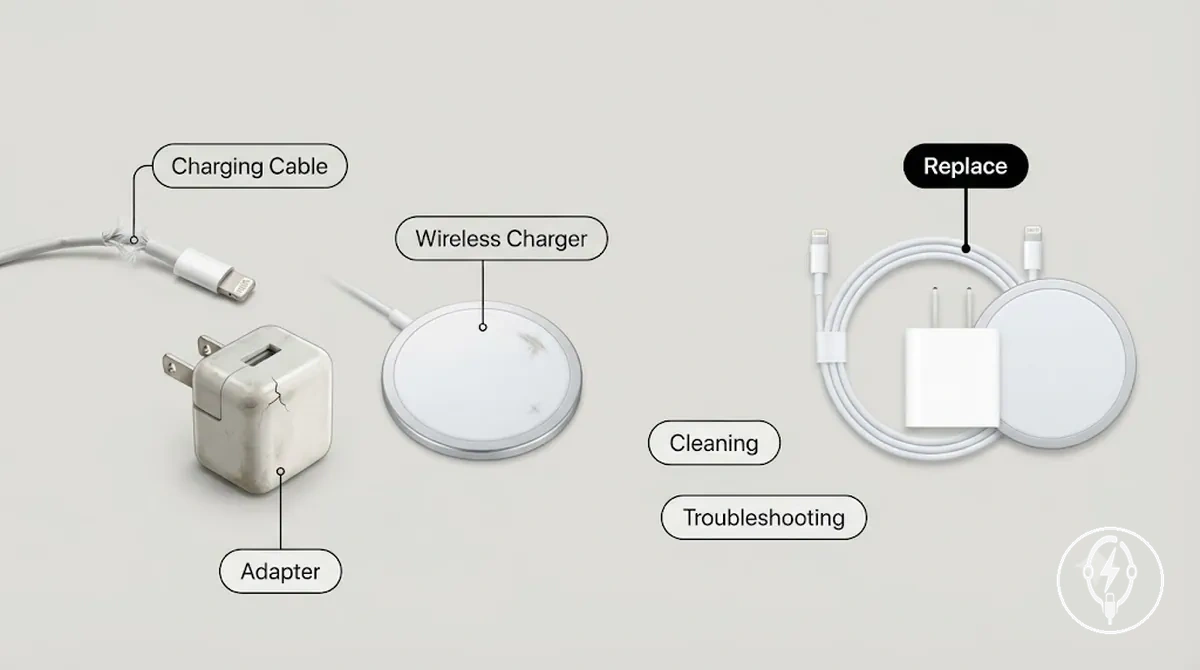
- Cleaning removes dirt or debris when the accessory is otherwise undamaged and capable of reliable charging.
- Troubleshooting checks whether charging symptoms result from temporary issues such as poor contact, alignment, or setup rather than accessory failure.
- Replacement retires the charging cable, adapter, or wireless charger when visible damage, an unsafe condition, incompatibility, or persistent unreliable charging remains after reasonable checks.
Wear Patterns That Shorten Accessory Lifespan
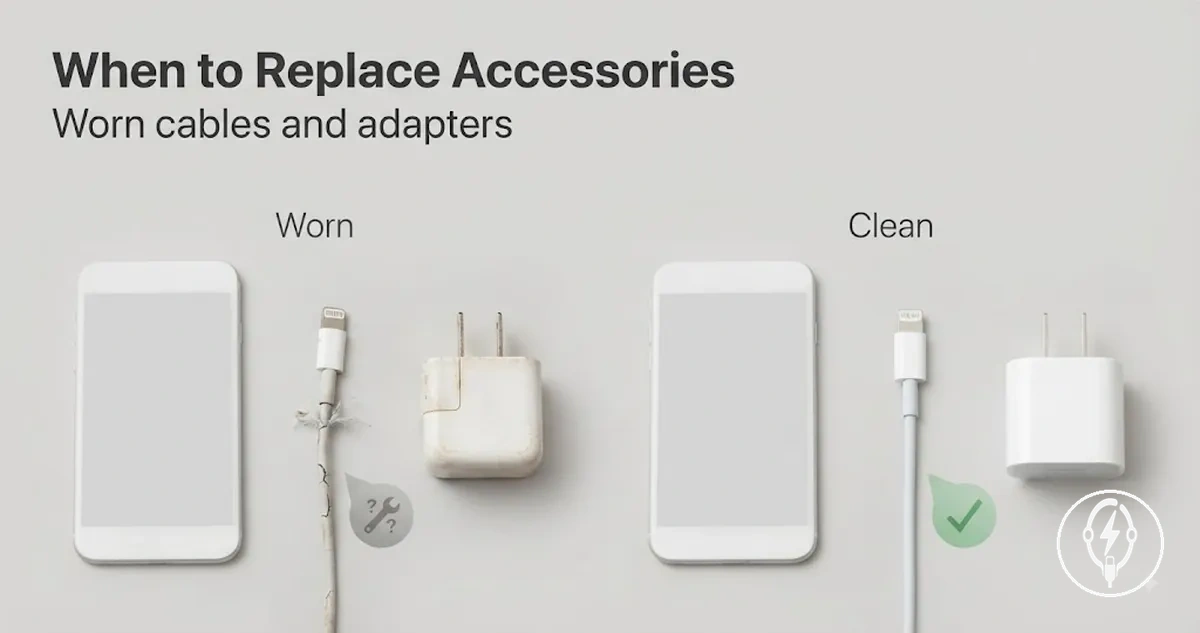
Wear patterns that shorten accessory lifespan are condition signals rather than fixed lifespan rules. An iPhone charging cable, power adapter, or wireless charger becomes less reliable when repeated use, bending, heat, connector stress, or ageing produces observable wear, but Apple does not specify a universal lifespan because durability depends on use, storage, build quality, and the charging environment. The most reliable replacement indicator is therefore the accessory's visible or functional condition rather than its age.
Wear patterns that shorten accessory lifespan are condition signals rather than fixed lifespan rules.
Wear patterns that shorten accessory lifespan can be identified by inspecting the accessory for visible signs and charging behaviour before deciding whether replacement is necessary. The image below labels common condition signals, and the table organises each accessory part by its wear attribute, visible or functional condition, and likely effect or decision signal.
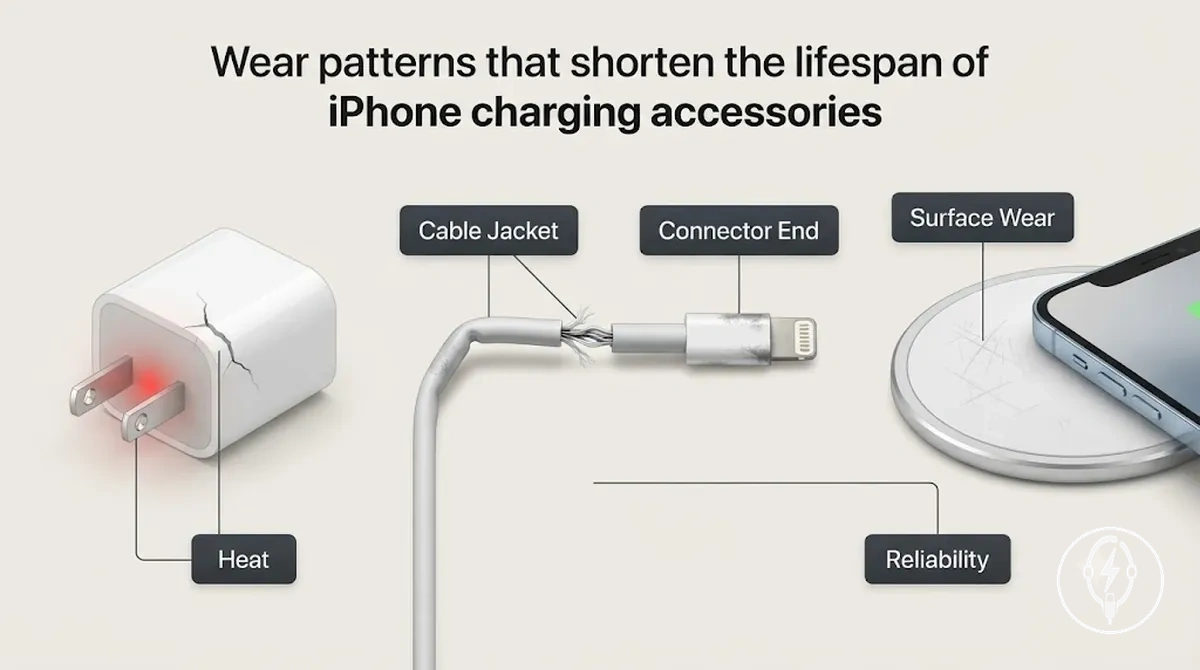
| Accessory or part | Wear attribute | Visible or functional condition | Likely effect or decision signal |
|---|---|---|---|
| Cable jacket | Repeated bending | Fraying, splits, or exposed insulation | Charging reliability can decline because the protective outer layer has deteriorated; exposed conductors indicate replacement. |
| Cable strain relief | Connector stress | Cracking, stretching, or separation near the plug | Internal wire fatigue can lead to intermittent charging or disconnecting during movement. |
| Connector end | Contact wear | Loose fit, bent connector, or unreliable electrical contact | Poor electrical contact can interrupt charging and indicates that connector wear should be assessed. |
| Adapter casing | Ageing and impact | Cracks, deformation, or loose housing | Physical damage is a visible sign that the adapter should no longer remain in service. |
| Adapter heat | Heat exposure | Persistent abnormal heating during normal charging | Continued overheating after basic checks suggests reduced reliability and the adapter should be evaluated for replacement. |
| Wireless charger contact surface | Surface wear | Scratches, contamination, or unstable alignment | Reduced charging consistency caused by poor contact or positioning rather than a fixed lifespan. |
Cable Bending, Fraying, and Exposed Wiring
Cable bending, fraying, and exposed wiring are visible cable damage patterns that affect the condition of an iPhone charging cable and determine whether replacement is appropriate. A bent cable, damaged cable jacket, or loose strain relief can reduce charging reliability, while exposed wiring means the cable's electrical insulation has failed and the cable should no longer be used for charging because continued use creates an electrical safety risk, as stated by Apple Support.
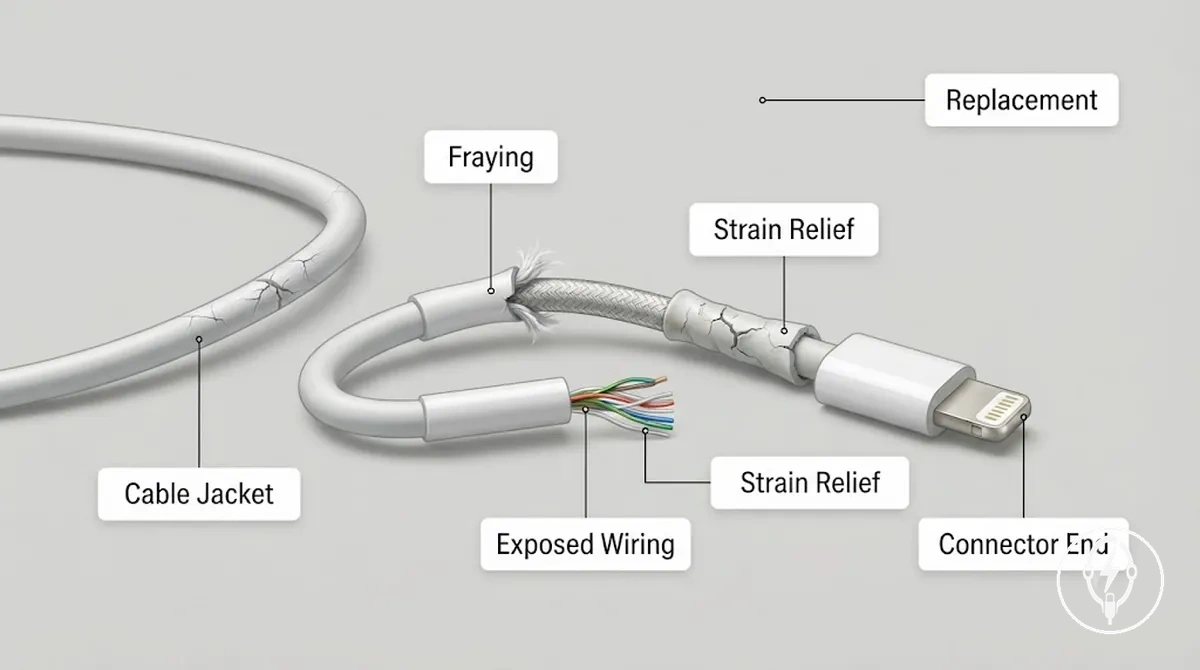
If exposed wiring or unusual heat appears while the cable is charging, disconnect it immediately and replace it rather than continuing to use it. Apple Support identifies exposed conductors and damaged charging cables as conditions that require the accessory to be taken out of service. For broader guidance on cable and connector condition beyond local cable damage, see worn cables and connectors.
- Cable bending: Repeated bending leaves visible stress marks that can weaken the cable jacket near the bend and increase the chance of intermittent charging.
- Frayed cable jacket: A worn or split outer jacket exposes inner protective layers and indicates that cable deterioration has progressed far enough for replacement to be appropriate.
- Kink: A sharp kink creates a local weak point where internal conductors may no longer maintain a stable electrical connection during movement.
- Exposed wiring: Visible conductor is an unsafe condition during charging use and requires the cable to be removed from service and replaced.
- Loose strain relief: Separation where the cable enters the connector shows mechanical wear that can lead to unstable charging when the cable is flexed.
Connector Looseness, Dirt, and Contact Wear
Connector looseness, dirt, and contact wear affect the charging reliability of an iPhone charging cable because each condition changes how securely the connector fits and how consistently electrical contact is maintained. According to Apple Support, charging accessories should be inspected for visible damage and contamination before continued use because dirt, bent contacts, or mechanical wear can interrupt charging or create an unreliable connection. Connector condition should therefore be assessed by visible fit and contact quality rather than by charging symptoms alone.
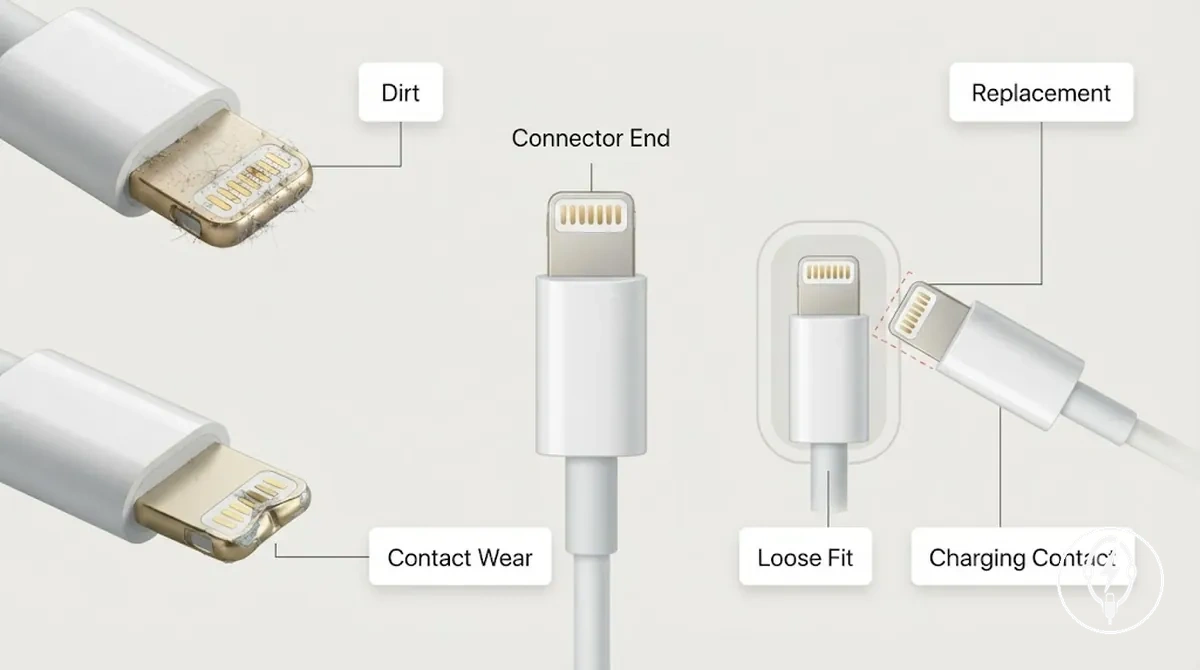
Visible dirt or debris should be removed safely before contact wear is assumed because contamination and mechanical wear are different conditions with different outcomes. If the connector still fits loosely, disconnects during normal movement, or has bent or visibly worn contact surfaces after inspection, replacement is generally more appropriate than continued use. For guidance on safe maintenance before replacing an accessory, see cleaning before replacement.
- Visible dirt or debris: The connector end shows contamination that may interrupt charging contact; clean and retest before considering replacement.
- Connector looseness: The connector has a poor fit or excessive movement; repeated disconnecting during normal use indicates mechanical wear that may require replacement.
- Contact wear: Bent or worn contact surfaces reduce stable electrical contact; if charging remains unreliable after cleaning, replacement is the safer next step.
- Repeated disconnecting: Charging stops when the cable is lightly moved after the connector is clean; this observation is more consistent with connector wear than with removable surface debris.
Heat, Age, and Adapter Stress
Heat, age, and adapter stress describe condition-related wear that can affect an iPhone charging adapter over time through repeated high-load use, normal ageing, and mechanical stress rather than a fixed service life. According to Apple Support, a power adapter with a cracked casing, damaged plug, burning smell, or other visible damage should no longer be used. Adapter condition should therefore be judged by observable signs such as casing condition, plug fit, and unusual heat instead of the adapter's age alone.
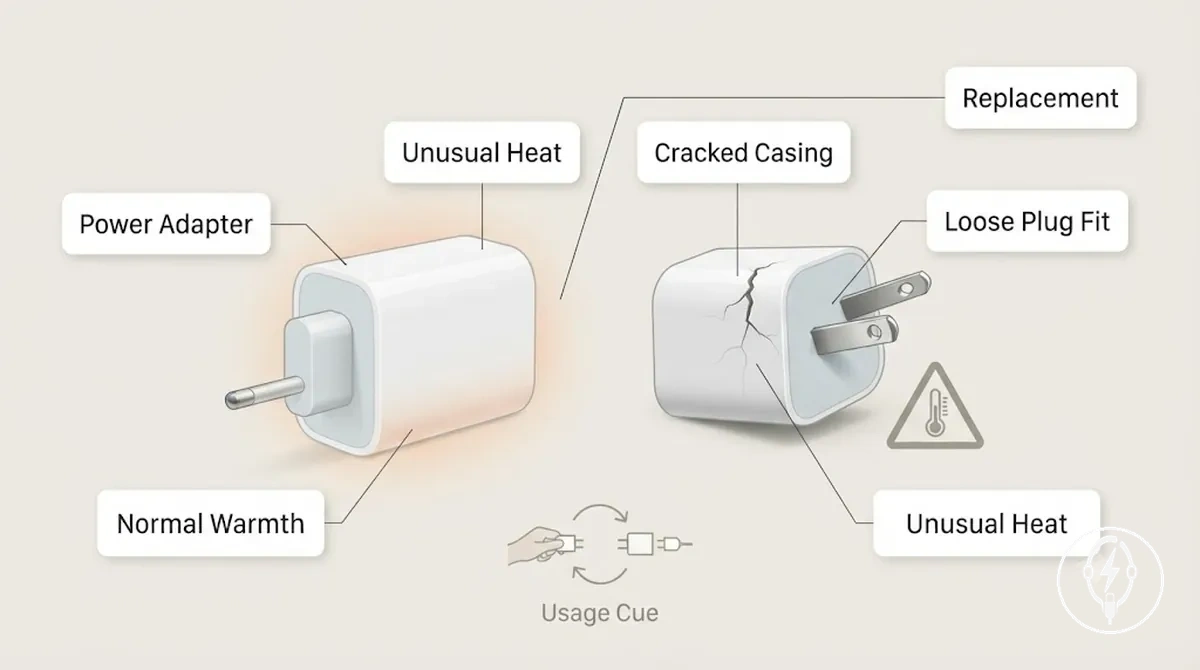
A warm adapter during charging can be a normal operating condition, especially during sustained high-load use, whereas unusual heat, buzzing, a burning smell, or a cracked casing indicates a condition that requires the adapter to be removed from service. For example, if a charging adapter becomes noticeably hotter than it normally does while charging the same iPhone under similar conditions and the behaviour continues after checking the cable and power outlet, replacement is generally the safer maintenance decision than continued use. Apple does not publish a fixed replacement age or maximum operating lifespan for its power adapters.
Apple does not publish a fixed replacement age or maximum operating lifespan for its power adapters.
Observable signs that change the replacement decision include:
- Cracked casing: Visible housing damage can reduce mechanical protection and is a clear reason to replace the adapter.
- Unusual heat: Heat that is noticeably greater than normal during comparable charging conditions suggests abnormal adapter stress and warrants replacement if it persists.
- Buzzing or burning smell: These observable conditions indicate an unsafe adapter condition and the adapter should no longer be used.
- Loose plug fit: Plug prongs that no longer fit securely in a wall outlet indicate mechanical wear and support a condition-based replacement decision.
Damage Signs That Make Replacement Necessary
Damage signs make replacement necessary when an iPhone charging accessory has severe visible damage or unsafe behaviour rather than cosmetic wear or temporary charging symptoms. According to Apple Support, accessories with frayed insulation, exposed wire, a cracked adapter housing, unusual heat, a burning smell, or other physical damage should no longer be used because these conditions create electrical or mechanical safety risks. The replacement decision should therefore be based on the observed damage condition rather than the accessory's age. :contentReference[oaicite:0]{index=0}
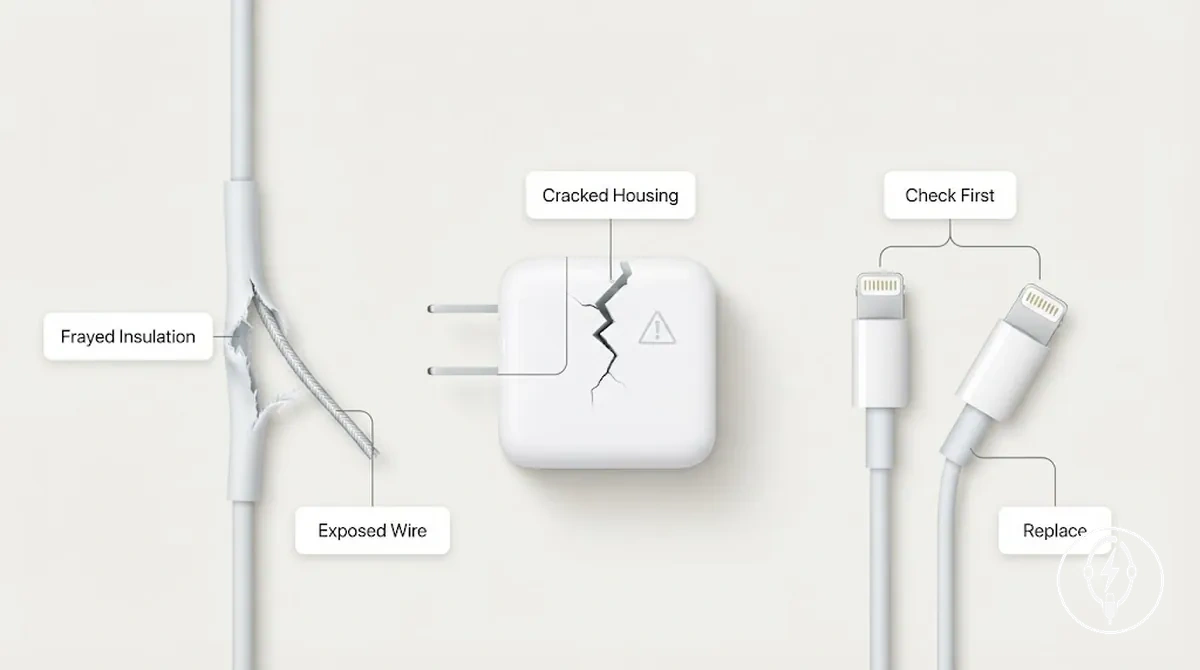
Damage signs that make replacement necessary are different from charging symptoms that still require inspection because intermittent charging or slow charging can result from removable contamination or poor contact instead of permanent accessory failure. If cleaning and basic inspection do not resolve an unstable fit or repeated disconnecting, replacement becomes the appropriate decision. The checklist below separates replacement-level damage from conditions that should be checked first, including criteria relevant to unsafe charging accessories. :contentReference[oaicite:1]{index=1}
- Replace immediately: Charging cable — Damage sign: Frayed insulation with exposed wire. Severity: Unsafe physical damage. Replacement decision: Stop using the cable and replace it immediately.
- Replace immediately: Power adapter — Damage sign: Cracked adapter housing together with unusual heat or a burning smell. Severity: Unsafe electrical warning sign. Replacement decision: Stop using the adapter and replace it.
- Check first: Connector — Damage sign: Unstable fit or repeated disconnecting. Severity: Confirm the connector is clean and free of debris. Replacement decision: Replace the accessory only if the unstable fit continues after inspection.
- Check first: Charging contacts — Damage sign: Visible dirt or debris without physical damage. Severity: Contamination rather than structural damage. Replacement decision: Clean and retest before deciding to replace the accessory.
- Monitor only if minor: Accessory housing — Damage sign: Light cosmetic scuffs with no cracks, loose parts, unusual heat, or charging faults. Severity: Cosmetic condition only. Replacement decision: Continue monitoring unless structural damage or charging problems develop.
Charging Symptoms That Point to a Worn Accessory
Charging symptoms such as persistent disconnecting, slow charging, no charging, an accessory warning, or unusual heat during charging can point to a worn accessory when they continue after basic checks do not resolve them. According to Apple Support, charging problems should first be checked by inspecting the charging cable, power adapter, charging port, and power source because the same symptoms can also result from the phone, charging port, wall outlet, or charging setup rather than accessory wear. If the symptom persists after those checks, the charging accessory becomes a more likely cause. :contentReference[oaicite:0]{index=0}
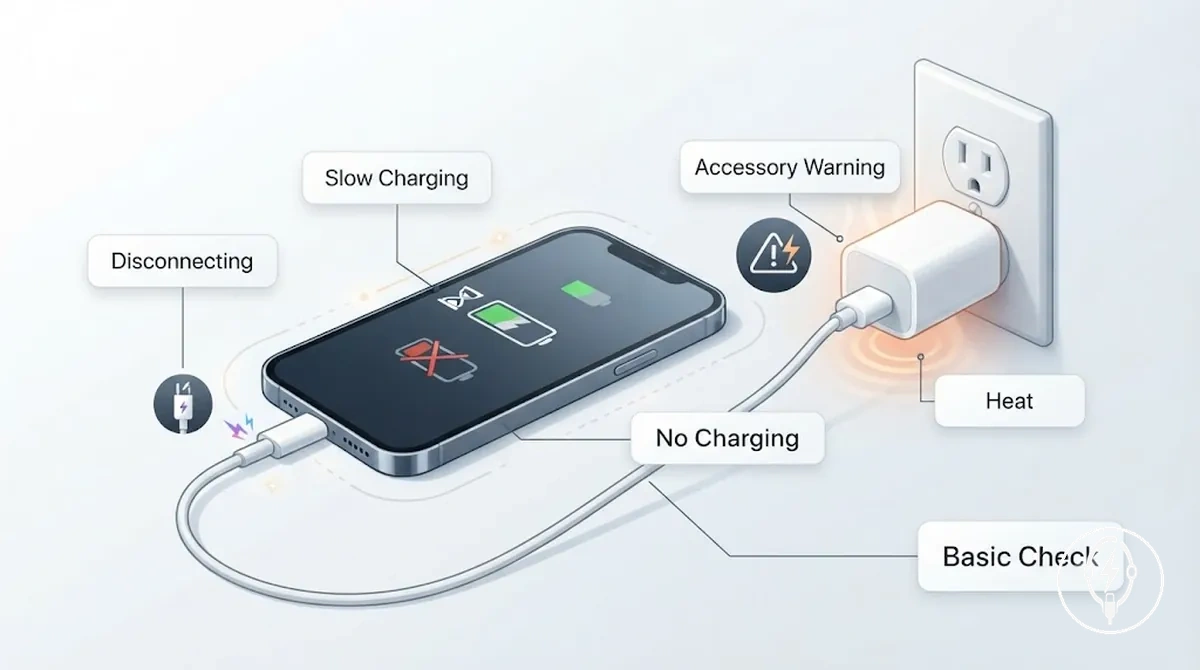
Charging symptoms should be interpreted as diagnostic clues instead of proof that the accessory has failed because each symptom has at least one common alternative cause. For example, repeated disconnecting after retesting with a different power outlet and known-working adapter is more consistent with connector looseness or cable wear than an outlet problem, while slow charging can also result from an unsuitable adapter or charging conditions. For broader diagnosis after these checks, see charging accessory failure signs. :contentReference[oaicite:1]{index=1}
| Symptom | Likely accessory issue | Basic check | What it means |
|---|---|---|---|
| Disconnecting | Connector looseness or cable damage | Reconnect the cable, inspect for visible damage, then retest with another cable or adapter | If disconnecting continues after the basic checks, the worn accessory becomes a more likely cause than the original charging setup. |
| Slow charging | Worn cable or unsuitable power adapter | Confirm the correct power adapter, test another cable, and check the power source | If slow charging persists after the checks, accessory wear becomes a more likely explanation. |
| No charging | Failed charging cable or power adapter | Inspect for damage, test another outlet, and try a known-working charging accessory | If the replacement accessory charges normally, the original accessory is more likely to be faulty. |
| Accessory warning | Damaged or incompatible charging accessory | Reconnect the accessory, inspect for visible damage, and retest if available with another accessory | A repeated accessory warning after the basic checks supports inspecting or replacing the charging accessory. |
| Heat during charging | Damaged cable or power adapter | Stop charging, inspect the accessory, and compare with a known-working charger | Persistent unusual heat after the basic checks indicates the accessory should no longer be used until it has been evaluated or replaced. |
Intermittent Charging and Repeated Disconnecting
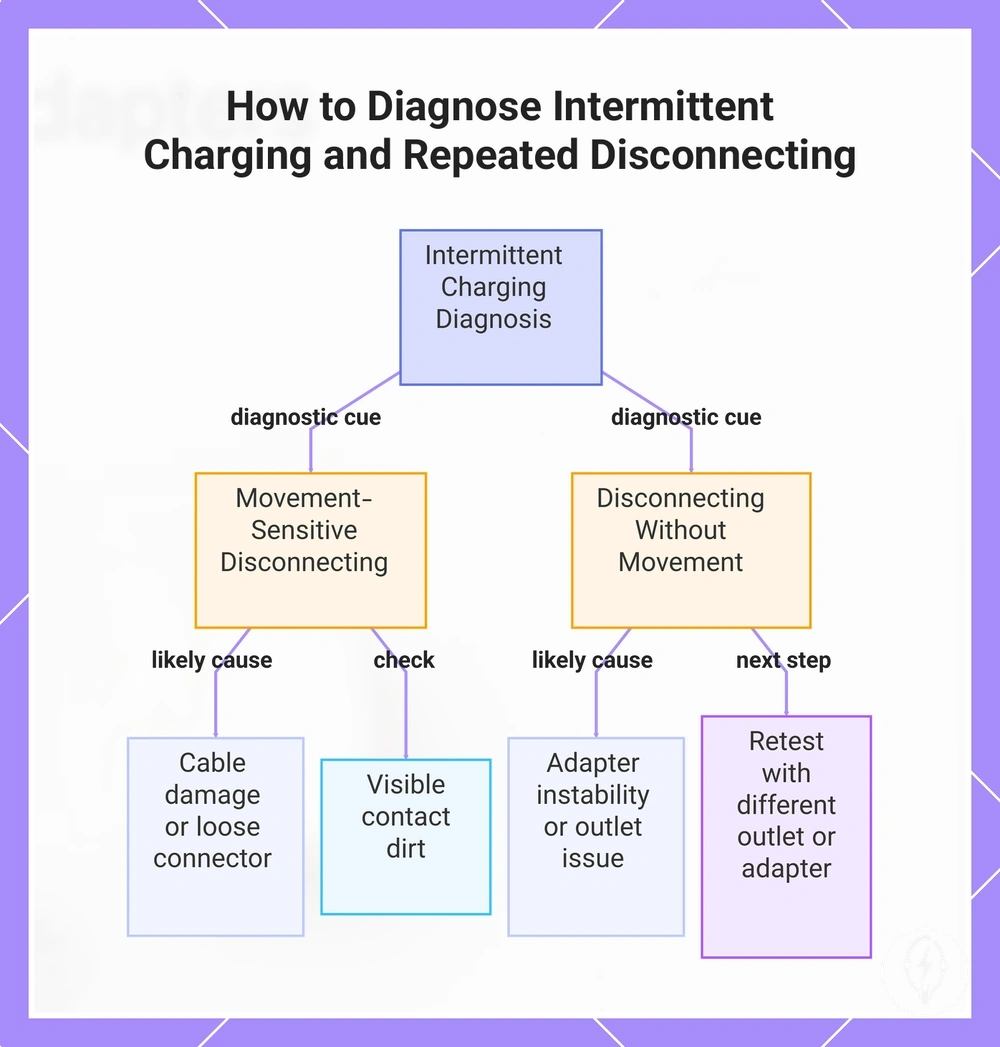
Intermittent charging and repeated disconnecting are local charging symptoms that can indicate cable damage, connector looseness, contact dirt, adapter instability, or movement affecting the charging connection rather than continuous accessory failure. The symptom should be observed while the accessory remains connected because charging that disconnects only during movement points to a different accessory condition from charging that never starts. :contentReference[oaicite:0]{index=0}
The symptom should be observed while the accessory remains connected because charging that disconnects only during movement points to a different accessory condition from charging that never starts.
For example, if charging begins normally and stops only when the cable is gently moved near the connector, the observation is more consistent with cable damage or connector looseness than constant no-charge behaviour. By contrast, if charging never starts even when the cable remains completely still, inspect the cable, power adapter, and power outlet before deciding that the charging accessory requires replacement. :contentReference[oaicite:1]{index=1}
By contrast, if charging never starts even when the cable remains completely still, inspect the cable, power adapter, and power outlet before deciding that the charging accessory requires replacement.
Observe these local diagnostic cues while the accessory is connected:
- Movement-sensitive disconnecting: If intermittent charging appears only when the cable is moved, cable damage or connector looseness becomes a more likely condition. Retest while keeping the cable stationary, then inspect both connector ends.
- Loose connector fit: If the connector feels loose or shifts during normal use, charging contact may become unstable. Retest after reconnecting firmly before considering replacement.
- Visible contact dirt: If debris is visible on the charging contact, clean the connector safely and retest. Replace the accessory only if repeated disconnecting continues after cleaning.
- Disconnecting without movement: If charging stops while the cable remains still, adapter instability or the wall outlet may be contributing to the symptom. Retest with another compatible outlet or power adapter before replacing the cable.
This chart shows the two main diagnostic cues for intermittent charging—movement-sensitive disconnecting and disconnecting without movement—and the likely causes and next steps for each.
Slow Charging, No Charging, and Accessory Warnings
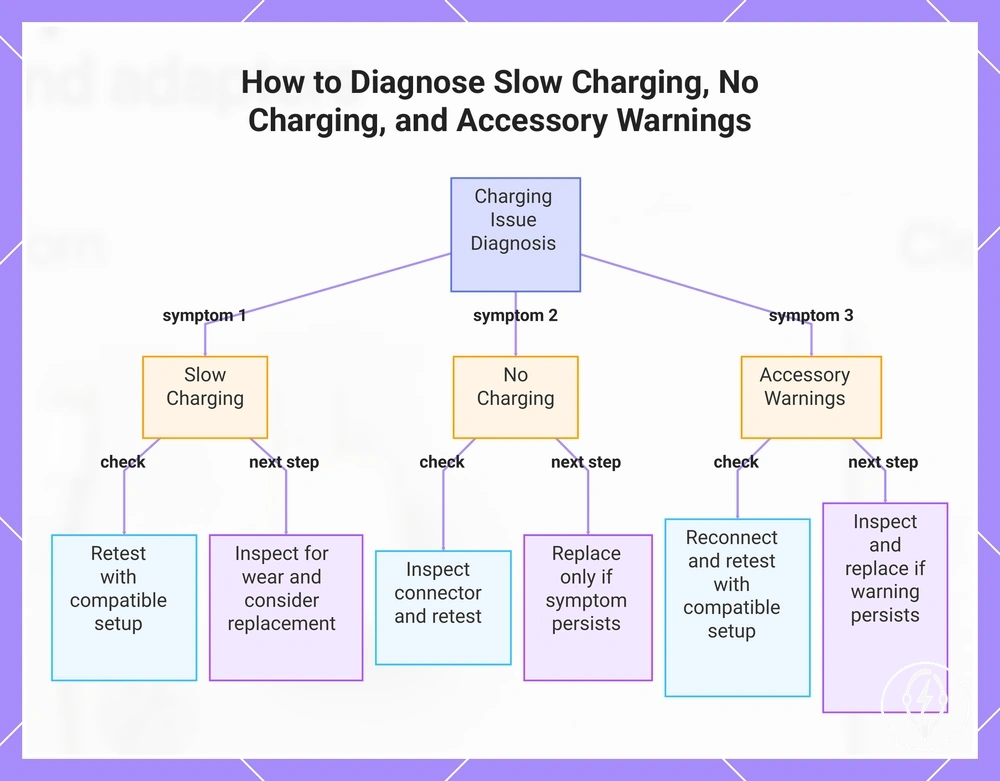
Slow charging, no charging, and accessory warnings can indicate accessory wear, but they do not identify a damaged charging accessory on their own because incompatibility, contact dirt, or a faulty power source can produce the same symptoms. According to Apple Support, the charging cable, power adapter, charging port, and power source should be inspected before concluding that the accessory requires replacement. If the symptoms continue after those exclusion checks, accessory wear becomes a more likely explanation. :contentReference[oaicite:0]{index=0}
Use the symptom-to-check guide below as the cautious next step.
The same symptom can have different accessory-related causes, so each symptom should be matched with a simple condition check before replacement. For example, if charging is slow with one adapter but returns to normal after switching to another compatible adapter and cable, the original accessory is the more likely source of the problem, whereas an accessory warning can also result from an incompatible accessory and should be confirmed by retesting with a known-compatible charging setup. Use the symptom-to-check guide below as the cautious next step. :contentReference[oaicite:1]{index=1}
- Slow charging: Possible accessory cause: Accessory wear affecting the cable or power adapter. Basic check: Retest with a compatible cable, adapter, and power source. Cautious next step: If charging remains consistently slow after the comparison, inspect the accessory for visible wear and consider replacement.
- No charging: Possible accessory cause: Connector damage, contact dirt, or a damaged accessory. Basic check: Inspect the connector for debris or visible damage and retest with another compatible charging accessory. Cautious next step: Replace the accessory only if the symptom persists after the exclusion checks.
- Accessory warnings: Possible accessory cause: Incompatibility or a damaged accessory. Basic check: Reconnect the accessory and retest with a known-compatible cable or power adapter. Cautious next step: If the warning message continues with a compatible charging setup, inspect the accessory for damage and replace it if necessary.
This chart shows the three common charging symptoms, their basic checks, and the cautious next steps to determine if accessory replacement is needed.
When Cleaning or Correct Use May Solve the Problem
Cleaning or correct use may solve an iPhone charging accessory problem when charging symptoms are caused by dirt, loose seating, blocked contacts, poor cable routing, cable strain, or case interference rather than visible damage. According to Apple Support, charging accessories should be inspected for debris, secure connections, and physical damage before replacement is considered. If the accessory has exposed wire, cracking, a burning smell, or abnormal heat, it has crossed the replacement boundary and should not be returned to service through cleaning or continued use. :contentReference[oaicite:0]{index=0}
According to Apple Support, charging accessories should be inspected for debris, secure connections, and physical damage before replacement is considered.
Dirt on charging contacts, a connector that is not fully seated, cable strain near the connector, or a protective phone case preventing full insertion can interrupt charging without permanently damaging the accessory. After correcting one of these conditions, retest the accessory before deciding to replace it because the symptom may disappear once proper contact is restored. For detailed maintenance guidance, see cleaning before replacement, then use the comparison below to distinguish maintenance situations from replacement conditions. :contentReference[oaicite:1]{index=1}
| Situation | Try first | Replace instead when |
|---|---|---|
| Dirt on charging contacts | Clean the contacts safely and retest. | Charging remains unreliable after cleaning and no other cause is identified. |
| Loose seating | Reseat the connector fully and check for case interference. | The connector still feels loose or repeatedly disconnects during normal use. |
| Cable strain or poor cable routing | Reduce cable strain, straighten the cable routing, and test again. | The cable has fraying, exposed conductors, or intermittent charging caused by visible physical damage. |
| Blocked contacts | Remove visible debris and retest. | The contacts are physically damaged or charging remains unreliable after cleaning. |
| Unsafe visible damage | Do not continue using the accessory. | Replace immediately if exposed wire, cracking, a burning smell, or abnormal heat is present. |
Safety Risks of Keeping Damaged or Old Accessories
Damaged or ageing charging accessories become a safety risk when insulation, casing, heat control, electrical contact, or connector fit is visibly compromised rather than showing only cosmetic wear. According to Apple Support, charging accessories with exposed conductors, physical damage, overheating, or other abnormal conditions should no longer be used because those conditions can prevent the accessory from operating safely as intended. Safety risk should therefore be assessed from the accessory's observable condition instead of its age alone. :contentReference[oaicite:0]{index=0}
Safety risk should therefore be assessed from the accessory's observable condition instead of its age alone.
Stop using a charging accessory immediately if it has exposed wiring, a cracked adapter casing, a persistent burning smell, or unusual heat during normal charging because these are clear severity cues that support a replacement decision. By contrast, an older accessory without visible damage or abnormal charging behaviour is not automatically unsafe, but it should still be checked for deteriorated insulation, casing damage, unstable plug fit, and unreliable electrical contact. For broader condition guidance, see unsafe charging accessories, then use the checklist below to match accessory condition with its safety risk and replacement decision. :contentReference[oaicite:1]{index=1}
| Accessory condition | Risk type and severity cue | Replacement decision |
|---|---|---|
| Exposed wiring or damaged insulation | Electrical insulation has failed and the conductor is visible, creating a clear stop-using condition. | Replace the charging cable immediately. |
| Cracked adapter casing | The protective housing is compromised, particularly if unusual heat is also present. | Stop using the adapter and replace it. |
| Unusual heat during normal charging | Heat noticeably greater than normal under comparable charging conditions is a caution sign of abnormal operation. | Disconnect the accessory and replace it if the condition continues. |
| Persistent burning smell | An abnormal odour indicates a serious operating fault and is a direct stop-using cue. | Do not continue using the accessory; replace it. |
| Unstable plug or connector fit | Poor electrical contact can reduce charging reliability and increase mechanical wear if it persists after basic checks. | Inspect the connection first; replace the accessory if the unstable fit remains. |
Replacement Checklist for Cables, Adapters, and Wireless Chargers
A replacement checklist should be used only after damage inspection, symptom diagnosis, cleaning, and safety checks have been completed because replacement is appropriate only when an accessory continues to show unsafe damage or persistent charging problems after those verification steps. According to Apple Support, visible physical damage and abnormal operating conditions are the primary replacement criteria rather than accessory age alone. Use the checklist below to verify the replacement decision for cables, adapters, and wireless chargers. :contentReference[oaicite:0]{index=0}
The replacement criterion is therefore the cable's verified condition rather than its appearance.
Charging cables should be replaced when the cable has fraying, exposed wire, or repeated charging failure that continues after connector cleaning and basic charging checks. Cosmetic marks without exposed conductors are not, by themselves, a replacement criterion, whereas persistent intermittent charging after cleaning supports replacement. The replacement criterion is therefore the cable's verified condition rather than its appearance. :contentReference[oaicite:1]{index=1}
Before making the final decision, review choose replacement accessories for accessory selection guidance.
Power adapters should be replaced when a cracked casing, persistent unusual heat during normal charging, or a burning smell is observed because those conditions indicate an unsafe accessory state. Wireless chargers should be replaced only after charging alignment, contact cleanliness, compatible positioning, and charging reliability have been verified. Before making the final decision, review choose replacement accessories for accessory selection guidance. :contentReference[oaicite:2]{index=2}
Wireless chargers should be replaced only after charging alignment, contact cleanliness, compatible positioning, and charging reliability have been verified.
Complete the replacement checklist only after every accessory has passed through the same verification sequence so that removable causes are excluded before replacement. The final decision should match the accessory type, replacement criterion, observed value, and recommended action shown below, allowing the next replacement step to be taken with confidence. :contentReference[oaicite:3]{index=3}
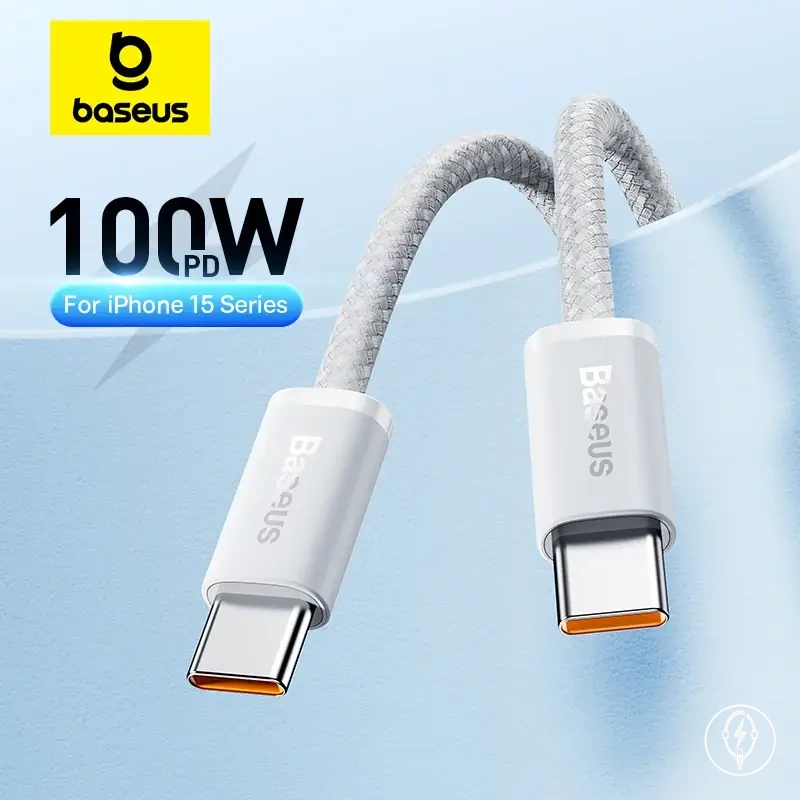
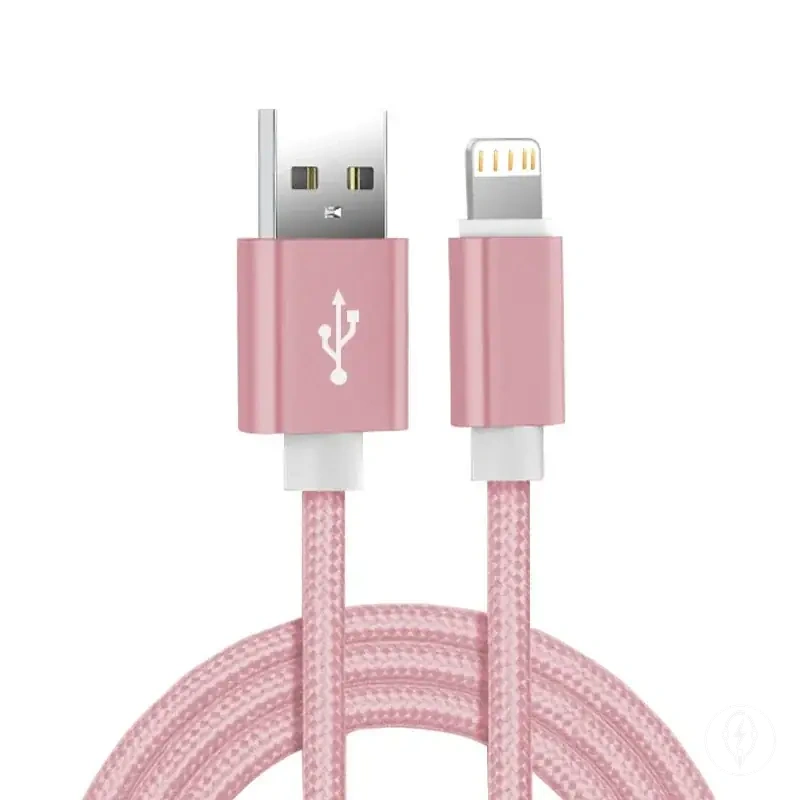
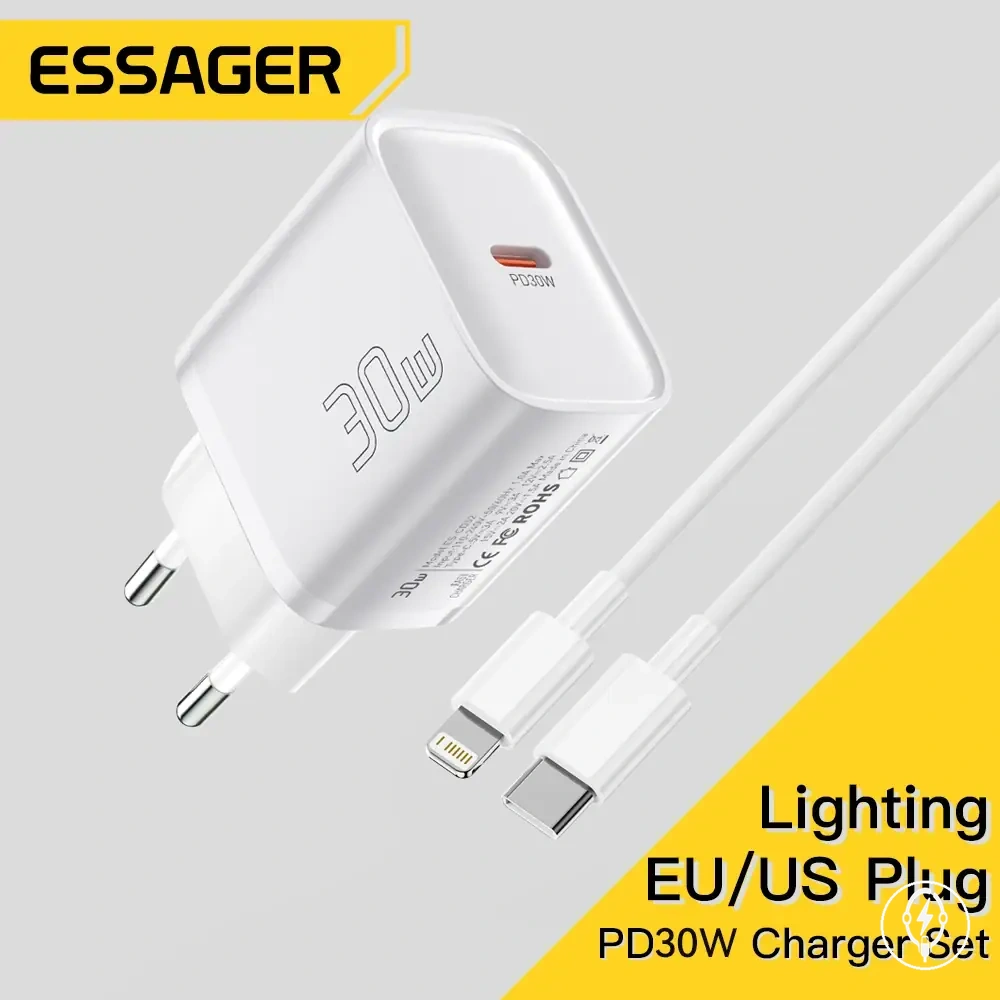
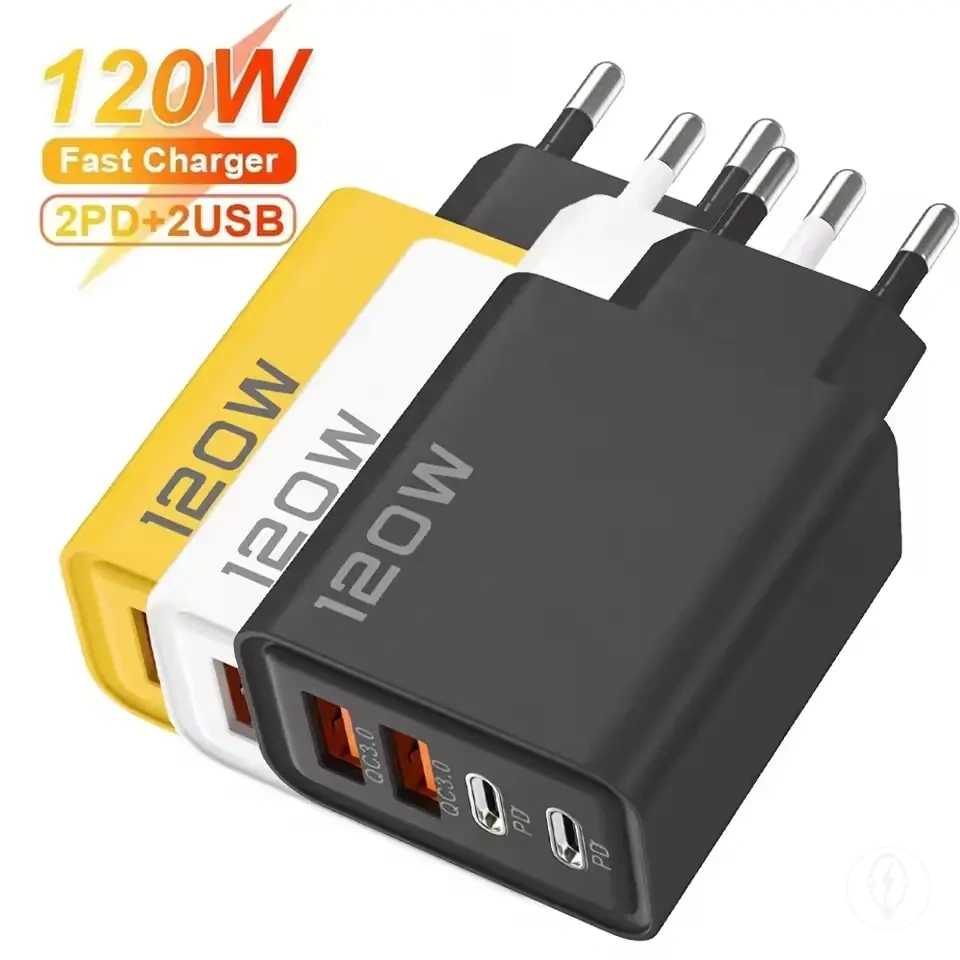
Here are product examples that may make comparison easier.
Here are product examples that may make comparison easier. Before buying, always review the compatibility criteria, essential features, and product details.
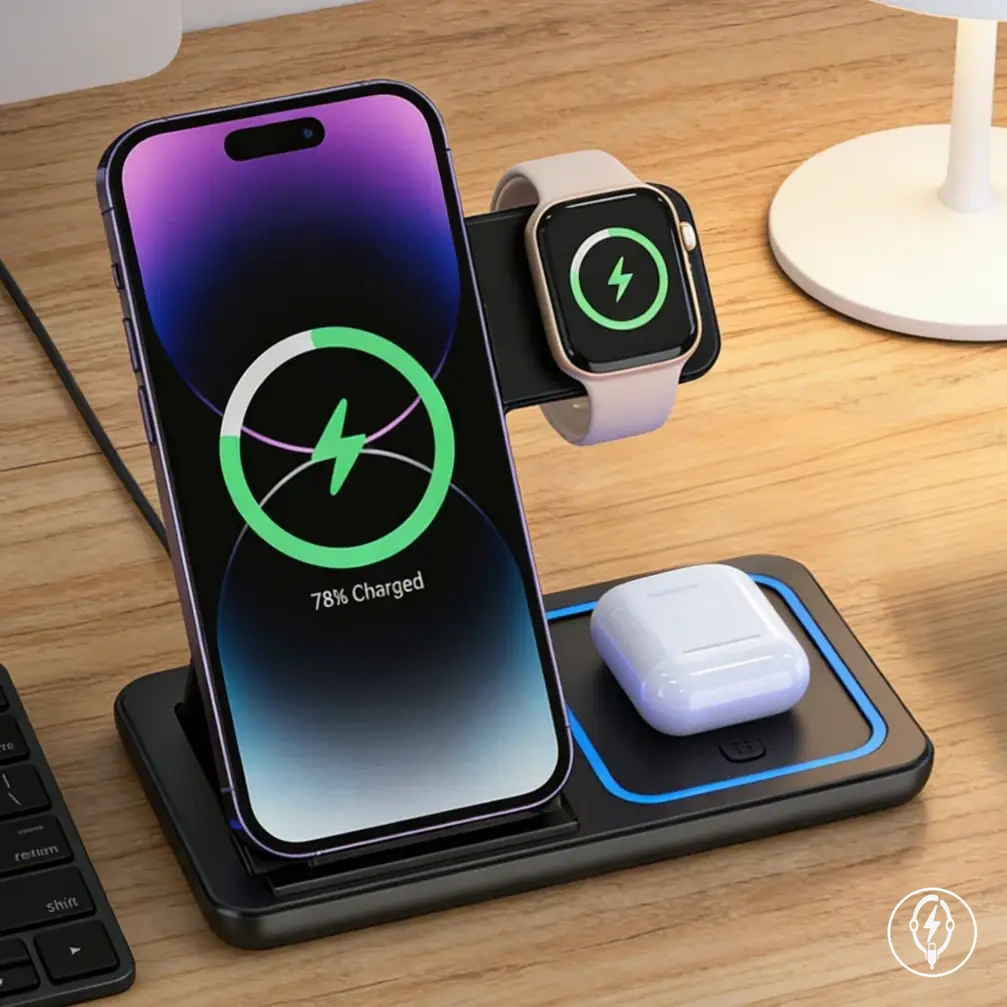
| Accessory type | Replacement criterion | Observed value | Recommended action |
|---|---|---|---|
| Charging cable | Insulation damage | Fraying or exposed wire is visible | Replace the cable immediately. |
| Charging cable | Persistent charging symptom | Repeated disconnecting continues after cleaning and retesting | Replace the cable if the symptom remains. |
| Power adapter | Unsafe condition | Cracked casing, persistent unusual heat, or burning smell | Stop using the adapter and replace it. |
| Power adapter | Charging failure | No charging after testing with a known-working cable and power outlet | Replace the adapter if the failure continues. |
| Wireless charger | Charging reliability | Charging still fails after alignment, cleaning, and positioning checks | Replace the wireless charger. |
| Wireless charger | Physical damage | Cracked charging surface or damaged housing | Replace the wireless charger. |
| Any charging accessory | Safety check failure | Unsafe condition remains after inspection | Stop using the accessory and replace it. |
Replacing One Accessory or the Full Charging Set
Replacement scope depends on which charging accessory has failed and whether the remaining charging set is still compatible and operating safely. According to Apple Support, charging accessories should be evaluated individually for physical damage, charging reliability, and abnormal operation before replacing additional components because a failure in one accessory does not automatically require replacing the full charging set. The decision should therefore be based on damage location, compatibility, accessory condition, and repeated symptoms after retesting. :contentReference[oaicite:0]{index=0}
The decision should therefore be based on damage location, compatibility, accessory condition, and repeated symptoms after retesting.
Replace only the cable when damage is limited to the cable, such as frayed insulation, exposed conductors, or repeated disconnecting that continues after cleaning the connector and retesting with a known-working adapter. For example, if a new cable restores stable charging while the existing adapter and wireless charger continue operating normally, replacing one accessory is sufficient and the remaining charging set can continue to be used. :contentReference[oaicite:1]{index=1}
The same decision applies when replacing a matching wireless charger if the charging pad alone has confirmed damage or persistent charging failure.
Replace only the adapter when the adapter has a cracked housing, persistent unusual heat, a burning smell, or fails to deliver reliable power while the cable continues to function correctly with another compatible adapter. The same decision applies when replacing a matching wireless charger if the charging pad alone has confirmed damage or persistent charging failure. Before selecting the replacement component, review choose replacement accessories to confirm compatibility with the remaining charging accessories. :contentReference[oaicite:2]{index=2}
Before selecting the replacement component, review choose replacement accessories to confirm compatibility with the remaining charging accessories.
Replace the full charging set only when more than one accessory has confirmed damage, repeated symptoms continue after replacing the suspected failed part, or compatibility between old and replacement accessories cannot be confirmed. This comparison focuses on replacement scope rather than product selection; if you need to evaluate replacement approaches after identifying the failed component, see compare replacement options. :contentReference[oaicite:3]{index=3}
A single confirmed failure usually supports replacing one accessory, whereas confirmed faults affecting multiple accessories support replacing the full charging set as the practical next step.
The final decision should prioritise the failed part, compatibility, repeated symptoms after retesting, and the verified condition of every charging accessory instead of automatically replacing the entire cable and adapter set. A single confirmed failure usually supports replacing one accessory, whereas confirmed faults affecting multiple accessories support replacing the full charging set as the practical next step. :contentReference[oaicite:4]{index=4}
Before buying, always review the compatibility criteria, essential features, and product details.
Here are product examples that may make comparison easier. Before buying, always review the compatibility criteria, essential features, and product details.
| Criteria | Replace one accessory | Replace the full set |
|---|---|---|
| Damage location | One cable, adapter, or wireless charger has confirmed damage. | Multiple charging accessories have confirmed damage. |
| Age mismatch | Older and newer accessories continue charging reliably together. | Multiple ageing accessories show reliability or safety problems. |
| Compatibility | The replacement accessory is compatible with the remaining charging set. | Compatibility between existing and replacement accessories cannot be verified. |
| Repeated symptoms | Charging problems stop after replacing the failed accessory. | Charging problems continue after replacing one confirmed failed part. |
| Practical use case | A single damaged cable, adapter, or charging pad requires replacement. | Multiple confirmed failures justify replacing the full charging set. |
Common Replacement Questions
These frequently asked questions clarify replacement decisions that remain after checking accessory condition, charging behaviour, cleaning results, and safety. They focus on common edge cases involving a damaged cable, an old charger, intermittent charging, and replacing one accessory versus a full charging set. :contentReference[oaicite:0]{index=0}
When should I replace a damaged cable that still charges?
Replace a damaged cable if it has frayed insulation, exposed wire, damaged connectors, or other visible physical damage, even if it still charges. A damaged cable that still charges is still considered a damaged charging accessory because electrical damage can worsen during continued use. If the cable only has superficial cosmetic wear without exposed conductors and charging remains stable, continue monitoring its condition and replace it if the damage progresses. :contentReference[oaicite:1]{index=1}
Should I replace an old charger if it still works?
No. An old charger that still works does not require replacement solely because of its age. Replace the old charger only if its condition becomes unsafe, such as a cracked housing, unusual heat, a burning smell, or unreliable charging, or if it is no longer compatible with your charging accessory. :contentReference[oaicite:2]{index=2}
Can intermittent charging after cleaning still mean replacement is necessary?
Yes. Intermittent charging that continues after cleaning and retesting with known-working accessories indicates that one charging accessory may still be faulty. Replace only the accessory that consistently reproduces the charging fault, or continue troubleshooting if the failed component has not yet been identified. :contentReference[oaicite:3]{index=3}
Does replacing one accessory mean I should replace the full charging set?
No. Replacing one accessory is appropriate when only one cable, adapter, or wireless charger has confirmed damage and the remaining charging set continues operating safely and remains compatible. Replace the full charging set only if multiple accessories are damaged or charging problems continue after replacing the suspected faulty part. :contentReference[oaicite:4]{index=4}
What if I am unsure whether a charging accessory is unsafe?
Treat a charging accessory as unsafe if it has exposed wire, a cracked casing, a burning smell, melting, or unusual heat during normal charging. If no visible safety issue is present but charging remains unreliable, retest the accessory with compatible equipment before deciding whether to replace it. :contentReference[oaicite:5]{index=5}
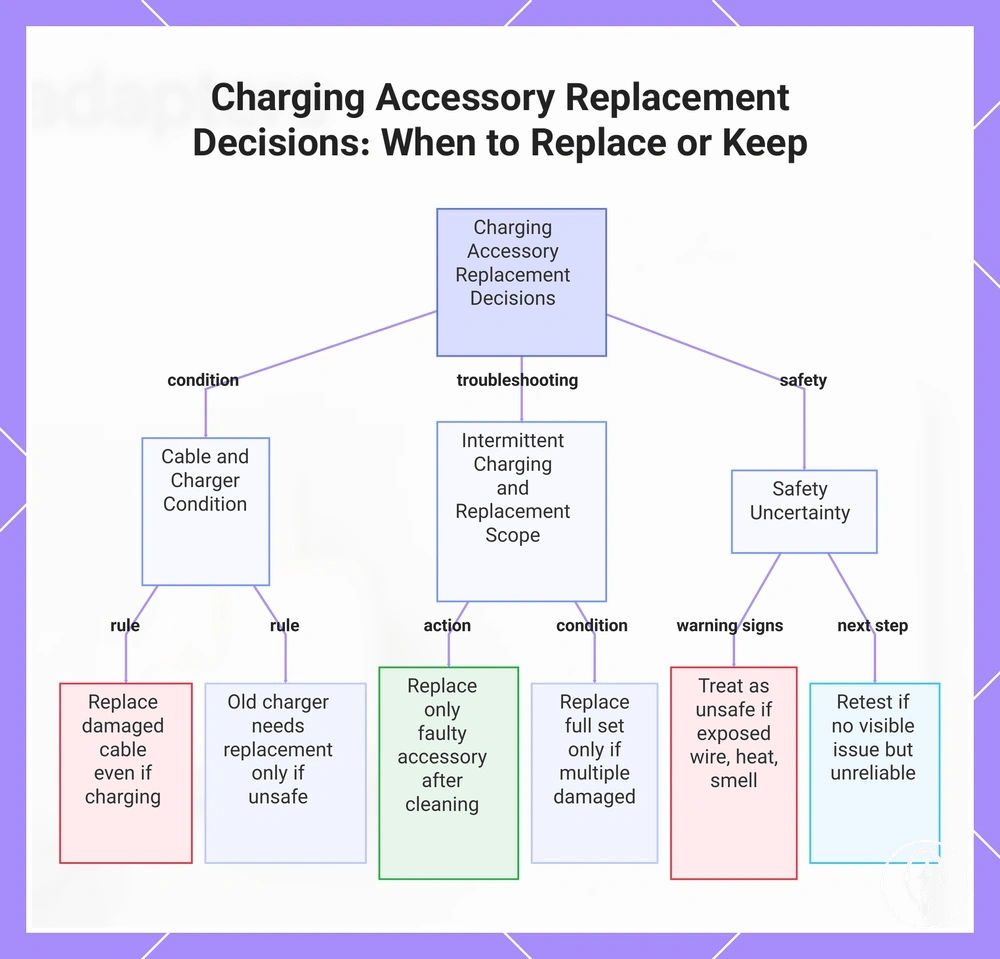
This chart summarizes the key replacement decisions for charging accessories based on condition, intermittent charging, and safety signs.
This chart summarizes the key replacement decisions for charging accessories based on condition, intermittent charging, and safety signs.