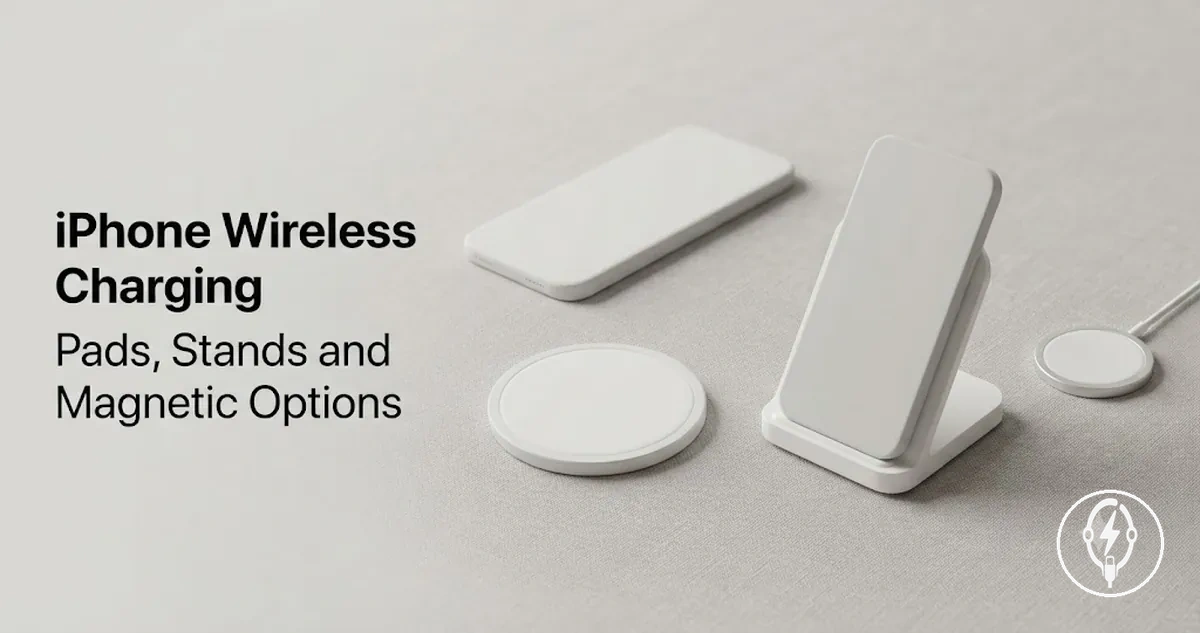
iPhone Wireless Charging Accessories for Everyday Charging Use
iPhone wireless charging accessories are devices that recharge a compatible iPhone without plugging a charging cable directly into the phone. They include a wireless charger such as a charging pad, charging stand, magnetic charger, or charging station that operates with a supported wireless charging standard, including Qi, Qi2, or Apple's MagSafe system where applicable. According to Apple, wireless charging requires a compatible wireless charger and correct placement on the charging surface, making convenience the primary benefit while charging speed, compatibility, alignment, and heat remain dependent on the charging setup.
For broader context on charging categories and accessories, see the iPhone charging accessories guide .
A charging pad is often suited to a bedside table, a charging stand keeps an iPhone visible on a desk, and a multi-device charging station can reduce cable clutter when charging an iPhone alongside other supported devices during everyday use. For broader context on charging categories and accessories, see the iPhone charging accessories guide. Apple also specifies that charging performance depends on factors including the iPhone model, charger technology, protective case, and proper alignment on the charging surface.
Apple also specifies that charging performance depends on factors including the iPhone model, charger technology, protective case, and proper alignment on the charging surface.
The most suitable iPhone wireless charging accessory is determined by four practical factors: compatibility with the iPhone model, charging standard (Qi, Qi2, or MagSafe), alignment during charging, and realistic charging speed expectations while controlling unnecessary heat. Magnetic alignment available with MagSafe-compatible and Qi2-certified chargers can improve positioning consistency, but it does not mean every compatible charger delivers identical charging performance. Wireless charging prioritises cable-free convenience, whereas maximum charging speed and thermal behaviour remain conditional on the charger, power adapter, case thickness, and the specific iPhone being charged.
According to Apple, a compatible iPhone begins charging automatically after it is correctly positioned on a supported wireless charger.
According to Apple, a compatible iPhone begins charging automatically after it is correctly positioned on a supported wireless charger. The following sections explain what qualifies as an iPhone wireless charging accessory before examining charger types, compatibility, and everyday selection considerations in greater detail.
Table of Contents
What iPhone Wireless Charging Accessories Include
iPhone wireless charging accessories are charging devices and related supports that power a compatible iPhone without a cable plugged into the phone. According to Apple, compatible iPhones support wireless charging through Qi-certified chargers, while MagSafe-compatible iPhone models also support magnetic charging and newer Qi2-compatible accessories. iPhone wireless charging accessories include charging pads, charging stands, magnetic chargers, multi-device stations, bedside chargers, foldable chargers, and related wireless charging supports.
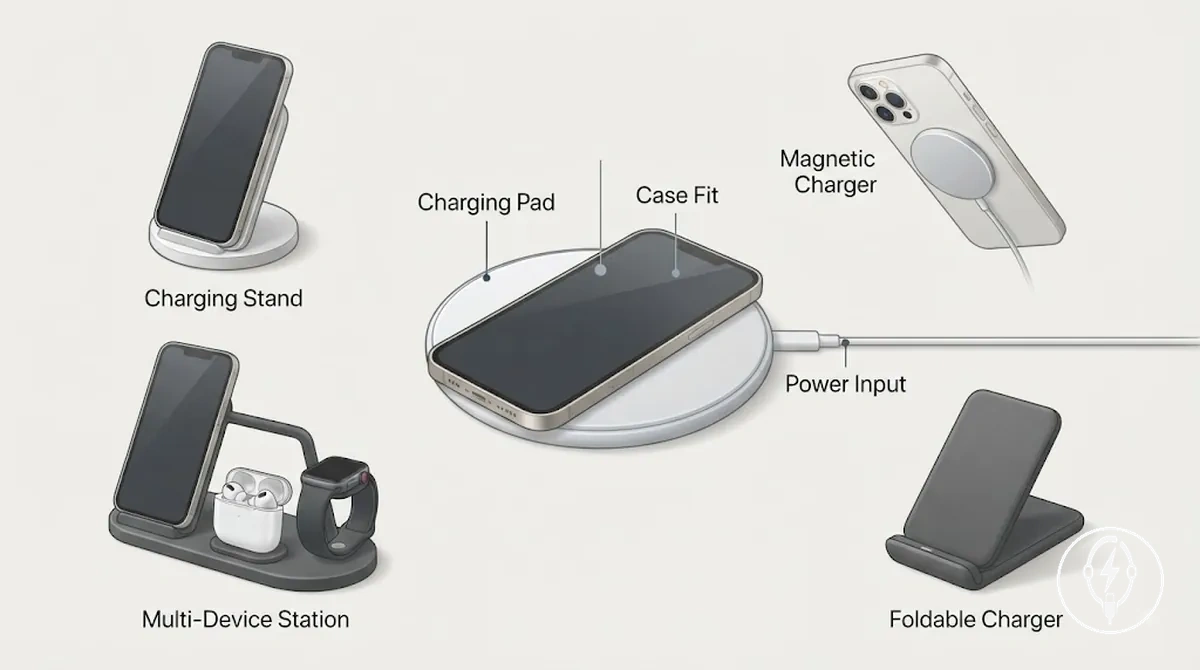
Wireless charging still requires a power source even though the iPhone-side connection remains wireless. According to Apple, the wireless charger receives power through a compatible power input before transferring energy wirelessly to the iPhone, while case fit and alignment on the charging surface can affect whether charging starts or continues correctly. iPhone wireless charging accessories include the wireless accessory types below, which are separated from adjacent charging accessories such as charging cables or wall adapters because the phone itself is not connected by a charging cable.
- Charging pad: A flat wireless charger that charges a compatible iPhone after it is placed on the charging surface.
- Charging stand: A wireless charger that supports an upright viewing angle while charging a compatible iPhone.
- Magnetic charger: A MagSafe or Qi2-compatible wireless charger that magnetically aligns supported iPhone models to help maintain charging position.
- Multi-device station: A wireless charging station designed to charge an iPhone together with other compatible devices, such as supported earbuds or a compatible smartwatch.
- Bedside charger or foldable charger: Wireless charging devices designed for bedside use or compact travel while providing the same cable-free connection to the iPhone.
- Power input and case fit: A compatible power input powers the wireless charger, while a case must allow sufficient wireless energy transfer and proper alignment for charging to function as intended.
Wireless Charger Types for iPhone
Wireless charger types for iPhone mainly differ by placement style, alignment method, and device count. According to Apple, compatible iPhones support wireless charging with Qi-certified chargers, while MagSafe-compatible iPhone models also support magnetic alignment with MagSafe accessories and Qi2-compatible chargers. The comparison below organises each charger type by placement style, suitable use case, alignment requirement, and practical limitation.
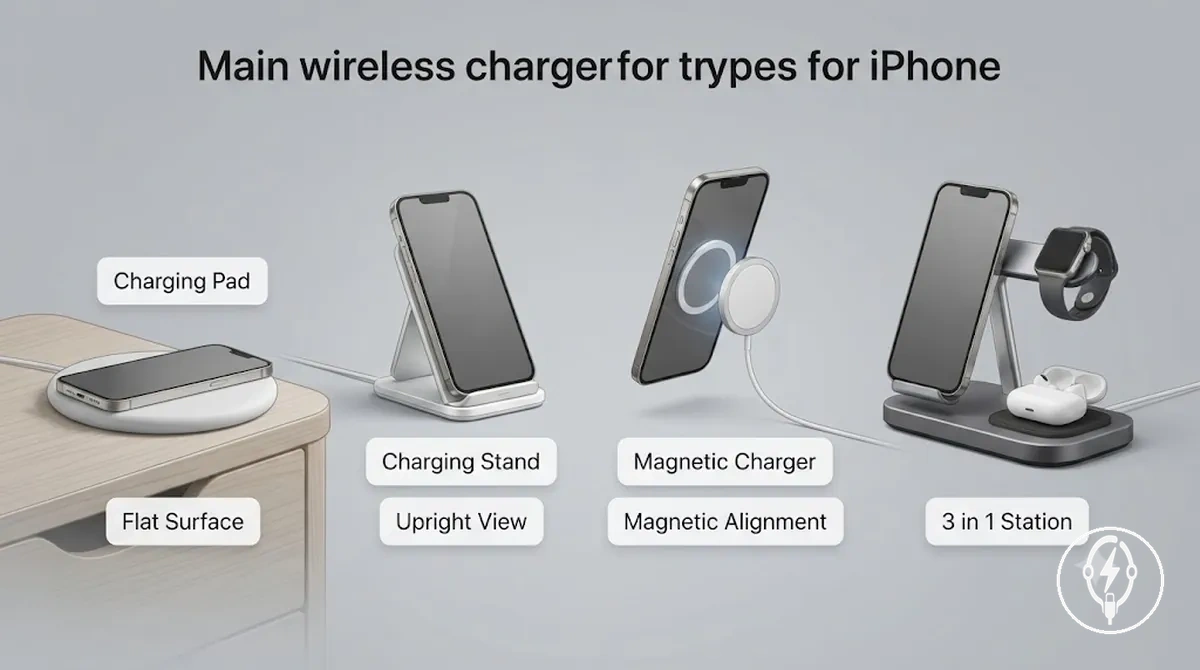
| Charger type | Placement style | Best use case | Alignment requirement | Practical limitation |
|---|---|---|---|---|
| iPhone charging pad | Flat surface, low-profile design | Bedside or everyday charging | Manual positioning on the charging surface | Screen is less convenient to view while charging |
| iPhone charging stand | Upright viewing position | Desk use, video calls, and notifications | Correct positioning on the charging area | Requires a stable surface for consistent placement |
| Magnetic charger | Magnetic charging puck | Frequent pick-up-and-place charging | Magnetic alignment on supported iPhone models or compatible magnetic cases | Magnetic attachment is unavailable on unsupported models or incompatible cases |
| 3 in 1 wireless charger | Multi-device charging station | Charging an iPhone together with compatible earbuds and a smartwatch | Each device must be positioned on its dedicated charging area | Requires more desk space and a more complex charging setup |
For example, a bedside setup usually benefits from an iPhone charging pad because the phone can simply be placed on a flat surface, while a desk setup is often easier to use with an iPhone charging stand that keeps the display visible for notifications and video calls. A magnetic charger can simplify alignment for supported iPhone models, whereas a 3 in 1 wireless charger is more suitable when three compatible devices are routinely charged in one location. According to Apple, charging speed and charging stability remain conditional on the iPhone model, the supported wireless charging standard, charger power, case compatibility, and correct alignment during charging.
Charging Pads
Charging pads are flat wireless chargers that recharge a compatible iPhone while it rests directly on the charging surface without a cable connected to the phone. According to Apple, compatible iPhones begin wireless charging when they are correctly positioned on a supported Qi, Qi2, or MagSafe-compatible charger, depending on the iPhone model and charger. Charging pads are intended for low-profile charging on a bedside table or desk where a flat placement is preferred.
Charging pads are intended for low-profile charging on a bedside table or desk where a flat placement is preferred.
Charging pads demonstrate flat placement and alignment because the iPhone must remain centred over the charging coil for charging to continue reliably. The image below shows how a flat wireless charger is positioned on a stable surface and why correct alignment is important during everyday charging.
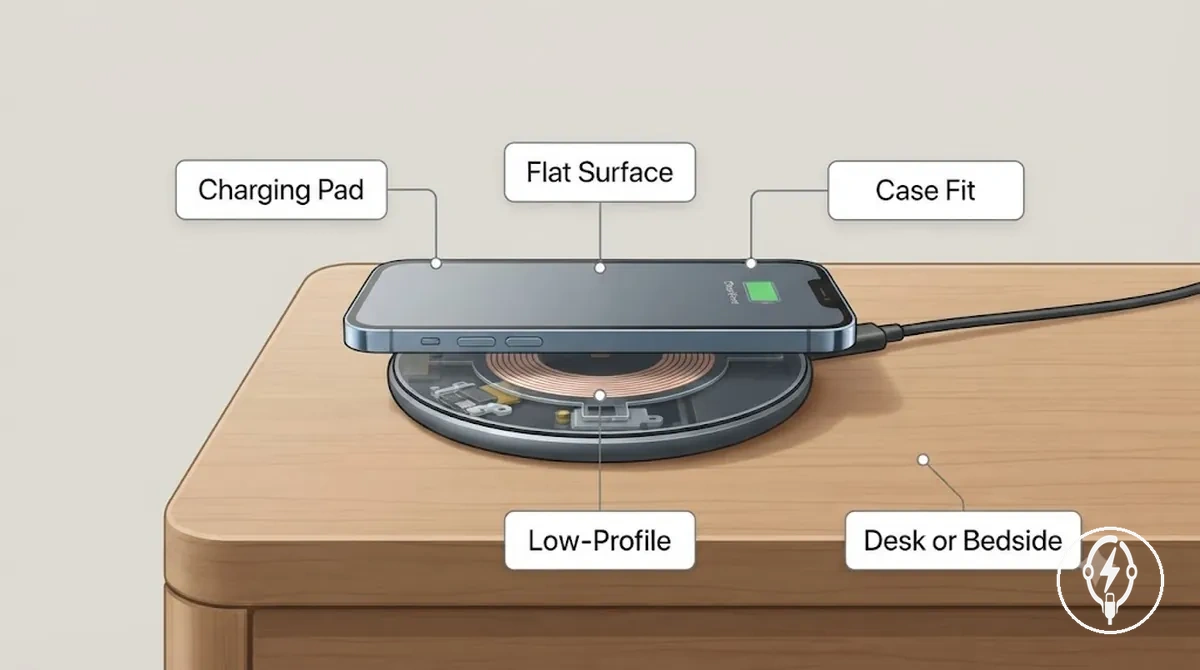
- Placement surface: Designed for stable, flat surfaces such as a bedside table or desk to support low-profile charging.
- Alignment tolerance: Charging starts only when the iPhone is positioned over the pad's charging area; off-centre placement can interrupt wireless charging.
- Phone visibility: The flat charging position makes the display less convenient to view than an upright charging stand during active use.
- Case thickness: According to Apple, compatible cases generally support wireless charging, while thick or incompatible cases or attached accessories can reduce alignment accuracy or prevent charging from starting.
Charging Stands
Charging stands are upright wireless chargers that hold a compatible iPhone in a raised position while charging without a cable connected to the phone. According to Apple, compatible iPhones begin wireless charging when correctly aligned on a supported Qi, Qi2, or MagSafe-compatible charger, depending on the iPhone model and charging stand. Their defining attribute is an upright viewing angle that keeps the screen visible for notifications, calls, or StandBy-compatible viewing while the device remains on the charger.
The image below illustrates upright placement, viewing angle, and the compact footprint of a wireless charging stand during everyday use.
Charging stands maintain screen visibility while supporting stable desk placement or bedside placement, provided the iPhone is positioned correctly on the charging surface. The image below illustrates upright placement, viewing angle, and the compact footprint of a wireless charging stand during everyday use.
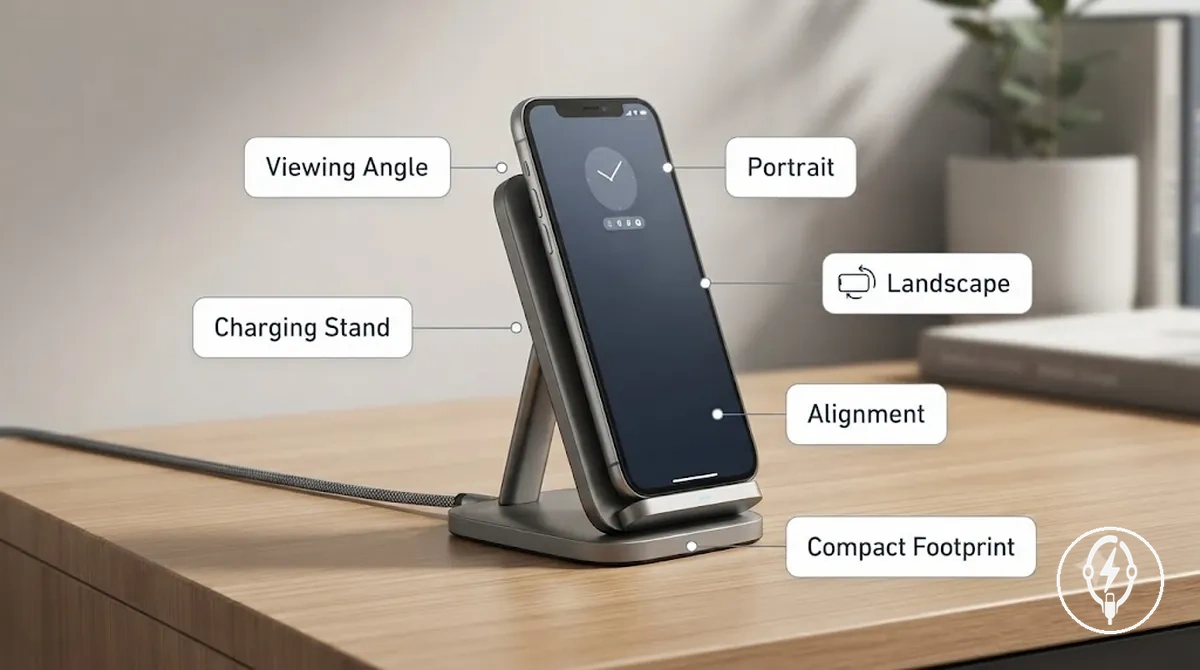
- Viewing angle: The upright position keeps notifications, video calls, and on-screen information easier to view than a flat charging pad during active phone use.
- Orientation: Depending on the charging stand design and iPhone compatibility, wireless charging may be supported in portrait orientation, landscape orientation, or both.
- Footprint: Charging stands use a compact upright footprint that lifts the iPhone above the desk or bedside surface while keeping the charger in a stable position.
- Alignment: Correct alignment with the charging area remains necessary for wireless charging, while magnetic alignment is available only on compatible MagSafe or Qi2 charging stands used with supported iPhone models or compatible magnetic cases.
Magnetic Chargers
Magnetic chargers are wireless chargers that use magnetic alignment to hold compatible iPhones in the correct charging position. According to Apple, MagSafe-compatible iPhones support magnetic alignment with MagSafe accessories, while the Wireless Power Consortium specifies that Qi2 incorporates the Magnetic Power Profile (MPP) for compatible devices. Magnetic attachment improves positioning accuracy, but it is separate from charging performance because charging speed depends on the supported charger standard, power adapter, and iPhone model.
Magnetic chargers fit correctly only when the phone model , charger standard , and case design all support magnetic alignment.
Magnetic chargers fit correctly only when the phone model, charger standard, and case design all support magnetic alignment. The image below shows how magnetic alignment and case fit affect charging position, while highlighting that magnetic attachment does not automatically mean identical MagSafe behaviour or charging speed across every charger.
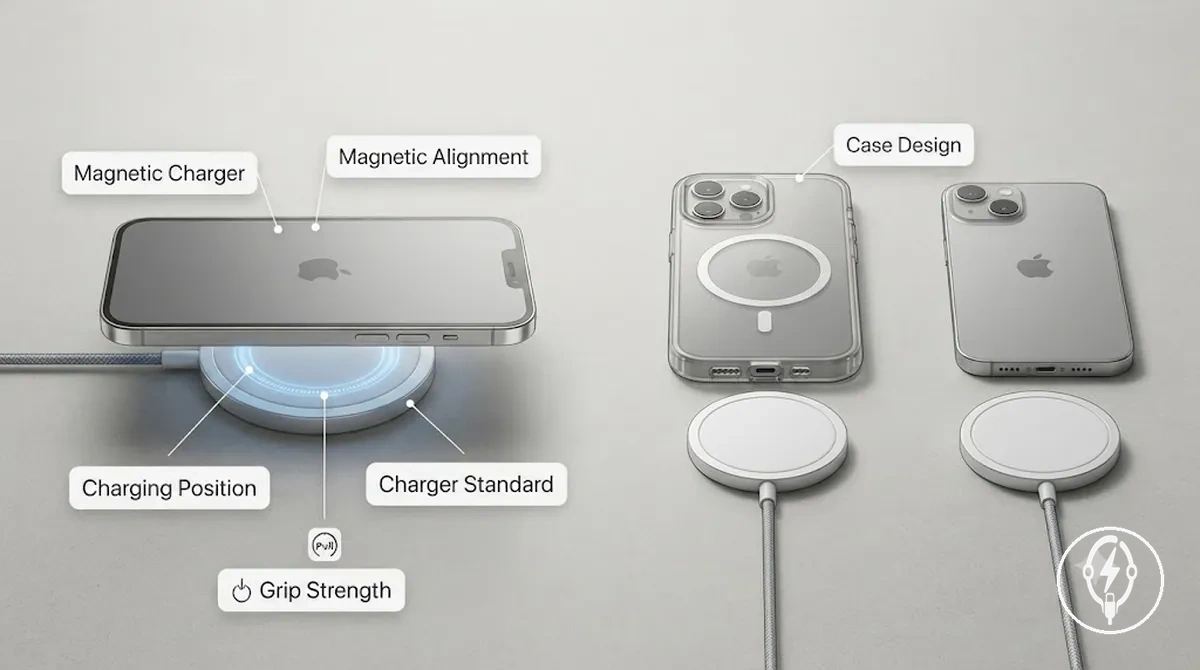
Use this checklist to confirm that magnetic alignment will work as intended before using a magnetic charger:
- Phone support: Verify that the iPhone model supports MagSafe or Qi2 magnetic alignment where applicable.
- Case design: Use a magnetic-compatible case or no case if the current case blocks magnetic attachment or prevents proper alignment.
- Charger standard: Check whether the charger supports MagSafe-compatible alignment or the Qi2 Magnetic Power Profile rather than assuming every magnetic charger provides the same charging behaviour.
- Grip strength: Magnetic holding force depends on the charger design, iPhone model, and case construction, affecting how securely the phone remains aligned during charging.
- Charging position: Ensure the magnetic ring centres the iPhone over the charging coil because correct alignment supports consistent wireless power transfer.
Chronograph Problems After a Battery Change
Chronograph problems after a battery change are most commonly linked to reset needs, an incorrect battery fit, disturbed contact seating, or caseback sealing issues that allow moisture to affect operation. According to watch manufacturers such as Seiko and Citizen, quartz chronograph movements often require the specified battery type and, on some calibres, a reset procedure after battery replacement to restore normal chronograph response. These post-change conditions produce different visible symptoms rather than confirming a component failure.
These post-change conditions produce different visible symptoms rather than confirming a component failure.
If the chronograph behaves differently immediately after a battery replacement, compare the symptom with the checks below before assuming the movement is damaged. If the correct battery type has been installed and the symptoms persist after appropriate non-invasive checks, manufacturer-authorised service is the safest next step because further diagnosis may require specialised equipment.
- Reset-related: If the movement requires a reset after the battery change, the chronograph hands may stop, fail to return to zero, or respond incorrectly when the pushers are pressed.
- Battery fit: If the replacement battery does not match the manufacturer-specified type or is not seated correctly, the watch may not start, may stop intermittently, or the chronograph response may become inconsistent.
- Contact seating: If a battery contact is disturbed during replacement, the watch may lose power intermittently, reset unexpectedly, or the chronograph functions may stop working while timekeeping is affected.
- Caseback sealing: If the gasket is damaged, misplaced, or contaminated during reassembly, moisture can enter the case over time, leading to condensation under the crystal or unreliable chronograph operation. Opening the case does not preserve the original water-resistance unless the seal is correctly inspected and tested.
- Replacement timing: If chronograph problems appear immediately after a battery change, the timing strongly suggests a post-change issue rather than normal battery ageing, making battery type, contact seating, reset needs, and caseback sealing the first conditions to verify.
MagSafe, Qi, and Qi2 Wireless Charging Differences
MagSafe, Qi, and Qi2 wireless charging differences primarily involve alignment method, wireless charging standard support, and condition-dependent charging behaviour rather than representing interchangeable technologies. According to Apple, MagSafe adds magnetic alignment for supported iPhone models, while the Wireless Power Consortium (WPC) defines Qi as the baseline wireless charging standard and Qi2 as the next-generation standard that incorporates the Magnetic Power Profile (MPP). The comparison below explains how these standards differ in alignment, compatibility, case sensitivity, and expected charging behaviour for iPhone users.
MagSafe, Qi, and Qi2 wireless charging differences become clearer when the charger, iPhone model, and case are evaluated together.
MagSafe, Qi, and Qi2 wireless charging differences become clearer when the charger, iPhone model, and case are evaluated together. Qi chargers require manual positioning on the charging surface, whereas MagSafe and Qi2 use magnetic alignment on supported hardware to improve positioning consistency. Apple specifies that magnetic alignment helps position compatible iPhones correctly, but charging compatibility still depends on the iPhone model, charger standard, power adapter, and compatible case rather than magnetic attachment alone.
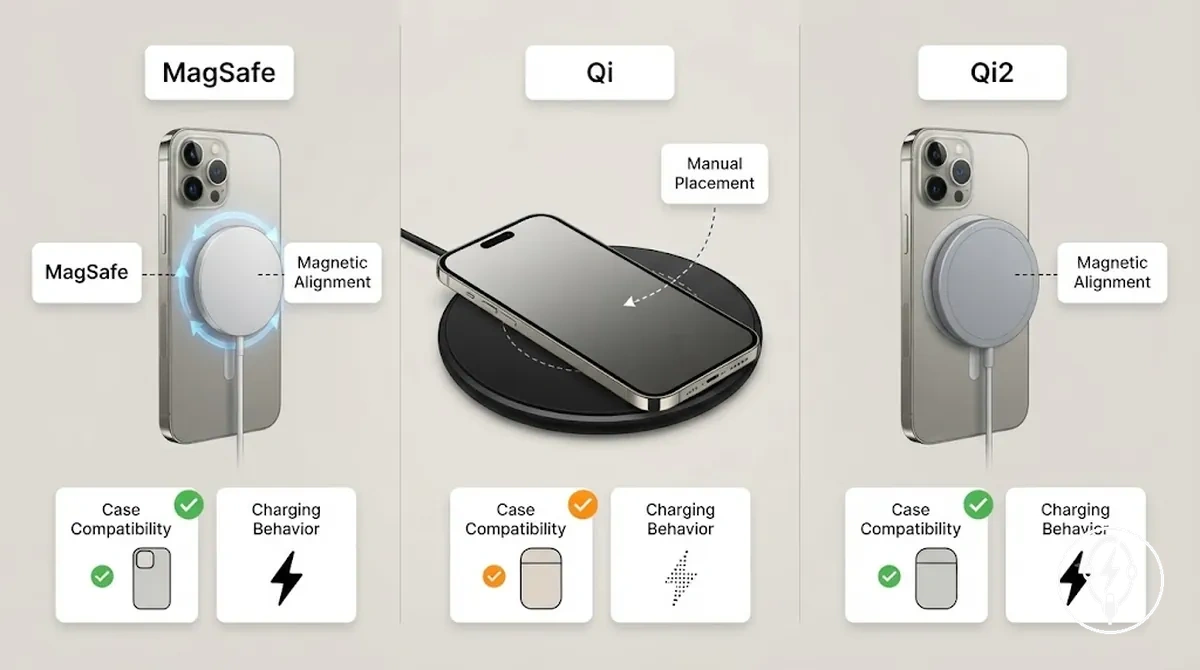
| Standard | Alignment method | iPhone support condition | Speed expectation | Case sensitivity | Practical takeaway |
|---|---|---|---|---|---|
| MagSafe | Integrated magnetic alignment | Supported on MagSafe-compatible iPhone models and compatible magnetic cases | Optimised when used with supported Apple hardware and a compatible power adapter | Magnetic-compatible cases preserve alignment; thick or incompatible cases can reduce magnetic attachment | Provides consistent positioning and easier placement for supported iPhones |
| Qi | Manual placement over the charging coil | Compatible with iPhones that support Qi wireless charging | Depends on charger capability, phone model, and placement accuracy | Very thick or incompatible cases can interfere with wireless charging | Offers broad wireless charging compatibility without magnetic positioning |
| Qi2 | Magnetic alignment using the Magnetic Power Profile (MPP) | Requires a Qi2-compatible charger and a supported iPhone or compatible magnetic case | Designed to improve alignment consistency while remaining dependent on compatible hardware and charging conditions | Magnetic-compatible cases help maintain intended alignment | Combines an open wireless charging standard with standardised magnetic positioning |
According to the Wireless Power Consortium, Qi2 standardises magnetic alignment through the Magnetic Power Profile, while Apple defines MagSafe as its own magnetic charging ecosystem for supported iPhone models. Magnetic alignment and charging compatibility are related but not identical because a charger can align magnetically while overall charging behaviour still depends on the wireless charging standard, iPhone model, compatible accessories, and charging conditions.
iPhone Wireless Charger Compatibility
iPhone wireless charger compatibility is determined by the iPhone model, charger standard, case thickness, magnet presence, adapter wattage, and alignment. According to Apple, iPhone 8 and later models support Qi wireless charging, while MagSafe magnetic alignment is available on iPhone 12 and later models, and Qi2 magnetic alignment is supported on compatible iPhone models and Qi2-certified chargers. Verifying these compatibility conditions before purchase or use helps ensure the charger and iPhone can operate together as intended.
Verifying these compatibility conditions before purchase or use helps ensure the charger and iPhone can operate together as intended.
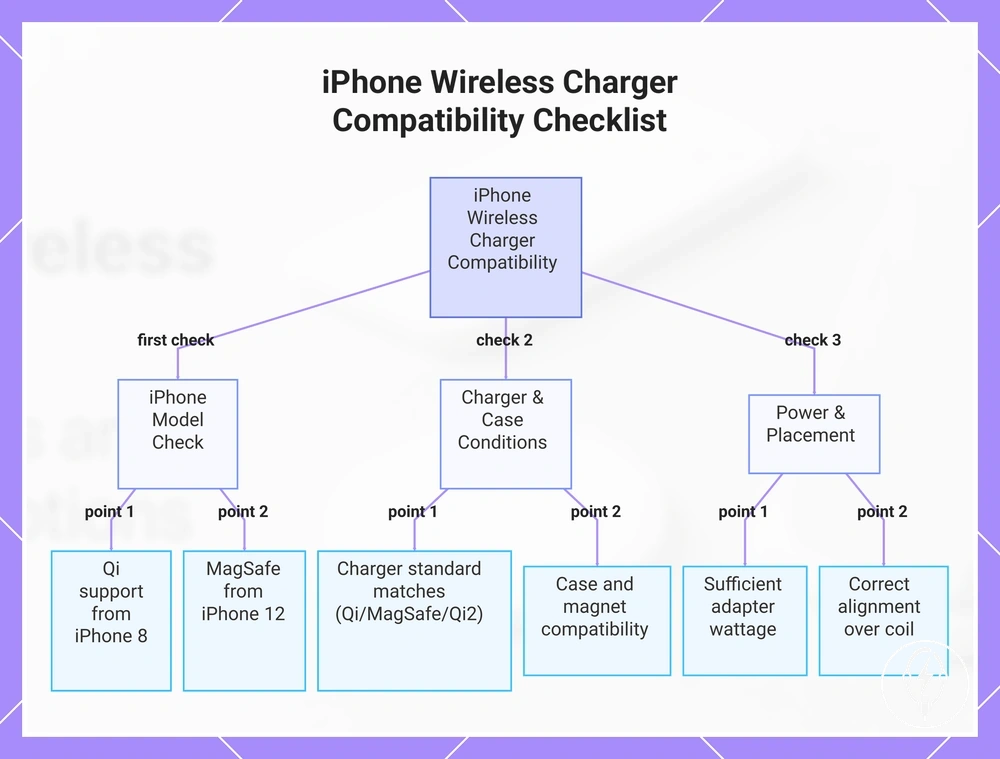
After confirming that the iPhone model supports wireless charging, evaluate the remaining compatibility conditions together rather than individually. For wireless charging compatibility, the charger standard must match the iPhone's supported wireless charging technology, the case must allow efficient wireless power transfer, the charger must receive sufficient power from a compatible USB power adapter, and the phone must remain correctly aligned on the charging surface. According to Apple and the Wireless Power Consortium, magnetic alignment on MagSafe and Qi2 chargers improves positioning accuracy, whereas standard Qi chargers rely on manual placement over the charging coil.
Older iPhone models without built-in wireless charging hardware cannot gain Qi, MagSafe, or Qi2 charging simply by changing the charger.
Older iPhone models without built-in wireless charging hardware cannot gain Qi, MagSafe, or Qi2 charging simply by changing the charger. Likewise, a magnetic phone case or magnetic accessory can attach to a charger without enabling magnetic wireless charging if either the iPhone or the charger does not support the required charging standard.
Use the checklist below to verify compatibility before purchasing or using an iPhone wireless charger.
Use the checklist below to verify compatibility before purchasing or using an iPhone wireless charger.
- iPhone model: Confirm that the iPhone supports wireless charging; Apple specifies Qi support begins with iPhone 8, while MagSafe magnetic alignment begins with iPhone 12.
- Charger standard: Match the charger with the supported wireless charging standard, including Qi, MagSafe, or Qi2 where applicable.
- Case thickness: Use a case designed for wireless charging because thick or incompatible materials can reduce charging efficiency or prevent charging.
- Magnet presence: If magnetic alignment is required, verify that both the iPhone or compatible case and the charger support MagSafe or Qi2 magnetic positioning.
- Adapter wattage: Use the USB power adapter recommended by the charger manufacturer because insufficient input power can limit charger behaviour and available charging performance.
- Alignment: Position the iPhone directly over the charging area or magnetic ring so wireless energy transfer can begin and remain stable.
- Certification: Prefer chargers that comply with the appropriate Qi or Qi2 standard published by the Wireless Power Consortium to help ensure standards-based interoperability.
This chart shows the key compatibility conditions to verify before using an iPhone wireless charger.
iPhone Models That Support Wireless Charging
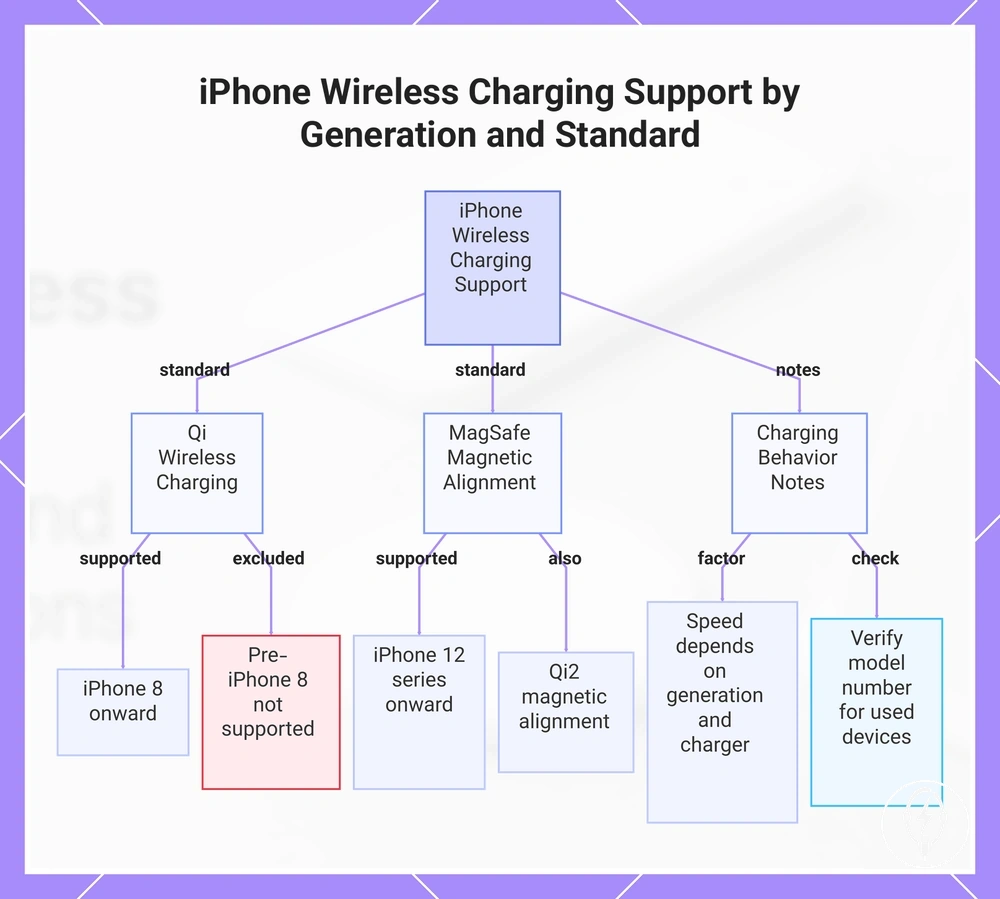
iPhone models support wireless charging according to their iPhone generation and the charger standard they are designed to use. According to Apple, all iPhone models from iPhone 8 onward support Qi wireless charging, while MagSafe support with magnetic alignment begins with the iPhone 12 series. Wireless charging support and magnetic alignment support are separate capabilities, so an iPhone can support Qi charging without supporting MagSafe magnetic alignment.
Expected charging speed depends on both the iPhone generation and the charger standard .
Expected charging speed depends on both the iPhone generation and the charger standard. Apple specifies that MagSafe-compatible iPhone models use magnetic alignment with MagSafe chargers, while Qi-certified chargers require manual positioning and Qi2-compatible chargers use standardized magnetic alignment on supported devices. As a result, supported iPhone models do not deliver identical charging behaviour even when they all support wireless charging.
The following model-generation groups provide a practical compatibility overview without becoming a full device catalogue.
The following model-generation groups provide a practical compatibility overview without becoming a full device catalogue.
- iPhone 8, iPhone 8 Plus, and iPhone X to iPhone 11 series: Support Qi wireless charging but do not include native MagSafe magnetic alignment.
- iPhone 12 series through current models: Support Qi wireless charging and built-in MagSafe magnetic alignment. Apple also states these models are compatible with Qi2-certified chargers that implement magnetic alignment.
- iPhone models released before iPhone 8: Do not include integrated Qi wireless charging hardware and therefore cannot charge wirelessly without third-party accessories.
- Used or refurbished iPhone models: Verify the exact model number rather than the purchase date because wireless charging support is determined by the original hardware generation, not whether the device is new or second-hand.
This chart shows which iPhone models support Qi wireless charging, MagSafe magnetic alignment, and key considerations for charging behavior.
Cases, Magnets, and Alignment Requirements
Case thickness, magnets, and alignment requirements affect whether wireless charging starts, stays stable, or performs as expected because wireless power transfer depends on correct physical fit between the iPhone and the charger surface. According to Apple, compatible iPhones should be centred on the charger, and metal objects or other foreign materials between the iPhone and the charger can interfere with wireless charging. If charging becomes unstable after fitting a case, the checklist below helps identify common physical fit and alignment conditions before assuming the charger is incompatible.
Case fit and magnetic alignment work together with the charging standard rather than independently.
Case fit and magnetic alignment work together with the charging standard rather than independently. MagSafe and Qi2-compatible chargers use a magnet ring to help centre supported devices, while Qi chargers rely on accurate phone placement over the charging coil. Apple also notes that thick cases, metal parts, or misaligned accessories can interfere with charging, whereas a raised camera bump or an uneven charger surface may prevent consistent contact, reducing charging stability without indicating a charger fault.
- Case thickness: Check whether the case is designed for wireless charging because additional material between the charging coils can reduce charging reliability.
- Metal parts: Remove magnetic plates, wallets, rings, or other metal parts positioned between the iPhone and the charger, as Apple states these objects can interfere with wireless charging.
- Magnet ring: On MagSafe or Qi2 chargers, confirm that the magnet ring aligns with the iPhone so the phone remains centred throughout charging.
- Camera bump: Verify that the camera bump does not prevent the phone from resting evenly on the charger surface, as uneven contact can affect alignment.
- Charger surface and phone placement: Place the charger on a flat, stable surface and centre the iPhone over the charging area. For example, if charging begins without the case but stops after the case is installed, inspect the case for excess thickness, misplaced magnets, or metal components before replacing the charger.
Choosing a Wireless iPhone Charger by Use Case
Choosing a wireless iPhone charger should be based on your use case and the charger attributes that support it rather than on a product category alone. According to Apple, wireless charging requires a compatible iPhone, correct alignment, and an appropriate power source, while the Wireless Power Consortium specifies that Qi2 adds standardized magnetic alignment for supported devices. The checklist below matches common charging situations with the charger format most suited to that daily charging context.
The checklist below matches common charging situations with the charger format most suited to that daily charging context.
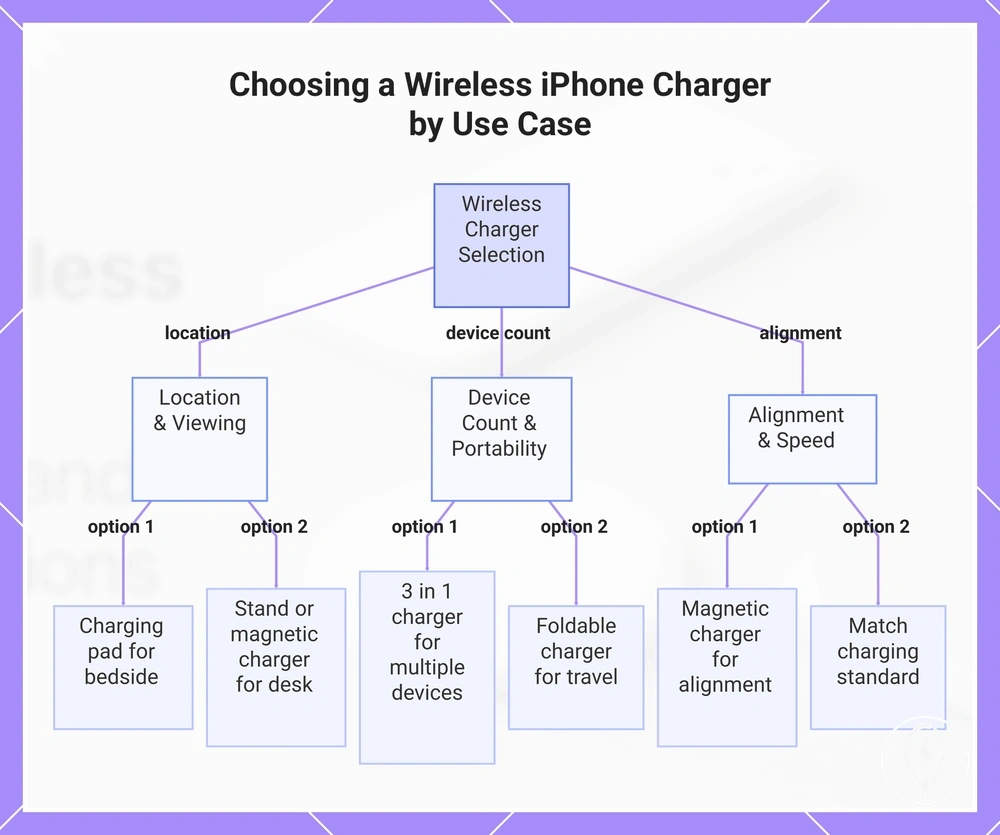
If your primary location is a desk, a charging stand or magnetic charger is generally more suitable because the screen remains visible while charging. A charging pad better suits a bedside table where the phone normally stays flat, while a foldable charger improves portability during travel. If your device count includes an iPhone, compatible earbuds, and a smartwatch, a 3 in 1 charger reduces cable clutter by providing dedicated charging positions for each device. If your priority is maintaining charging stability despite frequent repositioning or a compatible magnetic case, use alignment tolerance as the deciding criterion and consider a magnetic charger before a standard Qi charging pad.
Select the charger format below according to your charging conditions rather than brand or appearance.
Select the charger format below according to your charging conditions rather than brand or appearance.
- Location: Choose a charging pad for a bedside table where flat placement is preferred, or a charging stand for a desk where continuous screen visibility is more useful.
- Viewing need: Select a charging stand or magnetic charger if you regularly read notifications, join video calls, or use StandBy-compatible viewing while charging.
- Portability: If you travel frequently, a compact or foldable charger is generally easier to carry than a fixed desktop charging station while still supporting compatible wireless charging.
- Device count: Choose a 3 in 1 charger when you routinely charge one compatible iPhone, one compatible smartwatch, and one pair of compatible wireless earbuds from a single charging location; otherwise, a single-device charger keeps the setup simpler.
- Alignment tolerance and case fit: If accurate manual placement is inconvenient or you already use a compatible magnetic case, a magnetic charger provides magnetic alignment, whereas a standard Qi charger relies on manually centring the iPhone over the charging coil.
- Speed expectations: Match the charger with your iPhone's supported charging standard and use the power adapter specified by the charger manufacturer, because charging behaviour depends on charger compatibility, available input power, and correct alignment rather than charger format alone.
This chart shows the key factors for selecting a wireless iPhone charger based on your charging situation, including location, device count, and alignment needs.
Bedside and Desk Charging
Bedside charging and desk charging require different wireless charger attributes because the iPhone is used differently in each location. During bedside charging, a compact footprint, unobtrusive light indicators, organised cable routing, and reliable one-handed placement are generally more suitable for passive overnight use, whereas desk charging prioritises visibility, stand angle, and charging stability so the screen remains practical for active workday use. This distinction reflects local charging behaviour rather than a different wireless charging standard. :contentReference[oaicite:0]{index=0}
This distinction reflects local charging behaviour rather than a different wireless charging standard.
Passive bedside charging typically benefits from a charger that stays in a fixed position with minimal visual distraction, while active desk charging benefits from an upright viewing angle that keeps notifications visible and makes repeated one-handed placement easier throughout the day. These practical attributes influence everyday convenience without changing wireless charging compatibility. :contentReference[oaicite:1]{index=1}
- Bedside charging: Prioritise a small footprint, discreet light indicators where available, and tidy cable routing because the charger usually remains in one location overnight.
- Desk charging: Prioritise stand angle and visibility if you regularly check notifications, answer calls, or use StandBy-compatible viewing while the iPhone is charging.
- Stability: Place the charger on a flat, stable surface so the iPhone is easier to position consistently during repeated one-handed placement.
- Cable routing: Route the charger cable away from the placement area to reduce accidental movement and help maintain consistent charger positioning on a desk or bedside table.
Travel and Foldable Charging
Travel charging is most practical when a foldable charger balances portability, reliable wireless alignment, and sufficient power input instead of focusing only on compact size. A foldable charger reduces storage space during travel, but it still requires a stable charging surface, appropriate adapter needs, and correct iPhone alignment for consistent wireless charging. For travel charging, portability and stable placement are the primary selection criteria. :contentReference[oaicite:0]{index=0}
For travel charging, portability and stable placement are the primary selection criteria.
Hotel bedside placement and temporary workspaces often provide limited space and power outlets, making cable management and durable design more important than on a permanent desk. A foldable charger remains effective only when connected to a suitable USB power source recommended by its manufacturer, so compactness does not replace adequate power input or correct charger positioning. :contentReference[oaicite:1]{index=1}
Hotel bedside placement and temporary workspaces often provide limited space and power outlets, making cable management and durable design more important than on a permanent desk.
Before using a foldable charger while travelling, check the following conditions:
- Foldability: Choose a foldable charger when reducing packed size is important, provided the unfolded charger remains stable during wireless charging.
- Weight: A lightweight portable wireless charger is easier to carry during frequent travel if its lower weight does not allow the charger to slide during phone placement.
- Power input and adapter needs: Use the USB power adapter specified by the charger manufacturer because a foldable charger still requires adequate input power to operate correctly.
- Cable length and cable management: Select a cable long enough to reach the available outlet without pulling the charger away from its charging position on a hotel bedside table.
- Stable placement: Place the charger on a flat bedside table or desk so the iPhone remains correctly aligned throughout charging.
- Device count: If you normally travel with only an iPhone, a single-device foldable charger keeps the setup compact, while multi-device practicality is beneficial only when you also carry compatible wirelessly charging accessories.
Single-device and Multi-device Charging
A single-device charger is the right choice when your device count is limited to iPhone-only charging and simplicity, a small footprint, and easier travel are the priorities. Multi-device charging is better suited to a consolidated setup for an iPhone together with a compatible wearable, earbuds, or both, although it requires more space, greater total power needs, and higher setup complexity. Compare the options by device count, available space, charging priority, travel need, and cable reduction before deciding. :contentReference[oaicite:0]{index=0}
Compare the options by device count, available space, charging priority, travel need, and cable reduction before deciding.
On a desk or nightstand, a single-device charger keeps the charging area compact when only an iPhone needs charging, while multi-device charging reduces the number of separate chargers for compatible accessories. During travel, a single-device charger is typically easier to pack, whereas a multi-device setup is more practical only when you regularly carry and charge multiple compatible devices together. :contentReference[oaicite:1]{index=1}
For broader planning beyond this local decision, see the guide to multiple-device charging setup .
For broader planning beyond this local decision, see the guide to multiple-device charging setup.
| Choice | Better when | Trade-off | Check before choosing |
|---|---|---|---|
| Single-device charger | Your device count is limited to iPhone-only charging, you want a small footprint, or travel portability has the highest charging priority. | Compatible earbuds or a wearable require additional charging equipment, reducing cable consolidation. | Confirm the charger supports your iPhone's wireless charging standard and suits the intended desk, nightstand, or travel location. |
| Multi-device charger | You regularly charge an iPhone together with compatible earbuds, a wearable, or both from one desk or nightstand and want greater cable reduction. | Requires more physical space, higher total power needs supplied by the recommended power adapter, and greater setup complexity than a single-device charger. | Verify compatibility for every device and confirm the manufacturer-recommended power adapter can support the combined charging load. |
Wireless Charging Speed for iPhone
Wireless charging speed for an iPhone is condition-dependent and is shaped by the charger standard, adapter power, iPhone model, alignment, temperature, and current battery state rather than by the wireless charger alone. According to Apple, iPhone charging software dynamically manages charging performance to protect battery health, while the Wireless Power Consortium specifies that the available charging capability depends on the supported wireless charging standard. The table below summarises the primary factors that influence the charging outcome. :contentReference[oaicite:0]{index=0}
The table below summarises the primary factors that influence the charging outcome.
A compatible charger standard establishes the wireless charging capability available to the iPhone, while the recommended adapter power ensures the charger can operate as designed. Correct alignment improves energy transfer, whereas elevated temperature or a battery approaching full charge can cause iPhone charging software to reduce the charging rate to protect battery longevity, according to Apple. For example, an iPhone placed correctly on the same compatible charger immediately after charging begins can produce a different charging outcome than the same iPhone at a high battery state or elevated operating temperature because battery management adjusts charging behaviour under those conditions. :contentReference[oaicite:1]{index=1}
For a broader comparison of charging methods, see wired versus wireless charging .
For many everyday desk or bedside charging routines, convenience and consistent placement can matter more than achieving the highest possible wireless charging rate because the device often remains on the charger for extended periods. For a broader comparison of charging methods, see wired versus wireless charging. :contentReference[oaicite:2]{index=2}
| Factor | Condition to check | Likely effect | Decision cue |
|---|---|---|---|
| Charger standard | Confirm the charger supports the wireless charging standard compatible with the iPhone. | Determines the wireless charging capability available to the device. | Match the charger standard to the supported iPhone technology. |
| Adapter power | Use the power adapter recommended by the charger manufacturer. | Insufficient power input can limit the charging outcome. | Verify the charger and its power source together. |
| Model support | Check that the iPhone model supports the selected wireless charging standard. | Supported models can use the charging capability provided by the compatible charger. | Confirm compatibility before comparing charging behaviour. |
| Alignment | Place the iPhone centrally on the charging surface or magnetic alignment area. | Improves charging stability and reduces interruptions caused by poor coil alignment. | Reposition the phone if charging starts intermittently. |
| Temperature | Avoid charging while the iPhone is excessively warm. | Battery management can temporarily reduce the charging rate to protect the battery. | Allow the device to cool before reassessing charging behaviour. |
| Battery state | Charging progresses from a low battery level toward full capacity. | The charging rate typically decreases as the battery approaches full charge. | Slower charging near full capacity is normal battery-management behaviour. |
Wireless Charging Heat and Safe Everyday Use
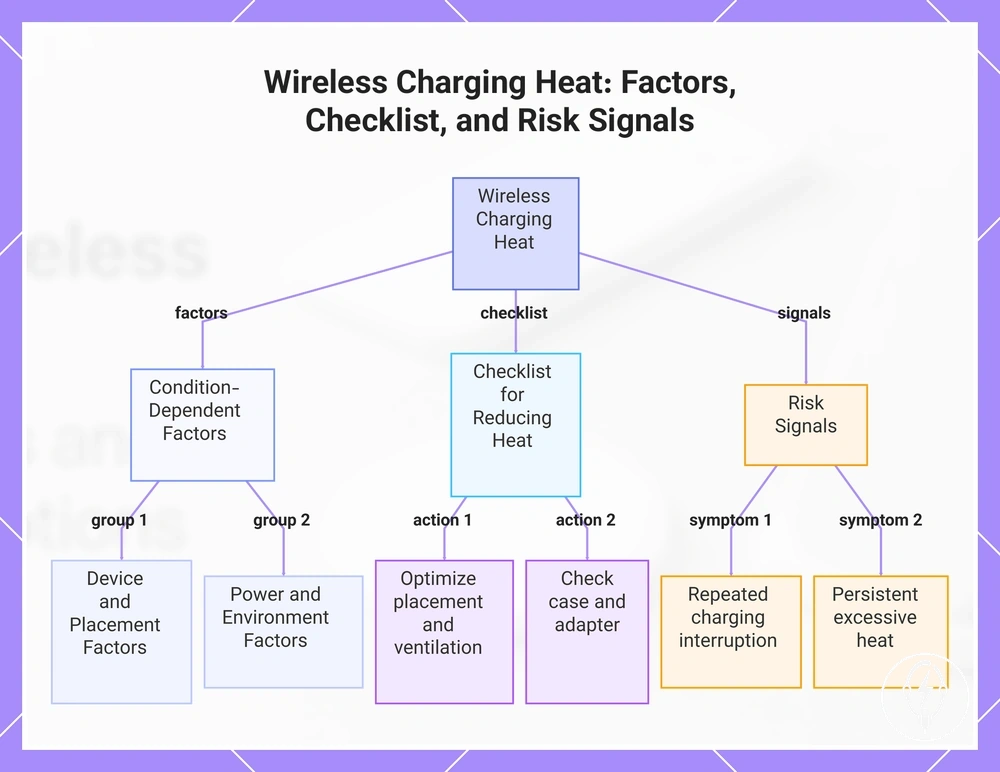
Wireless charging heat is a normal but condition-dependent part of safe everyday use because wireless power transfer naturally produces some warmth during operation. According to Apple, an iPhone may become warm while charging and can temporarily limit or pause charging if its internal temperature becomes too high to protect the device. Wireless charging heat should therefore be interpreted in the context of alignment, case material, charger surface, ventilation, adapter quality, and the charging environment rather than by charger type alone. :contentReference[oaicite:0]{index=0}
Correct alignment keeps the charging coils positioned efficiently, reducing unnecessary energy loss that can contribute to additional warmth.
Correct alignment keeps the charging coils positioned efficiently, reducing unnecessary energy loss that can contribute to additional warmth. A thick or poorly fitting case material, an insulated or uneven charger surface, and restricted ventilation can all reduce heat dissipation during charging. Using the power adapter recommended by the charger manufacturer also helps the charger operate under its intended electrical conditions instead of relying on an unsuitable power source. :contentReference[oaicite:1]{index=1}
Normal warmth should be distinguished from risk signals by observing charging behaviour rather than temperature alone.
Normal warmth should be distinguished from risk signals by observing charging behaviour rather than temperature alone. If charging interruption occurs repeatedly after confirming correct placement and adequate ventilation, or if excessive heat persists after repositioning the phone and removing an unsuitable case, the charger, adapter, case, or iPhone may require further evaluation. :contentReference[oaicite:2]{index=2}
Use the checklist below to reduce unnecessary wireless charging heat during safe everyday use.
Use the checklist below to reduce unnecessary wireless charging heat during safe everyday use.
- Alignment: Centre the iPhone on the charging pad or magnetic ring before charging begins.
- Case material: Remove unusually thick cases or accessories containing metal if they interfere with wireless charging.
- Charger surface: Place the charger on a firm, flat surface instead of bedding, cushions, or other insulating materials.
- Ventilation: Leave open space around the charger so heat can dissipate naturally during charging.
- Adapter quality: Use the power adapter recommended by the charger manufacturer.
- Overnight use and charging interruption: If charging repeatedly stops overnight or the device remains unusually hot after improving placement and ventilation, inspect the charging setup before continuing.
Persistent excessive heat should be evaluated as part of broader wireless charging safety rather than being attributed only to the wireless charger. When choosing a charger for safe everyday use, prioritise reliable alignment, appropriate case compatibility, stable placement, and adequate ventilation instead of focusing only on charging convenience. For broader guidance on long-term device care, see wireless charging and battery health, because battery longevity depends on multiple operating conditions rather than charger heat alone. :contentReference[oaicite:3]{index=3}
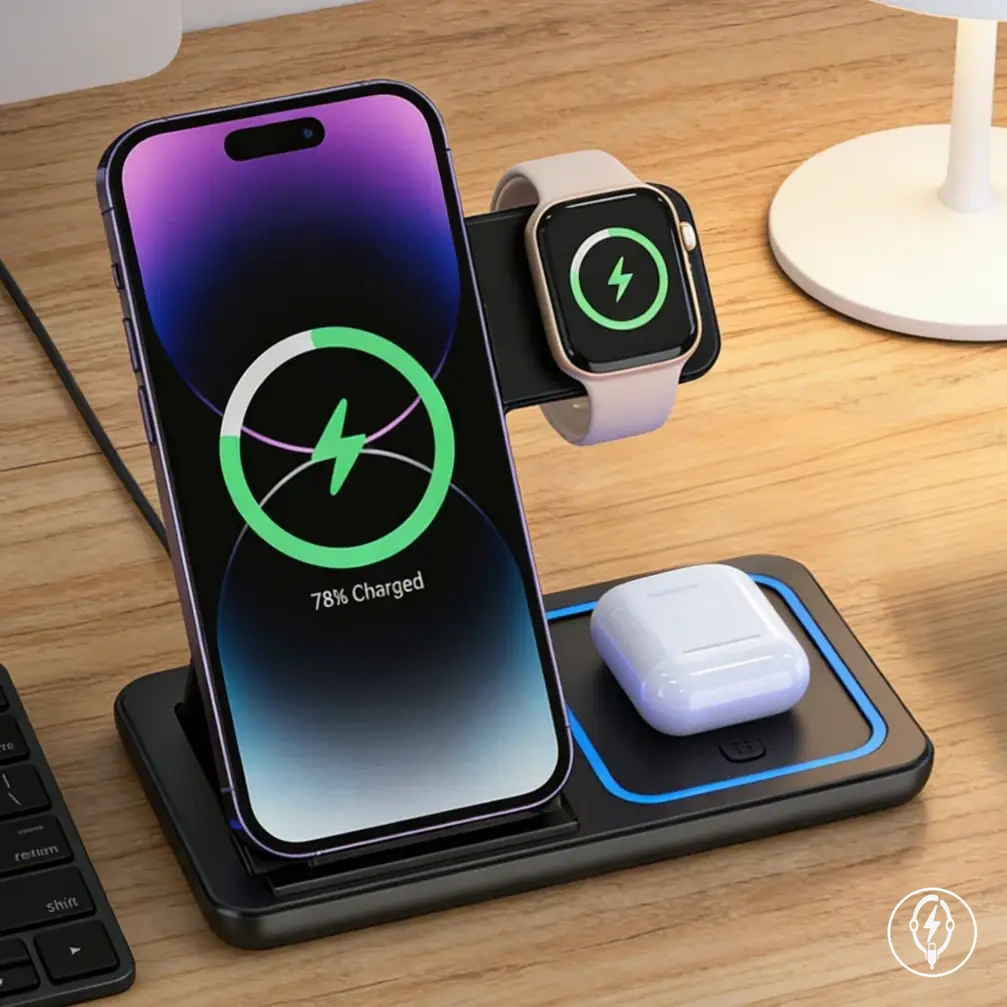
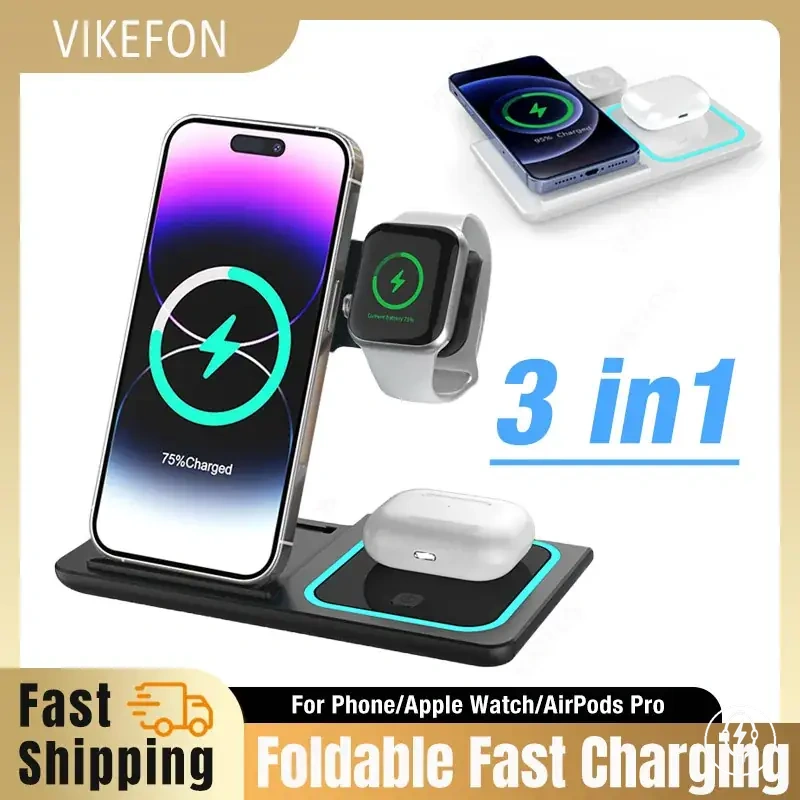
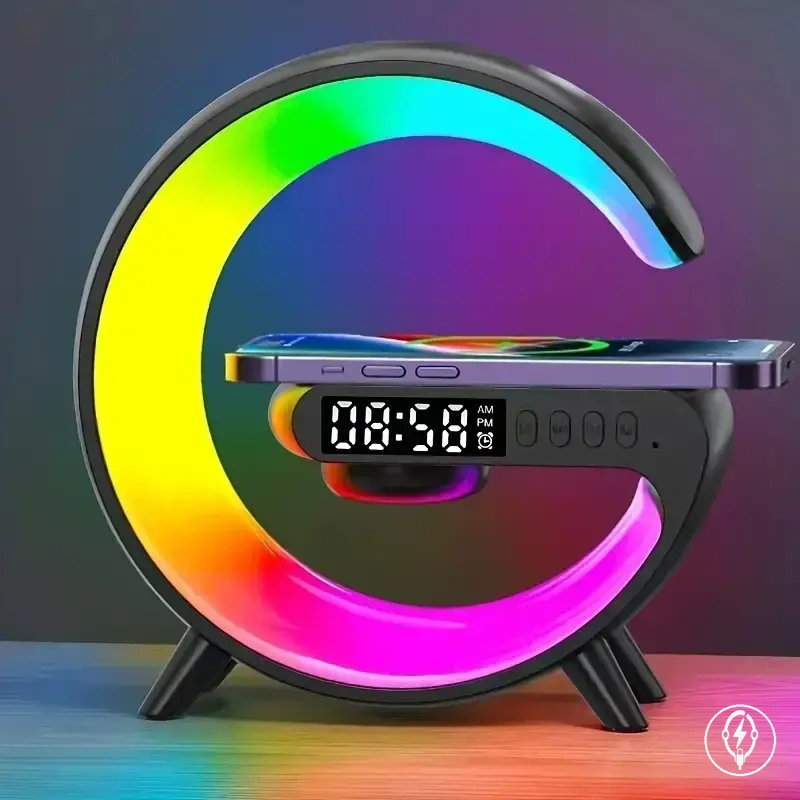
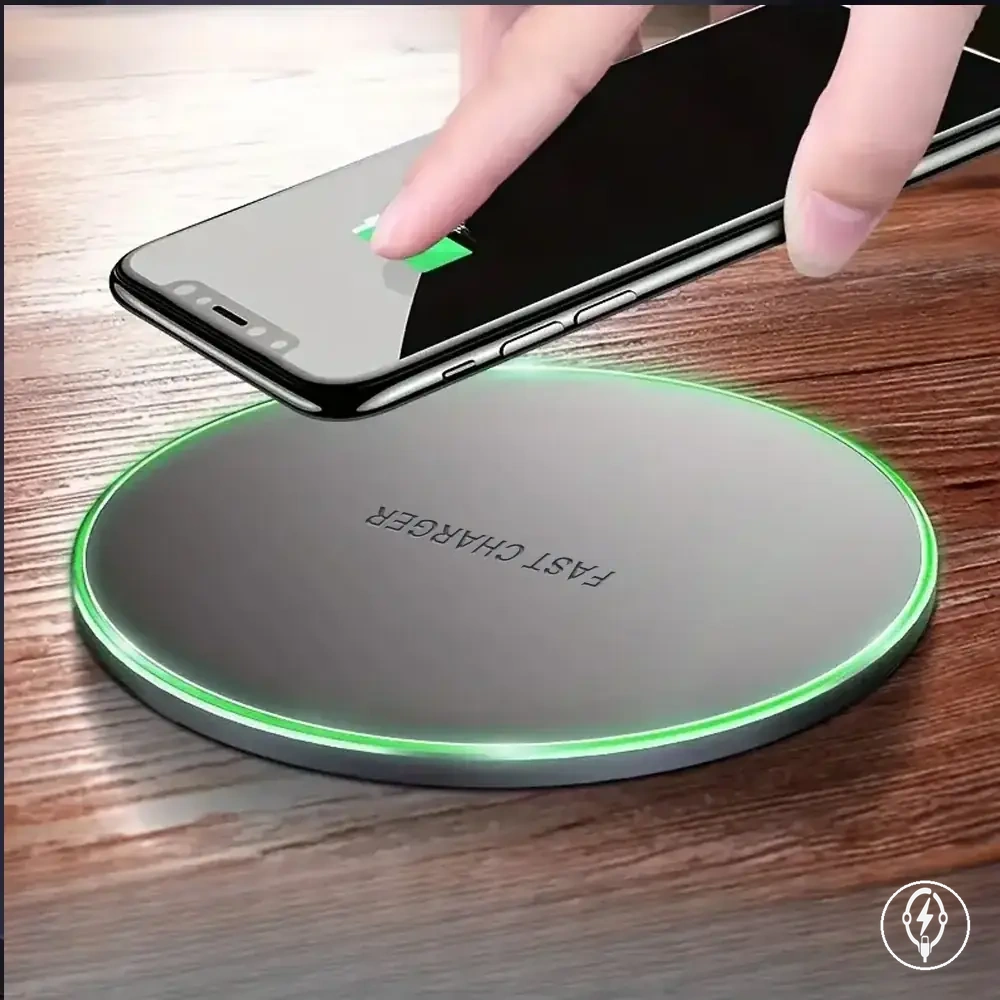
Here are product examples that may make comparison easier.
Here are product examples that may make comparison easier. Before buying, always review the compatibility criteria, essential features, and product details.
This chart shows the factors that influence wireless charging heat, a checklist to reduce unnecessary heat, and the risk signals that indicate when further evaluation is needed.
When Wireless Charging Is the Right iPhone Accessory Choice
Wireless charging is the right iPhone accessory choice when convenience and consistent placement are more important than achieving the maximum available charging speed. According to Apple, wireless charging requires a compatible iPhone, a compatible Qi, MagSafe, or Qi2 charger where applicable, correct alignment, and a suitable power adapter. The final wireless charging choice should therefore be based on convenience, compatibility, speed, heat, and setup context rather than on charger type alone. :contentReference[oaicite:0]{index=0}
The final wireless charging choice should therefore be based on convenience, compatibility, speed, heat, and setup context rather than on charger type alone.
Compatibility is the first decision criterion because the iPhone model, charger standard, case fit, and power adapter must all support the intended charging setup. Apple specifies that incorrect alignment, incompatible cases containing metal, or excessive device temperature can interrupt or reduce charging to protect the battery and internal hardware. The resulting trade-off is that wireless charging offers greater convenience while remaining more dependent on charger condition and placement than wired charging. :contentReference[oaicite:1]{index=1}
Bedside charging suits users who value simple overnight placement without reconnecting a cable each evening.
Bedside charging suits users who value simple overnight placement without reconnecting a cable each evening. A desk setup is appropriate when the iPhone is repeatedly picked up and returned throughout the workday, while travel users often benefit from compact or foldable chargers that occupy less luggage space. A multi-device charging station becomes a practical choice only when compatible accessories such as wireless earbuds or a smartwatch are charged together on a regular basis. :contentReference[oaicite:2]{index=2}
The correct decision outcome follows an EAV relationship between user need , charger condition , and expected charging behaviour.
The correct decision outcome follows an EAV relationship between user need, charger condition, and expected charging behaviour. If everyday convenience, organised cable management, and repeatable placement are the primary user needs, wireless charging is the recommended direction provided compatibility, alignment, and safe operating conditions are maintained. If the highest charging speed remains the primary requirement, a wired charging setup is the more appropriate direction because convenience is exchanged for faster energy delivery. :contentReference[oaicite:3]{index=3}
The checklist below summarises the final selection decision after balancing convenience, compatibility, speed, heat, and setup context.
The checklist below summarises the final selection decision after balancing convenience, compatibility, speed, heat, and setup context. Use these criteria to determine whether wireless charging fits your daily routine instead of treating one charging method as universally preferable. :contentReference[oaicite:4]{index=4}
Before buying, always review the compatibility criteria, essential features, and product details.
Here are product examples that may make comparison easier. Before buying, always review the compatibility criteria, essential features, and product details.
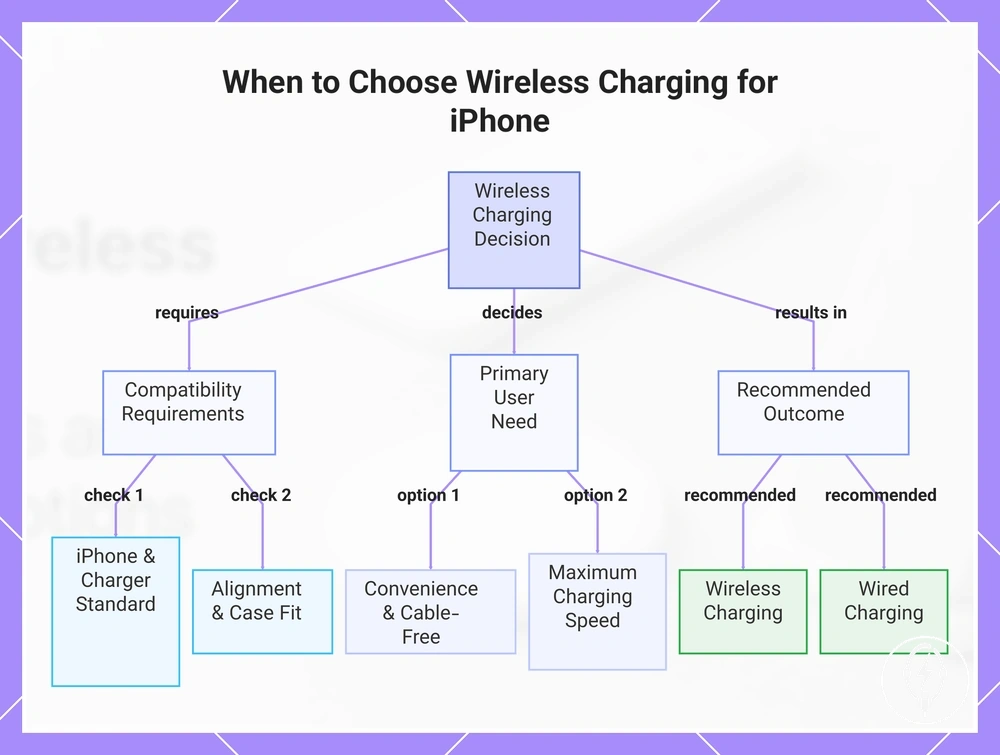
- User need: Everyday convenience and cable-free placement → Charger condition: Compatible iPhone, charger, and correct alignment → Trade-off: Slower charging than the fastest compatible wired charging → Recommended direction: Wireless charging.
- User need: Maximum charging speed → Charger condition: Speed is the highest priority → Trade-off: Reduced placement convenience → Recommended direction: Wired charging.
- User need: Bedside or desk charging → Charger condition: Stable charging location with reliable alignment → Trade-off: Requires correct phone positioning → Recommended direction: Wireless charging.
- User need: Frequent travel → Charger condition: Limited packing space → Trade-off: Portability becomes more important than additional charging features → Recommended direction: Compact or foldable wireless charger.
- User need: Charging multiple compatible devices → Charger condition: iPhone and compatible accessories charged together → Trade-off: Larger charging footprint → Recommended direction: Multi-device wireless charger.
- User need: Safe long-term everyday use → Charger condition: Compatible case, correct alignment, adequate ventilation, and manufacturer-recommended power adapter → Trade-off: Charging behaviour remains condition-dependent → Recommended direction: Wireless charging when these conditions are consistently met.
This chart shows the key factors and outcomes for deciding between wireless and wired iPhone charging based on compatibility, user need, and trade-offs.