iPhone Charging Setup by Use Case
An iPhone charging setup is the combination of a power source, charger, cable or wireless charger, charging surface, and device count selected for a specific place or activity. Its primary purpose is to provide a charging arrangement that matches your iPhone model, accessory compatibility, available power, protective case, and carrying conditions rather than relying on a single charging accessory. According to Apple Support, charging compatibility and available charging features depend on the iPhone model, connected accessories, and supported charging technologies, so the correct setup must always be matched to those conditions.
The most suitable setup is determined by where and how the iPhone is used.
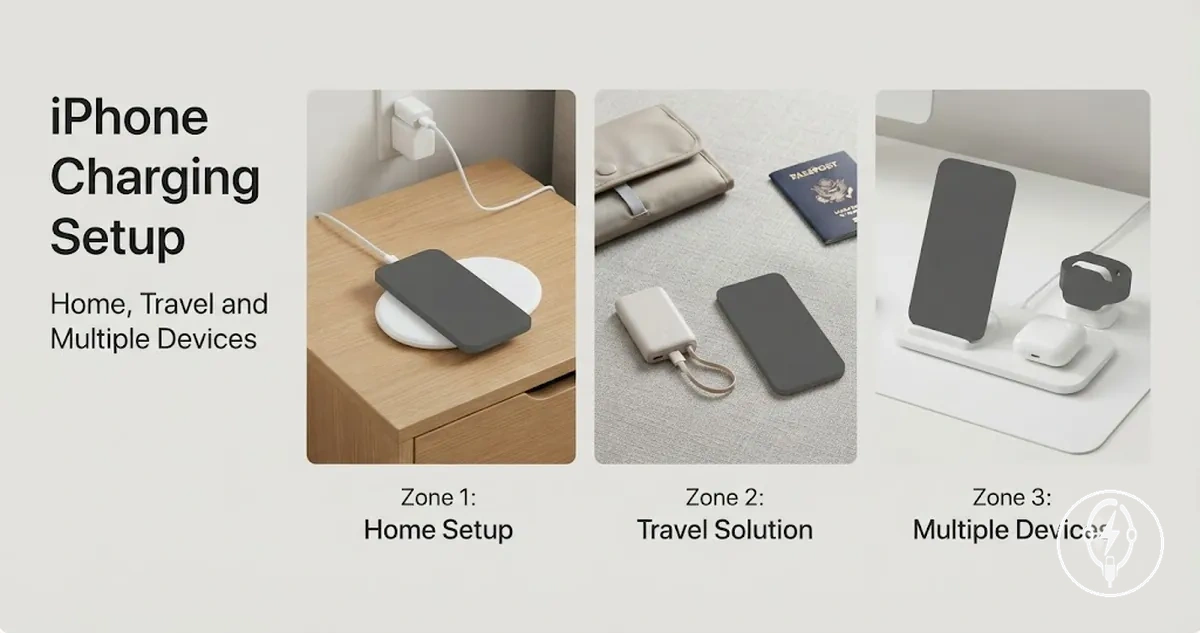
The most suitable setup is determined by where and how the iPhone is used. A home or office charging setup typically prioritises continuous access to mains power and a stable charging surface, while a travel setup usually prioritises portability by combining a compact wall charger or power bank with an appropriate cable. If more than one device needs charging, such as an iPhone, Apple Watch, and AirPods, device count becomes an explicit selection criterion because the charger must provide enough charging interfaces or compatible wireless charging positions for the intended accessories. Apple Support specifies that MagSafe charging requires a compatible iPhone model and compatible accessories, while Qi wireless charging is available on supported iPhone models but charging performance depends on accessory compatibility and operating conditions.
For example, a traveller carrying one iPhone and one pair of AirPods requires a two-device charging setup, whereas a family charging two iPhones and an Apple Watch requires a three-device setup with sufficient charging outputs or compatible wireless charging locations. According to Apple Support, USB-C-equipped iPhone models can also support USB Power Delivery fast charging when paired with a compatible USB-C power adapter and USB-C cable, making the available power source and accessory compatibility part of the setup decision rather than fixed characteristics of every charging arrangement.
Table of Contents
What an iPhone Charging Setup Needs to Include
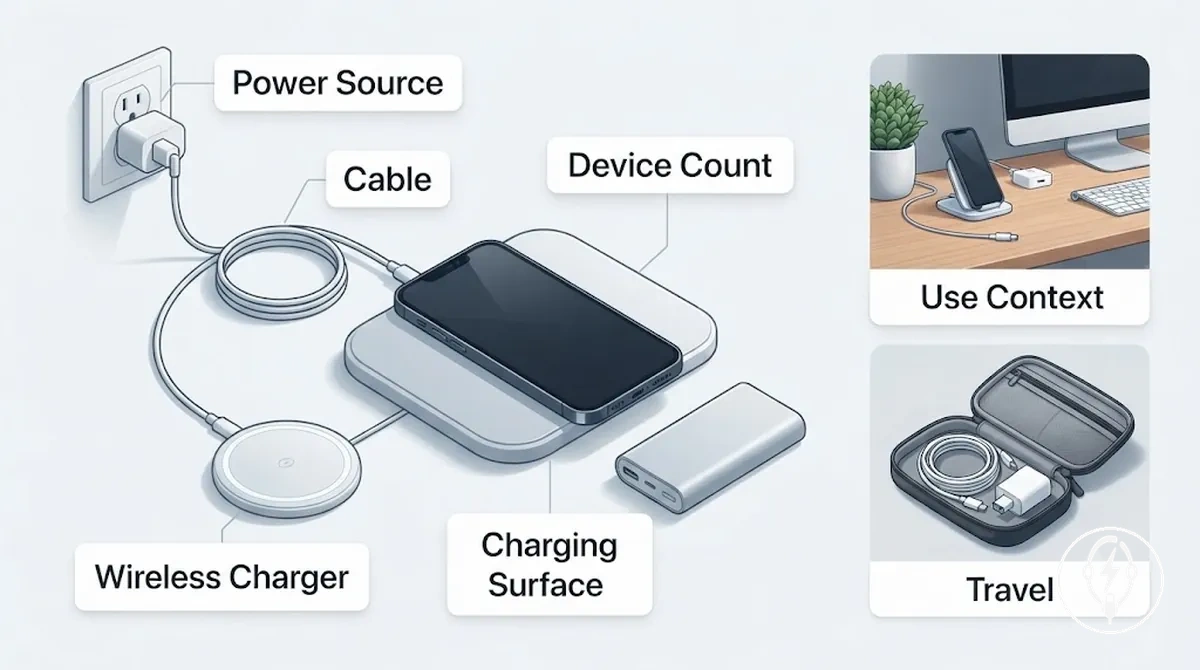
An iPhone charging setup includes five core components: a power source, a charging accessory, a connection method, a placement surface, and a device-use context. These components work together to determine charging compatibility, reliability, convenience, and portability. According to Apple Support, the available charging method depends on the iPhone model and the compatible charging technology, so every setup should be planned around the specific iPhone, charging accessories, and intended environment.
These components work together to determine charging compatibility, reliability, convenience, and portability.
An iPhone charging setup is organised by selecting components that match where and how the device is used rather than by choosing an accessory in isolation. For example, a home or office setup normally combines a mains power source, a compatible wall charger or wireless charger, a suitable cable when required, and a stable charging surface, while a travel setup often combines a compact USB charger or power bank with a cable for portable charging. Apple Support specifies that MagSafe charging requires a compatible iPhone model and compatible MagSafe accessories, while Qi wireless charging is supported on compatible iPhone models using Qi-certified chargers.
An iPhone charging accessories collection supplies the individual parts, whereas an iPhone charging setup defines how those parts are combined for a particular use case. For example, a traveller carrying one iPhone and one pair of AirPods needs a two-device setup with at least two charging connections or compatible charging positions, while a household charging two iPhones and one Apple Watch requires a three-device charging arrangement. Device count therefore becomes a practical planning attribute before comparing individual accessory categories.
Device count therefore becomes a practical planning attribute before comparing individual accessory categories.
The table below summarises the components that organise an iPhone charging setup before moving into detailed accessory selection.
| Setup component | Required attribute | Practical effect |
|---|---|---|
| Power source | Wall outlet, vehicle outlet, USB power output, or power bank appropriate for the location | Determines where charging can occur and whether the setup is stationary or portable |
| Charging accessory | Compatible wall charger, wireless charger, charging stand, or power bank | Provides the hardware that delivers electrical power to the iPhone |
| Connection method | USB cable or compatible Qi or MagSafe wireless interface | Determines how electrical power reaches the iPhone |
| Placement surface | Flat, stable, and accessible charging location | Improves charging reliability and everyday usability |
| Device count | Single-device or multi-device charging requirement | Determines whether one or multiple charging outputs or charging positions are needed |
Home Charging Setups for Desks and Bedside Spaces
A home charging setup should be organised according to where the iPhone is used while charging because placement changes cable reach, stand angle, screen visibility, and daily access. A desk charger is intended for active daytime use where the screen remains visible, while a bedside charging station on a nightstand is designed for overnight charging with minimal interaction. According to Apple Support, wireless chargers should be placed on a flat, stable surface and aligned correctly with a compatible iPhone to charge as intended.
According to Apple Support, wireless chargers should be placed on a flat, stable surface and aligned correctly with a compatible iPhone to charge as intended.
The image below shows how home charging setups for desks and bedside spaces differ by placement, cable position, and charging access, making it easier to compare the same charging accessories in different home environments.
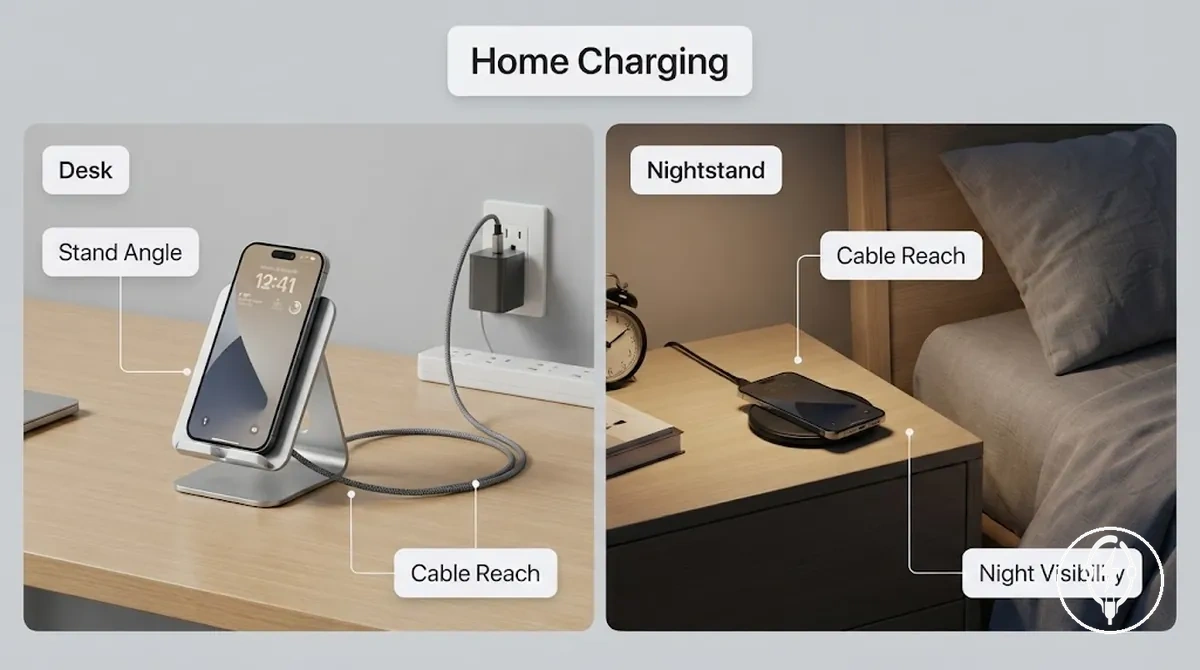
A desk charger normally uses a charging stand with a viewing angle that allows the screen to remain visible during work, while cable reach should be long enough to connect comfortably between the power outlet and the desk without placing strain on the connector. A bedside charging station usually prioritises a compact footprint, reduced cable visibility, and convenient access from the bed rather than continuous screen viewing. Apple Support specifies that MagSafe charging requires a compatible iPhone model and compatible MagSafe accessories, while Qi wireless charging requires a compatible Qi-certified charger.
A bedside charging station usually prioritises a compact footprint, reduced cable visibility, and convenient access from the bed rather than continuous screen viewing.
Home charging setups for desks and bedside spaces solve different daily charging needs because the same charger can perform differently depending on furniture layout and user habits. For example, a hypothetical desk positioned about 1.5 m from a wall outlet may require a 2 m charging cable to maintain comfortable cable reach, whereas a nightstand only 0.5 m from the outlet can often use a 1 m cable with less visible slack. These cable lengths are illustrative examples rather than Apple requirements because the appropriate cable length depends on outlet position, furniture placement, and the charging accessory being used.
The comparison below summarises how placement changes the decision criteria for a home charging setup.
The comparison below summarises how placement changes the decision criteria for a home charging setup.
| Home location | Primary use | Key decision variables | Practical outcome |
|---|---|---|---|
| Desk | Using the iPhone while charging | Surface space, cable reach, stand angle, charging speed if frequent top-up charging is needed | Keeps the display accessible and supports comfortable interaction during work or study |
| Bedside nightstand | Overnight charging | Night visibility, compact footprint, cable management, multi-device need, charging speed based on overnight charging time | Reduces bedside clutter and keeps the phone easy to reach after waking |
Desk Charging Setups for Work Surfaces and Cable Control
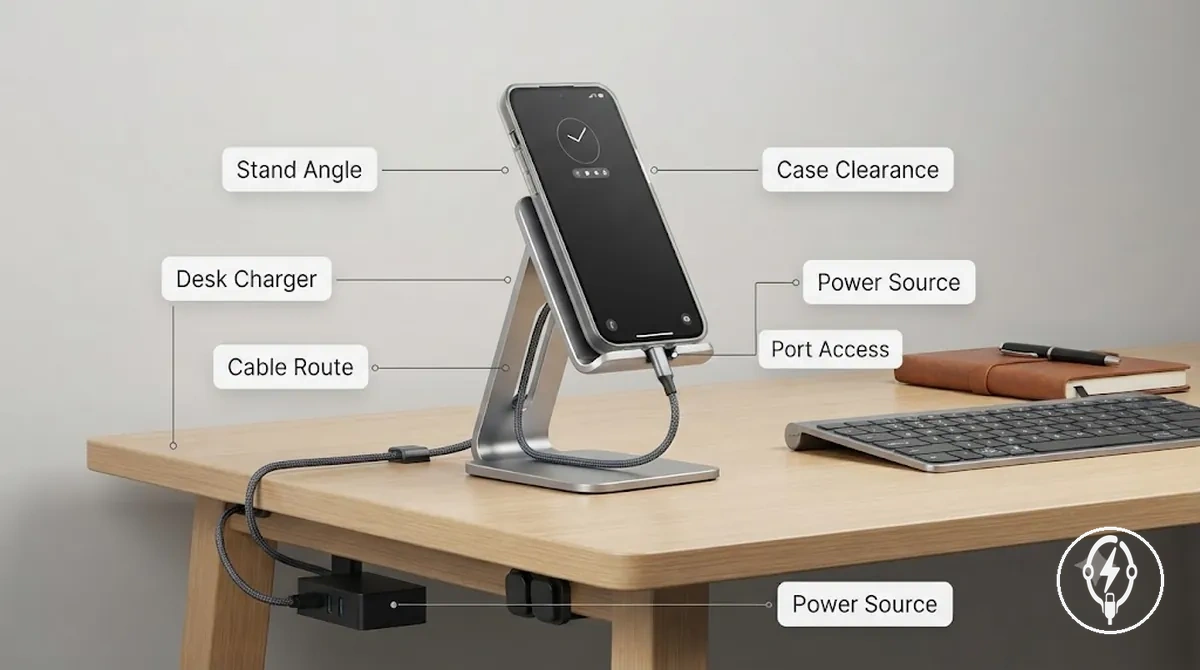
A desk charging setup should position the iPhone where the screen remains visible, the device can be picked up with one hand, and the charging cable reaches the power source without placing strain on the connector. In a home charging setup, the primary decision criteria are stand angle, cable route, port access, case clearance, and the availability of a nearby wall outlet or powered USB hub. Apple Support specifies that wireless chargers should be placed on a flat, stable surface and that MagSafe charging requires a compatible iPhone model and compatible MagSafe accessories.
In a home charging setup, the primary decision criteria are stand angle, cable route, port access, case clearance, and the availability of a nearby wall outlet or powered USB hub.
The image below highlights how a desk charging setup improves work-surface organisation by showing charging stand placement, cable routing, and power-source positioning rather than general home charging arrangements.
Use the placement checks below to verify whether a desk charger suits the available workspace without changing the broader home charging setup.
- Stand angle: Keep the display comfortably visible from the normal seated position.
- Cable reach: Route the cable along the rear or edge of the desk so it reaches the charger without remaining under tension.
- Port access: Leave enough clearance to connect or disconnect the charging cable without moving nearby equipment.
- Case clearance: Confirm that the protective case does not prevent proper cable insertion or wireless charging alignment.
- Power source: Position the desk charger within practical reach of a nearby wall outlet or powered USB hub to avoid unnecessary cable stretching.
For example, a hypothetical desk located approximately 1.8 m from the nearest wall outlet can use a 2 m charging cable to reach the charging stand while leaving a small amount of slack for one-handed use without pulling on the connector. This example is illustrative rather than manufacturer-specified because the appropriate cable length depends on desk dimensions, outlet position, charger placement, and the charging accessory being used.
Bedside Charging Setups for Overnight Access and Device Visibility
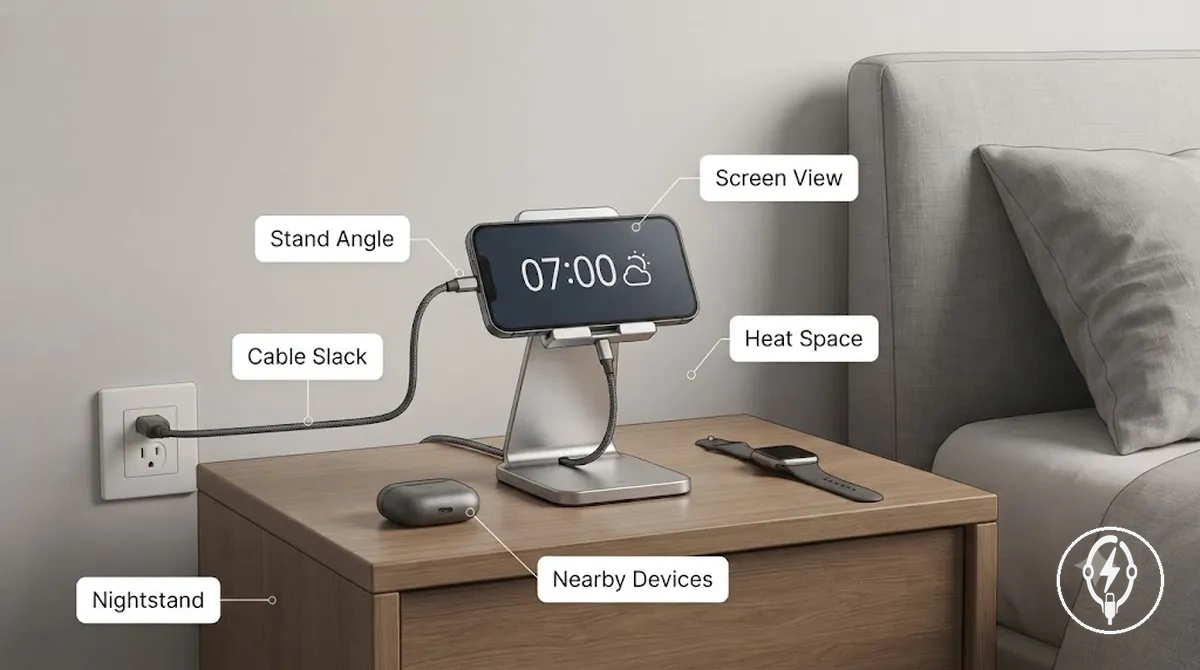
A bedside charging setup should position the iPhone where it remains easy to reach overnight, the display stays visible when needed, and the charging cable reaches the power source without placing continuous tension on the connector. Within a home charging setup, the main bedside placement attributes are available nightstand space, stand angle, cable slack, charger stability, nearby device spacing, and heat exposure around the charging accessory. Apple specifies that StandBy is available on supported iPhone models while charging in landscape orientation, and that wireless charging requires a compatible charger placed on a flat, stable surface.
Apple specifies that StandBy is available on supported iPhone models while charging in landscape orientation, and that wireless charging requires a compatible charger placed on a flat, stable surface.
The image below illustrates how a bedside charging setup organises the charging stand, nightstand space, cable routing, and screen position to improve overnight access and device visibility without repeating desk-focused cable management.
Use the checklist below to confirm whether a bedside charging station fits the available nightstand and charging environment.
- Nightstand space: Leave enough flat surface for the charging stand and the iPhone so nearby items do not interfere with placement.
- Stand angle: Position the display where alarms, notifications, or StandBy information remain visible from the bed if those features are used.
- Cable slack: Leave a small amount of free cable so lifting the iPhone does not place constant tension on the charging connector.
- Heat exposure: Place the charger on a hard, open surface rather than under bedding or soft materials that can restrict normal heat dissipation.
- Nearby devices: If charging AirPods or Apple Watch beside the iPhone, leave enough separation so charging cables or charging surfaces do not obstruct one another.
For example, a hypothetical nightstand positioned approximately 0.5 m from a wall outlet can comfortably use a 1 m charging cable, leaving about 0.5 m of remaining cable length for relaxed handling without pulling on the connector. This numerical example is illustrative rather than manufacturer-specified because the appropriate cable length depends on furniture layout, charger position, protective case thickness, and the charging accessory selected.
Travel Charging Setups for Compact Carry and Hotel Use
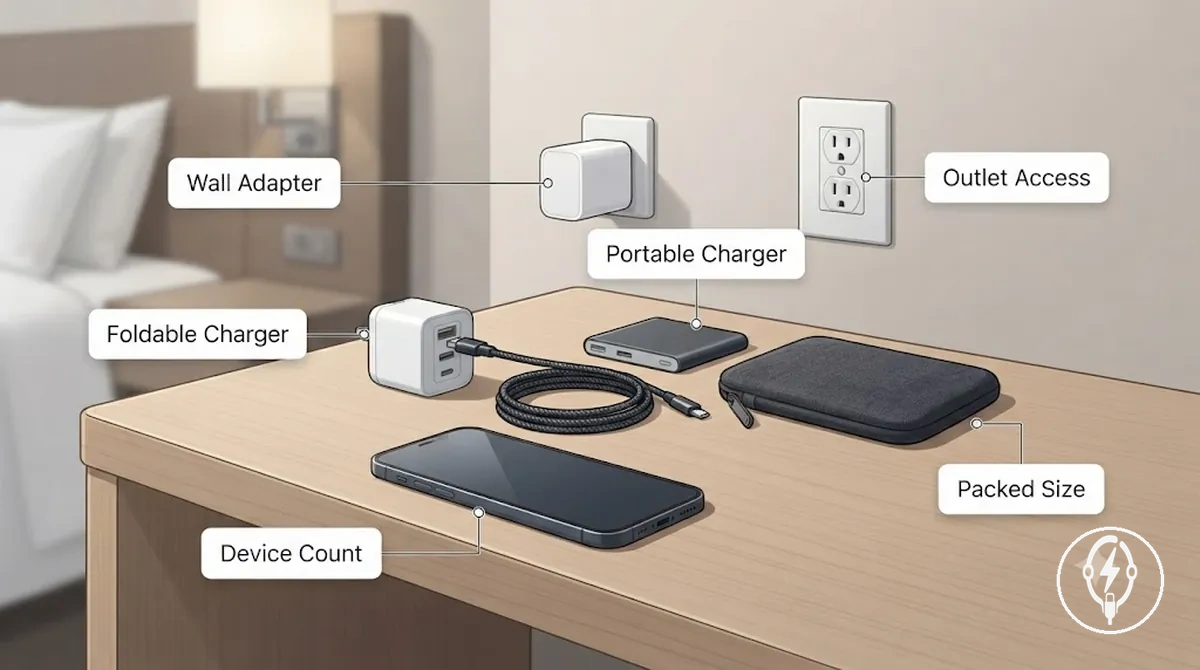
A travel charging setup should minimise packed size while ensuring reliable charging in places where outlet access is uncertain, such as hotel rooms, shared workspaces, or long travel days. The primary selection criteria are the wall adapter type, cable count, foldable charger design, portable charger availability, outlet access, and the number of devices that must be charged together. Apple specifies that compatible iPhone models can charge from USB-C power adapters, USB-C power banks, and other compatible USB-C power sources, so the charging setup should match the available power source and travel conditions rather than a fixed destination.
A travel charging setup should minimise packed size while ensuring reliable charging in places where outlet access is uncertain, such as hotel rooms, shared workspaces, or long travel days.
The image below illustrates how travel charging setups for compact carry and hotel use organise a foldable charger, wall adapter, charging cable, and portable charger into a compact charging kit that is easy to unpack on a hotel desk or bedside surface.
Travel charging setups reduce packing complexity by selecting accessories according to the expected charging environment instead of carrying every charging accessory. For a short hotel stay, one compact wall adapter and one charging cable may be sufficient when only one iPhone needs charging, while a longer trip involving an iPhone, AirPods, and an Apple Watch can justify a foldable charger and portable charger so charging remains available when wall outlets are occupied or temporarily unavailable. Apple also states that charging performance depends on the connected power source, cable, and compatible charging accessory, so the same travel charging setup can perform differently across hotels, aircraft, or shared workspaces.
Travel charging setups reduce packing complexity by selecting accessories according to the expected charging environment instead of carrying every charging accessory.
The checklist below summarises the decision factors that travel charging setups for compact carry and hotel use should address before selecting individual charging accessories.
- Wall adapter: Match the adapter output interface to the charging cable and the available outlet at the destination.
- Cable count: Carry one charging cable for each charging interface in use, adding a spare cable only when multiple devices or backup charging are expected.
- Foldable charger: Choose a foldable charger when charging multiple compatible devices while keeping packed size compact.
- Portable charger: Include a portable charger when outlet access may be limited during flights, train journeys, or extended travel days. Apple does not publish universal runtime values because operating time depends on battery capacity, iPhone model, and charging conditions.
- Device count: Match the number of charging ports or charging positions to the number of devices expected to charge simultaneously.
For example, a hypothetical traveller carrying one iPhone for a two-day hotel stay may pack one wall adapter, one USB-C charging cable, and one portable charger, while another traveller carrying an iPhone, AirPods, and an Apple Watch for a week may add a foldable multi-device charger to reduce the number of separate charging accessories. These numerical examples are illustrative travel scenarios rather than manufacturer recommendations because the appropriate charging setup depends on trip length, outlet availability, and the devices being carried.
Portable Power Banks for Travel Backup
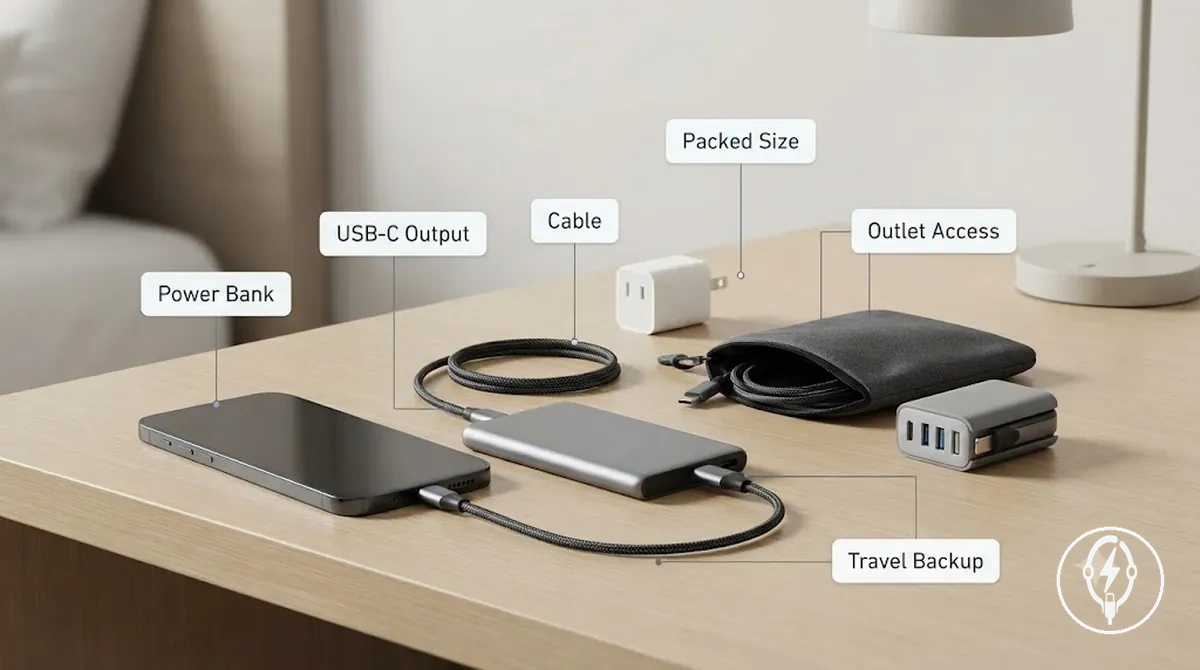
A portable power bank is the preferred backup power source in a travel charging setup when reliable outlet access is unavailable, while a wall adapter remains the primary charging solution whenever mains power is available. The key selection criteria are capacity class, output port, charging cable compatibility, recharge method, packed size, and carry context. According to Apple, compatible iPhone models can charge from compatible USB-C battery packs or USB-C power adapters, with charging performance depending on the iPhone model, battery condition, charging cable, and the power bank's output capabilities. :contentReference[oaicite:0]{index=0}
It highlights the relationship between the portable charger, charging cable, travel surface, and limited outlet access.
The image below shows how a portable power bank complements a wall adapter by providing backup charging during travel rather than replacing a permanent charging station. It highlights the relationship between the portable charger, charging cable, travel surface, and limited outlet access.
Use the checklist below to decide when a portable power bank is the right backup choice instead of relying solely on a wall adapter or foldable charger.
- Capacity class: Select a capacity category that matches the trip duration. Common consumer categories are under 5,000 mAh, 5,000–10,000 mAh, 10,000–20,000 mAh, and over 20,000 mAh.
- Output port: Match the power bank output to the iPhone charging interface, such as USB-C for compatible USB-C iPhone models.
- Charging cable: Carry a compatible charging cable because most portable chargers require a wired connection to charge an iPhone.
- Packed size: Smaller capacity classes reduce carrying weight, while higher-capacity models occupy more bag space and are better suited to longer trips.
- Recharge time: Recharge the portable power bank from a compatible wall adapter whenever mains power becomes available so backup capacity is restored before the next travel period.
- Carry context: A compact 5,000–10,000 mAh class is generally appropriate for everyday carry, whereas a 10,000–20,000 mAh class is better reserved for longer travel or charging multiple devices.
- Backup confidence: Choose a portable power bank when outlet access is uncertain. If reliable wall outlets are available throughout the trip, a wall adapter normally remains the primary charging method.
For example, a hypothetical traveller carrying one iPhone on a day trip may select a 5,000–10,000 mAh portable power bank for emergency backup, while another traveller carrying an iPhone, AirPods, and an Apple Watch for several days may select a 10,000–20,000 mAh class to provide additional backup energy between access to wall outlets. These capacity classes describe battery-size categories rather than guaranteed charge counts because usable charging output varies with battery efficiency, iPhone model, battery health, and charging conditions. :contentReference[oaicite:1]{index=1}
Foldable Charging Stations for Travel Surfaces
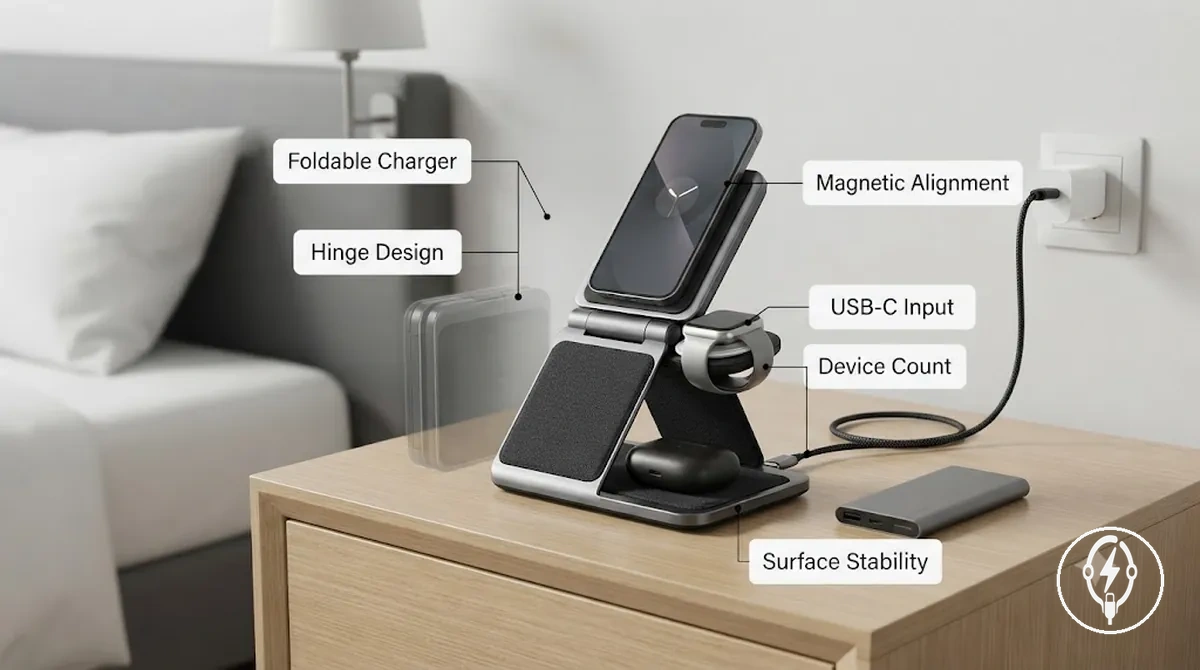
A foldable charging station is a compact charging platform designed for a travel charging setup where packed size, unfolded stability, and multi-device alignment are the primary selection criteria. Its main attributes are hinge design, magnetic alignment, stand angle, cable input, supported device count, case fit, and surface stability. According to Apple, MagSafe charging requires a compatible iPhone model and compatible MagSafe accessories, making device compatibility and alignment essential conditions for reliable charging. :contentReference[oaicite:0]{index=0}
Its main attributes are hinge design, magnetic alignment, stand angle, cable input, supported device count, case fit, and surface stability.
The image below shows how a foldable charger reduces packed size during transport while providing a stable charging surface after unfolding. It also illustrates the relationship between a single cable input, a compatible wall adapter or portable charger, and organised charging on limited travel surfaces such as a hotel nightstand.
The checklist below summarises the attributes that determine whether a foldable charging station is suitable for travel surfaces.
- Hinge design: The hinge should unfold into a stable position on a flat surface so the charging stand remains upright during normal device placement.
- Magnetic alignment: Compatible magnetic charging aligns supported iPhone models with the charging surface. Apple specifies that correct alignment requires compatible MagSafe hardware, while thick or incompatible cases can reduce charging reliability. :contentReference[oaicite:1]{index=1}
- Stand angle: A raised viewing angle keeps the display visible while reducing the surface area required compared with laying each device flat.
- Cable input: Most travel-oriented foldable charging stations use a single USB-C power input connected to a compatible wall adapter or portable charger, reducing cable clutter during travel. :contentReference[oaicite:2]{index=2}
- Device count: Many foldable charging stations are designed with three charging positions for a compatible iPhone, smartwatch, and wireless earbuds, although the supported combination depends on the manufacturer's design. :contentReference[oaicite:3]{index=3}
- Case fit: Protective cases should be compatible with the charging system because excessive thickness or incompatible materials can affect magnetic alignment and wireless charging performance.
- Surface stability: A rigid desk or nightstand provides more consistent charging alignment than soft bedding or uneven surfaces.
For example, a hypothetical traveller staying in a hotel for three nights could unfold a three-device charging station on a bedside table, connect one USB-C cable to a compatible wall adapter, and charge a compatible iPhone, smartwatch, and wireless earbuds from one charging location instead of carrying three separate charging stands. If your priority is a permanent desktop charging arrangement rather than compact travel storage, see wireless charging stations for stationary charging options. :contentReference[oaicite:4]{index=4}
Car Charging Setups for In-Vehicle Power
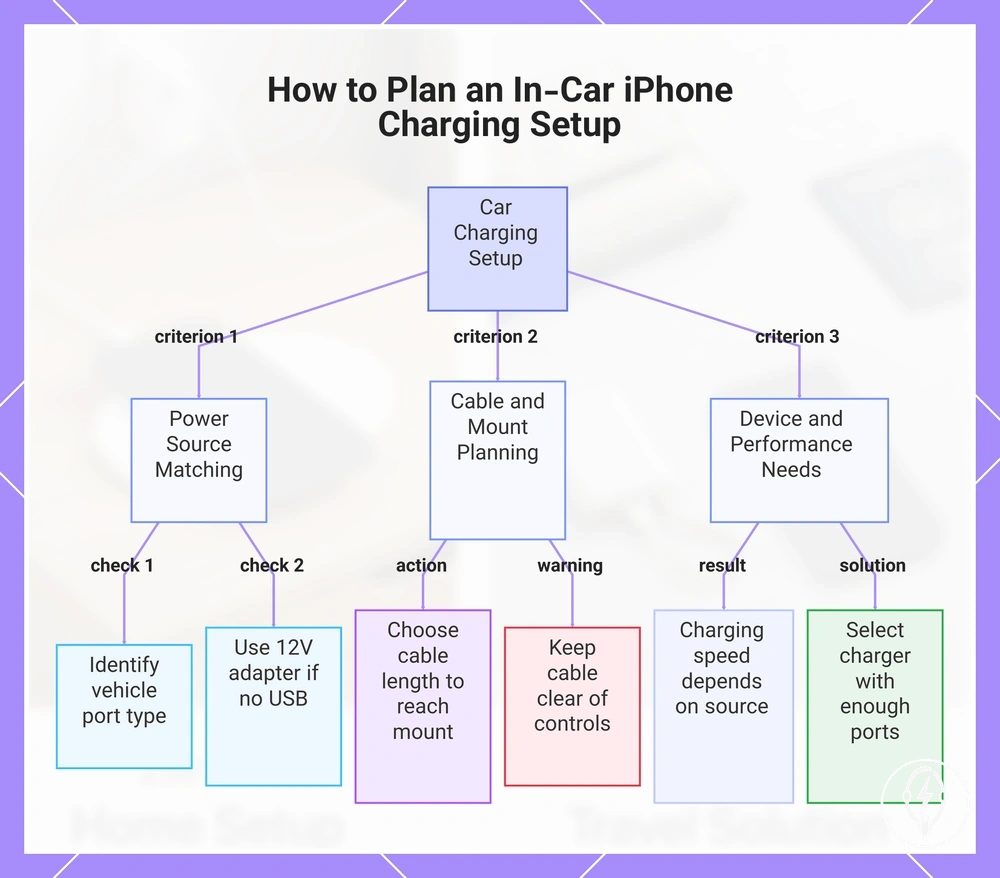
An in-car iPhone charging setup should be planned around the vehicle power port, charging interface, cable reach, mount position, and the number of devices that require charging. Most vehicles provide a USB-A port, a USB-C port, or a 12V accessory socket that requires a compatible 12V adapter, while the available charging performance depends on the vehicle, adapter output, charging cable, and compatible iPhone model. Apple specifies that charging speed varies with the connected power source and compatible charging accessories, so no single car charging setup is suitable for every vehicle. :contentReference[oaicite:0]{index=0}
This example illustrates setup selection rather than a manufacturer recommendation.
A car charging setup should first match the available vehicle power interface before selecting the cable and mount position. Vehicles equipped with USB-C ports can connect directly with a compatible USB-C cable, while vehicles with only USB-A ports require a compatible USB-A cable. If neither USB interface is available, a compatible 12V adapter connected to the vehicle's accessory socket provides the charging connection. For example, a hypothetical family travelling with two iPhones may use a dual-port 12V adapter, while a single occupant may only require one charging output. This example illustrates setup selection rather than a manufacturer recommendation. :contentReference[oaicite:1]{index=1}
These dimensions are illustrative rather than manufacturer-specified because vehicle interior layouts differ.
Cable reach and mount position should be considered together because the charging cable must reach the mounted iPhone without interfering with vehicle controls. For example, a hypothetical dashboard mount positioned approximately 40–60 cm from the nearest USB-C port can normally be connected comfortably with a 1 m cable, leaving enough slack for routing without placing continuous tension on the connector. These dimensions are illustrative rather than manufacturer-specified because vehicle interior layouts differ. Keep the cable route clear of the steering wheel, pedals, gear selector, and driver controls, and adjust the charging setup only when the vehicle is safely parked. :contentReference[oaicite:2]{index=2}
Cable reach and mount position should be considered together because the charging cable must reach the mounted iPhone without interfering with vehicle controls.
The checklist below summarises the key criteria that organise a car charging setup for in-vehicle power by matching the vehicle power source, cable route, mount position, and passenger-device needs.
- Vehicle power port: Confirm whether the vehicle provides USB-A, USB-C, or only a 12V accessory socket before selecting a charger.
- 12V adapter: Use a compatible 12V adapter when the vehicle does not include a suitable USB charging port.
- Cable route: Choose a cable length that reaches the mount position without crossing driver controls or creating unnecessary slack.
- Mount position: Position the phone where the charging cable can reach comfortably while maintaining unobstructed access to vehicle controls.
- Charging speed: Expect charging performance to depend on the vehicle power source, adapter output, compatible cable, and iPhone model rather than the cable alone.
- Passenger-device needs: If multiple passengers need charging, select a charger setup with enough charging ports instead of assuming every vehicle supports simultaneous charging through its built-in ports.
This chart shows the main criteria for planning a car charging setup, including matching the vehicle power source, planning cable and mount position, and considering device and performance needs.
Multiple-device Charging Setups for Apple Devices
A multiple-device charging setup organises an iPhone, Apple Watch, AirPods, and occasional shared devices by matching the device mix, port count, wireless charging positions, and power sharing to the number of devices charged at the same time. A 3-in-1 charging station normally provides three dedicated charging positions for one compatible iPhone, one compatible Apple Watch, and one compatible AirPods charging case, while additional shared devices require an extra charging port or a separate charger. Apple specifies that charging compatibility depends on the supported device generation, charging technology, and compatible accessories rather than the charging station alone. :contentReference[oaicite:0]{index=0}
This numerical example illustrates setup planning rather than a manufacturer specification.
Device count directly changes charging-surface organisation because each wireless charging position is designed for a specific device category. A multi-device charger with three dedicated charging positions reduces cable clutter for three compatible devices, but adding a fourth device such as another phone or tablet normally requires at least one additional USB charging port or a separate charger. For example, a hypothetical bedside setup charging one iPhone, one Apple Watch, one AirPods case, and one shared iPad overnight would require either three wireless charging positions plus one wired charging port or four independent charging connections. This numerical example illustrates setup planning rather than a manufacturer specification. :contentReference[oaicite:1]{index=1}
Device count directly changes charging-surface organisation because each wireless charging position is designed for a specific device category.
Power sharing, case fit, and charging order also influence charging reliability because accessory design determines how available power is distributed across connected devices. Apple notes that wireless charging requires correct device alignment and that incompatible or excessively thick protective cases can reduce charging performance. When overnight charging is the primary use case, placing the iPhone, Apple Watch, and AirPods on their dedicated charging positions before connecting occasional shared devices helps organise the charging surface without assuming identical charging performance across all accessories. :contentReference[oaicite:2]{index=2}
Apple notes that wireless charging requires correct device alignment and that incompatible or excessively thick protective cases can reduce charging performance.
The comparison below shows how device count changes the design of multiple-device charging setups for Apple devices while keeping the focus on charging positions, port count, and power distribution.
| Setup configuration | Typical device mix | Charging positions or port count | Primary setup consideration |
|---|---|---|---|
| 3-in-1 charging station | 1 iPhone, 1 Apple Watch, 1 AirPods case | 3 dedicated wireless charging positions | Organises three compatible devices with one charging station; compatibility depends on accessory design. |
| Integrated station with shared device | 1 iPhone, 1 Apple Watch, 1 AirPods case, 1 additional phone or tablet | 3 wireless charging positions plus at least 1 wired charging port | Shared devices normally require an additional charging output beyond the integrated charging station. |
| Separate chargers | Mixed Apple devices with changing device count | 1 charging connection per device | Provides flexible placement but increases cable count and charging-surface usage. |
3-in-1 Charging Stations for iPhone, Apple Watch, and AirPods
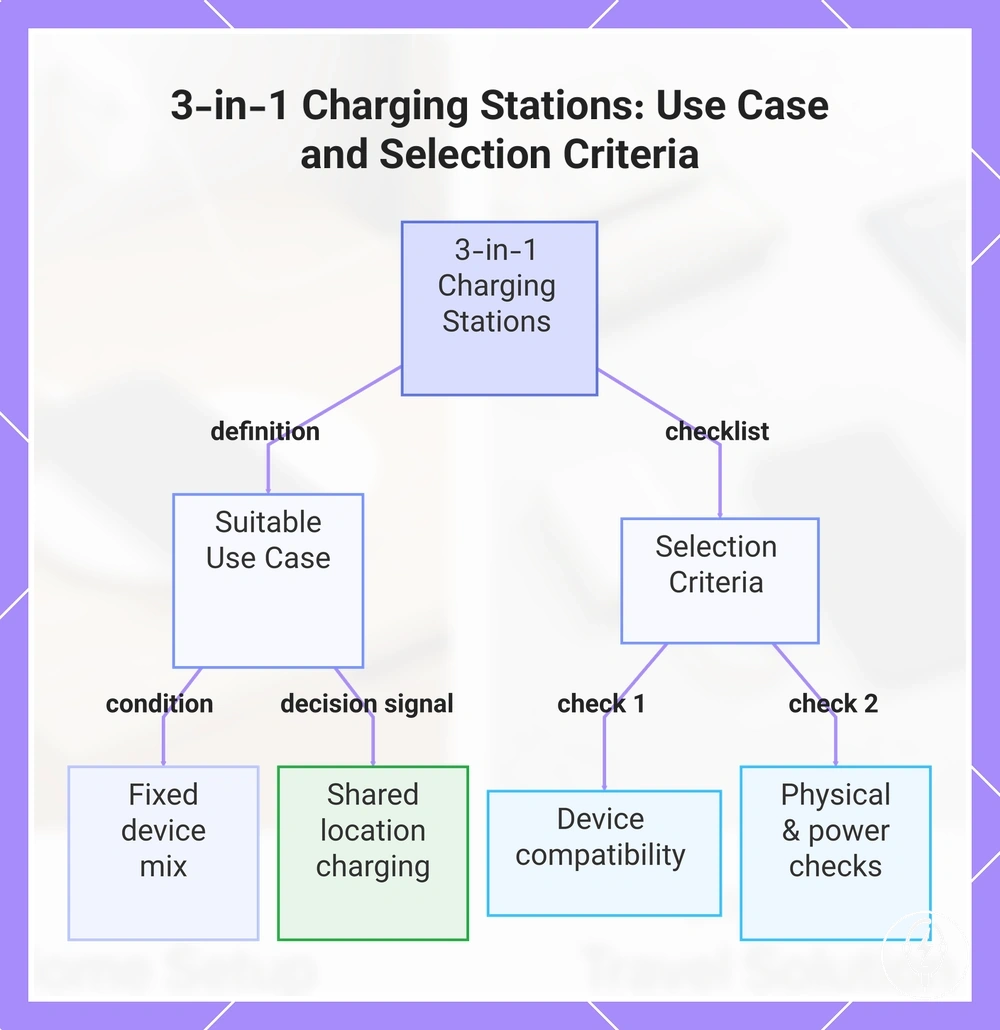
A 3-in-1 charging station is the most suitable multi-device charger when you routinely charge one compatible iPhone, one compatible Apple Watch, and one compatible AirPods charging case in a single location using one shared power input. It provides three dedicated charging positions instead of three separate charging cables, but Apple specifies that compatibility depends on the supported iPhone, Apple Watch, AirPods charging case, and the charging accessory rather than the charging station alone. A 3-in-1 charging station is therefore the right choice when your daily device mix remains fixed to these three compatible device categories. :contentReference[oaicite:0]{index=0}
A 3-in-1 charging station is therefore the right choice when your daily device mix remains fixed to these three compatible device categories.
The selection criteria below explain when a 3-in-1 charging station fits better than separate chargers by focusing on device compatibility, charging position, and power sharing.
- Magnetic alignment: Confirm that the charging surface supports the magnetic charging system required by your compatible iPhone model.
- Apple Watch support: Check that the integrated watch charging puck supports your Apple Watch generation or the watch charging module specified by the manufacturer.
- AirPods charging area: Verify that your AirPods charging case supports wireless charging because wired-only charging cases cannot use a wireless charging pad.
- Case thickness: Follow the manufacturer's supported case specification because thick or incompatible protective cases can reduce magnetic alignment or wireless charging performance.
- Stand stability: Choose a charging stand with a stable base that keeps all three charging positions aligned during normal placement and removal.
- Port count and power sharing: Most 3-in-1 charging stations use one shared power input to distribute power across three dedicated charging positions, while charging performance depends on the compatible power adapter and charger design.
- Decision signal: Choose a 3-in-1 charging station when the same iPhone, Apple Watch, and AirPods are normally charged together in one visible location instead of using separate charging cables in different rooms or travel bags.
For example, a hypothetical bedside setup charging 1 compatible iPhone, 1 compatible Apple Watch, and 1 compatible AirPods charging case every night can replace three separate charging cables with one shared power input and three dedicated charging positions. This numerical example illustrates the intended use case rather than guaranteeing compatibility because supported Apple device generations, case fit, watch puck support, and AirPods charging-case compatibility differ between charging station designs. :contentReference[oaicite:1]{index=1}
This chart shows when a 3-in-1 charging station is the right choice and the key checks to ensure compatibility and performance.
Multi-port Chargers for Mixed Device Groups
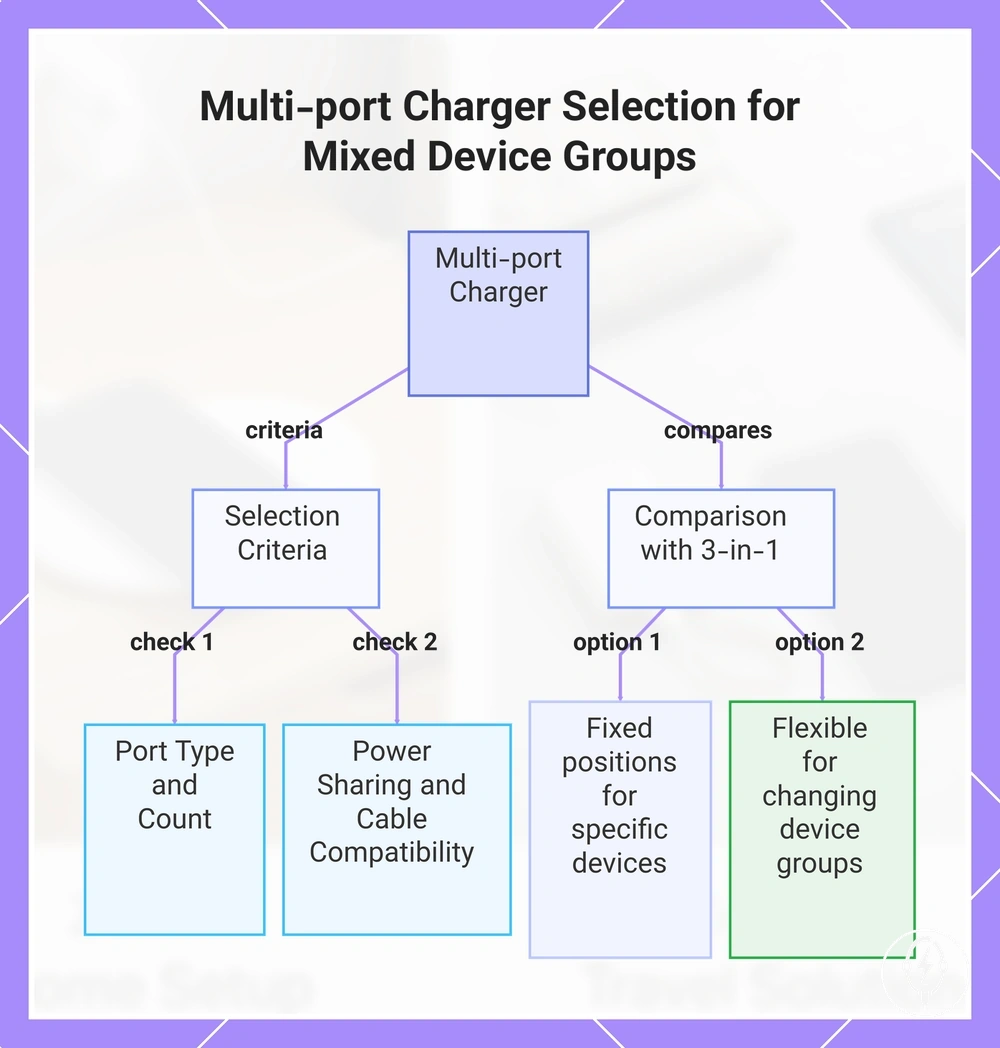
A multi-device charger is the preferred charging solution when your device group includes an iPhone together with wired or mixed-port accessories because its defining attribute is port count rather than fixed charging positions. Multi-port chargers commonly provide 2 or more USB output ports, allowing compatible devices to charge simultaneously from a single power adapter, while power sharing distributes the available output across active ports according to the charger's design. This makes a multi-port charger more suitable than a 3-in-1 charging station when the connected devices change or include accessories that cannot use dedicated wireless charging positions. :contentReference[oaicite:0]{index=0}
The checklist below summarises the selection criteria for mixed device groups where charging interfaces, cable types, and device count differ.
The checklist below summarises the selection criteria for mixed device groups where charging interfaces, cable types, and device count differ.
- Port type: Match the available USB-C and USB-A outputs to the charging cables required by your iPhone, Apple Watch charger, AirPods charging cable, and other accessories.
- Port count: Select a charger with at least the same number of output ports as the number of devices you expect to charge simultaneously. Common consumer models provide 2, 3, 4, or more output ports depending on the charger design.
- Power sharing: When two or more ports are active, the charger distributes available output between connected devices according to the manufacturer's power-sharing design rather than assigning the full output to every port.
- Cable compatibility: Confirm that every device has a compatible charging cable because mixed device groups may require different connector types.
- Adapter size: Compact chargers are generally easier to carry for travel, while larger multi-port chargers are more suitable for permanent desk charging where additional ports are needed.
- Desk or travel placement: Position the charger where connected cables reach every device without crossing the workspace or creating unnecessary cable tension.
- 3-in-1 comparison: A 3-in-1 charging station provides fixed charging positions for one compatible iPhone, one compatible Apple Watch, and one compatible AirPods charging case, whereas a multi-device charger offers greater flexibility when charging wired accessories or changing device combinations.
For example, a hypothetical workspace charging 1 iPhone, 1 tablet, 1 wired headset, and 1 power bank at the same time requires at least 4 available charging outputs or an additional charger so every device can remain connected simultaneously. If your devices instead remain fixed as one iPhone, one Apple Watch, and one AirPods charging case in the same location each day, compare the available types for each setup before choosing between a multi-port charger and a dedicated 3-in-1 charging station. :contentReference[oaicite:1]{index=1}
This chart shows the key selection criteria for multi-port chargers and compares them with 3-in-1 charging stations for mixed device groups.
This chart shows the key selection criteria for multi-port chargers and compares them with 3-in-1 charging stations for mixed device groups.
Charging Setup Criteria by Location and Device Count
A charging setup should be selected by matching the location, device count, charging method, power access, and portability to the intended charging environment. Fixed locations such as desks and bedside tables generally benefit from dedicated charging positions, while travel and vehicle use prioritise compact accessories and flexible power interfaces. Apple specifies that charging compatibility and performance depend on the iPhone model, compatible charging accessory, power source, and charging interface rather than on a single charger alone. :contentReference[oaicite:0]{index=0}
A charging setup should be selected by matching the location , device count , charging method , power access , and portability to the intended charging environment.
The comparison below clarifies how charging setup criteria change according to location and device count, helping you select an appropriate charger setup without repeating every individual charging scenario.
| Location | Primary constraint | Accessory attribute | Decision effect |
|---|---|---|---|
| Desk | 1–3 devices charged daily | Charging stand or multi-port charger with organised cable routing | Supports permanent placement and easy device access. |
| Bedside | Overnight charging for 1–3 devices | Stable charging stand, visible screen angle, suitable cable length | Improves overnight access while reducing cable strain. |
| Travel | Limited luggage space and changing power access | Foldable charger, compact wall adapter, or power bank | Prioritises portability over fixed charging positions. |
| Car | USB-A, USB-C, or 12 V accessory socket | Compatible vehicle charger and correctly sized charging cable | Matches the available in-vehicle power interface. |
| Shared-device area | More than 3 devices | Multi-port charger with at least the required number of charging outputs | Accommodates changing device groups more effectively than fixed charging positions. |
For example, a hypothetical household charging 4 devices overnight would require at least 4 charging outputs or a combination of a 3-in-1 charging station and one additional charging port, whereas a traveller carrying 1 iPhone may only need one compact wall adapter and one compatible charging cable. This example illustrates the selection criteria rather than a manufacturer specification because the appropriate charger setup depends on the charging location, device count, and available power access. :contentReference[oaicite:1]{index=1}
This example illustrates the selection criteria rather than a manufacturer specification because the appropriate charger setup depends on the charging location, device count, and available power access.
The principal trade-off is between portability and charging capacity: fixed locations favour dedicated charging positions, while travel and mixed-device environments benefit from flexible ports and compact charging kits. If you are comparing charging patterns before selecting accessories, choose accessories by situation to match the charger setup to your daily charging environment.:contentReference[oaicite:2]{index=2}
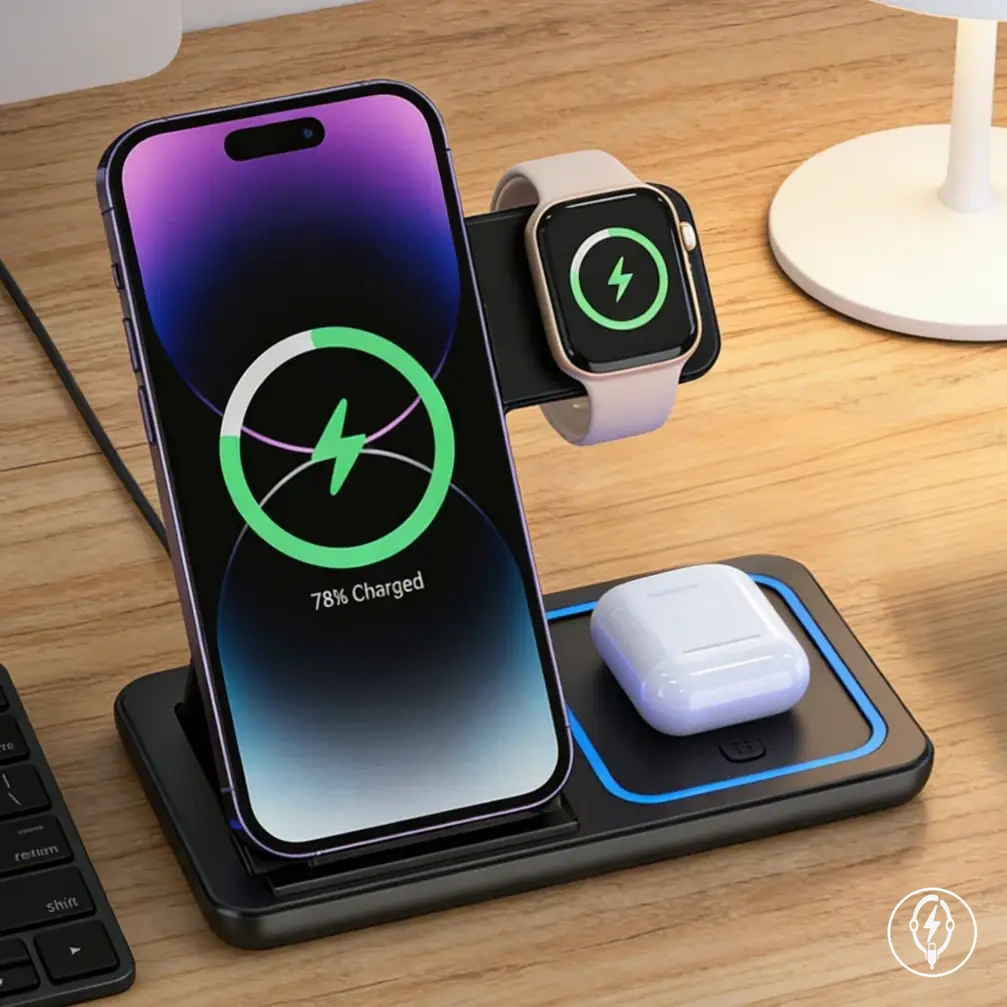
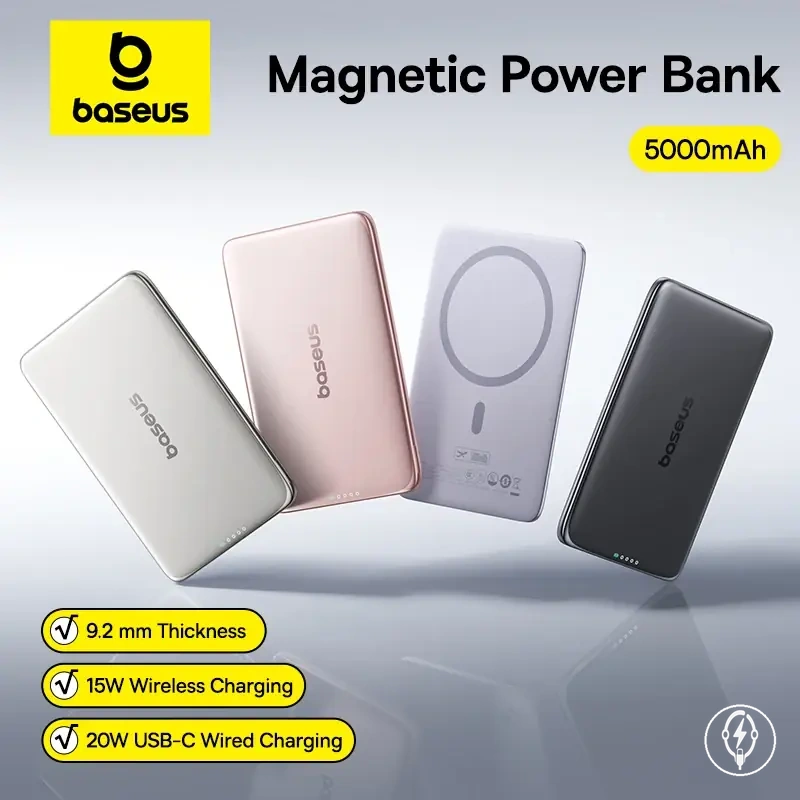
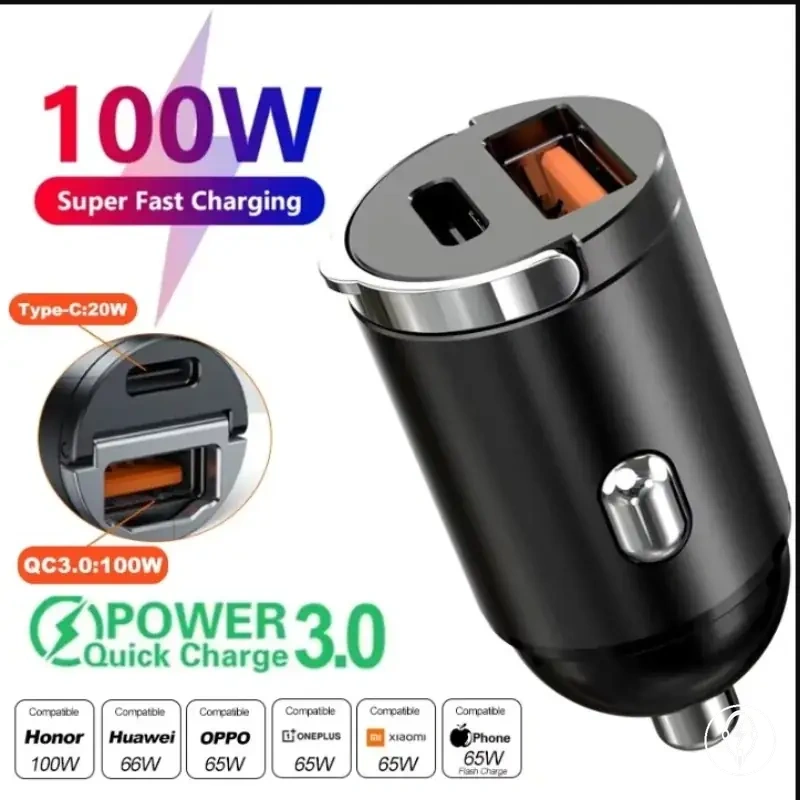
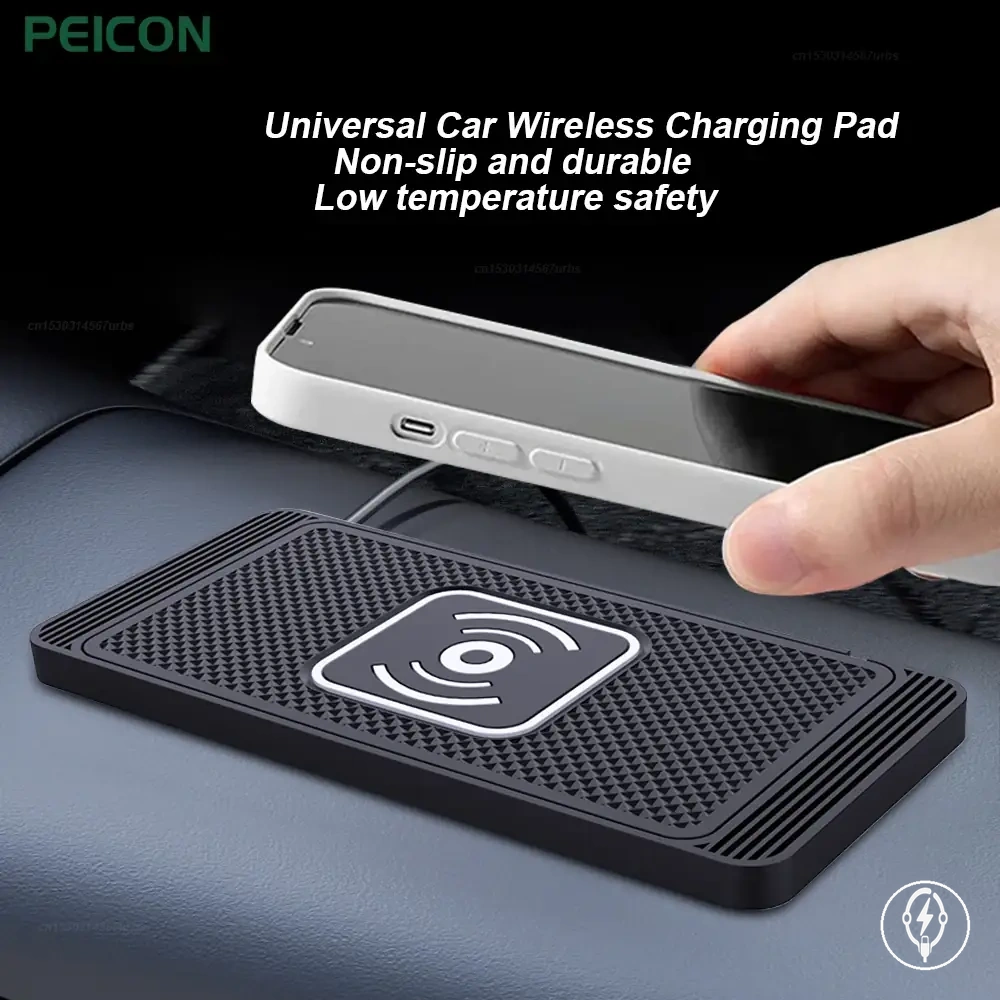
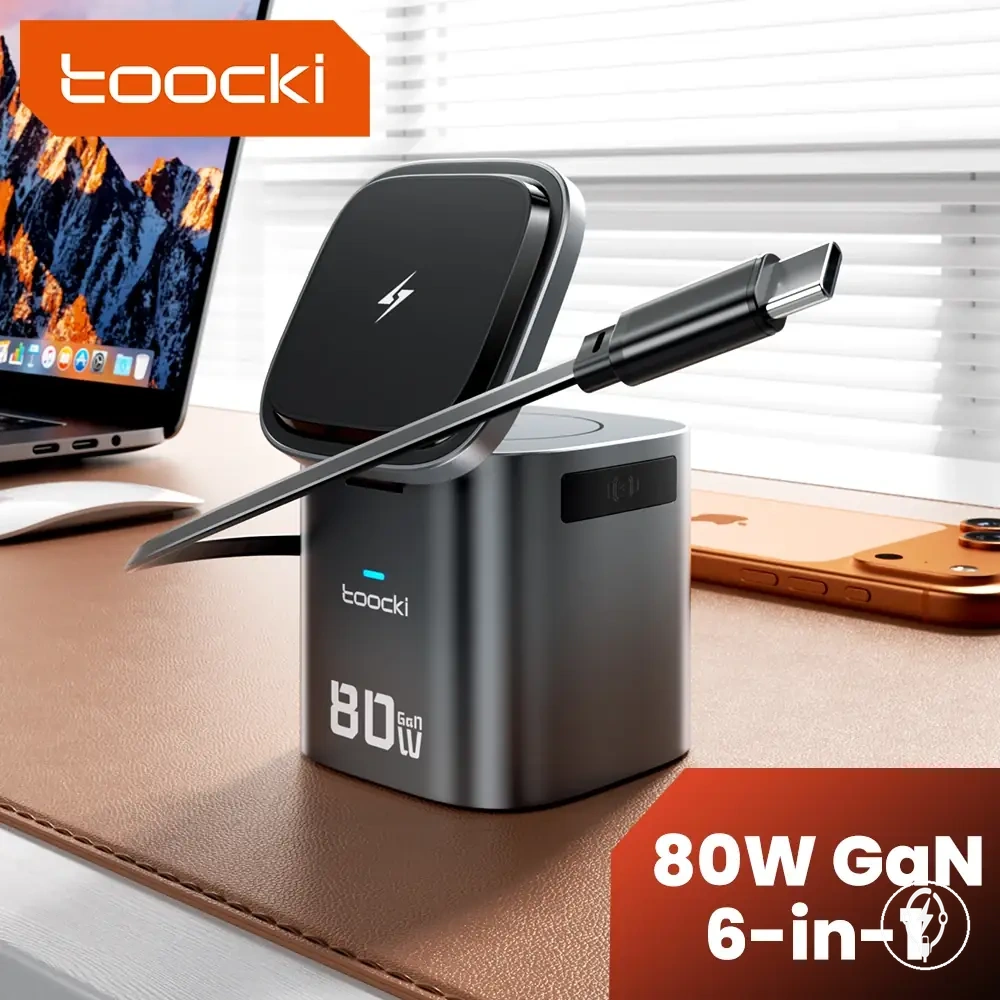
Here are product examples that may make comparison easier.
Here are product examples that may make comparison easier. Before buying, always review the compatibility criteria, essential features, and product details.
Power Output, Ports, and Cable Fit
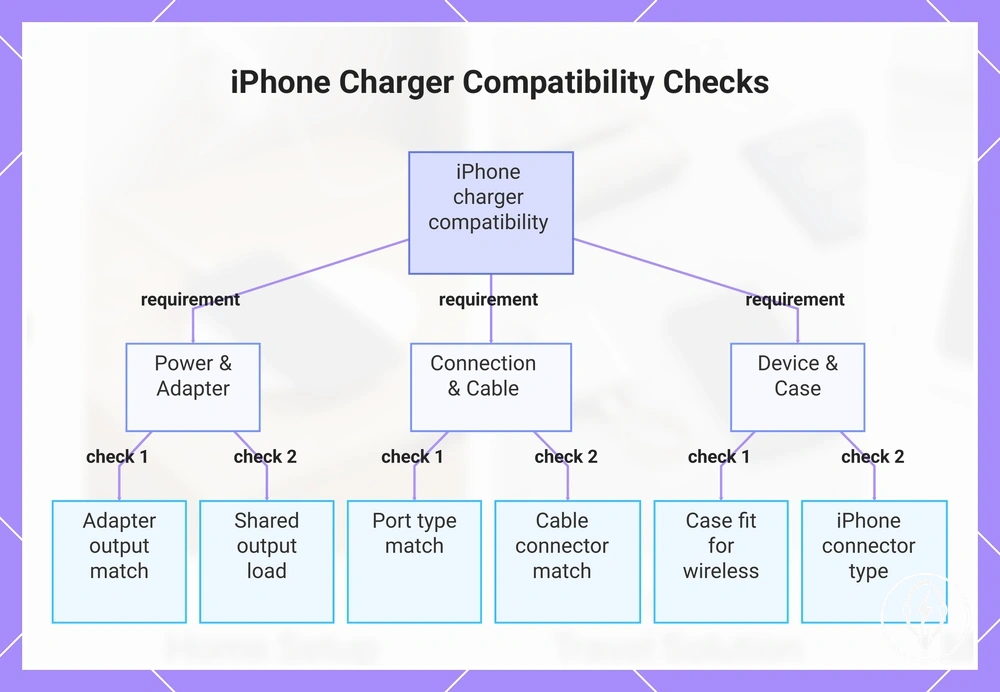
A charger setup works as intended only when the power output, port type, and cable fit are compatible with both the charging station and the connected iPhone model. According to Apple, charging compatibility depends on using a compatible power source, charging cable, and device interface, while charging performance is determined by the combined characteristics of the adapter, cable, accessory, and iPhone model rather than by one component alone. These compatibility checks prevent mismatched accessories before a charger setup is selected. :contentReference[oaicite:0]{index=0}
These compatibility checks prevent mismatched accessories before a charger setup is selected.
The checklist below clarifies the local compatibility conditions that should be verified before using a charging station or charging kit.
- Adapter output: The power adapter output must match the charging station or charging cable input. Charging performance depends on the compatible adapter, cable, and iPhone model rather than the adapter alone. :contentReference[oaicite:1]{index=1}
- Port type: Confirm whether the charger provides a USB-C port, a USB-A port, or both, and use a cable with the matching connector.
- Cable fit: Use a Lightning cable for compatible Lightning-equipped iPhone models or a USB-C cable for compatible USB-C iPhone models so that both cable ends match the device and charger interfaces.
- Wireless input cable: A wireless charging station still requires a wired power input, typically through its specified USB input connection, so the input cable must match the charging station's power interface.
- Simultaneous charging load: When 2 or more devices charge from one multi-port charger or charging station, available output is shared according to the charger's design, so charging performance depends on the connected devices and compatible power source rather than the number of ports alone.
- Case fit: If a wireless charging surface is used, the protective case must remain compatible with the charging technology because incompatible or excessively thick cases can reduce charging alignment or wireless charging performance.
- iPhone model variation: Charging interface requirements differ between Lightning-equipped and USB-C-equipped iPhone models, making connector compatibility the final fit check before selecting a charger setup.
For example, a hypothetical charger setup using 1 USB-C wall adapter, 1 USB-C charging station, and 1 USB-C cable forms a compatible connection path for a USB-C iPhone, whereas replacing the cable with a Lightning connector would require a compatible Lightning-equipped iPhone to maintain interface compatibility. Deeper checks involving specific iPhone generations, charging standards, or accessory certifications fall outside this local compatibility check. :contentReference[oaicite:2]{index=2}
This chart shows the key compatibility checks to verify before using an iPhone charging station or kit.
This chart shows the key compatibility checks to verify before using an iPhone charging station or kit.
Magnetic Alignment, Case Fit, and Surface Stability
A charger setup delivers the most reliable wireless or stand-based charging when magnetic alignment, case fit, and surface stability keep the iPhone correctly positioned throughout the charging session. Apple specifies that MagSafe charging requires a compatible iPhone, a compatible MagSafe charger, and correct alignment between the internal charging coils, while protective cases and accessory compatibility can affect charging performance. Reliable charging therefore depends on maintaining consistent physical contact rather than on magnetic attachment alone. :contentReference[oaicite:0]{index=0}
Reliable charging therefore depends on maintaining consistent physical contact rather than on magnetic attachment alone.
The checklist below clarifies how physical fit influences charging reliability and distinguishes alignment issues from power or cable issues within the same charger setup.
- Magnet position: The charging station should align the magnetic ring with the iPhone charging coil so the charging interface remains centred during use.
- Case fit: Use a case designed to support the charging technology because incompatible materials or excessive case thickness can reduce magnetic alignment or interrupt wireless charging. :contentReference[oaicite:1]{index=1}
- Camera bump clearance: The rear camera housing should not prevent the phone from sitting evenly against the charging surface, as uneven contact can reduce charging consistency.
- Stand base: A charging stand should remain stable on a flat surface so normal device placement and removal do not shift the charging position.
- Surface angle: Place the charger setup on a firm, level surface rather than soft or uneven materials that can change device alignment during charging.
- Accidental movement: Sliding or rotating the phone after charging begins can move the charging coils out of alignment, reducing charging reliability even when the power source, port, and cable remain compatible.
For example, a hypothetical charger setup using 1 compatible MagSafe charging station, 1 compatible iPhone, and 1 thick non-compatible protective case may stop charging after a slight movement because the charging coils no longer align correctly. Replacing the case with a compatible design restores proper contact without changing the charging station, cable, or power source, illustrating how a single physical-fit mismatch can alter the charging outcome. :contentReference[oaicite:2]{index=2}
Portability, Folding Design, and Packed Size
A charger setup is more portable when its folding design, packed size, cable count, and adapter dependency match the intended travel or daily-carry environment. A foldable charging station reduces the storage volume required when packed, but portability also depends on whether a separate power adapter, charging cable, or protective case must be carried. Folded size improves packing efficiency rather than compatibility because charging compatibility remains determined by the supported device, charging interface, and power source. :contentReference[oaicite:0]{index=0}
The criteria below clarify how portability depends on physical size, accessory count, and charging conditions instead of compactness alone.
The criteria below clarify how portability depends on physical size, accessory count, and charging conditions instead of compactness alone.
- Folded thickness: A folding charging station occupies less storage space when closed than when opened for charging, although manufacturers do not define a standard folded thickness across all models. :contentReference[oaicite:1]{index=1}
- Weight class: Portable charging stations are available in multiple weight categories, but no industry standard specifies a maximum weight that defines portability. Weight should therefore be assessed using the manufacturer's specification for the selected model.
- Included cable need: Some charger setups include a USB-C power cable, while others require it to be packed separately. Confirm the included accessories before preparing a charging kit.
- Adapter dependency: Most foldable charging stations require an external USB power adapter because the charging surface cannot operate without an external power source.
- Case fit and storage: A protective carrying case keeps the charging station, cable, and power adapter organised, although the case increases the total packed size.
- Surface footprint: The storage footprint is smallest when the charging station is folded, while the operating footprint increases after unfolding onto a desk or bedside surface.
For example, a hypothetical traveller choosing between 1 foldable charging station with 1 USB-C cable and 1 USB power adapter, or 3 separate compact chargers with 3 cables, trades fewer packed accessories against greater charging flexibility. The foldable charging station reduces cable management in one charging location, while separate chargers remain more practical when devices are charged simultaneously in different rooms or locations. :contentReference[oaicite:2]{index=2}
When Separate Chargers Work Better than One Charging Station
Separate chargers are the better charger setup when devices are used in different locations, require different charging methods or cable types, or need independent power access instead of one shared charging station. A single charging station centralises charging for compatible devices in one place, whereas separate chargers distribute charging across multiple locations, allowing each compatible device to remain where it is normally used. The primary selection criterion is whether location flexibility, household sharing, or independent charging outweighs the convenience of a single charging surface. :contentReference[oaicite:0]{index=0}
The comparison below clarifies when one charging station becomes less practical than separate chargers by comparing the key selection criteria.
The comparison below clarifies when one charging station becomes less practical than separate chargers by comparing the key selection criteria.
| Selection criterion | One charging station | Separate chargers |
|---|---|---|
| Device location | Designed for charging compatible devices at one fixed location. | Allows compatible devices to remain in separate rooms, vehicles, offices, or travel bags. |
| Device count | Limited by the available charging positions or output ports on one charger. | Each additional compatible device can use its own charger without occupying shared charging positions. |
| Charging speed needs | Multiple connected devices may share the charger's available output according to its design. | Each charger supplies power independently, reducing dependence on shared power distribution. |
| Travel packing | Reduces cable count when devices travel together. | Only the charger required for a specific trip needs to be packed. |
| Household sharing | Requires users to return devices to one charging location. | Allows family members to keep chargers in their own rooms or workspaces. |
| Cable replacement | Replacing an integrated cable or charging module depends on the charger design. | A damaged cable or charger can usually be replaced individually without affecting other chargers. |
| Failure isolation | A fault affecting the charging station can interrupt charging for every connected device. | If one charger fails, the remaining chargers continue operating independently. |
For example, a hypothetical household using 4 devices every day could keep 1 charger beside the bed, 1 at a desk, 1 in a vehicle, and 1 inside a travel bag instead of moving every device to one charging station. This illustrative example demonstrates how separate chargers improve location flexibility, simplify cable replacement, and isolate charger failures without changing the charging setup used for the other devices. :contentReference[oaicite:1]{index=1}
For example, a hypothetical household using 4 devices every day could keep 1 charger beside the bed, 1 at a desk, 1 in a vehicle, and 1 inside a travel bag instead of moving every device to one charging station.
The trade-off is between centralised convenience and distributed flexibility: a charging station reduces cable clutter in one place, while separate chargers improve portability, household sharing, and independent power access across multiple locations. If your devices usually remain together on one desk or bedside table, a charging station may be more practical; if they are regularly used in different places, compare charging accessories before selecting a charging setup. :contentReference[oaicite:2]{index=2}
Practical Checks before Relying on an iPhone Charging Setup
A charging setup is suitable for daily use when its power access, charging method, device count, case fit, surface stability, and location all match the intended charging environment. According to Apple, charging performance depends on the compatible power source, charging cable or wireless charger, charging accessory, and iPhone model rather than on a single charger component. Completing these practical checks before regular use reduces setup failures caused by incompatible interfaces, unstable placement, or insufficient charging capacity. :contentReference[oaicite:0]{index=0}
The checklist below confirms whether the selected charger setup is practical for everyday use rather than only technically compatible.
The checklist below confirms whether the selected charger setup is practical for everyday use rather than only technically compatible.
- Power access: Verify that the available wall outlet, USB port, vehicle power source, or power bank matches the charging adapter or charging station input.
- Charging method: Confirm that the selected wired or wireless charging method is compatible with the iPhone model and charging accessory.
- Device count: Ensure the charger provides at least the same number of charging positions or output ports as the number of devices normally charged together.
- Case fit: Check that any protective case supports the selected charging method, particularly for magnetic or wireless charging.
- Surface stability: Position the charging stand or charging station on a flat, stable surface so normal device placement does not interrupt charging alignment.
- Travel portability: If the charging setup is used away from home, confirm that the charger, cable, adapter, and any required power bank fit inside the intended charging kit.
- Heat awareness: If the phone, charger, or charging surface becomes unusually warm, stop and verify correct alignment, compatible accessories, and unobstructed ventilation before continuing.
- Backup charging: Keep one compatible spare charger or a charged power bank available when continuous power access is important.
For example, a hypothetical user charging 3 devices each evening with a charging station that provides only 2 charging positions would require at least 1 additional charging output to connect every device simultaneously. This numerical example illustrates how matching device count to available charging capacity helps avoid routine charging interruptions during daily use. :contentReference[oaicite:1]{index=1}
After completing these practical checks, continue with using accessories correctly to maintain reliable day-to-day charging performance.
The main trade-off is between portability and charging capacity: a compact travel charging kit is easier to carry, while a larger charging station can support more devices in one location. After completing these practical checks, continue with using accessories correctly to maintain reliable day-to-day charging performance. :contentReference[oaicite:2]{index=2}
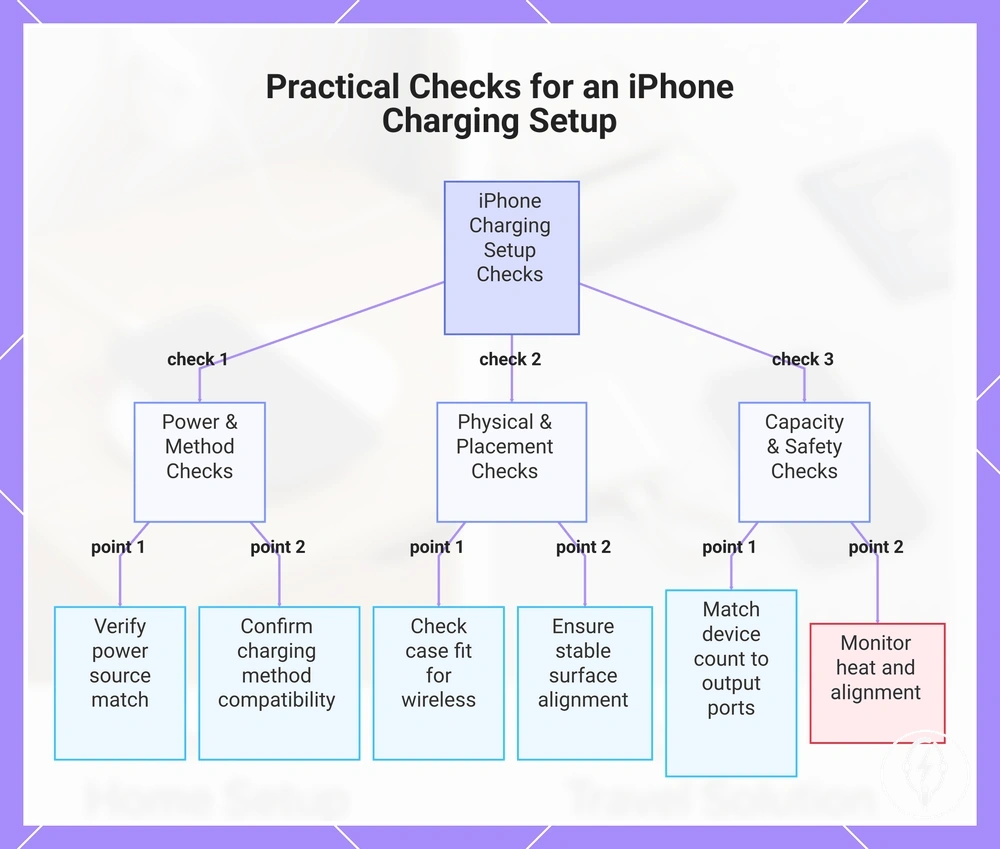
This chart shows the key practical checks to verify before relying on an iPhone charging setup for daily use, grouped by power and method, physical placement, and capacity and safety.
This chart shows the key practical checks to verify before relying on an iPhone charging setup for daily use, grouped by power and method, physical placement, and capacity and safety.