iPhone Charging Accessory Types and Practical Uses
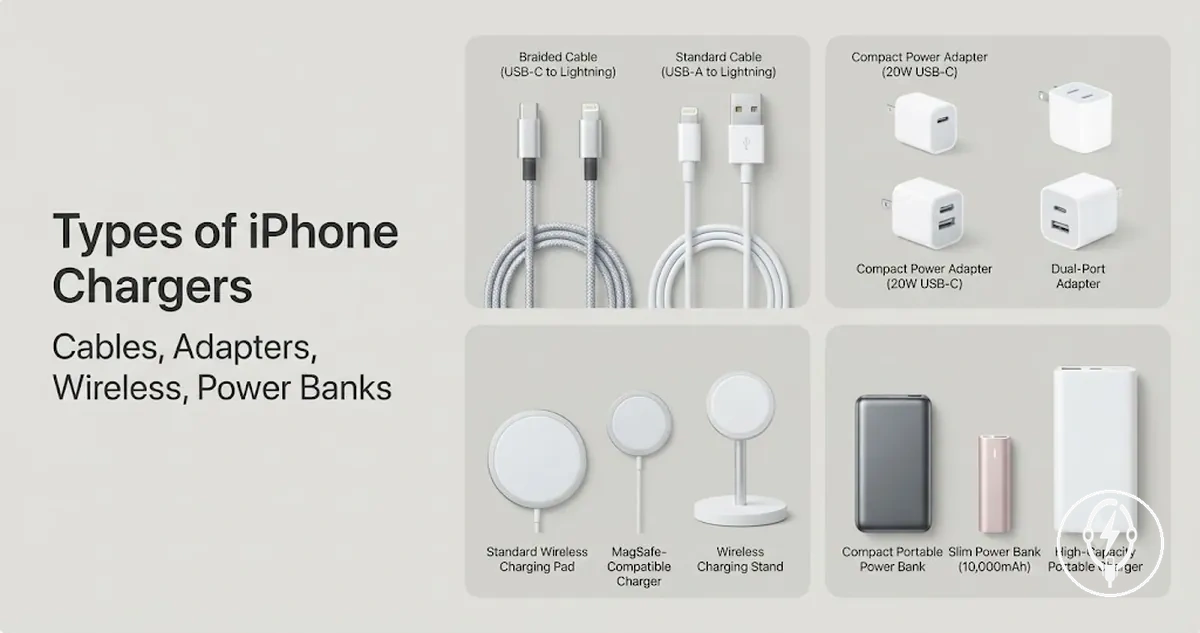
iPhone charging accessory types are the main categories of equipment used to supply, manage, or extend power for an iPhone through wired, wireless, portable, or vehicle-based charging methods. These categories include a cable, wall adapter, wireless charger, charging stand, charging station, car charger, and portable charger or power bank, each serving a different charging use case rather than representing an individual product or merchant offer.
Portable chargers and power banks provide backup power away from an electrical outlet, and car chargers are intended for charging through a vehicle power source.
Choosing the correct charging accessory type matters because each category is designed for a different charging situation, connector fit, portability requirement, or convenience preference. Apple's iPhone documentation identifies cables and compatible power adapters as the primary wired charging components, while wireless charging requires a compatible wireless charger and supported iPhone model. Portable chargers and power banks provide backup power away from an electrical outlet, and car chargers are intended for charging through a vehicle power source. Your charging speed, connector compatibility, and everyday convenience depend on selecting the accessory family that matches both your iPhone and how you use it.
This guide focuses on charging accessory families rather than individual products, brands, or model recommendations.
This guide focuses on charging accessory families rather than individual products, brands, or model recommendations. The following sections explain connector terminology, wired charging, wireless charging, portable charging, and situation-based charging choices so you can understand when each accessory type is the most practical option without assuming identical compatibility or charging performance across every iPhone configuration.
Table of Contents
What iPhone Charging Accessory Types Include
iPhone charging accessory types are categories of accessories that supply or organize power for charging an iPhone. They include cables, power adapters, wireless chargers, charging stations, portable power devices, and vehicle charging accessories, with each category grouped by its charging function rather than by an individual product, brand, or merchant offer.
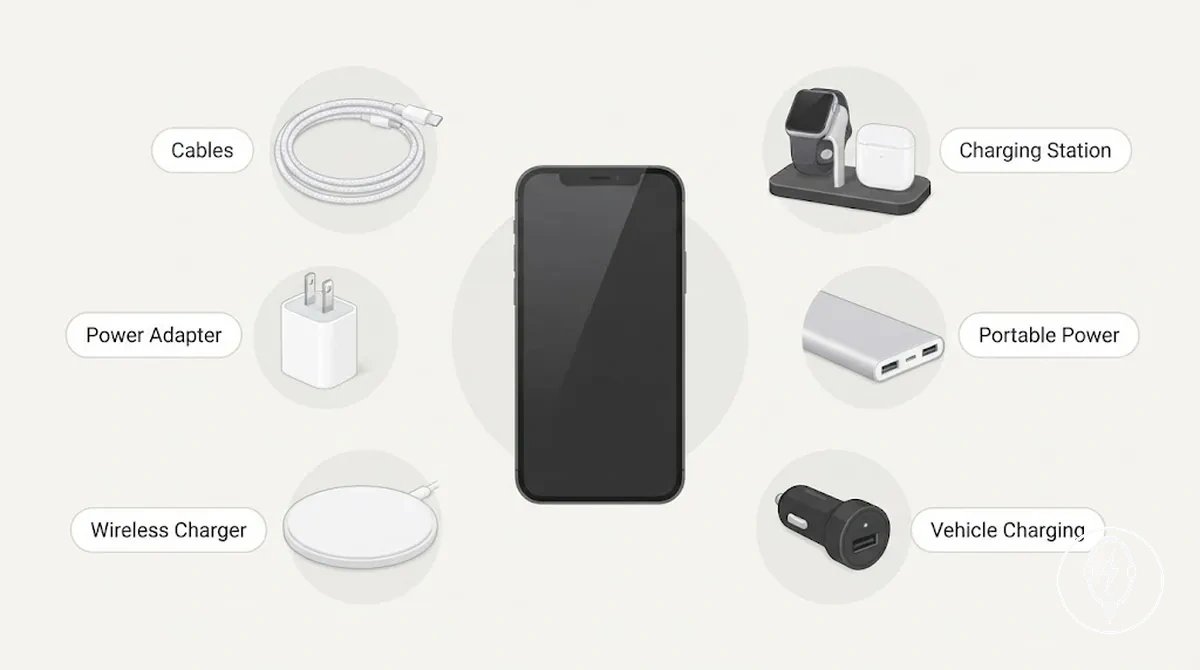
The list below organizes what iPhone charging accessory types include by charging function.
- Cables: Connect an iPhone to a compatible power source for wired charging. Their core function is power delivery through a physical connection.
- Power adapters: Convert AC outlet power into USB power that a charging cable can deliver to an iPhone.
- Wireless chargers: Charge compatible iPhone models through inductive charging without plugging a cable directly into the phone. Apple specifies Qi and MagSafe-compatible charging for supported iPhone models.
- Charging stations: Hold and charge one or multiple compatible devices from a single location using wired, wireless, or combined charging methods.
- Portable power: Battery-powered power banks provide stored electrical energy so an iPhone can be charged when a wall outlet is unavailable, such as during travel or emergencies.
- Vehicle charging accessories: Car chargers deliver charging power from a vehicle's electrical system through a compatible USB connection while driving.
According to Apple, charging accessories are classified by the function they perform—such as connecting power, converting outlet power, enabling wireless charging, providing portable battery power, or supplying power in a vehicle—rather than as individual products. This functional grouping helps distinguish the correct accessory category before comparing compatibility, charging speed, or other specifications on later pages. For example, a power bank belongs to the portable power category because its primary use condition is charging away from mains electricity, while a charging station is intended for charging multiple devices in one place.
These categories define charging functions rather than individual products or merchant listings.
These categories define charging functions rather than individual products or merchant listings. For a broader explanation of how these categories fit together, see the iPhone charging accessories guide.
Connector Terms That Affect Charger Type
Connector terms affect charger type by determining whether an iPhone, cable, adapter, and charging port can physically connect before you compare accessory categories. Connector names such as USB-C, Lightning, and USB-A identify connection interfaces rather than charger types, so they act as a compatibility filter before selecting a charging accessory.
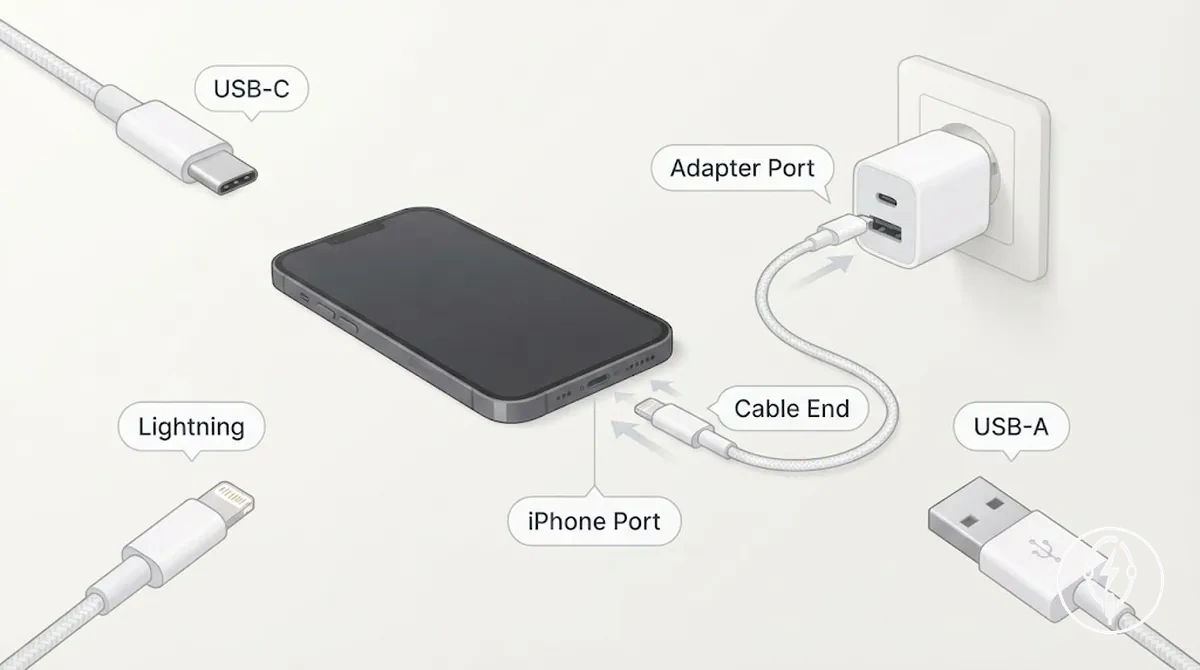
Connector terms affect charger type by organizing cable fit, adapter port pairing, and charging implications. The illustration below labels the iPhone port, cable end, wall adapter port, and common connector names to show how physical fit is evaluated before charger selection.
| Connector term | Where it appears | What it affects | Selection risk |
|---|---|---|---|
| USB-C | Cable end or adapter port | Physical fit with a USB-C port | A USB-C cable cannot connect directly to a Lightning port without an appropriate compatible adapter or matching cable. |
| Lightning | iPhone port or cable end on supported iPhone models | Physical connection between the iPhone and the cable | A Lightning cable will not physically fit an iPhone with a USB-C port. |
| USB-A | Wall adapter, computer, or vehicle USB port | Power-source connection for the cable | A USB-A adapter requires a cable with a USB-A connector on the adapter side. |
| Adapter port | Wall charger or vehicle charger | Cable-to-power-source pairing | If the cable end does not match the adapter port, the charging path cannot be completed directly. |
Apple identifies USB-C and Lightning as distinct connector interfaces used for physical connections on compatible devices and accessories. Connector terms therefore describe the cable end or port involved in the charging path, while charger types describe the accessory itself, such as a wall charger, wireless charger, charging station, or power bank. A connector mismatch changes the physical fit condition first, which can require a compatible adapter or different cable before charging is possible.
Connector names should be treated as a compatibility criterion rather than as charger categories.
Connector names should be treated as a compatibility criterion rather than as charger categories. For a complete explanation of connector designs, cable ends, and their compatibility differences, see iPhone charging cable types.
USB-C, Lightning, and USB-A Naming Differences
USB-C, Lightning, and USB-A are connector names that identify a connector end or an adapter port, not complete charging accessory types. According to Apple, USB-C and Lightning describe physical connector interfaces used on compatible devices and cables, while USB-A identifies the rectangular USB connector commonly found on older adapters and computers. The names therefore refer to connector ends or ports rather than the charger itself.
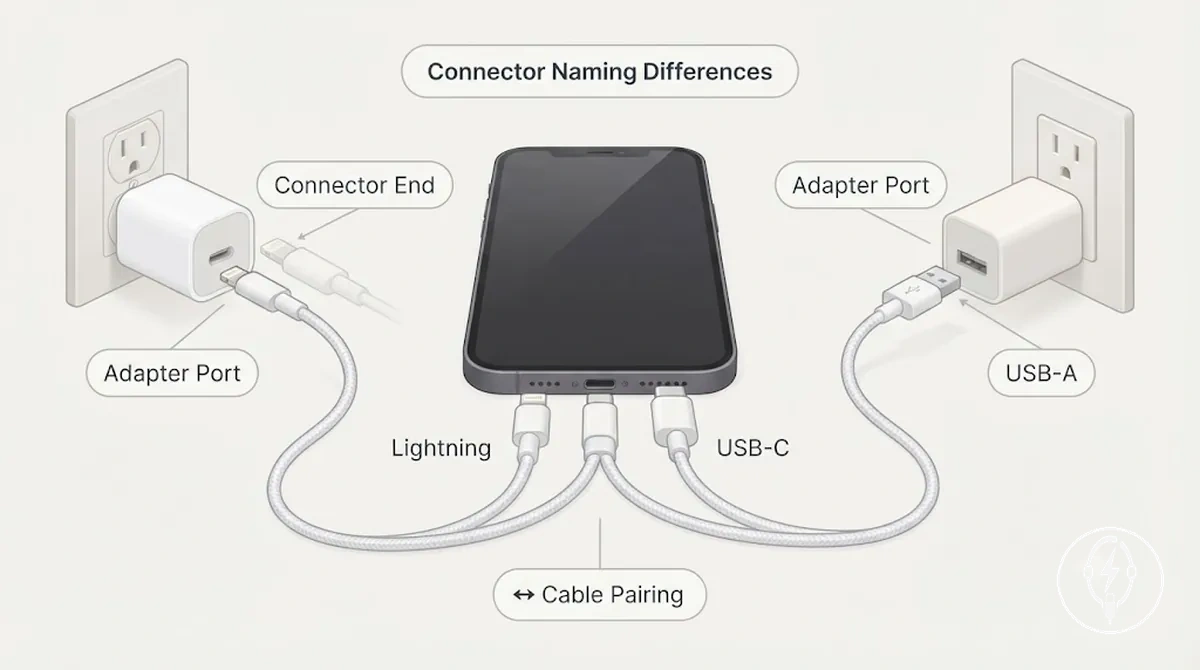
USB-C, Lightning, and USB-A naming differences clarify what plugs into what by showing where each connector label appears on a charging cable or power source.
| Term | Usually names | Practical meaning |
|---|---|---|
| USB-C | Connector end or adapter port | Used for cable pairing with a compatible USB-C port on an adapter or device. |
| Lightning | Connector end for compatible iPhone connections | Identifies the cable end designed to fit a Lightning port on supported devices. |
| USB-A | Adapter port or cable end | Commonly pairs with an older USB power source, computer, or vehicle USB port. |
Connector names identify the physical interface but do not confirm charging speed, power output, or device support. For example, a cable with a USB-C connector on one end and a Lightning connector on the other can pair a compatible USB-C adapter with a compatible Lightning-equipped device, while a USB-A to Lightning cable pairs with a USB-A power source instead. Apple specifies that connector type and accessory capability are separate characteristics, so the connector name alone does not determine charging performance.
Main Wired Charging Accessories for iPhone
Wired charging accessories for iPhone are the cable-and-adapter components that deliver electrical power through a physical connection between a power source and the iPhone. According to Apple, a wired charging setup consists of a compatible charging cable connected to a USB power adapter or another compatible USB power source, making the cable and power adapter the core wired charging accessories.
Main wired charging accessories for iPhone work together as a complete charging path.
Main wired charging accessories for iPhone work together as a complete charging path. A cable transfers power, a wall charger or power adapter supplies power from an electrical outlet, the adapter port accepts the cable, and compatible connector ends complete the physical connection. If any component cannot pair correctly with the next component, the charging path cannot be completed, regardless of the charging accessory category.
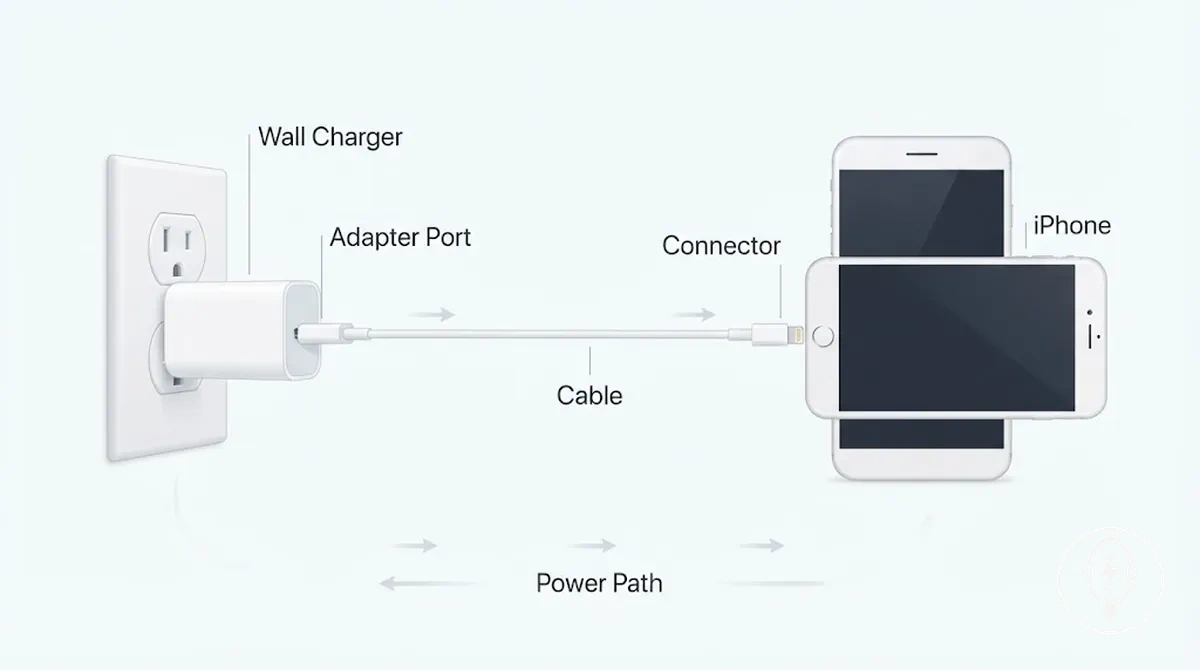
Main wired charging accessories for iPhone are easier to compare when each component's charging role is separated.
| Component | Charging role | Pairing needed | Decision note |
|---|---|---|---|
| Cable | Transfers electrical power to the iPhone | Compatible connector at both ends | Choose a cable that matches both the iPhone and the power adapter connection. |
| Wall charger | Converts mains electricity into USB charging power | Compatible adapter port and cable | Suitable when charging from a wall outlet through a physical connection. |
| Adapter port | Provides the connection point for the cable | Matching cable connector | The cable connector must match the available adapter port. |
| Connector | Completes the physical charging connection | Compatible device and adapter interfaces | A mismatched connector prevents wired charging until the correct pairing is used. |
Wired charging accessories are commonly selected when a predictable physical connection or greater speed potential is preferred, although charging performance depends on the combined capabilities of the cable, power adapter, and iPhone. For example, Apple states that compatible iPhone models can charge through a USB power adapter or another compatible USB power source, so replacing only one component does not increase charging performance unless the entire charging path supports the same capability. If you want to compare the conditions that affect higher charging performance, see fast charging accessories.
Charging Cables for Connector-Dependent Charging
Charging cables are the physical link between an iPhone and a compatible power source during wired charging. According to Apple, a charging cable must connect a compatible iPhone port to a compatible USB power adapter or another USB power source, making connector ends the key attribute that determines physical fit for connector-dependent charging.
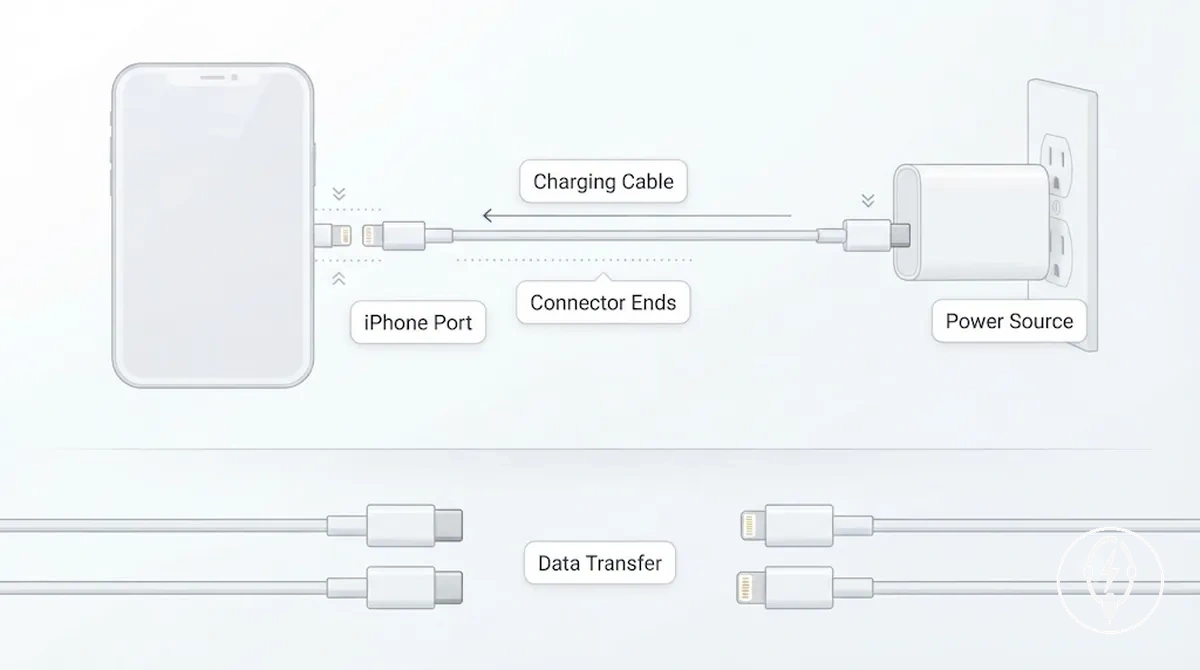
Charging cables for connector-dependent charging work only when both connector ends match the iPhone port and the power-source connection. For example, a USB-C to USB-C cable fits an iPhone with a USB-C port and a USB-C power adapter, while a USB-C to Lightning cable fits a Lightning-equipped iPhone and a USB-C adapter; Apple specifies that connector compatibility is required before power can be delivered. The same cable pairing may also support data transfer when both connected devices and the cable specification support data communication, but the data-use implication depends on the cable design and the capabilities of the connected hardware rather than the connector shape alone. This distinction keeps cable fit separate from charging speed, which is determined by the combined capabilities of the charging cable, power source, and compatible iPhone.
Wall Chargers and Plug-in Power Adapters
Wall chargers and plug-in power adapters are outlet-based power sources that convert mains electricity into USB power for iPhone charging. According to Apple, a compatible power adapter must pair with a charging cable that matches the adapter's USB port and the iPhone's connector, making port type and cable compatibility the primary adapter-side selection criteria.
Wall chargers and plug-in power adapters are outlet-based power sources that convert mains electricity into USB power for iPhone charging.
Wall chargers and plug-in power adapters differ by USB port type and available wattage range, but charging suitability depends on the complete charging path rather than the adapter alone. Apple specifies that compatible iPhone models can charge from USB power adapters or other USB power sources, while the charging capability is determined by the combined support of the adapter, cable, and iPhone. A USB-C power adapter paired with a USB-C cable and a compatible iPhone, for example, can support USB-C charging, whereas a USB-A adapter requires a cable with a USB-A connector on the adapter side.
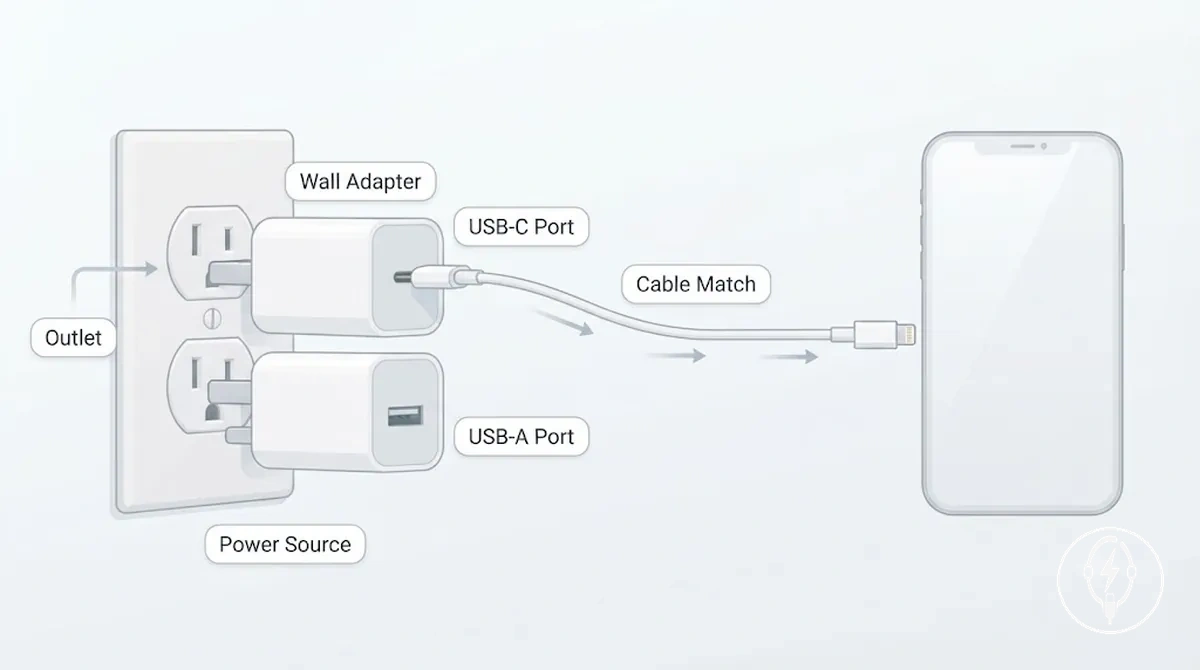
Wall chargers and plug-in power adapters are easiest to compare by checking these adapter-side criteria.
- Port type: Select a USB-C or USB-A adapter port that matches the connector on the charging cable.
- Cable requirement: The adapter port and cable connector must physically fit before electrical power can be delivered.
- Wattage range: Choose an adapter with an output appropriate for the connected iPhone and cable. A higher-rated adapter does not automatically increase charging speed if the iPhone or cable supports a lower charging capability.
- Physical plug: The wall plug must match the electrical outlet standard used in the country or region where the adapter will be used.
- Use situation: Single-port adapters suit charging one device, while multi-port adapters can power multiple compatible devices without changing the cable-pairing requirements.
Wireless Charging Accessories for iPhone
Wireless charging accessories for iPhone are chargers that transfer power to compatible iPhones without plugging a charging cable directly into the phone. According to Apple, wireless charging requires a compatible iPhone, a compatible wireless charger, and correct alignment between the device and the charging surface. Wireless charging therefore depends on compatibility and alignment rather than on the charger format alone.
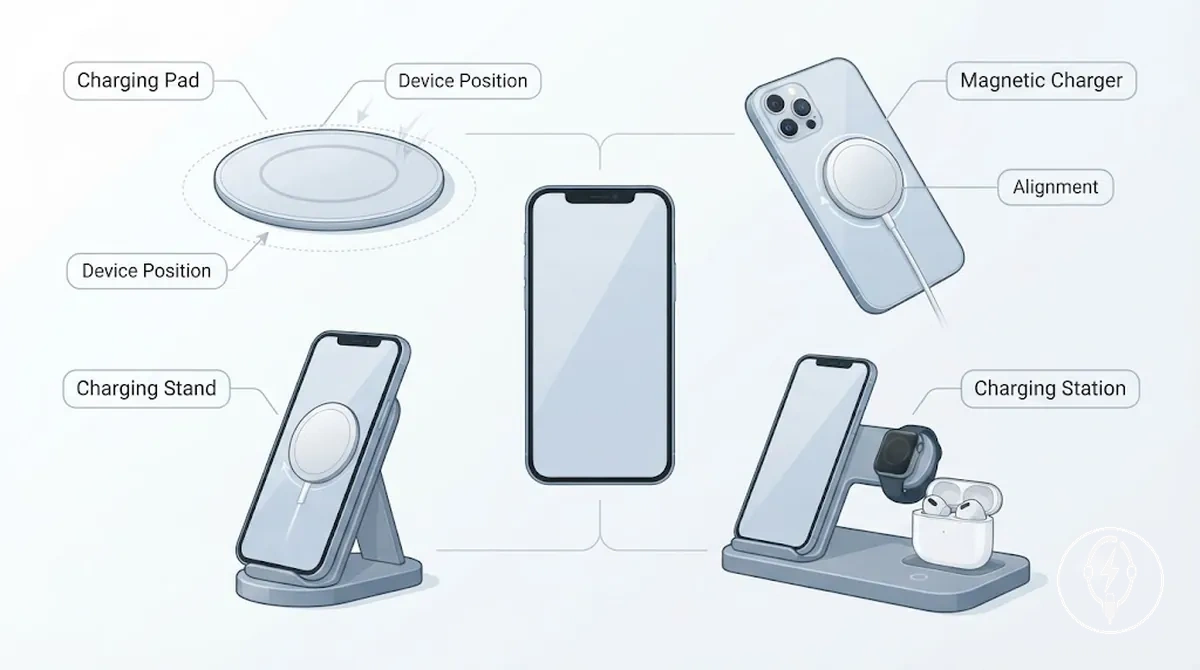
Wireless charging accessories for iPhone differ by alignment method, device position, and charging setup. A charging pad is designed for flat placement, so the phone must be positioned correctly on the charging surface. A magnetic charger helps align supported iPhone models through magnetic attachment, while a charging stand keeps the phone upright for easier viewing during charging. A charging station organizes multiple compatible devices, such as an iPhone, Apple Watch, or AirPods, into separate charging positions without changing the alignment requirements for each device.
| Wireless type | Alignment method | Position | Best-fit use case |
|---|---|---|---|
| Charging pad | Manual placement on the charging surface | Flat | Simple everyday charging |
| Magnetic charger | Magnetic alignment on supported iPhone models | Centered against the charger | Improved placement stability |
| Charging stand | Fixed support with correct positioning | Upright | Charging while viewing notifications or video calls |
| Charging station | Separate aligned charging locations | Multiple device positions | Organizing and charging multiple compatible devices together |
Wireless charging accessories prioritize cable-free convenience and organized device placement, while wired charging remains a separate decision dimension with different performance characteristics. According to Apple, wireless charging behavior depends on the supported iPhone model, charger compatibility, protective case characteristics, and device alignment, so identical charging behavior should not be assumed across all iPhones.
For more detailed guidance on charger types, compatibility conditions, and setup recommendations, see wireless charging accessories .
For more detailed guidance on charger types, compatibility conditions, and setup recommendations, see wireless charging accessories.
Charging Pads and Magnetic Wireless Chargers
Charging pads and magnetic wireless chargers are two wireless charging formats for a compatible iPhone that differ by device positioning rather than charging purpose. A charging pad requires flat placement so the iPhone's charging coil aligns with the charging surface, while a magnetic wireless charger uses magnetic alignment on supported iPhone models to help maintain the intended charging position. Apple specifies that wireless charging requires both a compatible iPhone and correct charger alignment for charging to begin. :contentReference[oaicite:0]{index=0}
This distinction improves everyday convenience without implying faster charging or universal compatibility.
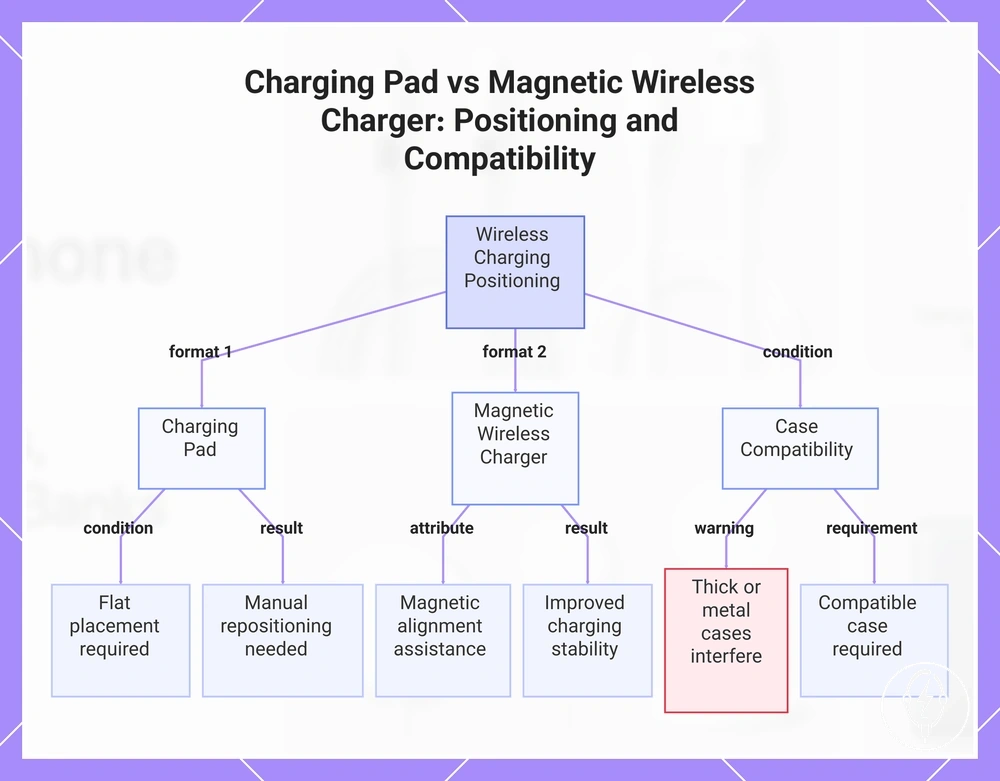
Charging pads rely on manual placement, whereas magnetic wireless chargers provide alignment assistance that can improve charging stability if the iPhone remains correctly attached. Case fit remains a compatibility condition because thick, metal, or incompatible cases can reduce magnetic attachment or interfere with wireless power transfer. For example, a compatible iPhone placed on a magnetic wireless charger is more likely to remain in its intended charging position during normal desk use than the same device placed slightly off-center on a charging pad, where manual repositioning may be needed to restore charging. This distinction improves everyday convenience without implying faster charging or universal compatibility. :contentReference[oaicite:1]{index=1}
This chart compares charging pads and magnetic wireless chargers, highlighting differences in positioning, alignment, and case compatibility.
This chart compares charging pads and magnetic wireless chargers, highlighting differences in positioning, alignment, and case compatibility.
Charging Stands and Multi-Device Stations
Charging stands and multi-device stations are charging organizers that hold compatible devices in fixed charging positions while power is delivered. A charging stand is designed to support one compatible device in an upright charging position, whereas a multi-device station provides dedicated charging positions for two or more compatible devices. According to Apple, each device must still meet the applicable charging compatibility and alignment requirements, so device arrangement and charging position are the primary differences between these organizer formats. :contentReference[oaicite:0]{index=0}
Charging stands and multi-device stations are charging organizers that hold compatible devices in fixed charging positions while power is delivered.
Charging stands and multi-device stations are easier to compare by the number of devices they organize, where they are placed, and the resulting organization.
| Format | Device arrangement | Placement condition | Organization outcome |
|---|---|---|---|
| Charging stand | One compatible device in an upright position | Desk or bedside where screen visibility is useful | Keeps a single device accessible while reducing cable clutter |
| Multi-device station | Dedicated charging positions for two or more compatible devices | Desk, bedside, or shared use where multiple devices are charged together | Improves organization by assigning each compatible device a fixed charging location |
A charging stand is suitable when one compatible iPhone benefits from an upright charging position on a desk or bedside table, allowing notifications or the screen to remain visible during charging. A multi-device station is more appropriate for shared use or for organizing two or more compatible devices, such as an iPhone, Apple Watch, and AirPods, because each device has its own charging position instead of sharing one charging surface. This distinction improves cable management and device organization without implying any increase in charging speed or broader compatibility. :contentReference[oaicite:1]{index=1}
Portable and in-vehicle charging accessories
Portable and in-vehicle charging accessories are charging types designed to power a compatible iPhone away from a wall outlet by using either a rechargeable battery or a vehicle power outlet. A power bank or portable charger stores electrical energy for backup power, while a car charger draws power from a compatible vehicle outlet for in-vehicle charging. Their shared attribute is mobility, but they differ by power source and charging environment. :contentReference[oaicite:0]{index=0}
Their shared attribute is mobility, but they differ by power source and charging environment.
Portable and in-vehicle charging accessories differ by power source and charging environment.
| Accessory type | Power source | Main condition | Mobility outcome |
|---|---|---|---|
| Power bank / portable charger | Rechargeable internal battery | Available backup power depends on the battery capacity stored before use | Provides charging away from a wall outlet during travel or power interruptions |
| Car charger | Vehicle power outlet | Requires a compatible vehicle outlet and matching charging cable | Supports in-vehicle charging while the vehicle supplies electrical power |
Power banks and portable chargers are intended for backup power because they contain rechargeable batteries rather than relying on an external outlet while charging the iPhone. Battery capacity is commonly specified by manufacturers in milliamp-hours (mAh) or watt-hours (Wh), but the number of complete iPhone charges cannot be stated universally because it depends on both the power bank capacity and the battery capacity of the connected iPhone. This capacity-dependent relationship makes stored energy, rather than a fixed charge count, the appropriate comparison criterion. :contentReference[oaicite:1]{index=1}
For guidance on selecting accessories for home, travel, work, or vehicle use, see charging setup by situation .
Car chargers obtain electrical power from a vehicle outlet instead of an internal battery, so the charging outcome depends on the available outlet, compatible charger, and correct cable pairing. Vehicle outlet design and USB port configuration differ by charger model, making compatibility a condition rather than a universal property. For guidance on selecting accessories for home, travel, work, or vehicle use, see charging setup by situation. :contentReference[oaicite:2]{index=2}
Power banks and portable chargers
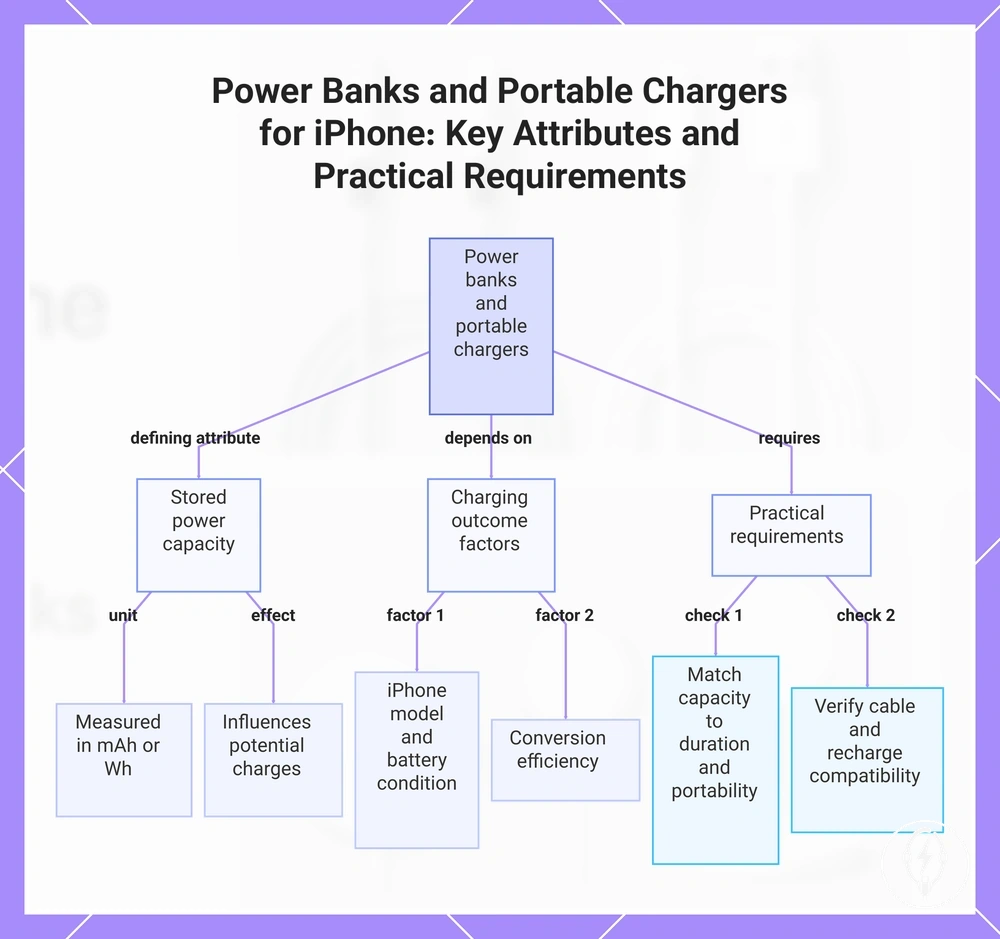
Power banks and portable chargers are battery-based accessories that store electrical energy for later iPhone charging when a wall outlet is unavailable. Their defining attribute is stored power, which manufacturers typically express as battery capacity in milliamp-hours (mAh) or watt-hours (Wh). Because usable charging output depends on the power bank capacity, the connected iPhone model, conversion efficiency, and battery condition, manufacturers do not specify a universal number of full iPhone charges. :contentReference[oaicite:0]{index=0}
Portability is therefore best evaluated by balancing battery capacity with the size and weight that can be carried comfortably.
Power banks and portable chargers require compatible cable needs to connect to an iPhone and have their own recharge requirement before stored power can be used again. Capacity influences the potential charging outcome, but it should not be interpreted as an exact charge count because different iPhone battery capacities and energy-conversion losses affect the result. For example, a hypothetical 20,000 mAh power bank generally stores more usable energy than a 10,000 mAh model under comparable conditions, but neither capacity guarantees a specific number of complete iPhone charges because the outcome remains dependent on device model and charging conditions. Portability is therefore best evaluated by balancing battery capacity with the size and weight that can be carried comfortably. :contentReference[oaicite:1]{index=1}
Before choosing a power bank or portable charger, verify these practical requirements.
Before choosing a power bank or portable charger, verify these practical requirements.
- Capacity condition: Match the battery capacity with your expected charging duration instead of relying on advertised full-charge claims.
- Connector or cable need: Confirm that the charging cable is compatible with both the power bank output and the iPhone connection.
- Size and weight: Higher-capacity portable batteries generally increase carrying weight and physical size.
- Recharge method: Check how the power bank is recharged and whether the required cable and charging adapter are available.
This chart explains what power banks are, their defining capacity attribute, factors affecting charging outcome, and the practical requirements to consider before choosing one.
Car chargers for outlet-free charging
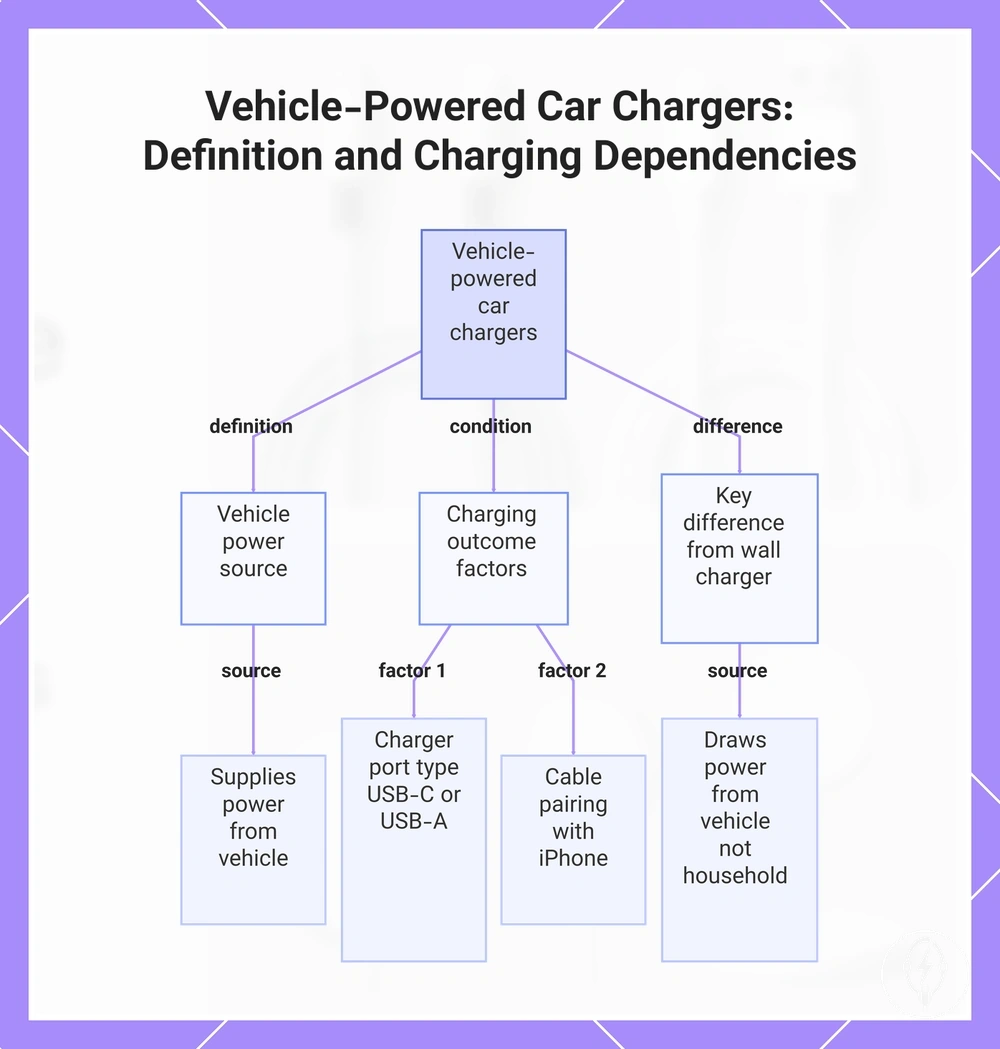
Car chargers are vehicle-power accessories that convert an in-car outlet or compatible vehicle port into a charging source for an iPhone. Their defining attribute is the vehicle power source, which supplies electrical power from the vehicle rather than from household mains electricity. The charging outcome depends on the available vehicle power source, the charger's port type, and correct cable pairing with the iPhone. :contentReference[oaicite:0]{index=0}
The charging outcome depends on the available vehicle power source, the charger's port type , and correct cable pairing with the iPhone.
A car charger supports in-vehicle charging only when the charger matches the available vehicle outlet or port and the charging cable matches both the charger output and the iPhone connector. Unlike a wall charger, which receives power from a household electrical outlet, a car charger draws power from the vehicle while the vehicle is providing electrical power. For example, a USB-C car charger paired with a USB-C charging cable can charge a compatible USB-C iPhone, while a USB-A car charger requires a cable with a USB-A connector on the charger side; passenger-use suitability therefore depends on the available vehicle port, correct cable pairing, and the charging needs during travel rather than on a universal vehicle standard. :contentReference[oaicite:1]{index=1}
This chart shows the defining attribute of vehicle-powered car chargers, the key factors that determine charging outcome, and how they differ from wall chargers.
This chart shows the defining attribute of vehicle-powered car chargers, the key factors that determine charging outcome, and how they differ from wall chargers.
How accessory type changes charging speed, convenience, and portability
Accessory type changes the practical trade-off between charging speed, convenience, portability, organization, and fit because each charging category uses different hardware, compatibility requirements, and operating conditions. According to Apple, charging performance is determined by the combined capabilities of the iPhone, charging cable, power adapter, or compatible wireless charger rather than by any accessory category alone. The decision outcome therefore depends on matching the accessory type to the intended use context instead of assuming one option is universally superior. :contentReference[oaicite:0]{index=0}
The comparison assumes compatible devices and accessories because charging outcomes depend on compatibility, charging configuration, and use context.
The comparison below summarizes how each accessory type changes the practical buying criteria across speed potential, convenience, portability, and everyday use. The comparison assumes compatible devices and accessories because charging outcomes depend on compatibility, charging configuration, and use context. :contentReference[oaicite:1]{index=1}
| Accessory type | Speed potential | Convenience factor | Portability | Best-fit situation |
|---|---|---|---|---|
| Charging cable | Highest potential when paired with a compatible power adapter and supported iPhone | Requires a physical cable connection | Easy to carry in a pocket or bag | Daily wired charging at home, work, or while travelling |
| Wall charger | Depends on the adapter output and compatible cable | Requires access to a mains power outlet | Portable between locations but outlet-dependent | Home, office, and hotel charging |
| Wireless charger | Depends on charger compatibility and correct device alignment | Reduces cable handling because the cable connects to the charger instead of the iPhone | Typically used at fixed locations | Desk and bedside charging |
| Charging stand or station | Depends on the integrated charging technology | Improves organization through dedicated charging positions | Less portable because of its larger footprint | Permanent desk or multi-device setup |
| Power bank | Depends on battery output, cable compatibility, and iPhone support | Provides charging without a wall outlet | Designed for mobile use | Travel and backup power |
| Car charger | Depends on the vehicle power source and charger capability | Charges while the vehicle supplies electrical power | Intended for in-vehicle use | Driving and passenger charging |
The strongest trade-off patterns emerge when charging priorities change. If charging speed is the primary goal, a compatible wired charging setup generally provides the greatest charging potential because both the cable and power adapter directly influence charging capability. If convenience and organization are more important, a wireless charger or charging station reduces cable handling but requires compatible positioning. If portability is the priority, a power bank or car charger provides charging away from a household outlet under the conditions supported by the connected equipment. :contentReference[oaicite:2]{index=2}
The strongest trade-off patterns emerge when charging priorities change.
At home, a wall charger or charging station suits a permanent charging location, while a wireless stand keeps an iPhone visible on a desk during charging. During travel, a power bank supports charging where no wall outlet is available, and a car charger supports charging while a compatible vehicle supplies power. These scenarios show that the appropriate accessory type depends on the intended use context, compatibility, and desired balance between charging speed, convenience, portability, organization, and fit rather than a universal ranking. :contentReference[oaicite:3]{index=3}
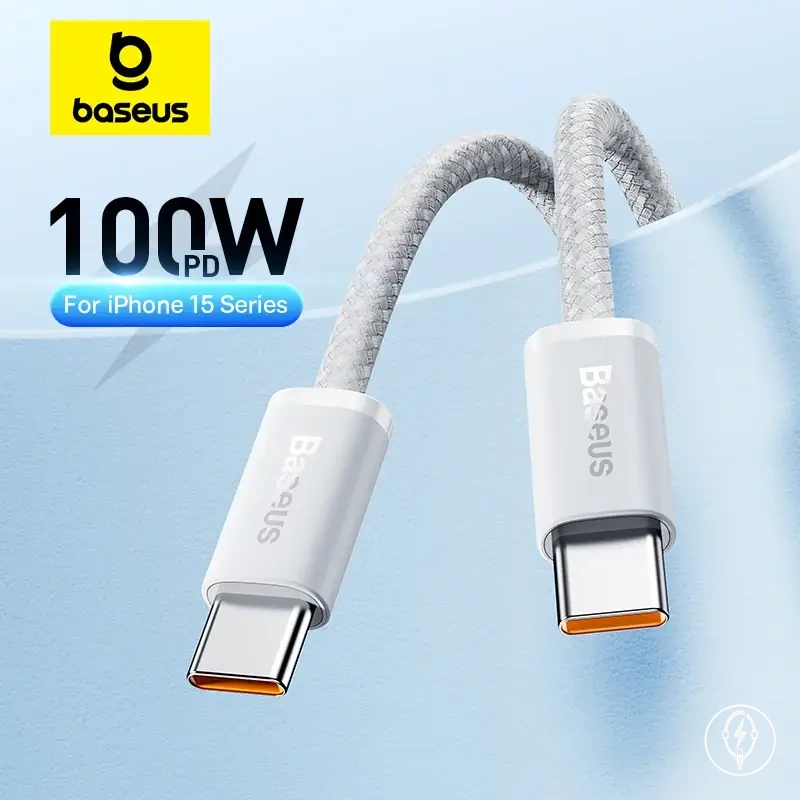
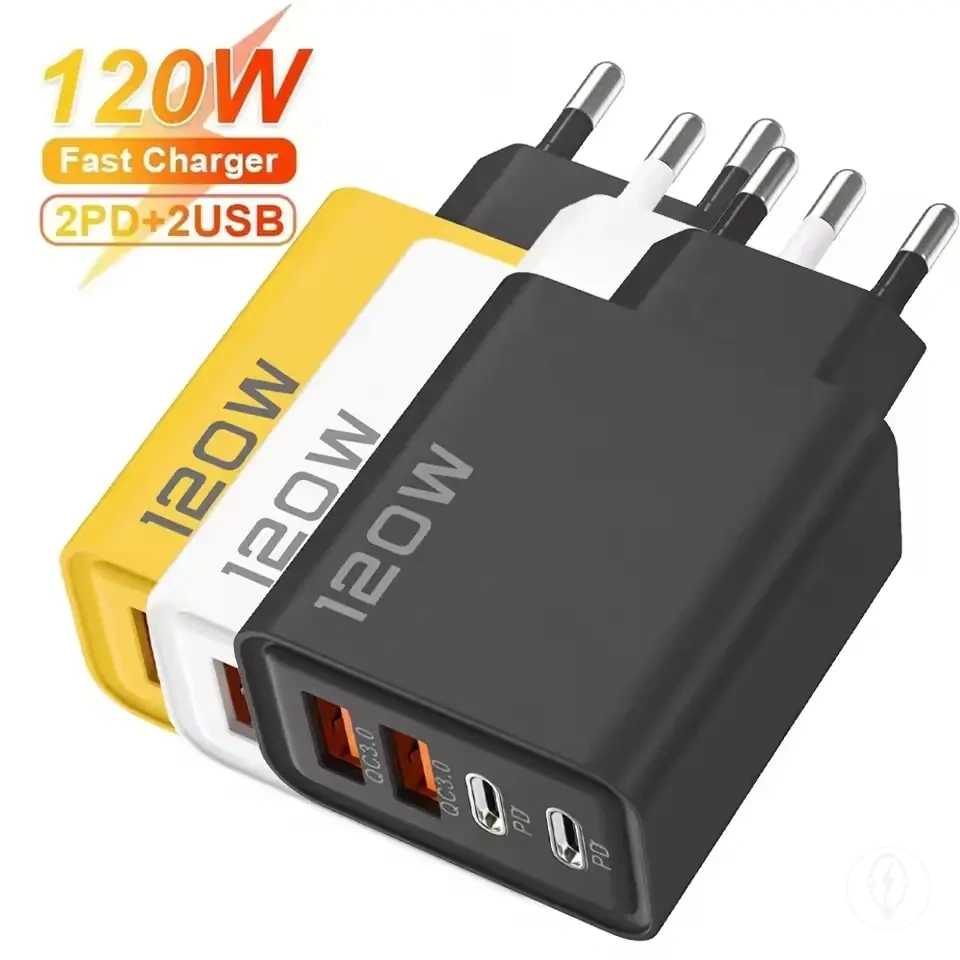
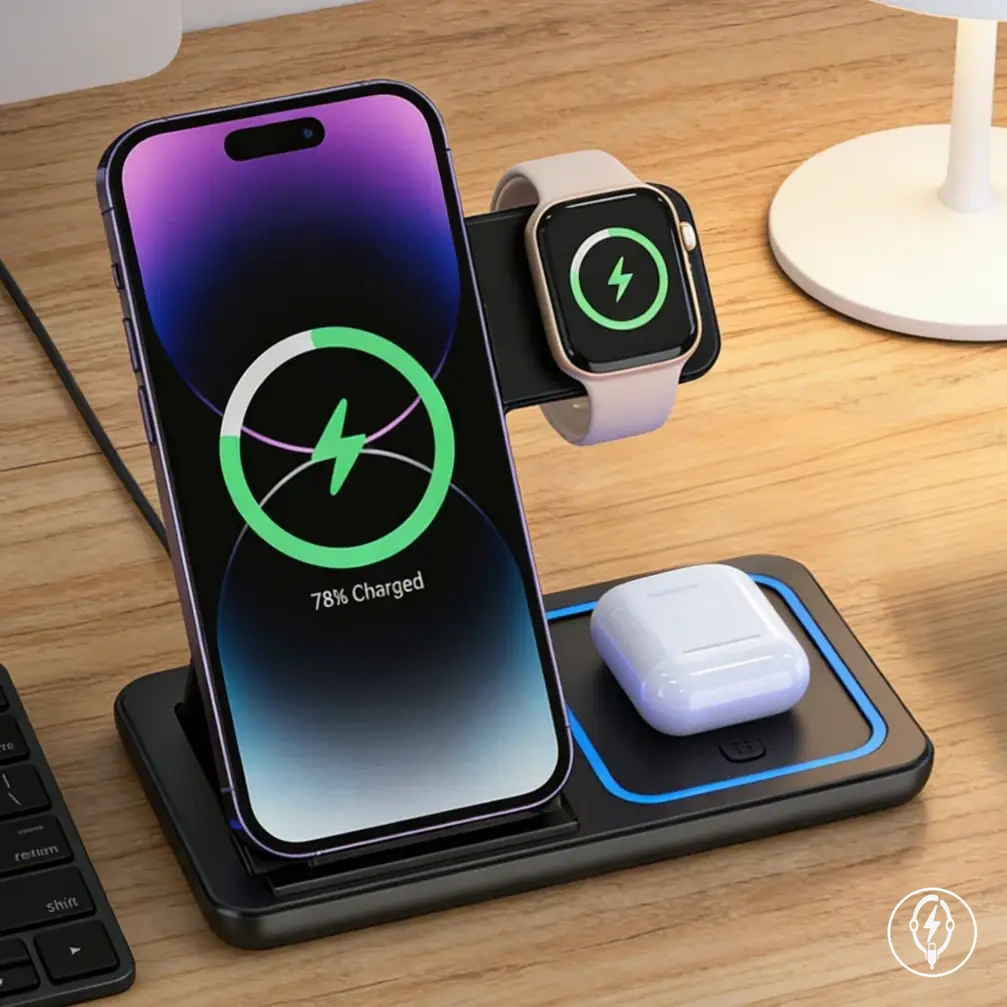
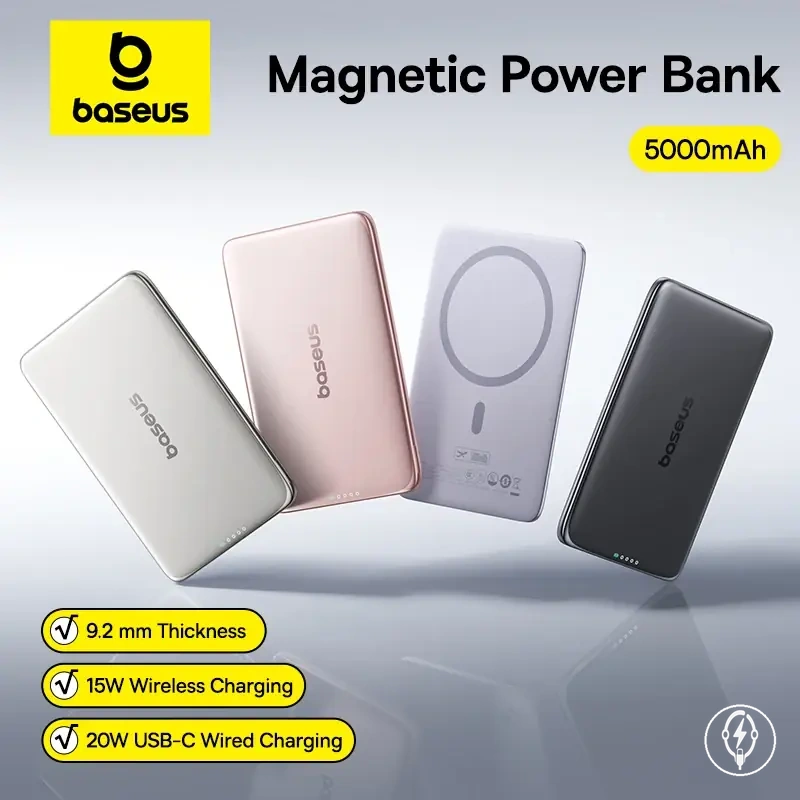
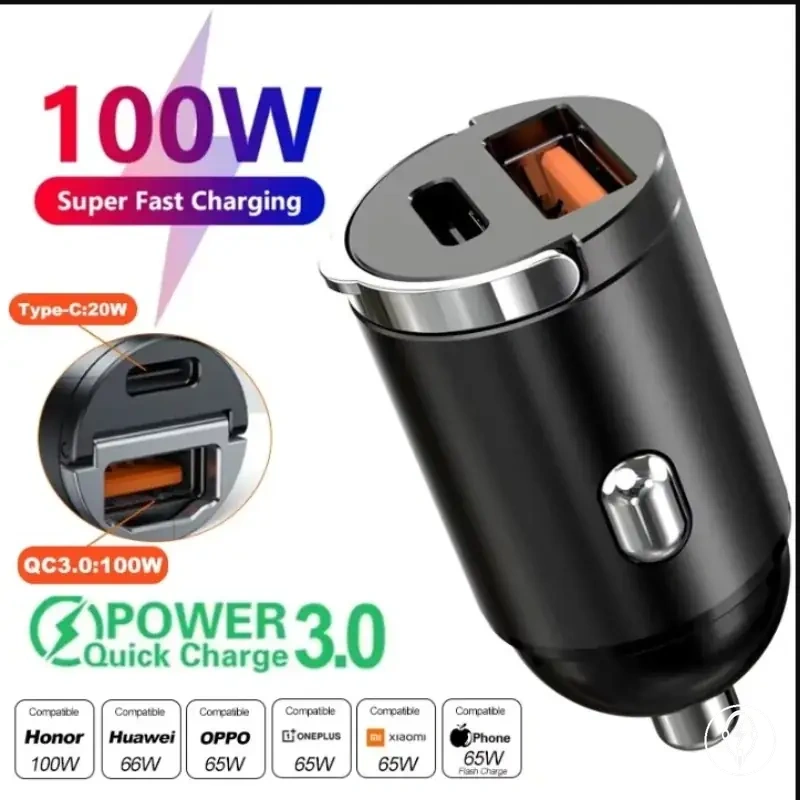
Here are product examples that may make comparison easier.
Here are product examples that may make comparison easier. Before buying, always review the compatibility criteria, essential features, and product details.
Choosing an accessory type by charging situation
Choosing an accessory type by charging situation means selecting the accessory family that matches the charging location, required charging behavior, device count, and portability needs. According to Apple, successful charging requires a compatible iPhone, charging method, cable or wireless charger, and power source, so the appropriate accessory type is determined by the charging situation rather than by a universal recommendation. A user's charging situation therefore narrows the most suitable accessory type. :contentReference[oaicite:0]{index=0}
A user's charging situation therefore narrows the most suitable accessory type.
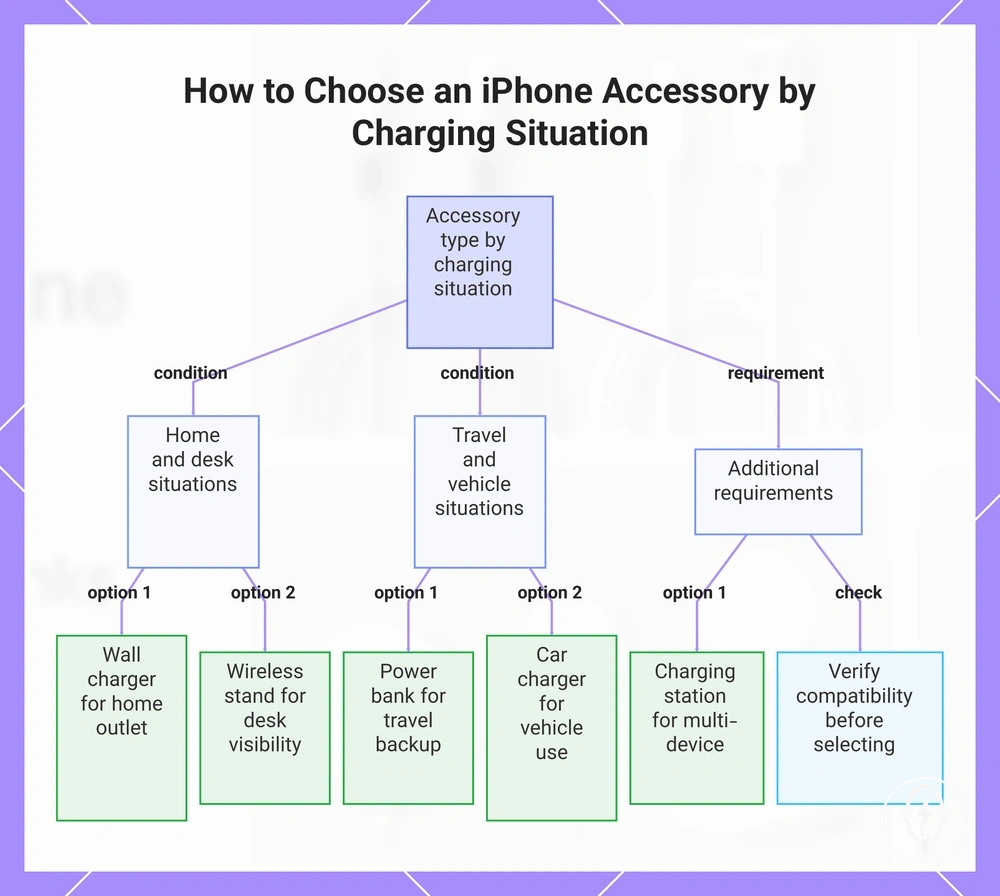
An at-home routine is typically suited to a wall charger because a fixed mains outlet is available for regular charging. If desk visibility is important, a wireless charging stand can keep a compatible iPhone upright while remaining accessible for notifications, video calls, or StandBy-compatible viewing, provided the iPhone and charger support wireless charging. For multi-device charging, a charging station organizes compatible devices into dedicated charging positions, reducing the need for separate chargers in one location. :contentReference[oaicite:1]{index=1}
An at-home routine is typically suited to a wall charger because a fixed mains outlet is available for regular charging.
For travel backup, a power bank or portable charger is the appropriate accessory type because stored battery power allows charging when no wall outlet is available. For car use, a car charger is appropriate only when the vehicle provides a compatible power outlet or USB connection and the charging cable matches both the charger and the iPhone. If extended travel limits access to fixed power, prioritize sufficient battery capacity, correct cable pairing, and portability before selecting a portable charging accessory. :contentReference[oaicite:2]{index=2}
The mini-checklist below helps match the charging situation to the most suitable accessory type.
The mini-checklist below helps match the charging situation to the most suitable accessory type. Apply each decision only after confirming compatibility with the iPhone, charging cable, wireless charging method, or vehicle connection.
- Home outlet use: Choose a wall charger for routine charging from a mains power outlet.
- Desk or bedside visibility: Choose a wireless charging stand when upright screen access during charging is important.
- Travel backup: Choose a power bank or portable charger for charging away from fixed electrical outlets.
- Vehicle charging: Choose a car charger only if the vehicle outlet, charger port, and charging cable are compatible.
- Multi-device organization: Choose a charging station when regularly charging multiple compatible devices in one location.
- Compatibility confirmation: Verify connector type, charging method, and supported iPhone compatibility before selecting any accessory.
Every charging situation involves a trade-off between charging location, portability, organization, and compatibility rather than a universally correct accessory type. A power bank requires stored battery power before use, a wall charger requires access to mains electricity, and a car charger requires a compatible vehicle power source, making each accessory appropriate only under its intended conditions. Selecting an accessory according to the charging situation and confirming compatibility reduces unnecessary compromises while improving everyday charging convenience. :contentReference[oaicite:3]{index=3}
Before buying, always review the compatibility criteria, essential features, and product details.
Here are product examples that may make comparison easier. Before buying, always review the compatibility criteria, essential features, and product details.
This chart shows the main charging situations and the recommended accessory type for each, plus the essential compatibility check.
Compatibility checks before comparing charger types
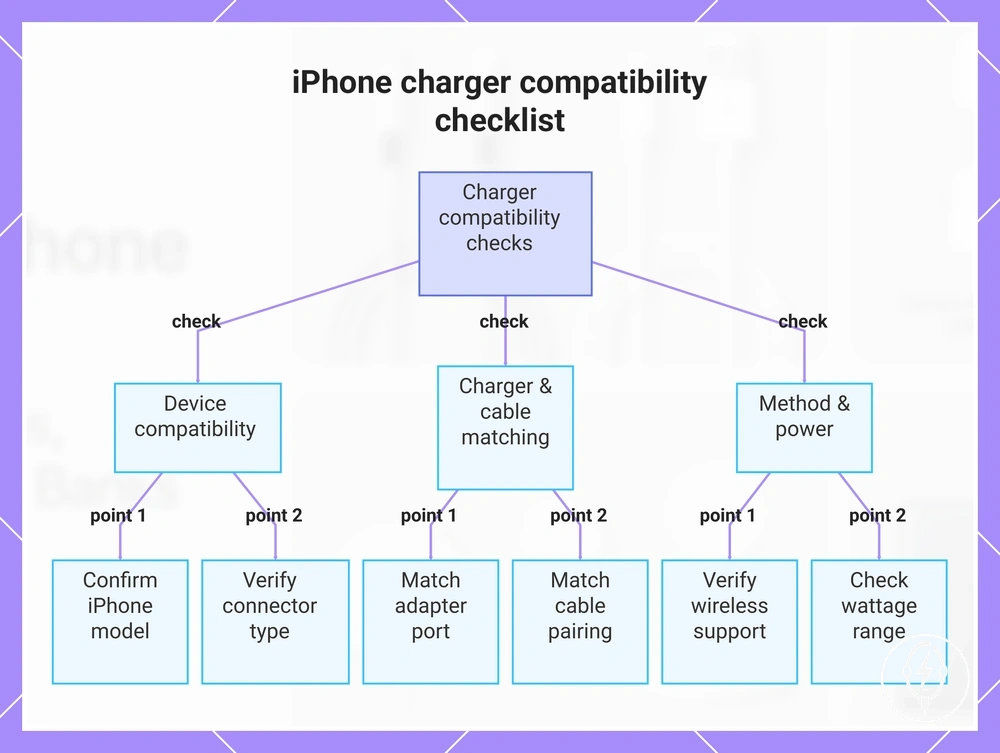
Compatibility checks should be completed before comparing charger types because the correct choice depends on the iPhone model, connector, adapter port, cable pairing, wireless support, wattage range, and safety condition rather than on the charger category alone. According to Apple, charging requires compatible hardware throughout the charging path, so completing these compatibility checks before comparison reduces fit and usability mistakes while avoiding incorrect expectations about charging speed. :contentReference[oaicite:0]{index=0}
Start by confirming the iPhone model because it determines the supported charging connector and charging methods.
Start by confirming the iPhone model because it determines the supported charging connector and charging methods. Then verify that the connector, adapter port, and cable pairing match each other, since an incompatible connector or cable prevents wired charging regardless of charger type. For example, a USB-C power adapter requires a cable with a USB-C connector on the adapter side, while the phone-side connector must match the supported connector used by the selected iPhone model. :contentReference[oaicite:1]{index=1}
Next, verify wireless support , an appropriate wattage range , and the accessory's safety condition .
Next, verify wireless support, an appropriate wattage range, and the accessory's safety condition. Wireless charging is available only on supported iPhone models and requires correct alignment with a compatible wireless charger, while Apple does not specify one universal wattage requirement because charging capability depends on the combined support of the iPhone, charger, and charging cable. Chargers and cables should also be free from visible damage and used according to the manufacturer's instructions before normal operation. :contentReference[oaicite:2]{index=2}
The checklist below provides a final review before comparing charger types.
The checklist below provides a final review before comparing charger types. Completing these compatibility checks first helps reduce fit, speed, and usability mistakes.
- iPhone model: Confirm the selected model supports the intended charging method.
- Connector: Verify that the iPhone connector matches the charging cable.
- Adapter port: Confirm the charger port matches the cable connector.
- Cable pairing: Check that one cable end matches the charger and the other matches the iPhone.
- Wireless support: Verify that both the iPhone and the charger support wireless charging if a cable-free setup is planned.
- Wattage range: Choose a charger whose supported output is appropriate for the compatible iPhone and cable instead of assuming one output suits every model.
- Safety condition: Inspect chargers and cables for visible wear or damage before use and follow the manufacturer's safety guidance.
If these compatibility checks are complete but charging problems still occur, the issue extends beyond charger-type selection into diagnosis. For the next step, see when accessories stop working. :contentReference[oaicite:3]{index=3}
For the next step, see when accessories stop working .
This chart shows the essential compatibility checks to perform before comparing charger types, covering device, charger, and method checks to avoid fit and speed mistakes.