iPhone Charging Cables and Connector Compatibility
iPhone charging cables and connector compatibility are determined by matching three components: the iPhone port, the cable ends, and the charging source. According to Apple, iPhone models with a USB-C port require a USB-C connector on the phone end, while iPhone models with a Lightning port require a Lightning connector. Compatibility is established only when all three connection points match the hardware being used.
Connector compatibility is separate from charging performance.
Connector compatibility is separate from charging performance. Apple specifies that the cable's source-side connector must also match the available charger or computer port, such as USB-C or USB-A. Even when the iPhone-side connector fits correctly, an incompatible source-side connector prevents a direct physical connection without an appropriate adapter.
It provides the macro compatibility decision before later sections discuss charging capability or cable selection.
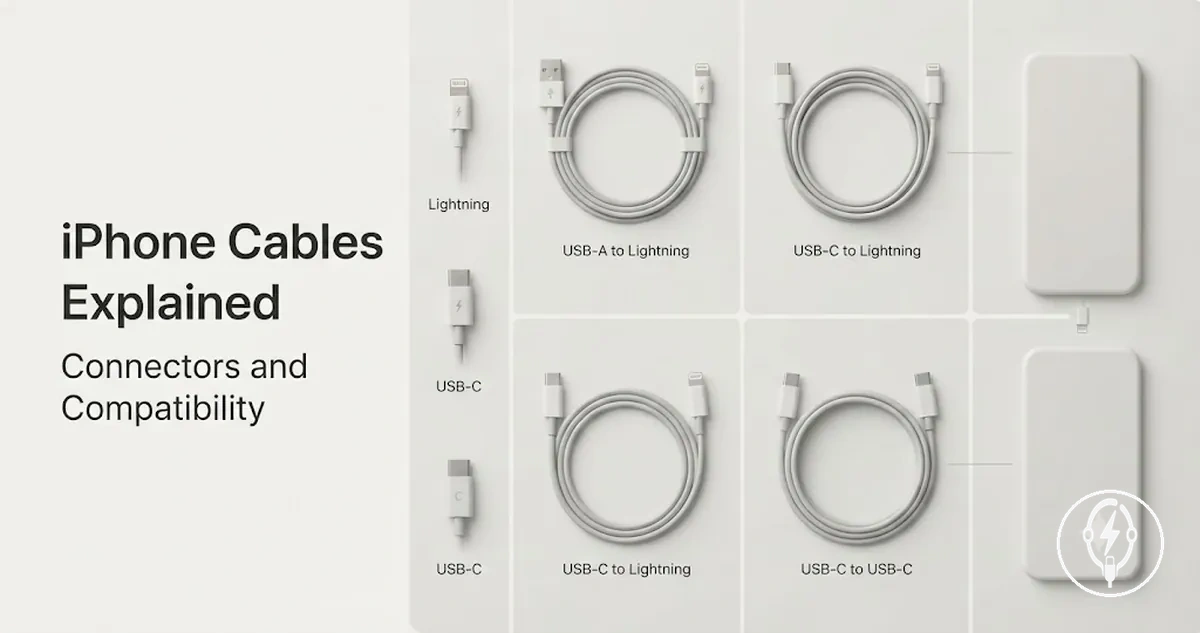
The compatibility summary below organizes iPhone charging cables and connector compatibility by cable type, the connector that plugs into the iPhone, the connector that plugs into the charging source, and the intended connection relationship. It provides the macro compatibility decision before later sections discuss charging capability or cable selection.
| Cable type | iPhone-side end | Source-side end | Compatibility note |
|---|---|---|---|
| USB-C to USB-C | USB-C | USB-C | Compatible with iPhone models that have a USB-C port when connected to a USB-C power adapter or USB-C computer port, according to Apple. |
| USB-C to Lightning | Lightning | USB-C | Compatible with Lightning-equipped iPhone models when the charging source provides a USB-C port. |
| USB-A to Lightning | Lightning | USB-A | Compatible with Lightning-equipped iPhone models when connected to a USB-A charger or USB-A computer port. |
According to Apple, iPhone 15 and later models use USB-C, while iPhone 14 and earlier standard models use Lightning. For example, an iPhone 15 can connect directly with a USB-C to USB-C cable, whereas an iPhone 14 requires a Lightning cable. The connector on the charger side can still differ, provided it matches the available USB-C or USB-A source port.
Recognition problems are not always caused by the cable type.
Recognition problems are not always caused by the cable type. Apple notes that charging or data recognition can also depend on the condition of the cable, the cleanliness of the iPhone port, the compatibility of the charging source, or whether the connected accessory supports both charging and data transfer.
Table of Contents
What iPhone Charging Cables and Connectors Include
An iPhone charging cable is a cable that connects an iPhone to a compatible power adapter or computer for charging and, when supported, data connection. It includes a cable body, an iPhone-side connector, and a power-source-side connector. According to Apple, the iPhone-side connector is either USB-C or Lightning depending on the iPhone model, while the source-side connector is USB-C or USB-A depending on the cable design. :contentReference[oaicite:0]{index=0}
It includes a cable body , an iPhone-side connector , and a power-source-side connector .
What iPhone charging cables and connectors include is easier to understand by identifying the physical parts shown below. The illustration labels the cable body, both connector ends, and the connection path between the iPhone and the charging source.
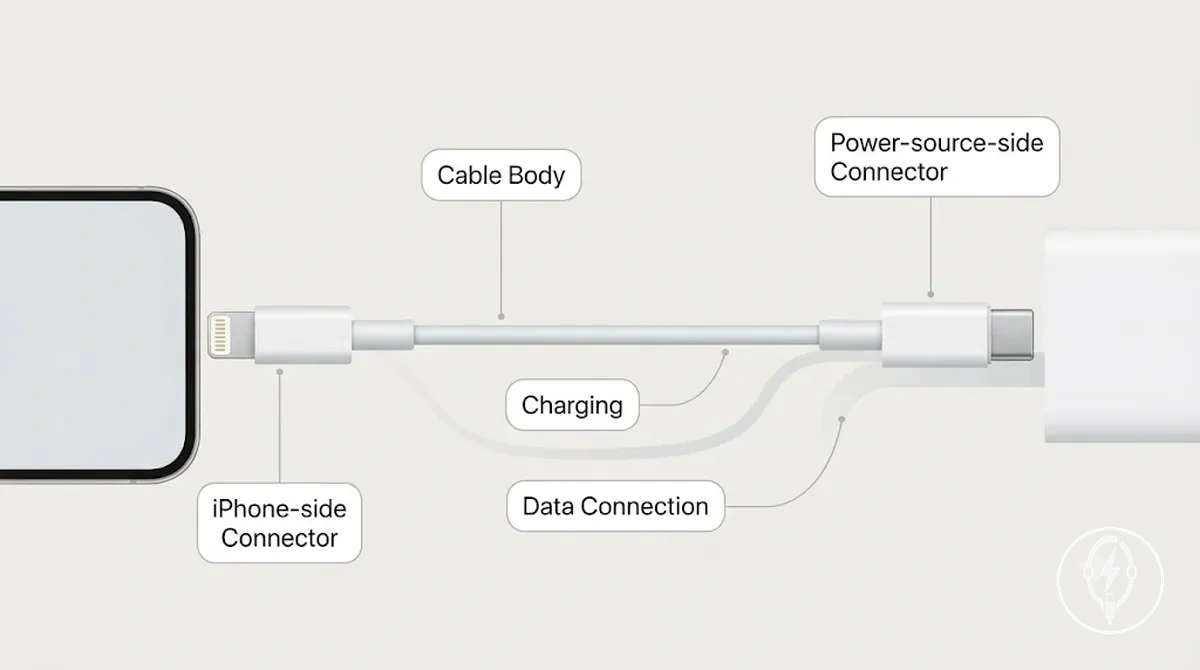
The main components of an iPhone charging cable include:
- Cable body: The insulated cable, including its protective jacket and strain relief, that carries electrical power and, where supported, data signals.
- iPhone-side connector: A USB-C connector for iPhone 15 series and later models or a Lightning connector for compatible earlier models, as specified by Apple. :contentReference[oaicite:1]{index=1}
- Power-source-side connector: A USB-C or USB-A connector that plugs into a compatible power adapter or computer port to complete the charging path.
- Supported function: The cable can provide charging and, if both the cable and connected devices support it, data transfer between an iPhone and a computer.
For example, an iPhone 15 with a USB-C port requires a cable with a USB-C iPhone-side connector, while an iPhone 14 uses a Lightning iPhone-side connector; both examples follow Apple's connector specifications. :contentReference[oaicite:2]{index=2}
For a broader overview of related components, see iPhone charging accessories .
An iPhone charging cable is only one part of a complete iPhone charging setup and should not be confused with the power adapter or other charging hardware. For a broader overview of related components, see iPhone charging accessories.
Lightning, USB-C, and USB-C to Lightning Cable Types
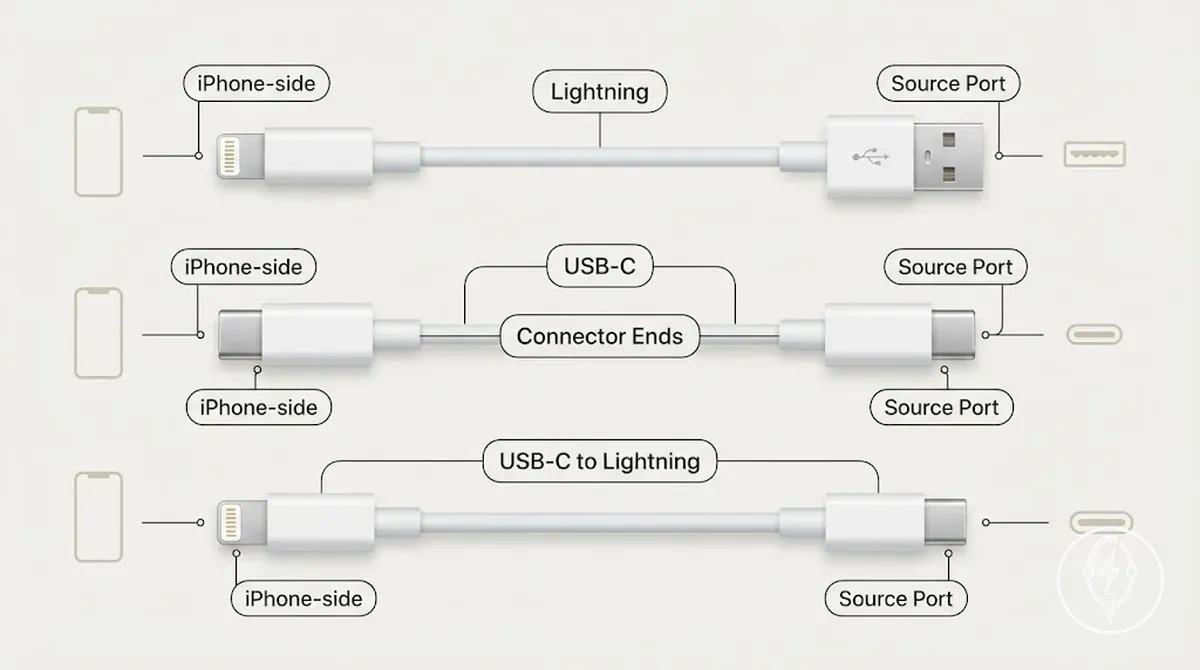
Lightning, USB-C, and USB-C to Lightning cable types are distinguished by their connector ends rather than by charging function alone. According to Apple, Lightning cables use a Lightning connector on the iPhone-side end, USB-C cables use USB-C on both ends, and a USB-C to Lightning cable combines a USB-C source-side connector with a Lightning iPhone-side connector. This distinction determines which iPhone model and source port the cable can physically connect to. :contentReference[oaicite:0]{index=0}
This distinction determines which iPhone model and source port the cable can physically connect to.
Lightning, USB-C, and USB-C to Lightning cable types are easier to compare when each connector end is identified visually. The illustration below labels the iPhone-side end and the source-side end so the cable formats can be distinguished at a glance.
| Cable type | iPhone-side end | Other end | Practical use |
|---|---|---|---|
| Lightning | Lightning | USB-A | Connects Lightning-equipped iPhone models to USB-A chargers or computers for charging, syncing, and supported accessory connections. |
| USB-C | USB-C | USB-C | Connects USB-C iPhone models to USB-C chargers, computers, or compatible USB-C accessories for charging and data transfer. |
| USB-C to Lightning | Lightning | USB-C | Connects Lightning-equipped iPhone models to USB-C power adapters or USB-C computer ports for charging, syncing, and supported accessory use. |
For example, according to Apple, an iPhone with a Lightning port can connect to a USB-C power adapter by using a USB-C to Lightning cable, while an iPhone with a USB-C port requires a USB-C to USB-C cable because the connector on the iPhone-side end is different. The cable function remains charging and data transfer, but the connector format must match both the iPhone and the source port. :contentReference[oaicite:1]{index=1}
For a broader overview of related charging accessory types , continue to the next section.
These cable types describe connector combinations rather than every charging product available. For a broader overview of related charging accessory types, continue to the next section.
Connector Ends on the iPhone Side and Charger Side
Connector ends on the iPhone side and charger side serve different connection points and both must match the correct port for a cable to connect properly. The iPhone-side end must fit the iPhone port, while the charger-side end must fit the wall adapter port or computer port. According to Apple, a charging cable only forms a direct connection when each cable end matches the corresponding port on both devices. :contentReference[oaicite:0]{index=0}
The iPhone-side end must fit the iPhone port, while the charger-side end must fit the wall adapter port or computer port.
Connector ends on the iPhone side and charger side are easier to distinguish when each connection point is labeled separately. The image below identifies the iPhone-side end, the charger-side end, and the cable-end shape so the physical connection path is clear before comparing cable types.
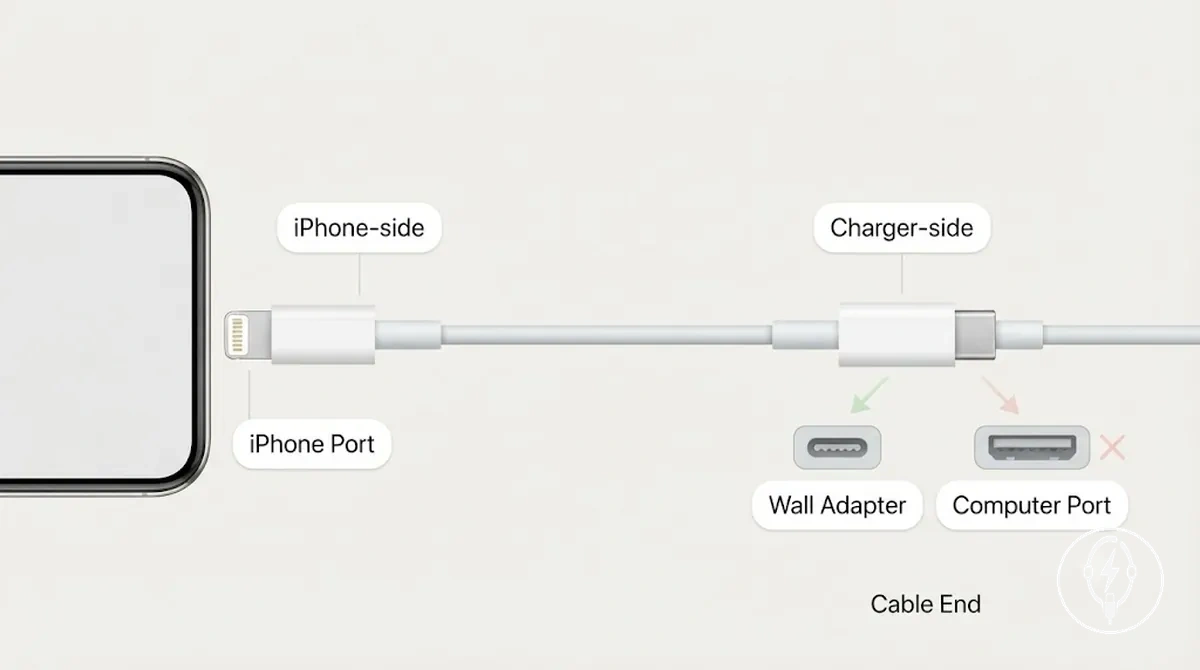
The table below shows what each cable side must match and the most common connection-fit mistake.
| Cable side | Must match | Common mismatch |
|---|---|---|
| iPhone-side end | The iPhone port and its cable-end shape | The connector shape does not fit the iPhone port. |
| Charger-side end | The wall adapter port or computer port | The cable end does not match the available source port, such as USB-A or USB-C. |
For example, a cable with the correct iPhone-side end can plug into the phone but still cannot charge if its charger-side end is USB-C and the available wall adapter has only a USB-A port. In this situation, the phone connection is correct, but the source-side connection cannot be completed until both connector ends match the available ports. :contentReference[oaicite:1]{index=1}
How USB-C and Lightning Differ for Charging and Data
How USB-C and Lightning differ for charging and data is determined by the connector format, the iPhone model, the cable capability, and the connection source. According to Apple, iPhone 15 models and later use a USB-C connector, while compatible earlier iPhone models use a Lightning connector, so the connector on the iPhone must match the cable before charging or data transfer can occur. :contentReference[oaicite:0]{index=0}
How USB-C and Lightning differ for charging and data becomes clearer when the connector formats are compared side by side.
How USB-C and Lightning differ for charging and data becomes clearer when the connector formats are compared side by side. The illustration below labels the iPhone-side connector, the source-side connector, and the distinction between a USB-C iPhone port and a USB-C charger port, which are often confused but are separate connection points.
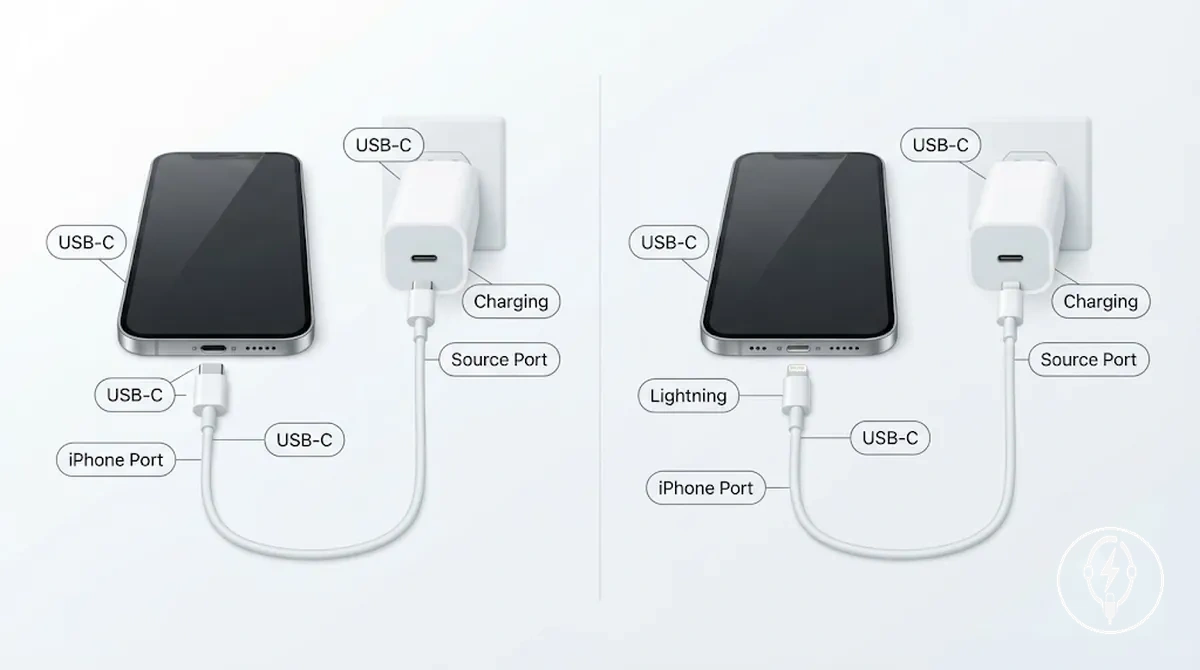
| Format | Connector relationship | Charging/data relevance | Boundary note |
|---|---|---|---|
| USB-C | USB-C connector on the iPhone side and USB-C connector on the connection source | Supports charging, data transfer, and compatible USB-C accessories when both the cable and connected devices support those functions. | A USB-C charger port alone does not make a Lightning-equipped iPhone compatible; the cable must also have a Lightning connector on the iPhone side. |
| Lightning | Lightning connector on the iPhone side with either a USB-C or USB-A connector on the connection source | Supports charging, data transfer, and compatible Lightning accessories when used with a compatible Lightning cable. | A Lightning connector cannot plug directly into an iPhone with a USB-C port because the connector formats are physically different. |
For example, an iPhone 14 charges from a USB-C wall adapter by using a USB-C to Lightning cable, while an iPhone 15 requires a USB-C to USB-C cable because the phone itself has a USB-C port. According to Apple, the charging source connector and the iPhone-side connector must both match the cable configuration for the intended charging or data connection. :contentReference[oaicite:1]{index=1}
Which iPhone Models Use USB-C or Lightning
Which iPhone models use USB-C or Lightning depends on the iPhone model and its physical port type. According to Apple, the iPhone 15 series and later models use a USB-C port and require a USB-C connector on the iPhone side, while iPhone 14 series and earlier compatible models use a Lightning port and require a Lightning connector. The required cable must match the iPhone port before the adapter or source port can determine the charging outcome. :contentReference[oaicite:0]{index=0}
Which iPhone models use USB-C or Lightning depends on the iPhone model and its physical port type.
Which iPhone models use USB-C or Lightning is easiest to determine by identifying the charging port before selecting a cable. The comparison below labels the connector types and shows how the iPhone-side connector relates to the source-side connector, helping prevent cable selection errors.
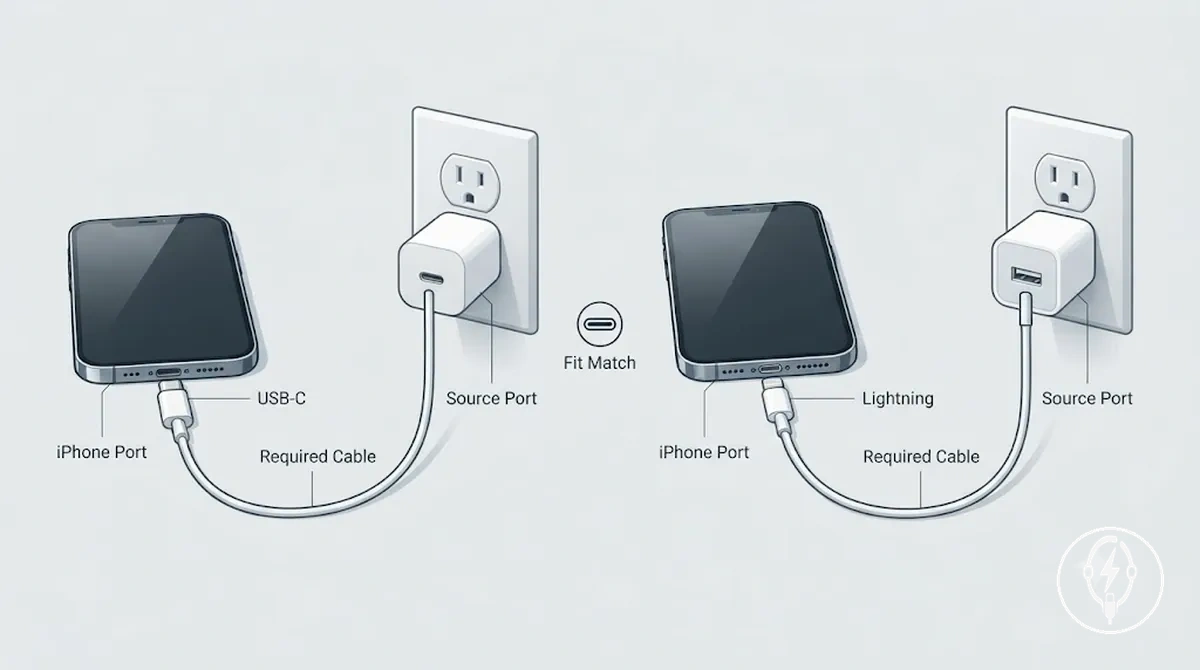
The table below summarizes the model era, required cable connector, source-side condition, and the resulting compatibility decision.
| iPhone model or port | Required cable end | Source-side condition | Decision |
|---|---|---|---|
| iPhone 15 series and later (USB-C port) | USB-C connector | Connect the opposite cable end to a compatible USB-C adapter or USB-C source port. | Use a USB-C to USB-C cable. |
| iPhone 14 series and earlier compatible models (Lightning port) | Lightning connector | The opposite cable end may be USB-C or USB-A if it matches the available adapter or source port. | Use a Lightning cable with the appropriate source-side connector. |
For example, an iPhone 15 requires a USB-C connector on the phone side, whereas an iPhone 14 requires a Lightning connector even when both devices are charged from a USB-C power adapter. According to Apple, the charging source can differ, but the connector that plugs into the iPhone must match the device's port type. This section focuses on cable-to-iPhone compatibility; broader adapter and charger matching is covered in iPhone charger compatibility. :contentReference[oaicite:1]{index=1}
Lightning iPhones and USB-C to Lightning Cables
Lightning iPhones and USB-C to Lightning cables are compatible when a Lightning-equipped iPhone is connected to a USB-C charger, USB-C computer port, or another power source with a USB-C output. A USB-C to Lightning cable has a Lightning connector on the iPhone side and a USB-C connector on the source side, while a USB-A to Lightning cable is used only when the available source port is USB-A. Apple specifies that the cable connector must match both the iPhone port and the charger or computer port for a direct physical connection. :contentReference[oaicite:0]{index=0}
Apple specifies that the cable connector must match both the iPhone port and the charger or computer port for a direct physical connection.
Lightning iPhones and USB-C to Lightning cables become easier to distinguish by comparing the connector on the iPhone side with the connector on the charging source. The image below identifies both cable ends and shows when adapter fit requires a USB-C to Lightning cable instead of a USB-A to Lightning cable.
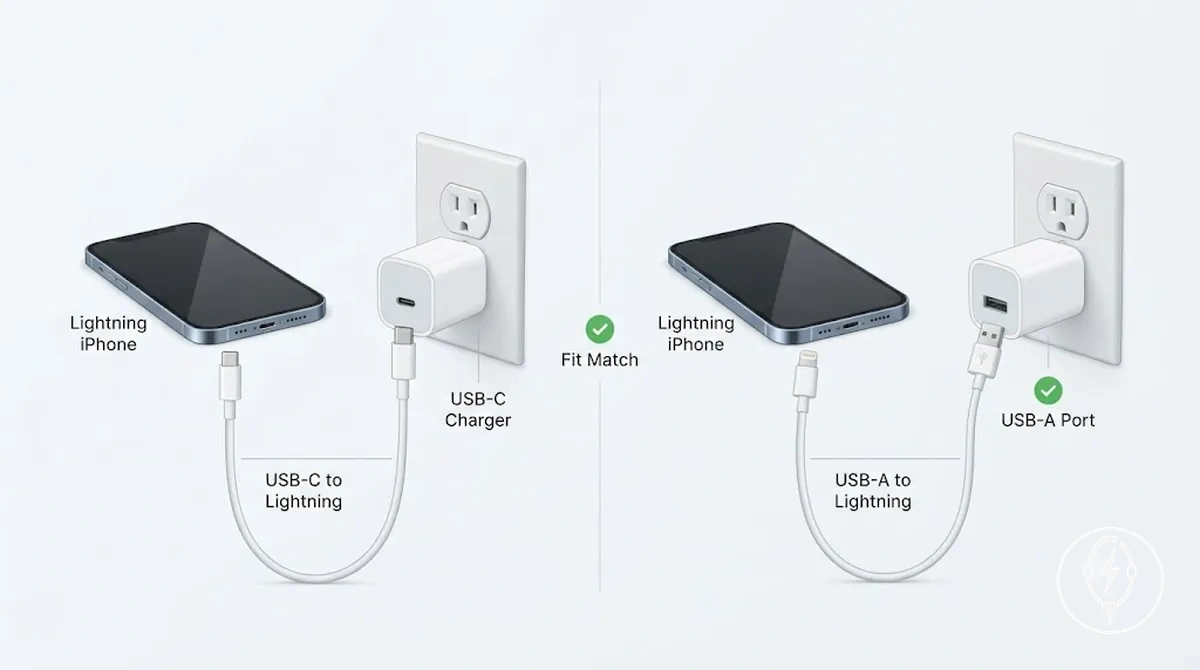
The checklist below verifies which cable matches your charging setup before you connect the iPhone.
- Condition: The Lightning iPhone connects to a USB-C charger or USB-C computer port. Check: The cable has a Lightning connector on the iPhone side and a USB-C connector on the source side. Decision: Use a USB-C to Lightning cable.
- Condition: The Lightning iPhone connects to a USB-A charger or USB-A computer port. Check: The cable has a Lightning connector on the iPhone side and a USB-A connector on the source side. Decision: Use a USB-A to Lightning cable.
- Condition: You replace an older USB-A charger with a USB-C charger. Check: The iPhone still uses the same Lightning connector. Decision: Change only the source-side connector by using a USB-C to Lightning cable.
- Condition: You expect improved charging performance. Check: Apple notes that charging support depends on the Lightning iPhone model, the USB-C charger, and the cable being used. Decision: A USB-C to Lightning cable does not, by itself, indicate faster charging without compatible hardware. :contentReference[oaicite:1]{index=1}
For example, an iPhone 14 uses a Lightning connector on the phone side even when connected to a USB-C wall adapter. In that situation, the correct adapter fit is a USB-C to Lightning cable because the source port is USB-C, whereas a USB-A to Lightning cable is intended only for a USB-A source. :contentReference[oaicite:2]{index=2}
USB-C iPhones and USB-C Charging Cables
USB-C iPhones and USB-C charging cables are compatible when the iPhone has a USB-C port, the cable has a USB-C connector on the iPhone side, and the opposite connector matches the available USB-C charger, computer port, power bank, or compatible accessory source. According to Apple, USB-C iPhone models require a USB-C connector at the phone end, while charging, data transfer, and accessory support depend on the capability of the specific USB-C cable in use rather than the connector shape alone. :contentReference[oaicite:0]{index=0}
USB-C iPhones and USB-C charging cables are easier to verify by checking both connector ends before making the connection.
USB-C iPhones and USB-C charging cables are easier to verify by checking both connector ends before making the connection. The illustration below labels the iPhone-side connector, the source-side connector, and the fit relationship that determines whether the cable can connect physically while distinguishing connector compatibility from cable capability.
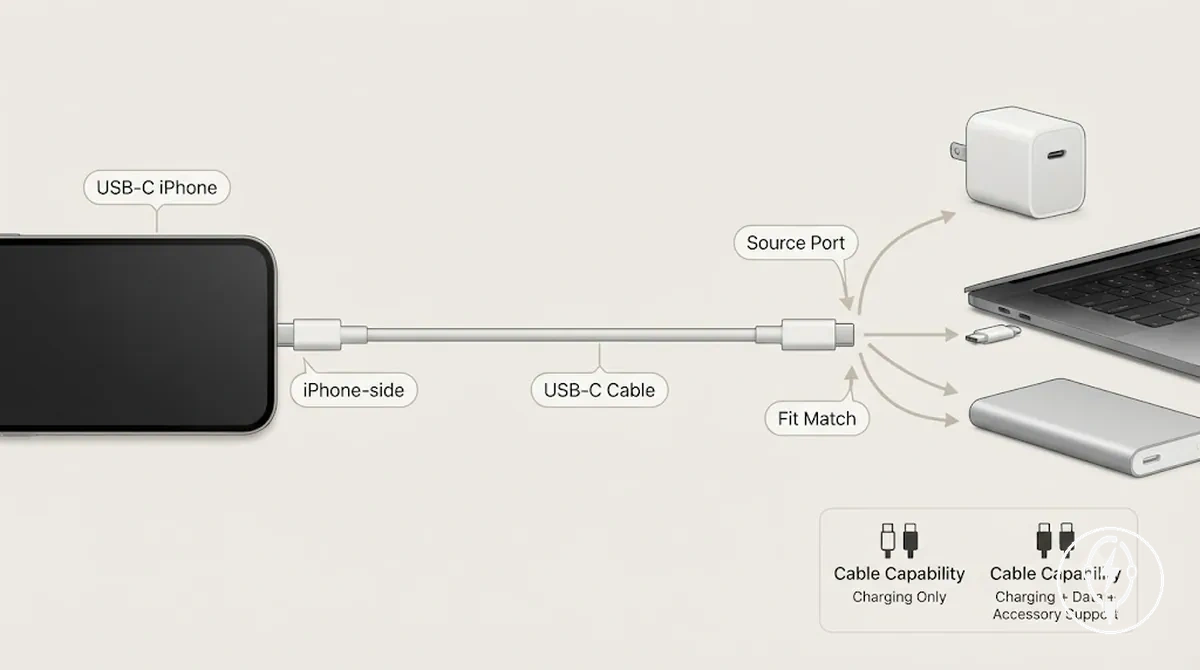
The checklist below verifies both the USB-C iPhone port and the USB-C source port before connecting the cable.
- Condition: The USB-C iPhone connects to a USB-C charger. Check: Confirm that both cable ends use USB-C connectors. Decision: A USB-C to USB-C cable provides the correct physical connection.
- Condition: The USB-C iPhone connects to a computer port. Check: Verify that the computer provides a USB-C port matching the cable. Decision: Charging is supported, while data transfer is available only if both the cable and connected devices support data communication.
- Condition: The USB-C iPhone connects to a USB-C power bank or compatible accessory. Check: Confirm that both the source port and the cable use USB-C connectors. Decision: The connection is physically compatible, but accessory functions remain limited by the cable's supported capability.
- Condition: The cable fits both ports but expected features are unavailable. Check: Determine whether the USB-C charging cable supports charging only or also supports data transfer and accessory communication. Decision: Matching USB-C connectors alone do not confirm every USB-C function. :contentReference[oaicite:1]{index=1}
For example, an iPhone 15 connected to a USB-C computer port with a USB-C charging cable can establish a physical connection because both connector ends match. According to Apple, whether that same connection also supports file transfer depends on the capability of the USB-C cable and the connected devices rather than on the USB-C connector itself. :contentReference[oaicite:2]{index=2}
Cable Compatibility with Adapters, Computers, and Other Devices
Cable compatibility with adapters, computers, and other devices requires both ends of the cable to match the connected hardware and, when needed, the cable to support the intended function. Apple specifies that the iPhone-side connector must match the iPhone port, while the source-side connector must match the adapter, computer, vehicle port, or other device port. A correct connector fit alone does not confirm that charging, syncing, CarPlay, or other data functions are available. :contentReference[oaicite:0]{index=0}
A correct connector fit alone does not confirm that charging, syncing, CarPlay, or other data functions are available.
Cable compatibility with adapters, computers, and other devices should be checked in two stages: first confirm the connector fit, then confirm the supported function. For example, a USB-C cable can physically connect to a USB-C computer or Thunderbolt port because Thunderbolt uses the USB-C connector, but available features still depend on the cable and the connected devices. Likewise, a cable that charges an iPhone through a vehicle port may not support CarPlay if the vehicle, cable, or connection is limited to charging only. :contentReference[oaicite:1]{index=1}
Likewise, a cable that charges an iPhone through a vehicle port may not support CarPlay if the vehicle, cable, or connection is limited to charging only.
The table below summarizes the connection source, the port to verify, the cable requirement, and the most common compatibility risk before connecting an iPhone.
| Connection source | Port to check | Cable requirement | Compatibility risk |
|---|---|---|---|
| Power adapter | USB-A or USB-C | The source-side connector must match the adapter port. | The iPhone connector fits, but the adapter port does not. |
| Computer | USB-A, USB-C, or Thunderbolt | The connector must fit the computer port, and the cable must support the required charging or data function. | The cable connects physically but does not provide the expected data connection. |
| Vehicle port | USB-A or USB-C | The connector must match the vehicle port, and the cable must support the intended device connection. | Charging works, but syncing or other functions are unavailable. |
| CarPlay connection | USB-A or USB-C | The cable must match both the iPhone connector and the vehicle port while supporting the required connection mode. | A matching connector does not by itself confirm CarPlay operation. |
For example, an iPhone with a USB-C port can connect physically to a computer with a Thunderbolt port because both use a USB-C connector, while a Lightning iPhone connected to a USB-C wall adapter requires a USB-C to Lightning cable rather than a USB-A to Lightning cable. These examples illustrate that compatibility depends on matching both connector ends and the required device function rather than the connector shape alone. :contentReference[oaicite:2]{index=2}
USB-A, USB-C, and Thunderbolt Port Fit
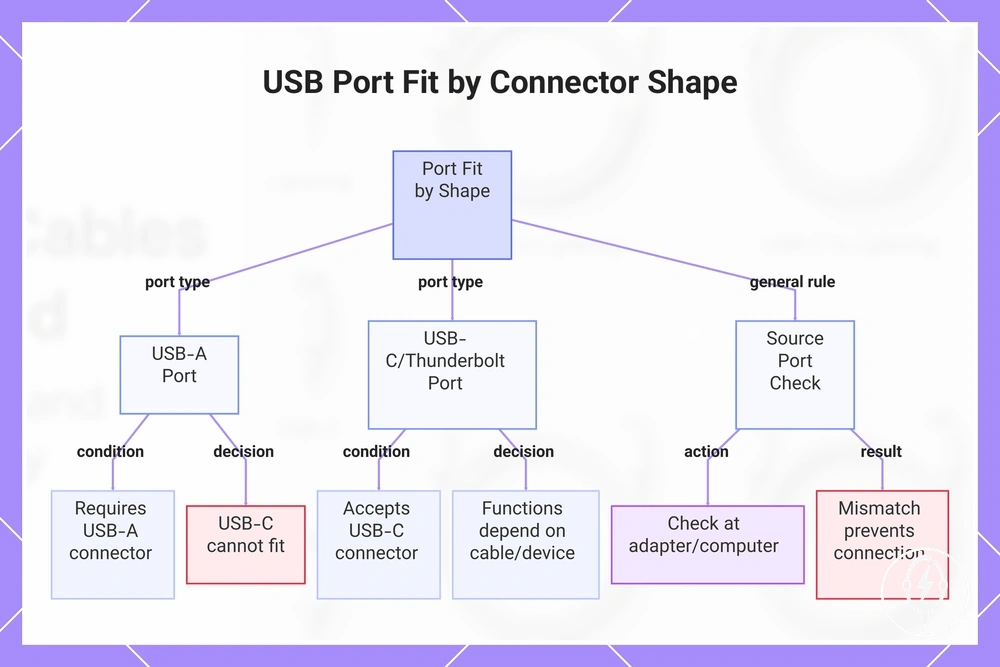
USB-A, USB-C, and Thunderbolt port fit is determined by the shape of the source port and the source-side connector on the cable. A USB-A plug end fits only a USB-A port, while a USB-C plug end fits USB-C ports and Thunderbolt-style ports that use the USB-C connector shape. According to Apple, the cable-end match must correspond to the available adapter or computer source port before charging or data communication can begin. :contentReference[oaicite:0]{index=0}
USB-A, USB-C, and Thunderbolt port fit should be checked at the adapter or computer rather than at the iPhone.
USB-A, USB-C, and Thunderbolt port fit should be checked at the adapter or computer rather than at the iPhone. A Thunderbolt-style port accepts the USB-C connector because it uses the same physical connector shape, but supported functions remain dependent on the connected cable and device. By contrast, a USB-A connector cannot be inserted directly into a USB-C or Thunderbolt-style port because the port shapes are different. :contentReference[oaicite:1]{index=1}
The checklist below verifies the source-port side of the connection before you connect the cable.
The checklist below verifies the source-port side of the connection before you connect the cable.
- Condition: The adapter or computer has a USB-A source port. Check: Verify that the cable-end match is USB-A. Decision: A USB-C connector cannot plug directly into the USB-A port.
- Condition: The adapter or computer has a USB-C source port. Check: Confirm that the cable uses a USB-C connector on the source side. Decision: The connector fits physically when both connector shapes are USB-C.
- Condition: The computer has a Thunderbolt-style port. Check: Confirm that the cable uses a USB-C connector. Decision: The cable-end match is physically compatible because Thunderbolt-style ports use the USB-C connector shape, while available charging or data functions remain dependent on the cable and connected devices.
- Condition: The iPhone connector fits correctly but the source connection fails. Check: Inspect the adapter or computer source port instead of the phone connector. Decision: A mismatched source-port connector prevents the connection even when the iPhone-side connector is correct.
For example, a USB-C charging cable connects directly to a USB-C laptop or a Thunderbolt-style computer port because both accept the USB-C connector shape, whereas that same cable cannot plug directly into a USB-A wall adapter. This comparison separates port shape from supported device function, helping prevent cable-end selection errors. :contentReference[oaicite:2]{index=2}
This comparison separates port shape from supported device function , helping prevent cable-end selection errors.
This chart shows how connector shape determines port fit for USB-A, USB-C, and Thunderbolt ports, with key checks and decisions.
Charging, Syncing, CarPlay, and Device Connection Limits
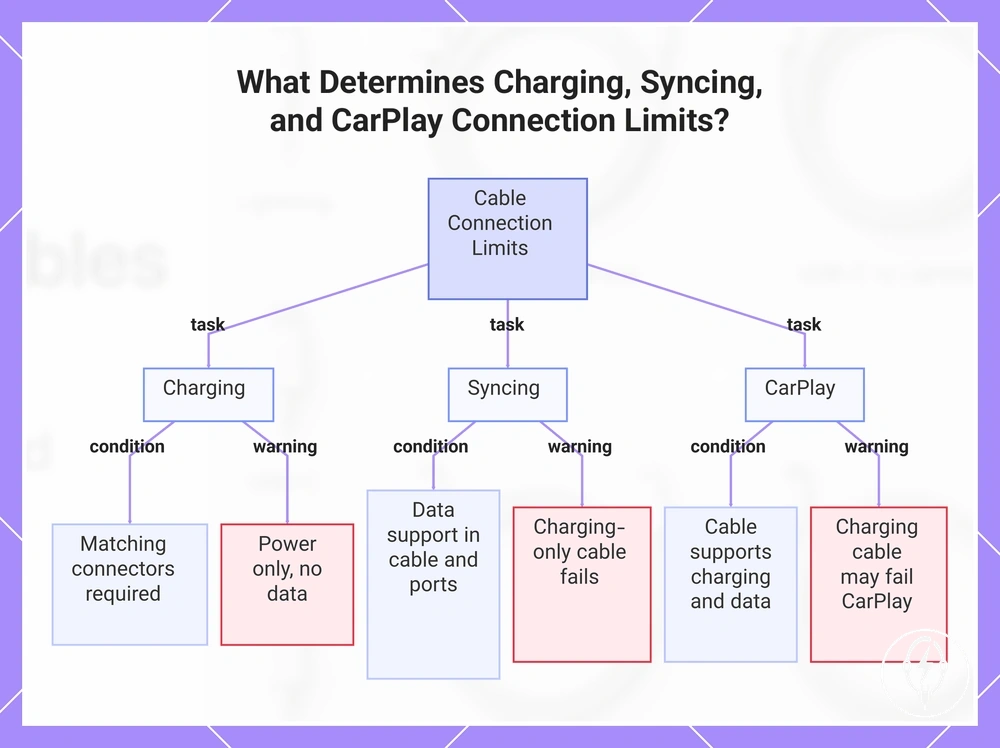
Charging, syncing, CarPlay, and device connection limits are determined by the cable capability, port compatibility, and the requirements of the connected device or accessory rather than by connector fit alone. According to Apple, a cable can charge an iPhone without supporting data transfer or accessory communication because charging capability and data capability are separate cable attributes. The key distinction is that a successful charging connection does not confirm full syncing, CarPlay, or device connection support. :contentReference[oaicite:0]{index=0}
The following conditions summarize the most common cable-related limitations.
Charging, syncing, CarPlay, and device connection limits should be evaluated by use case because the same cable can behave differently across tasks. The following conditions summarize the most common cable-related limitations.
- Charging: Condition: The connector ends match both the iPhone and the source port. Cable capability: Charging support is available when the cable carries power. Limitation: A charging-only cable can power the iPhone without providing data support.
- Syncing: Condition: The cable, computer, and ports all support data transfer. Data support: The cable must include data capability in addition to charging. Limitation: A charging-only cable establishes power but does not enable file syncing or device recognition.
- CarPlay: Condition: The vehicle, iPhone, cable capability, and connection method are compatible. Accessory requirement: Wired CarPlay requires a cable that supports both charging and data communication. Limitation: A cable that charges successfully may still fail to establish a CarPlay session if it lacks the required data support.
- Device connection: Condition: The connected accessory or computer supports the cable and connector in use. Port compatibility: Matching connector shapes establish the physical connection, while supported functions depend on the combined capabilities of the cable and connected devices. Limitation: Connector fit alone does not guarantee accessory communication. :contentReference[oaicite:1]{index=1}
For example, a USB-C cable that is designed only for charging can recharge a compatible iPhone from a USB-C wall adapter but may not sync with a computer or operate wired CarPlay because those tasks require data support in both the cable and the connected devices. This practical distinction helps explain why two cables with identical USB-C connectors can produce different device connection results. :contentReference[oaicite:2]{index=2}
This practical distinction helps explain why two cables with identical USB-C connectors can produce different device connection results.
This chart shows how cable capability, port compatibility, and device requirements determine whether a cable can charge, sync, or support CarPlay, and why connector fit alone is not enough.
Cable Attributes That Affect Everyday Use
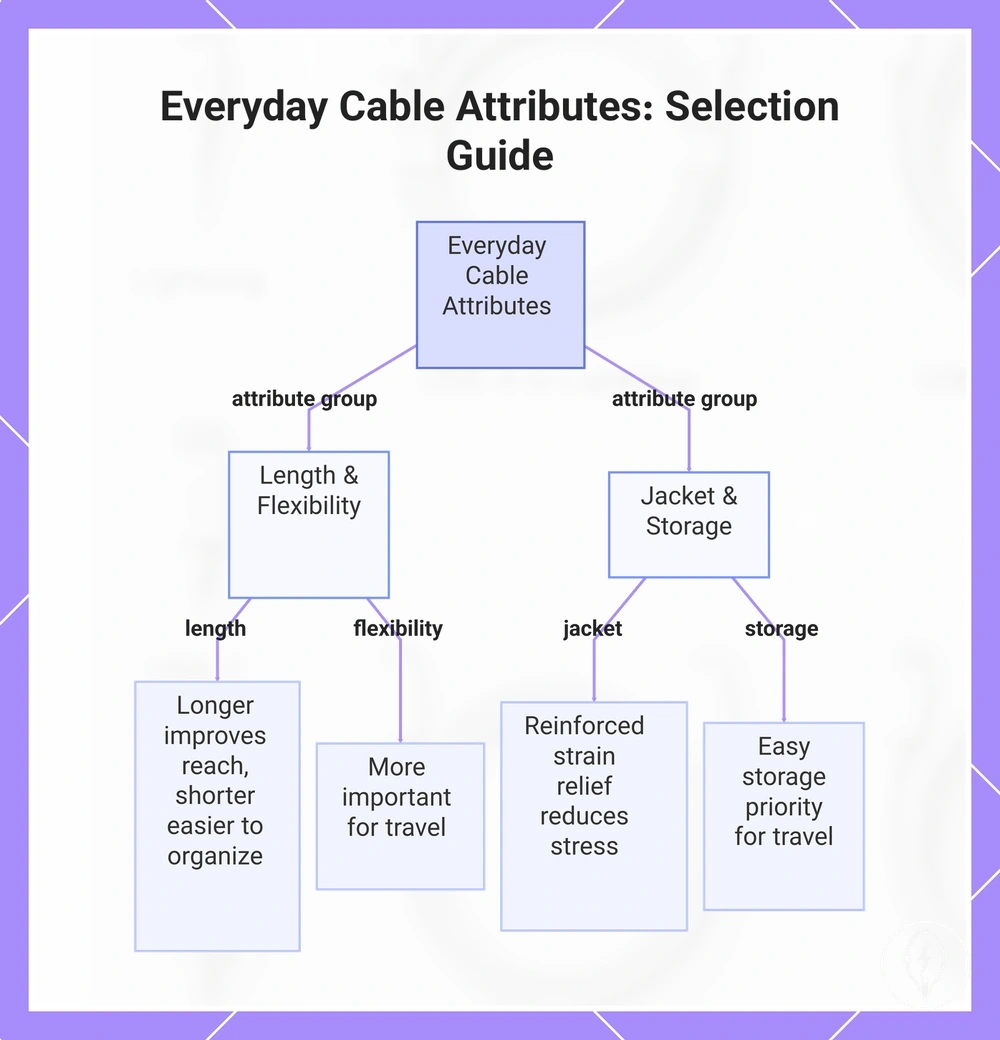
Cable attributes that affect everyday use should be evaluated only after connector compatibility has been confirmed. Once the cable matches both the iPhone connector and the source port, everyday usability is determined by attributes such as length, flexibility, jacket material, strain relief, and storage, because these characteristics influence how easily the cable can be used in different environments rather than whether it connects successfully. :contentReference[oaicite:0]{index=0}
Cable attributes that affect everyday use should be evaluated only after connector compatibility has been confirmed.
Cable attributes that affect everyday use are easiest to assess by comparing the intended use with the cable's physical characteristics. The checklist below helps verify which attribute is important for the situation and which becomes a secondary consideration after connector fit has already been confirmed.
- Length: Condition: The cable is used at a desk, bedside, or while travelling. Check: Confirm the cable comfortably reaches the charging source without leaving unnecessary slack. Decision: A longer cable improves reach, while a shorter cable is typically easier to organise and transport. :contentReference[oaicite:1]{index=1}
- Flexibility: Condition: The cable is frequently bent, routed around furniture, or packed into a bag. Check: Verify that the cable lead bends easily without placing excessive stress on the connector ends. Decision: Flexibility becomes more important for travel and portable use than for a permanent desk setup. :contentReference[oaicite:2]{index=2}
- Jacket material and strain relief: Condition: The charging lead is plugged in and unplugged repeatedly. Check: Inspect the outer jacket and the reinforced strain-relief section where the cable enters each connector end. Decision: Reinforced strain relief helps reduce repeated bending stress, while the jacket material affects resistance to everyday wear. :contentReference[oaicite:3]{index=3}
- Storage: Condition: The cable is stored in a backpack, drawer, or travel pouch between uses. Check: Coil the cable naturally without forcing tight bends. Decision: Easy storage is usually a higher priority for travel, whereas cable routing and reach are often more important in a fixed desk environment. :contentReference[oaicite:4]{index=4}
For example, a traveller may choose a shorter, more flexible charging lead because it occupies less space in a travel pouch, while a desk setup may benefit from a longer cable that reaches a power outlet without stretching across the workspace. This comparison shows that, after compatibility is confirmed, the appropriate cable attributes are selected according to the intended daily environment rather than treated as universal advantages. :contentReference[oaicite:5]{index=5}
This chart shows the key cable attributes that affect everyday use and the decision for each attribute based on the intended environment.
This chart shows the key cable attributes that affect everyday use and the decision for each attribute based on the intended environment.
Length Choices for Travel, Bedside, Desk, and Power Bank Use
Length choices for travel, bedside, desk, and power bank use should be based on the distance between the iPhone and the charging source rather than treated as a cable quality indicator. Common cable lengths are typically available in short (about 0.3-0.5 m), standard (about 1 m), and long (about 2 m) options, allowing the cable length to match the charging location, required reach, and acceptable level of clutter. The USB-C or Lightning connector type determines port compatibility, whereas cable length determines everyday convenience after compatibility has already been confirmed. :contentReference[oaicite:0]{index=0}
The checklist below helps identify when each cable length is appropriate without implying that one option is suitable for every charging situation.
Length choices for travel, bedside, desk, and power bank use are easiest to verify by comparing the charging location with the amount of cable reach required. The checklist below helps identify when each cable length is appropriate without implying that one option is suitable for every charging situation.
- Short cable (about 0.3-0.5 m): Condition: Charging from a power bank, inside a vehicle, or while travelling. Check: The source port remains close to the iPhone throughout use. Decision: A short cable reduces excess cable and helps minimise clutter in compact spaces. :contentReference[oaicite:1]{index=1}
- Standard cable (about 1 m): Condition: Everyday charging at a bedside table or desk. Check: The charger is within comfortable arm's reach. Decision: A standard cable balances reach with manageable cable routing for routine charging. :contentReference[oaicite:2]{index=2}
- Long cable (about 2 m): Condition: The wall outlet or source port is positioned farther from the desk, sofa, or bedside table. Check: Additional reach is needed without relocating the charger. Decision: A long cable provides extra reach but may create additional clutter when the full length is unnecessary. :contentReference[oaicite:3]{index=3}
For example, a traveller carrying a power bank in a pocket may find that a 0.3-0.5 m charging lead keeps the cable compact, while a desk with a power outlet beneath the work surface may benefit from a 2 m cable that reaches comfortably without placing tension on the connector ends. This comparison illustrates that cable length should match the charging environment and movement needs rather than being treated as a universal preference. :contentReference[oaicite:4]{index=4}
Braided, Woven, and Standard Jacket Durability
Braided, woven, and standard jacket durability refers to the outer covering of an iPhone charging cable and influences handling characteristics such as flexibility, bend resistance, fraying risk, feel, and storage behaviour. A braided cable, woven jacket, and standard jacket can all use the same USB-C or Lightning connectors because the jacket material affects durability and handling rather than connector compatibility or charging capability. The most suitable jacket depends on how the cable is handled and stored instead of one material being universally longer-lasting. :contentReference[oaicite:0]{index=0}
Braided, woven, and standard jacket durability can be compared by the way each outer covering behaves during everyday use.
Braided, woven, and standard jacket durability can be compared by the way each outer covering behaves during everyday use.
- Braided cable: The braided outer layer is intended to improve abrasion resistance and reduce visible fraying during repeated handling. It often feels more textured and can offer greater bend resistance, although it may occupy slightly more space when coiled for storage. :contentReference[oaicite:1]{index=1}
- Woven jacket: A woven jacket uses a fabric-style outer covering that combines flexibility with everyday wear resistance. Depending on the weave and construction, it can remain easy to bend while helping reduce surface scuffing during frequent transport or desk use. :contentReference[oaicite:2]{index=2}
- Standard jacket: A standard jacket normally has a smooth plastic or thermoplastic outer layer that coils compactly and slides easily through cable organisers. If the charging lead is repeatedly bent sharply near the connector ends, visible jacket wear or fraying can occur sooner than with careful handling. :contentReference[oaicite:3]{index=3}
For example, a charging lead that remains beside a bed with minimal movement may show little practical difference between a standard jacket and a braided cable, while a cable that is packed into a backpack and coiled many times each day may benefit from the additional abrasion resistance of a braided or woven jacket. This comparison relates only to the cable's outer covering and should not be interpreted as a difference in charging speed, USB-C support, or Lightning compatibility. :contentReference[oaicite:4]{index=4}
Charging Speed Limits from Cable, Connector, and Adapter Fit
Charging speed limits from cable, connector, and adapter fit are determined by the combined compatibility of the cable type, connector, adapter fit, and iPhone model. The charging system operates only up to the power capability supported by the lowest-capability component in the charging path, so replacing a single cable or adapter does not automatically increase charging speed. Charging speed remains limited until the cable, connector type, adapter, and iPhone model all support the same charging capability. :contentReference[oaicite:0]{index=0}
If one component provides less power support than the others, that component becomes the charging speed limit.
Connector compatibility establishes only the physical connection, whereas power support determines the realistic charging outcome. A compatible cable type must support the required power capability, the adapter fit must provide compatible power output, and the iPhone model must support that charging level before higher charging performance becomes available. If one component provides less power support than the others, that component becomes the charging speed limit. :contentReference[oaicite:1]{index=1}
Connector compatibility establishes only the physical connection, whereas power support determines the realistic charging outcome.
Charging speed limits from cable, connector, and adapter fit can be evaluated by checking each compatibility factor before replacing charging accessories. The table below organises the conditions that most commonly determine whether the charging cable, adapter, or iPhone model is the limiting component.
| Factor | Condition to check | Effect on speed | Decision |
|---|---|---|---|
| Cable type | The charging cable supports the required power capability. | A lower-capability cable limits the maximum charging speed available to the iPhone. | Confirm the cable's supported power capability before replacing the adapter. |
| Connector | The connector matches both the iPhone port and the source port. | Matching connectors enable the physical connection but do not increase charging speed by themselves. | Verify connector compatibility before diagnosing charging performance. |
| Adapter fit | The adapter is compatible with both the cable and the iPhone. | An adapter with lower supported output becomes the charging speed limit. | Evaluate the adapter together with the cable instead of replacing only one component. |
| iPhone model | The iPhone supports the charging capability supplied by the connected accessories. | The device charges only up to the capability supported by that iPhone model. | Check the complete charging combination rather than a single accessory. |
For example, replacing a USB-C charging cable while continuing to use the same lower-capability power adapter may not improve charging speed because the adapter remains the limiting component. Before selecting replacement accessories, compare the compatibility criteria explained in fast charging cable requirements after confirming that the cable type, connector, adapter fit, and iPhone model all support the intended charging capability. :contentReference[oaicite:2]{index=2}
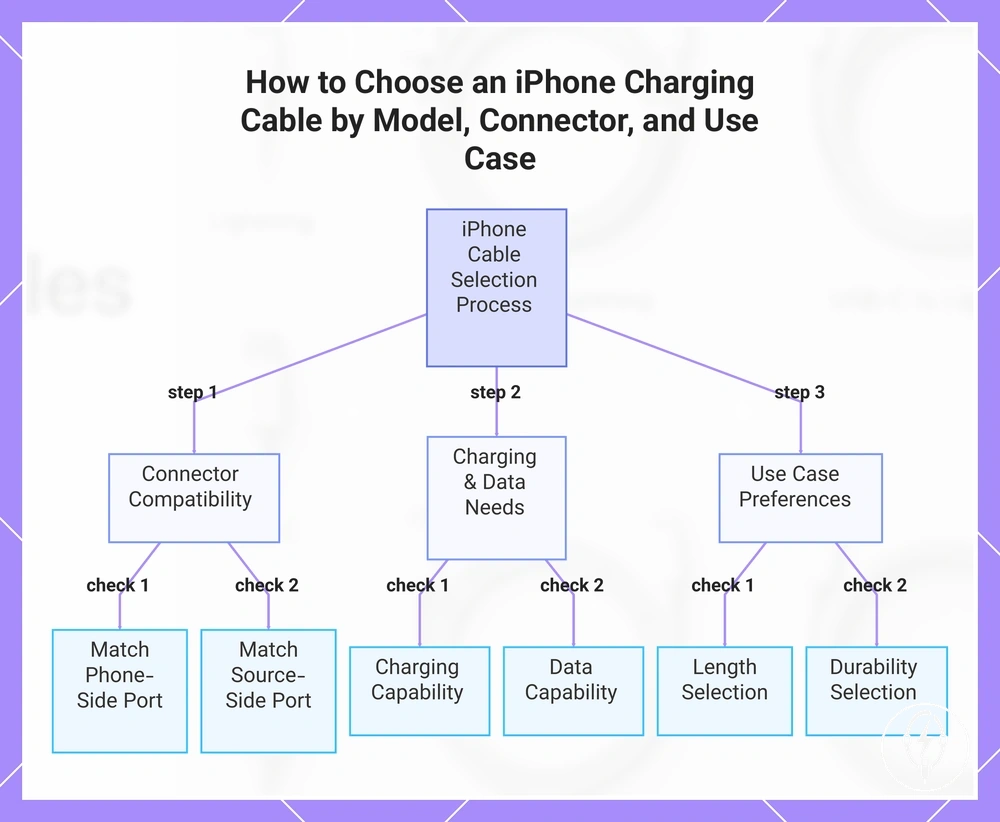
Choosing an iPhone Charging Cable by Model, Connector, and Use Case
Choosing an iPhone charging cable by model, connector, and use case begins by confirming the model port on the iPhone, then matching both cable ends to the phone and the charging source before considering charging speed, length, durability, or everyday use. USB-C iPhone models require a USB-C connector on the phone side, while Lightning iPhone models require a Lightning connector. Following the sequence model port → cable ends → adapter or computer port → charging needs → use case reduces compatibility mistakes and keeps each selection criterion in the correct order. :contentReference[oaicite:0]{index=0}
USB-C iPhone models require a USB-C connector on the phone side, while Lightning iPhone models require a Lightning connector.
Start by identifying whether the iPhone has a USB-C or Lightning model port, because the phone-side connector must match the charging port exactly. Then inspect the opposite cable end and confirm that it matches the available USB-C or USB-A adapter, computer, power bank, or vehicle port. If either connector end does not match its destination port, the cable cannot form the intended physical connection even when the opposite end is correct. :contentReference[oaicite:1]{index=1}
After connector compatibility is confirmed, evaluate the intended charging and data requirements.
After connector compatibility is confirmed, evaluate the intended charging and data requirements. If the cable will only recharge the iPhone, verify that it supports the required charging capability for the adapter and iPhone model. If the cable will also connect to a computer or compatible accessories, confirm that both the cable and connected devices support the required data functions because connector compatibility alone does not determine charging speed or data capability. :contentReference[oaicite:2]{index=2}
Choosing an iPhone charging cable by model, connector, and use case is easiest when each criterion is checked in order.
Choosing an iPhone charging cable by model, connector, and use case is easiest when each criterion is checked in order. The checklist below verifies the compatibility sequence before secondary preferences such as length or durability are considered.
- Condition: The iPhone model is known. Check: Identify whether the model port is USB-C or Lightning. Decision: Select a charging lead with the matching phone-side connector.
- Condition: The charging source has been chosen. Check: Match the opposite cable end to the USB-C or USB-A adapter or computer source port. Decision: Both cable ends must match their respective ports.
- Condition: Charging speed or data transfer matters. Check: Confirm that the charging lead supports the required charging and, where needed, data capability. Decision: Matching connectors alone do not confirm every supported function.
- Condition: The cable will be used at home, while travelling, at a desk, or as a backup. Check: Choose an appropriate length and durability for that environment. Decision: Shorter cable leads are often easier to carry for travel and power banks, while longer leads can improve reach at desks or beside a bed after compatibility has already been confirmed.
Following these criteria keeps the selection focused on compatibility before convenience features. For example, a backup cable for travel may prioritise compact length, while a home desk cable may prioritise reach and jacket durability, but both should first match the iPhone model port and the available source port before any secondary preference is considered.:contentReference[oaicite:3]{index=3}
The products below are useful examples for comparing available options.
The products below are useful examples for comparing available options. Before buying, check that the compatibility criteria, key features, and product details match your needs.
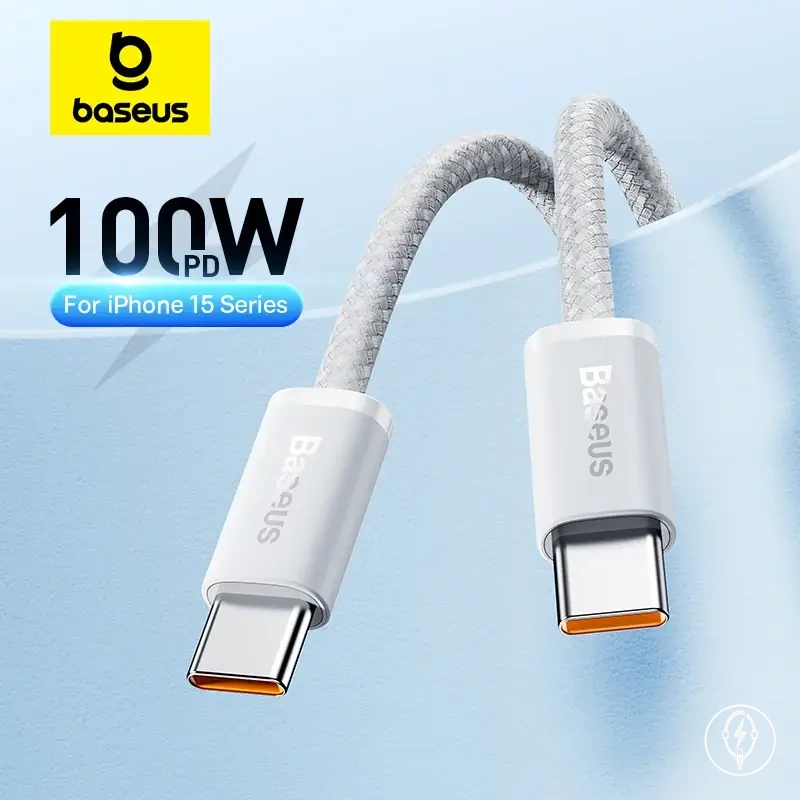
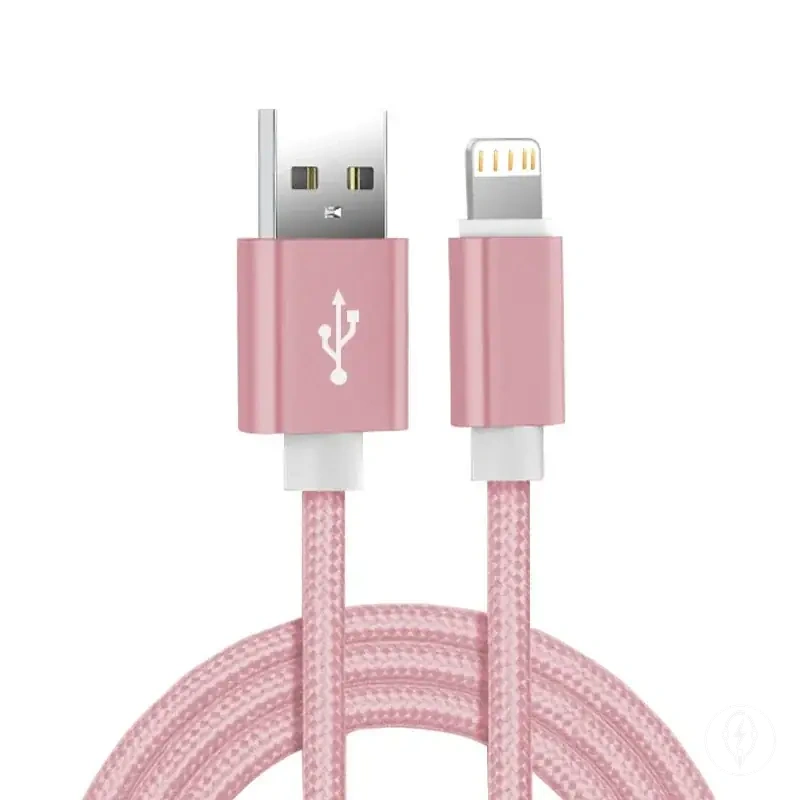
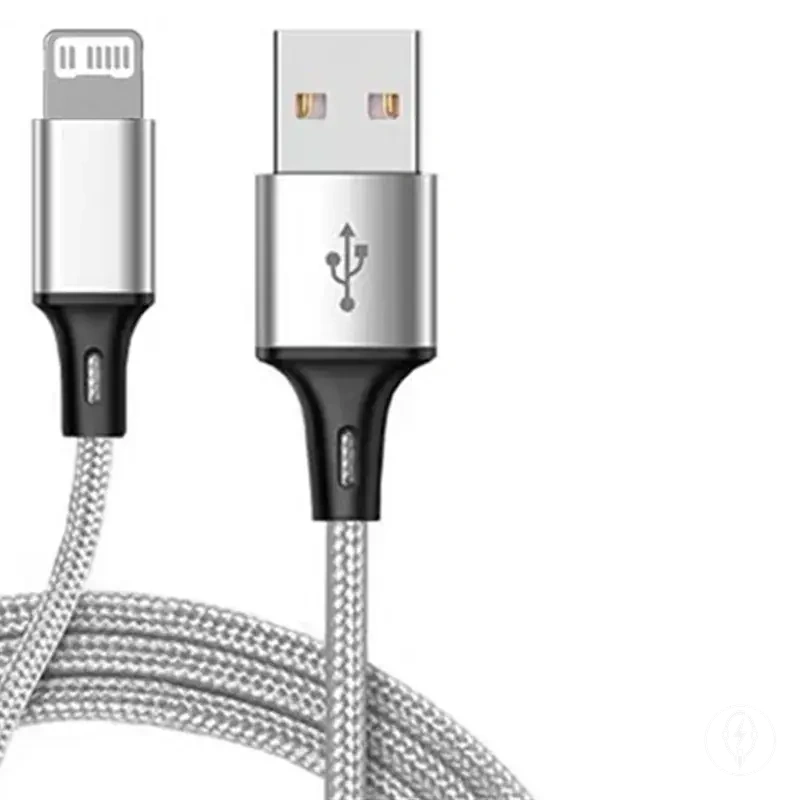
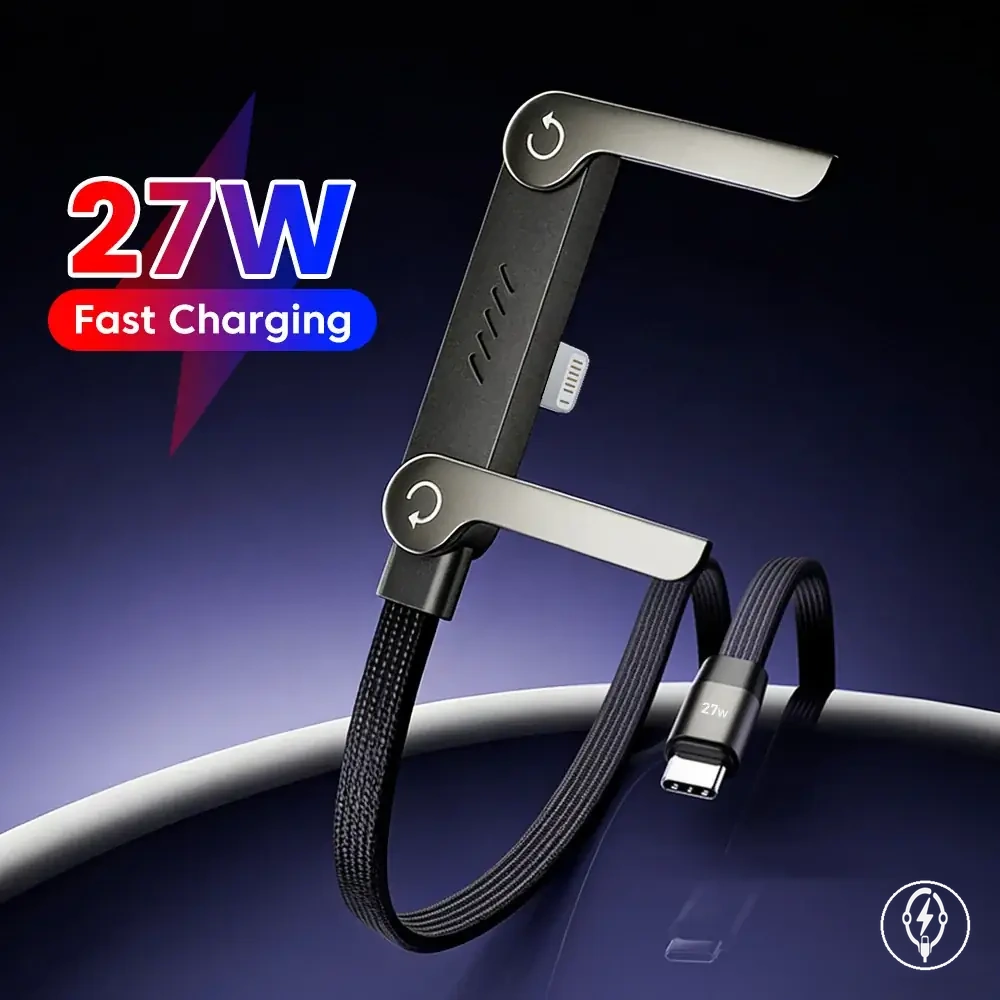
This chart shows the step-by-step process for selecting an iPhone charging cable, starting with connector compatibility, then verifying charging and data needs, and finally considering use case preferences.
Single Cables, Spare Cables, and Cable Packs
Single cables, spare cables, and cable packs should be selected according to the number of charging locations and the need for a backup rather than by quantity alone. A single cable is appropriate when the same compatible charging source is used consistently, while a spare cable or cable pack is practical when charging occurs across multiple locations or when an immediate replacement is needed after loss or damage. Additional cables do not replace the need to match the correct USB-C or Lightning connector to the iPhone and charging source. :contentReference[oaicite:0]{index=0}
Single cables, spare cables, and cable packs are a reliability decision based on where the iPhone is charged.
Single cables, spare cables, and cable packs are a reliability decision based on where the iPhone is charged. If charging regularly takes place at home, work, and during travel, leaving one compatible charging lead at each charging source can reduce repeated cable movement and minimise the chance of forgetting a cable. A cable pack is useful only when each cable has the correct phone-side connector and source-side connector for the intended devices, because quantity does not resolve compatibility problems. :contentReference[oaicite:1]{index=1}
The checklist below verifies whether a single cable, spare cable, or cable pack matches the intended charging routine.
The checklist below verifies whether a single cable, spare cable, or cable pack matches the intended charging routine.
- Condition: One household charging location. Check: The same compatible charging source is used every day. Decision: A single cable is normally sufficient.
- Condition: A home charger and a work charger are both used. Check: Each location has a compatible USB-C or Lightning connection. Decision: A spare cable avoids repeatedly moving one cable between locations.
- Condition: Regular travel with a power bank or vehicle charger. Check: Keep a compatible charging lead in the travel bag. Decision: A dedicated travel backup reduces the risk of arriving without a cable.
- Condition: Replacing worn or damaged charging leads. Check: Confirm connector compatibility before using another cable from a cable pack. Decision: A cable pack simplifies replacement planning but does not change connector compatibility.
For example, a user who charges an iPhone at home, at work, and while travelling may keep one compatible cable at each of the three charging locations instead of carrying a single cable throughout the day. This approach uses additional cables to improve availability while keeping compatibility checks separate from the decision about cable quantity. :contentReference[oaicite:2]{index=2}
Common Cable Recognition and Connection Problems
Common cable recognition and connection problems are identified by matching the observed symptom to its most likely connection point rather than assuming the charging cable is defective. A not recognized warning, intermittent charging, loose fit, worn connector ends, dirty contacts, or an adapter-side mismatch can each originate from the cable, charger, iPhone port, or connected device, so the symptom should be interpreted before any replacement decision is made. Apple advises checking the cable, connector, charging accessory, and device connection when charging or accessory recognition is inconsistent. :contentReference[oaicite:0]{index=0}
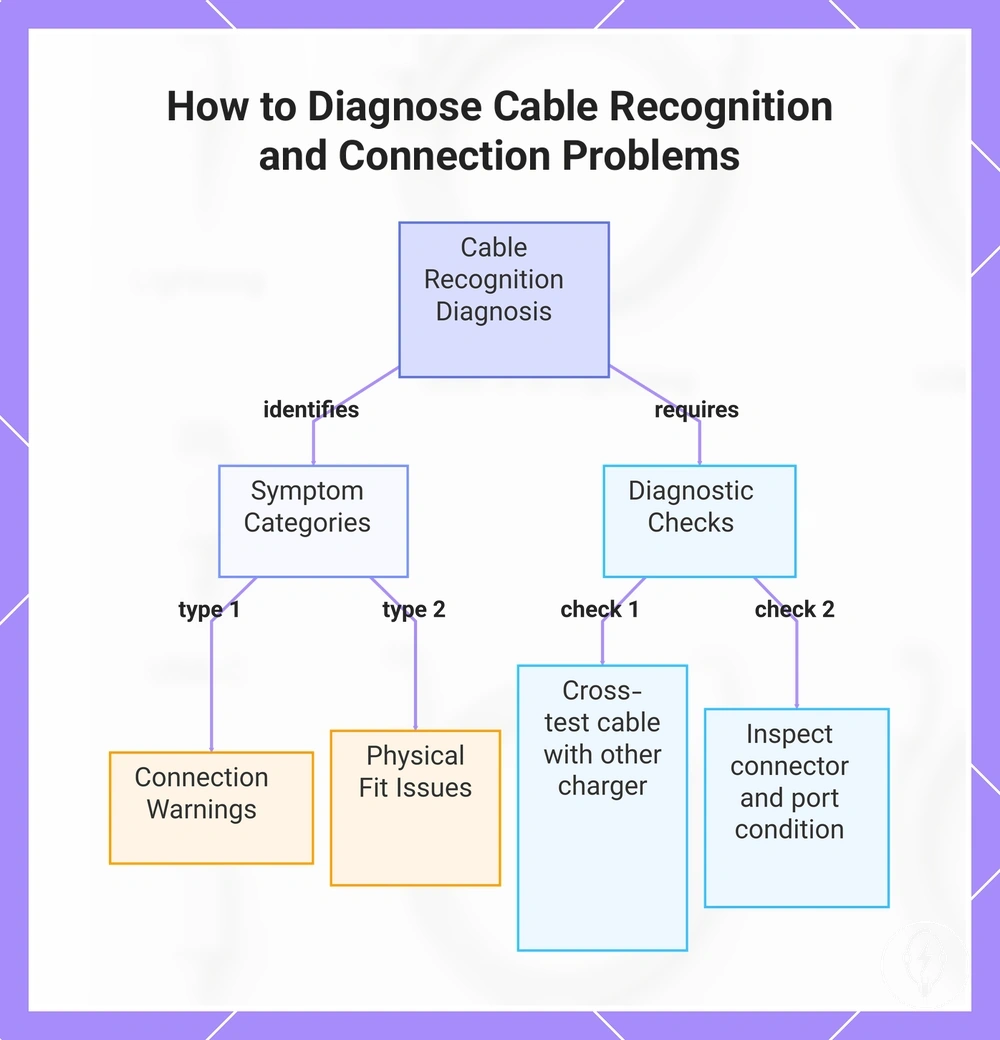
Recognition problems are best assessed by comparing the symptom with the connection condition.
Recognition problems are best assessed by comparing the symptom with the connection condition. A charging lead that works with one compatible charger but not another can indicate an adapter-side mismatch, while a cable that disconnects only when moved is more consistent with intermittent contact at the connector end or cable condition. A connector that feels loose after being fully inserted may indicate wear at the cable connector, the charger, or the iPhone port rather than a compatibility problem alone. :contentReference[oaicite:1]{index=1}
The checklist below helps relate each recognition problem to its likely cause and the next safe diagnostic check.
The checklist below helps relate each recognition problem to its likely cause and the next safe diagnostic check.
- Symptom: Not recognized warning. Likely cause: The cable, charger, iPhone port, or connected accessory is not establishing a reliable connection. Check: Test the same cable with another compatible charger or device to determine whether the warning follows the cable or the charging source.
- Symptom: Intermittent charging. Likely cause: Unstable electrical contact caused by cable wear, connector movement, or inconsistent contact between the charging lead and the source port. Check: Observe whether charging stops only when the connector or cable is moved.
- Symptom: Loose fit or worn connector ends. Likely cause: Physical wear affecting the connector end, charger socket, or iPhone port. Check: Confirm that both connector ends seat fully without excessive movement.
- Symptom: Dirty contacts. Likely cause: Dust or debris interrupting electrical contact at the connector or port. Check: Visually inspect the connector and charging interface without attempting unsafe cleaning procedures.
- Symptom: Cable fits the iPhone but not the charger or computer. Likely cause: Adapter-side mismatch between the cable connector and the available USB-C or USB-A source port. Check: Verify that the source-side connector matches the available charging or data port.
For example, if an iPhone charges consistently with one compatible USB-C power adapter but repeatedly displays a not recognized warning with another adapter using the same charging cable, the charging source becomes the more likely cause than the cable itself. If these checks do not identify the problem, continue with the broader charging cable problems guide for additional cable-specific troubleshooting. :contentReference[oaicite:2]{index=2}
This chart shows how to identify common cable recognition problems by matching symptoms to likely causes and performing targeted checks.
This chart shows how to identify common cable recognition problems by matching symptoms to likely causes and performing targeted checks.
Unsupported Accessory Warnings and Cable Rejection
Unsupported accessory warnings and cable rejection indicate that the iPhone cannot establish a reliable charging or data connection with the connected accessory at that time. According to Apple Support, an unsupported accessory warning can be triggered by cable condition, connector fit, an adapter or source-port mismatch, contamination in the charging port, or an accessory that the device cannot properly recognise. The warning identifies a connection or recognition problem, not a guaranteed hardware failure. :contentReference[oaicite:0]{index=0}
The warning identifies a connection or recognition problem, not a guaranteed hardware failure.
Unsupported accessory warnings and cable rejection should be interpreted together with the connection pattern rather than as a single diagnosis. If the same charging lead works with one compatible charger but repeatedly shows a software message with another charger, the observed symptom is more consistent with an adapter mismatch or source-port issue. If the warning appears across multiple compatible charging sources, the cable condition, connector fit, or iPhone charging port becomes a stronger diagnostic cue, although further testing is still required before identifying the exact cause. :contentReference[oaicite:1]{index=1}
The checklist below separates the most common conditions from their likely diagnostic meaning.
Unsupported accessory warnings and cable rejection can be narrowed by comparing where the warning appears and whether the failure pattern changes. The checklist below separates the most common conditions from their likely diagnostic meaning.
- Condition: An unsupported accessory warning appears immediately after connection. Check: Confirm that both connector ends are fully inserted and match the iPhone port and the charging source. Decision: Poor connector fit or an incompatible accessory can prevent successful recognition.
- Condition: Cable rejection occurs with one charger but not another compatible charger. Check: Test the same charging lead with a different compatible power source. Decision: The symptom is more consistent with an adapter mismatch or source-port problem than with the cable alone.
- Condition: A repeated failure pattern occurs across multiple compatible chargers. Check: Inspect the cable condition, connector ends, and charging port for visible wear or contamination. Decision: Repeated failure suggests that the cable or charging interface requires closer inspection instead of assuming a compatibility problem.
- Condition: The software message appears only when the cable is moved. Check: Observe whether charging resumes after the connector position changes. Decision: An intermittent connection commonly indicates unstable electrical contact rather than confirmed cable incompatibility.
For example, if a USB-C charging cable works normally with one USB-C power adapter but consistently displays an unsupported accessory warning when connected to another compatible adapter, the changed charging source becomes the first diagnostic difference to investigate before replacing the cable. :contentReference[oaicite:2]{index=2}
Loose Fit, Damaged Cable Ends, and Dirty Connector Contacts
Loose fit, damaged cable ends, and dirty connector contacts are physical conditions that can interrupt charging or data transfer by preventing a stable electrical connection between the iPhone, charging cable, and power source. According to Apple Support, intermittent charging, accessory recognition warnings, or repeated disconnections should be assessed by checking the cable, connector, charging port, and power adapter because each can contribute to an unstable connection. :contentReference[oaicite:0]{index=0}
Dirty connector contacts or debris on the connector can interrupt electrical contact even when the USB-C or Lightning connector is otherwise compatible.
Loose fit, damaged cable ends, and dirty connector contacts should be evaluated by comparing the visible cable condition with the observed charging symptom. A loose fit can indicate wear at the connector end or charging port, while bent connector pins, frayed insulation, exposed wiring, or visible heat signs indicate that the charging lead should no longer be used. Dirty connector contacts or debris on the connector can interrupt electrical contact even when the USB-C or Lightning connector is otherwise compatible. :contentReference[oaicite:1]{index=1}
Loose fit, damaged cable ends, and dirty connector contacts should be evaluated by comparing the visible cable condition with the observed charging symptom.
The checklist below helps verify whether the physical condition is likely to reduce connection reliability or indicates that replacement is the safer decision.
- Condition: Loose fit. Check: Confirm that the connector seats fully without excessive movement. Decision: A loose connection can cause intermittent charging or repeated disconnection.
- Condition: Damaged cable end. Check: Inspect the connector end for bent metal, cracked housing, or frayed strain relief. Decision: Physical damage can reduce connection reliability and indicates replacement.
- Condition: Exposed wiring or heat signs. Check: Look for visible internal conductors, melted insulation, discoloration, or unusual warmth during charging. Decision: Stop using the charging lead because visible damage or overheating indicates an unsafe cable condition.
- Condition: Dirty connector contacts. Check: Inspect the connector contacts and charging port for visible debris or contamination. Decision: Dirty contacts can interrupt electrical connection without indicating connector incompatibility.
- Condition: Repeated disconnection. Check: Observe whether charging repeatedly starts and stops while the cable remains connected. Decision: Repeated disconnection commonly indicates a physical connection problem affecting charging reliability.
For example, if one USB-C charging cable maintains a stable connection while another cable with a frayed connector end repeatedly disconnects when the phone is moved, the visible cable damage becomes the most likely physical difference to investigate. If inspection confirms loose fit, damaged cable ends, dirty connector contacts, exposed wiring, or heat signs, the appropriate next step is to replace worn charging cables instead of continuing to use a visibly damaged charging lead. :contentReference[oaicite:2]{index=2}