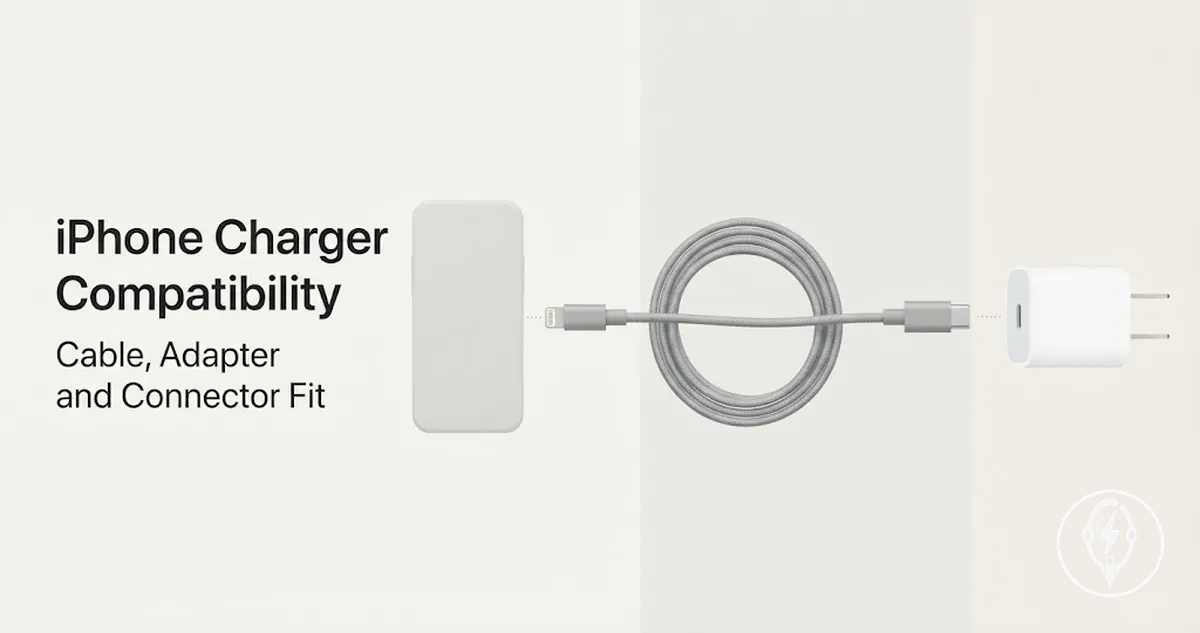
iPhone Charger Compatibility for Cable, Adapter, and Connector Fit
iPhone charger compatibility is the correct match between the iPhone model, charging port, cable end, adapter port, charging standard, and wireless charging method. A charging setup is compatible only when these components are designed to work together, while charging speed, charging efficiency, and charging experience remain conditional on factors such as wattage, supported charging protocols, cable capability, and wireless technology. In other words, connector fit and charging performance are related but are not the same compatibility requirement.
Physical connector fit must be evaluated together with the charging standard.
Physical connector fit must be evaluated together with the charging standard. According to Apple Support, iPhone models with USB-C are designed to charge through the USB-C connector and support USB Power Delivery (USB-PD) fast charging when paired with a compatible USB-C cable and USB-C power adapter, while earlier iPhone models with a Lightning port require a Lightning cable even if the power adapter itself uses USB-C. A cable can therefore fit the adapter correctly but still fail to connect to the iPhone if the cable end does not match the phone's charging port, illustrating the difference between connector compatibility and charging performance.
Wireless charging also depends on matching standards rather than simply placing the phone on a charging pad.
Wireless charging also depends on matching standards rather than simply placing the phone on a charging pad. Apple specifies that compatible iPhone models support Qi wireless charging, while MagSafe-compatible models also support magnetic alignment that helps maintain proper positioning during charging. Fast charging, charging speed, and safe operation therefore remain conditional on the iPhone model, adapter wattage, charging protocol, cable capability, wireless standard, and the physical condition of the charging accessories rather than connector fit alone.
Apple specifies that compatible iPhone models support Qi wireless charging, while MagSafe-compatible models also support magnetic alignment that helps maintain proper positioning during charging.
The following sections explain each compatibility criterion in detail so you can evaluate cable ends, adapter ports, charging standards, wireless methods, and accessory condition without confusing physical compatibility with charging performance.
Table of Contents
What iPhone Charger Compatibility Depends On
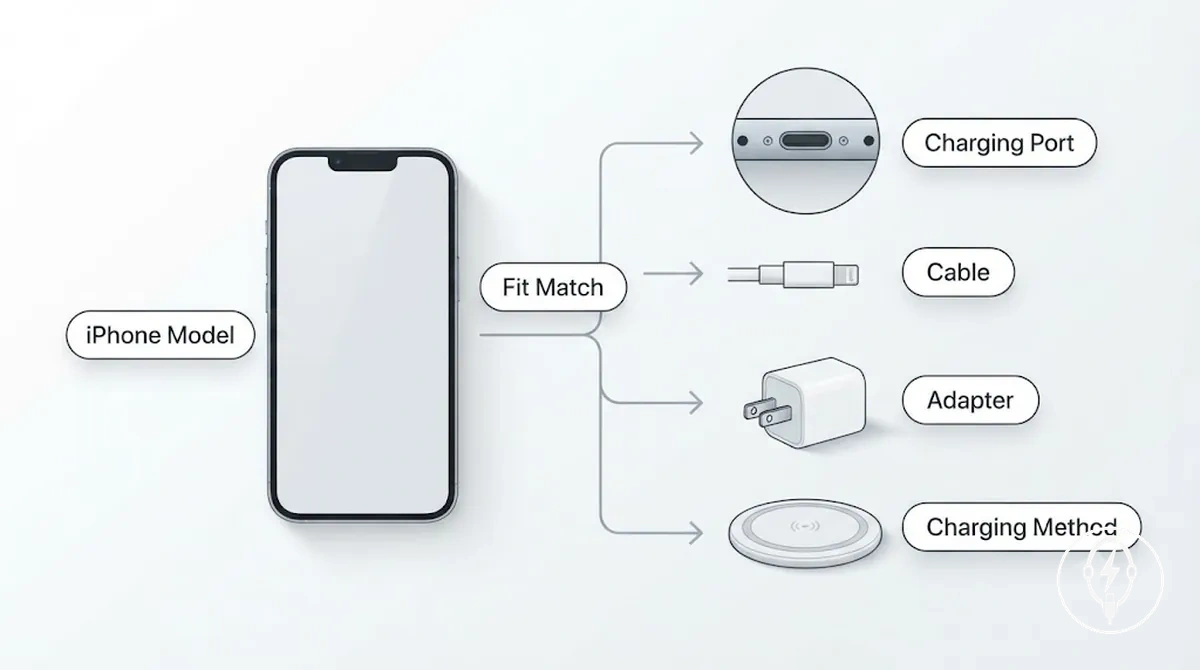
iPhone charger compatibility is the match between the iPhone, cable, adapter, connector, and charging method. A charging setup is compatible only when these components support the same connection and charging standard for the specific iPhone model. According to Apple Support, the primary dependency factors are the iPhone model, charging port or wireless support, cable, adapter, and charging method.
iPhone charger compatibility is the match between the iPhone, cable, adapter, connector, and charging method.
What iPhone charger compatibility depends on follows a clear dependency chain: the iPhone model determines the supported charging port or wireless charging capability, which determines the required cable, adapter, and charging standard. For example, Apple specifies that iPhone 15 and later models use USB-C, while earlier iPhone models use Lightning, so the connector must match the device before charging can occur. Apple also states that supported iPhone models can achieve fast charging with a USB-C power adapter rated at 20 W or higher, demonstrating that a compatible connector does not by itself guarantee the fastest charging outcome. Compatibility therefore remains conditional on the complete charging setup rather than on a single accessory.
Compatibility includes both physical fit and expected charging behavior, but it does not replace checks for accessory safety, certification, or cable condition because a connector that fits may still lack the charging protocol or power capability needed for the expected charging result. For broader context about compatible charging products and related accessories, visit the iPhone charging accessories hub before comparing individual charging solutions.
Fit Compatibility Versus Charging Speed Compatibility
Fit compatibility confirms that an iPhone, cable, and power adapter can connect physically, while charging speed compatibility determines whether the complete charging setup also supports the intended charging rate through the correct charging protocol, cable capability, and adapter output. According to Apple, supported iPhone models can fast charge only when used with a compatible USB-C power adapter rated at 20 W or higher together with a compatible USB-C cable. A charger can therefore have the correct connector fit but still deliver slower charging because physical connection and speed support are separate compatibility checks.
Fit compatibility versus charging speed compatibility depends on different technical attributes even though both are required for an effective charging setup.
Fit compatibility versus charging speed compatibility depends on different technical attributes even though both are required for an effective charging setup. The comparison below separates physical connection from speed support by comparing connector fit, adapter port, cable capability, charging protocol, wattage, and expected charging behavior.
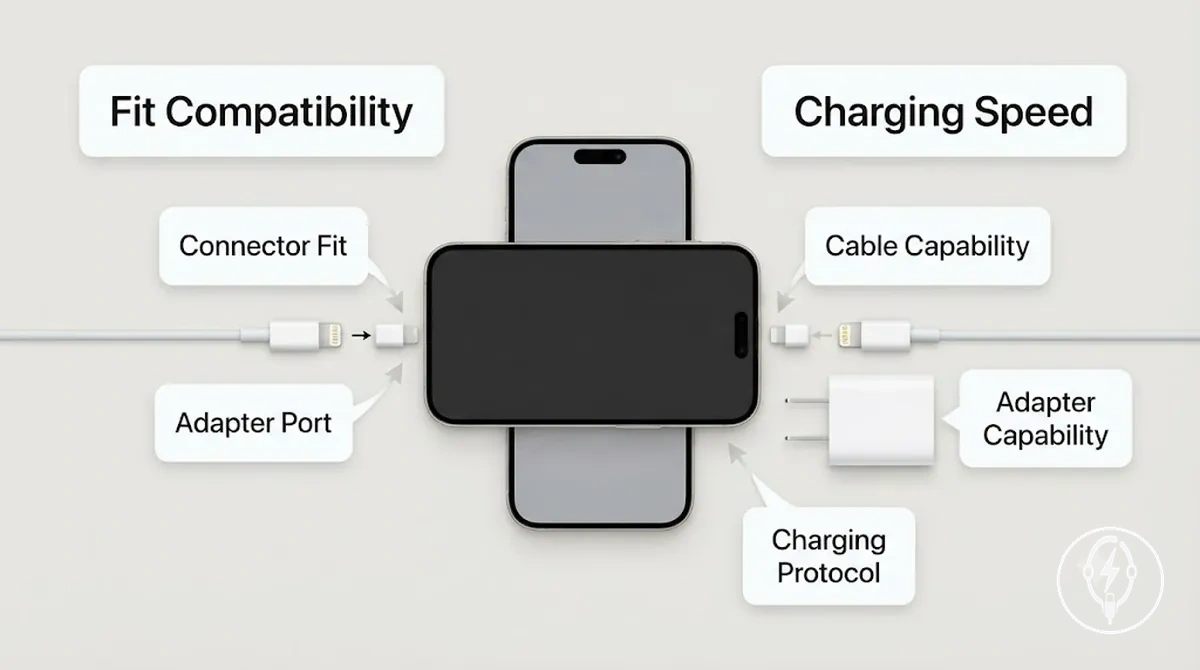
| Compatibility type | What it checks | Main attributes | Possible outcome |
|---|---|---|---|
| Fit compatibility | Whether the cable end matches the iPhone connector and the adapter port accepts the cable | Connector fit, cable end, adapter port | A physical connection can be established |
| Charging speed compatibility | Whether the complete charging path supports the intended charging rate | Cable capability, charging protocol, adapter wattage, iPhone support | Fast charging is available only when all required conditions are met |
| Adapter match | Whether the power adapter supports the required charging protocol | USB Power Delivery support, adapter output | A connected phone may charge at standard speed if protocol support is absent |
| Cable capability | Whether the cable supports the required power delivery | Power delivery capability, connector type | A compatible connector may still limit charging performance |
| Expected charging behavior | Overall charging result from the complete setup | Fit compatibility, charging protocol, wattage, cable capability | Correct connector fit does not by itself guarantee fast charging |
A common mismatch occurs when every connector fits correctly but one component does not support the required charging protocol or power output. For example, according to Apple, an iPhone that supports fast charging can still charge at a standard rate if it is connected through a compatible cable to a power adapter that provides less than the recommended 20 W output or does not support USB Power Delivery. This example shows that charging behavior depends on the complete charging path rather than connector fit alone.
iPhone Model and Charging Port Compatibility
iPhone model and charging port compatibility is determined by matching the iPhone model family to its charging port, then selecting the correct cable connector and adapter-side connection. According to Apple, iPhone 15 and later models use a USB-C charging port, while earlier iPhone models use a Lightning port, so the charging port determines the cable direction before charging can begin. The charging result depends on this correct port-to-cable match, while charging speed remains conditional on the charging standard, cable capability, and power adapter rather than the port type alone.
The following mapping shows how the port type determines the required cable connector and adapter-side requirement.
iPhone model and charging port compatibility is easier to understand by grouping iPhones according to their charging port instead of listing every model individually. The following mapping shows how the port type determines the required cable connector and adapter-side requirement.
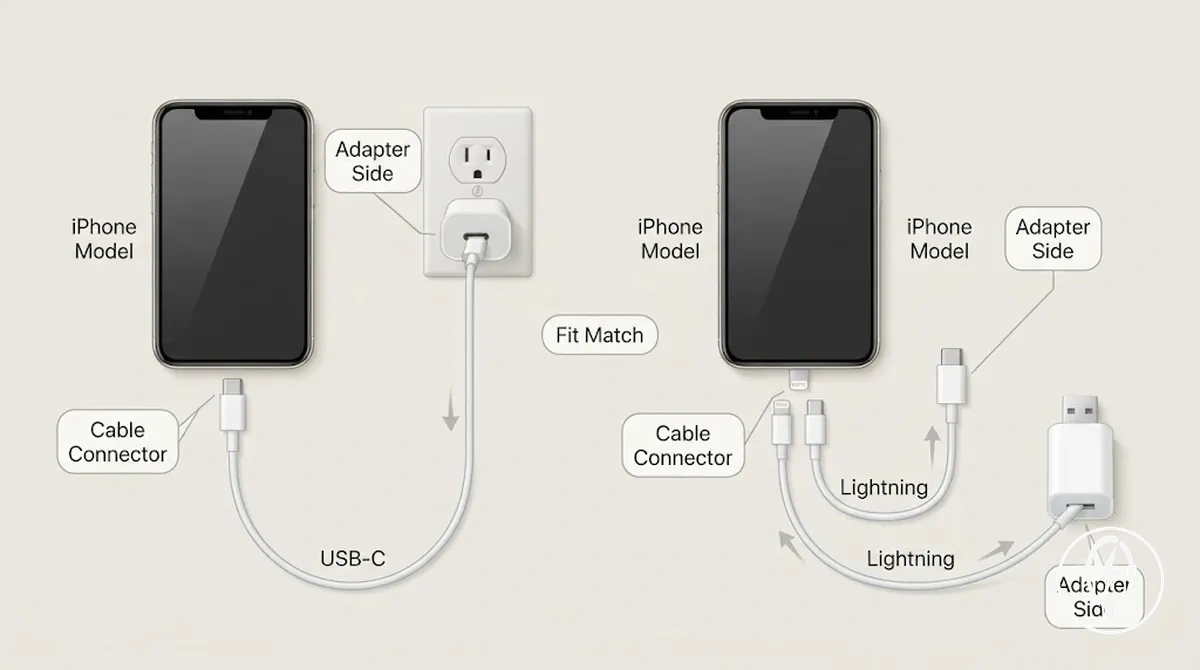
| iPhone port type | Cable phone end | Adapter-side cable end | Adapter port needed | Compatibility note |
|---|---|---|---|---|
| USB-C | USB-C | USB-C | USB-C | According to Apple, iPhone 15 and later models use USB-C for charging and data, requiring a USB-C connector at the phone end. |
| Lightning | Lightning | USB-C | USB-C | Compatible with a Lightning-to-USB-C cable when used with a USB-C power adapter. |
| Lightning | Lightning | USB-A | USB-A | Compatible with a Lightning-to-USB-A cable when used with a USB-A power adapter. |
USB-C and Lightning identify the physical charging port rather than the charging speed. For example, according to Apple, a USB-C iPhone paired with a USB-C power adapter rated at 20 W or higher can support fast charging when the charging setup also supports USB Power Delivery, whereas the same USB-C port connected to a lower-output adapter may charge at a lower rate. This shows that the charging port determines cable direction, but the charging result depends on the complete charging system.
USB-C and Lightning identify the physical charging port rather than the charging speed.
For detailed guidance on connector types, cable ends, and physical matching, see cable and connector fit. Keeping cable taxonomy separate from iPhone model and charging port compatibility helps identify the correct cable direction before comparing charging standards or charging performance.
USB-C iPhone Charging Requirements
A USB-C iPhone requires a USB-C port, a USB-C to USB-C cable, and a compatible adapter with an adapter-side USB-C connection for wired charging. According to Apple Support, iPhone 15 and later models use USB-C for charging and data, so every connection point in the wired charging path must use USB-C. The required compatibility path is USB-C iPhone → USB-C port → USB-C cable → compatible adapter with adapter-side USB-C.
The required compatibility path is USB-C iPhone → USB-C port → USB-C cable → compatible adapter with adapter-side USB-C .
USB-C iPhone charging requirements are easier to verify by confirming each connection point shown in the diagram before evaluating charging speed.
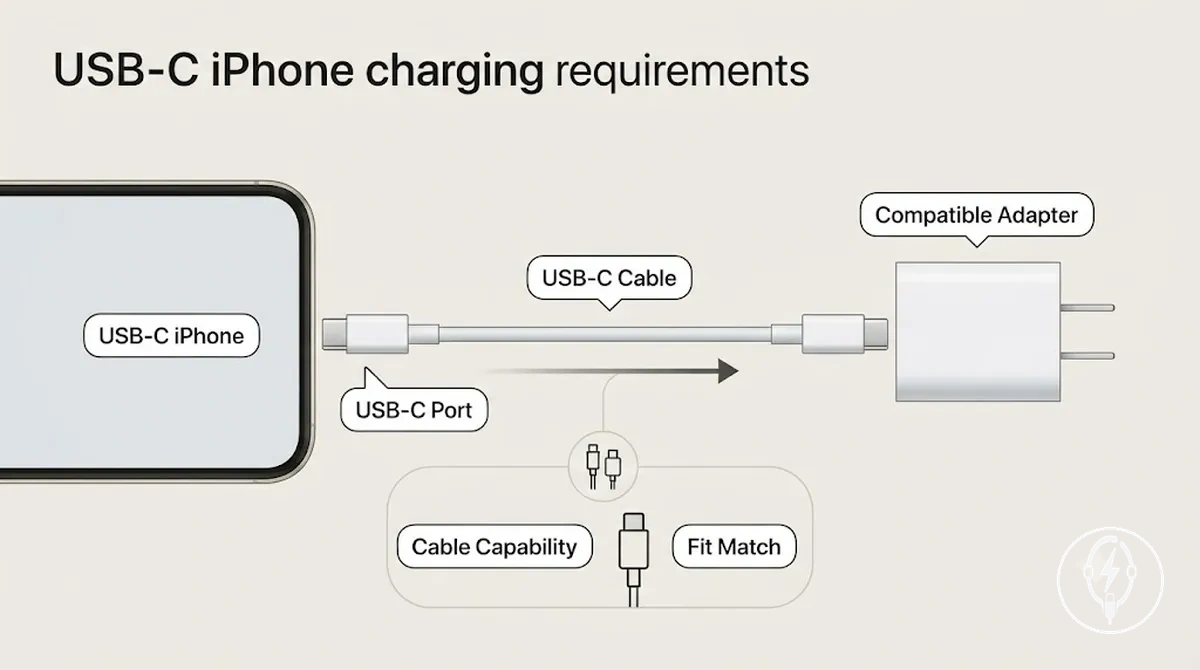
- Phone-side USB-C: The USB-C iPhone must have a USB-C port that accepts a USB-C connector.
- USB-C cable: A USB-C to USB-C cable is required so both ends match the phone and the compatible adapter.
- Adapter-side USB-C: The power adapter must provide a USB-C output that matches the cable connector.
- Charging speed: According to Apple Support, supported iPhone models can fast charge when used with a compatible USB-C power adapter rated at 20 W or higher, while the final charging speed also depends on cable capability and USB Power Delivery support.
A USB-C connector confirms physical fit but does not guarantee identical charging performance. For example, according to Apple Support, a supported iPhone connected with a USB-C cable to a 20 W USB-C Power Delivery adapter can fast charge, whereas the same phone connected through a lower-wattage adapter or a cable that does not support the required charging capability may charge more slowly even though every connector fits correctly.
Lightning iPhone Charging Requirements
A Lightning iPhone requires a Lightning connector at the phone end, a compatible Lightning cable, and a power adapter with a matching adapter port for wired charging. According to Apple Support, Lightning iPhones support two wired charging paths: a Lightning-to-USB-C cable used with a USB-C adapter or a Lightning-to-USB-A cable used with a USB-A adapter. The required compatibility path is Lightning iPhone → Lightning connector → Lightning cable → matching adapter port → charging result, while fast-charge capability depends on the cable and adapter rather than the Lightning connector itself.
Lightning iPhone charging requirements become clearer when the two adapter-side cable paths are compared below.
Lightning iPhone charging requirements become clearer when the two adapter-side cable paths are compared below.
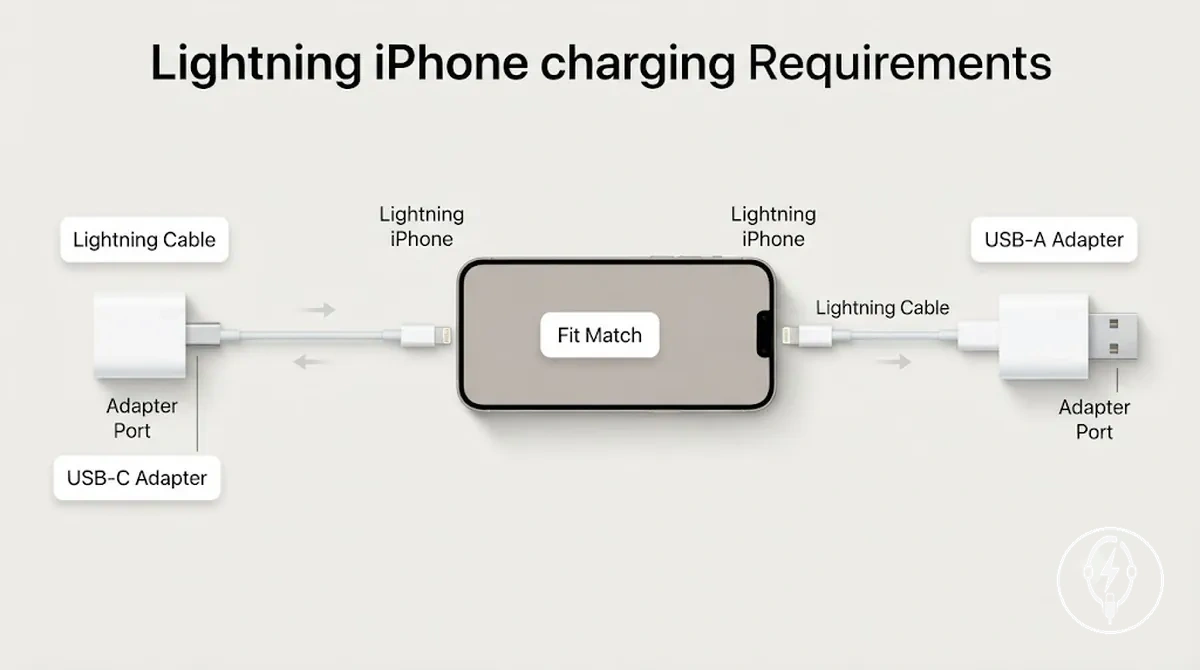
- Lightning-to-USB-C: The cable uses a Lightning connector at the iPhone end and a USB-C plug end for a USB-C adapter port. According to Apple Support, supported Lightning iPhone models can fast charge when paired with a compatible USB-C power adapter rated at 20 W or higher.
- Lightning-to-USB-A: The cable uses a Lightning connector at the iPhone end and a USB-A plug end for a USB-A adapter port. This path provides standard wired charging with a compatible USB-A adapter, but Apple does not specify USB-A charging as a fast-charge configuration.
For example, according to Apple Support, an iPhone 14 connected with a Lightning-to-USB-C cable and a compatible 20 W USB-C power adapter can reach approximately 50% charge in around 30 minutes under Apple's fast-charge conditions. The same iPhone connected through a Lightning-to-USB-A cable and USB-A adapter remains physically compatible for charging, but it does not meet Apple's documented fast-charge configuration.
Cable End and Adapter Port Matching
Cable end and adapter port matching requires the adapter-side end of the cable to match the adapter port before an iPhone charging setup can work. This verification is separate from phone end connector fit because the cable must fit both the iPhone charging port and the power adapter. According to Apple Support, connector compatibility establishes the physical connection, while charging performance depends on the supported charging standard, cable capability, and adapter support, making physical port matching the first compatibility criterion.
The table below verifies the cable end and adapter port matching rules before charging capability is evaluated.
The table below verifies the cable end and adapter port matching rules before charging capability is evaluated.
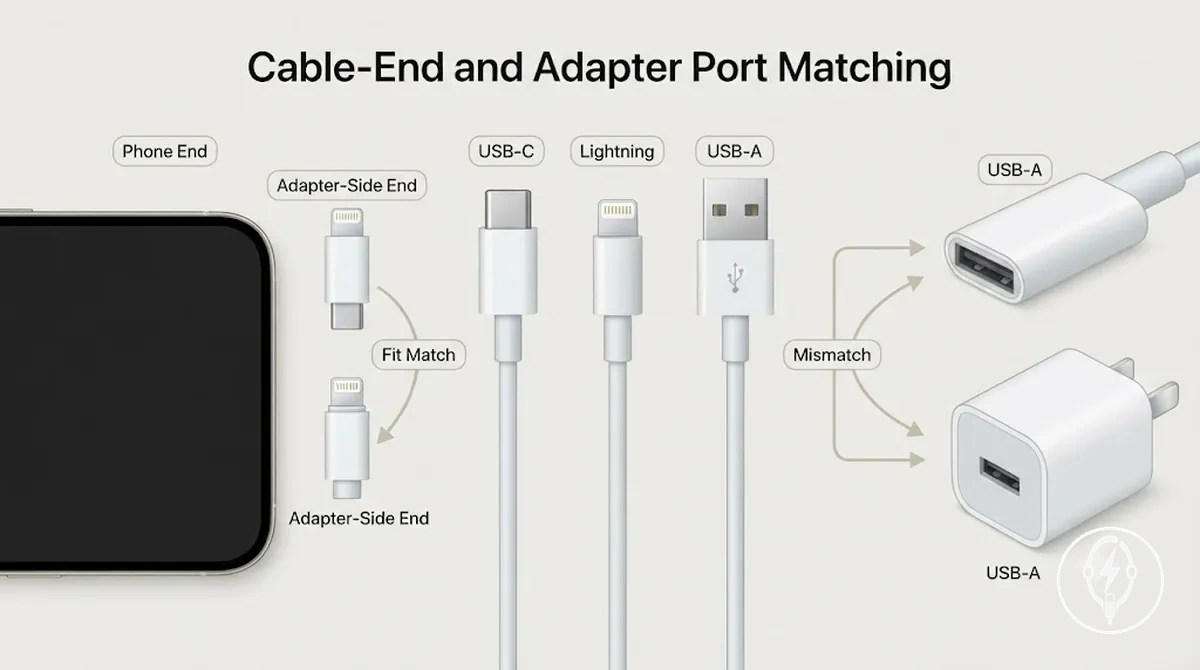
| Cable phone end | Cable adapter end | Adapter port needed | Compatibility result |
|---|---|---|---|
| USB-C | USB-C | USB-C | Compatible pairing when the cable end matches the adapter port and the adapter supports the required charging standard. |
| Lightning | USB-C | USB-C | Compatible pairing for a Lightning-to-USB-C cable connected to a USB-C adapter. |
| Lightning | USB-A | USB-A | Compatible pairing for a Lightning-to-USB-A cable connected to a USB-A adapter. |
| USB-C | USB-C | USB-A | Incompatible pairing because the USB-C adapter-side end cannot plug directly into a USB-A adapter port. |
A common mismatch occurs when the phone end fits the iPhone but the adapter-side end does not fit the adapter port. For example, a USB-C-to-USB-C cable cannot connect directly to a USB-A charger because the connector shapes are different, even though the USB-C phone end fits a USB-C iPhone. This prevents charging until the cable and adapter port are physically matched.
This prevents charging until the cable and adapter port are physically matched.
After the cable end and adapter port form a compatible pairing, the charging outcome depends on the supported charging standard. According to Apple Support, supported iPhone models require a compatible USB Power Delivery charger rated at 20 W or higher together with a compatible cable to enable fast charging, demonstrating that connector fit confirms compatibility but does not by itself determine charging speed.
USB-C to USB-C Cable Fit
USB-C to USB-C cable fit is the correct pairing when both the iPhone and the power adapter use USB-C connectors. According to Apple, iPhone 15 and later models use a USB-C connector for charging, so a USB-C to USB-C cable provides the correct physical port match only when the phone-side USB-C connector fits the iPhone and the adapter-side USB-C connector fits a compatible USB-C adapter. This same-end USB-C cable confirms connector compatibility but does not by itself determine charging behavior.
This same-end USB-C cable confirms connector compatibility but does not by itself determine charging behavior.
The diagram below illustrates USB-C to USB-C cable fit by showing both cable ends matched to USB-C ports on the iPhone and the USB-C adapter.
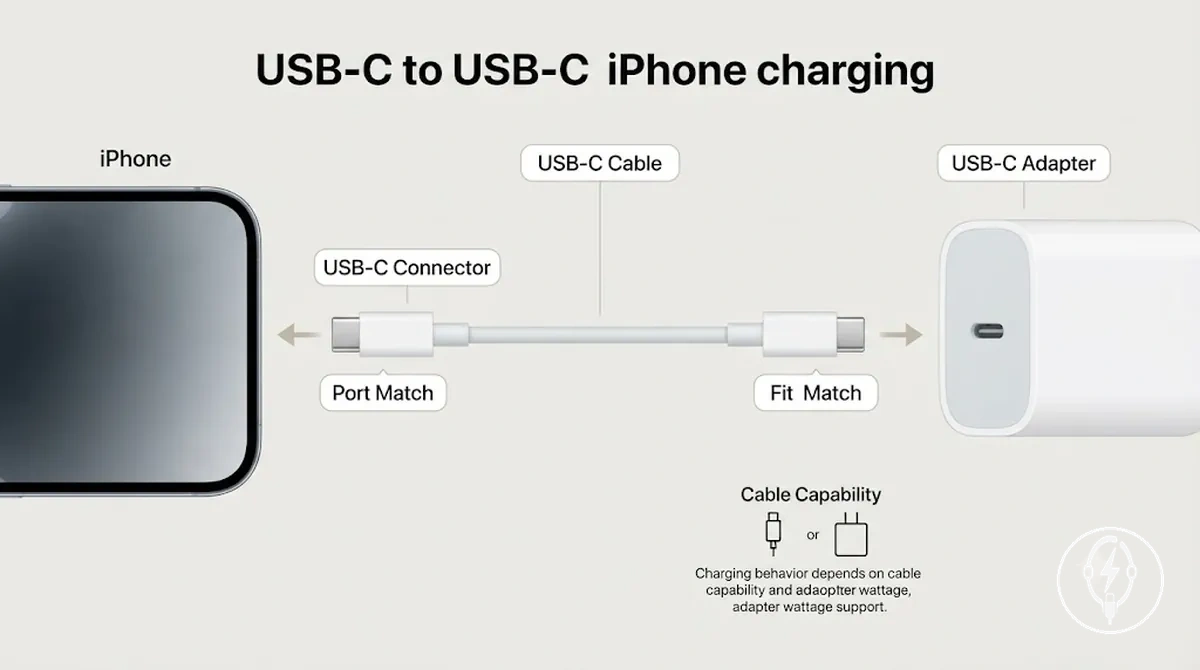
- Phone-side fit: The USB-C connector must plug into the iPhone's USB-C charging port.
- Adapter-side fit: The opposite USB-C connector must plug into a compatible USB-C adapter port to complete the charging path.
- Performance condition: According to Apple, charging behavior depends on cable capability and adapter wattage support in addition to correct port match, so identical USB-C connector fit does not guarantee identical charging performance.
For example, Apple specifies that supported iPhone models can fast charge when used with a compatible USB-C power adapter rated at 20 W or higher and a compatible USB-C cable. This means two USB-C to USB-C cable connections can have the same physical fit, yet produce different charging behavior if cable capability or adapter wattage support differs.
USB-C to Lightning and USB-A to Lightning Cable Fit
USB-C to Lightning and USB-A to Lightning cables both fit iPhones with a Lightning connector, but each Lightning cable requires a different adapter-side plug. A USB-C to Lightning cable fits only a USB-C adapter, while a USB-A to Lightning cable fits only a USB-A adapter. According to Apple, supported Lightning iPhone models can use a USB-C to Lightning cable with a compatible USB-C power adapter rated at 20 W or higher for fast charging, whereas a USB-A to Lightning cable provides a compatible physical connection but is not Apple's documented fast-charge configuration.
A USB-C to Lightning cable fits only a USB-C adapter , while a USB-A to Lightning cable fits only a USB-A adapter .
The Lightning connector on the phone remains the same for both cable paths, so the compatibility decision is made at the adapter-side plug rather than the iPhone. For example, a Lightning cable with a USB-C adapter-side plug cannot fit a USB-A adapter port, and a Lightning cable with a USB-A adapter-side plug cannot fit a USB-C adapter. This local adapter-port match determines whether the cable fits before charging behavior or speed implications are considered.
| Lightning cable path | Adapter-side fit and speed implication |
|---|---|
| USB-C to Lightning | Adapter-side plug fits a USB-C adapter port. According to Apple, supported iPhone models can fast charge when paired with a compatible USB-C power adapter rated at 20 W or higher and a USB-C to Lightning cable. |
| USB-A to Lightning | Adapter-side plug fits a USB-A adapter port. Provides compatible wired charging, but Apple does not specify the standard USB-A charging path as a fast-charge configuration. |
Fast Charging Compatibility Conditions
Fast charging compatibility requires every major charging condition to align: the iPhone must support fast charging, the charger must support USB Power Delivery (USB PD), the power adapter must provide at least 20 W of output, the cable must support the required charging capability, and the complete connector path must be compatible. According to Apple, supported iPhone models can fast charge only when used with a compatible USB-C power adapter rated at 20 W or higher together with a compatible charging cable and charging standard. A setup that does not satisfy one or more of these conditions can still provide basic charging but does not meet the documented conditions for faster charging. :contentReference[oaicite:0]{index=0}
Fast charging compatibility depends on the phone, adapter, cable, and charging standard working together rather than on any single component.
Fast charging compatibility depends on the phone, adapter, cable, and charging standard working together rather than on any single component. Use the criteria below to determine whether an iPhone charging setup supports basic charging only or is compatible with optimized faster charging.
| Condition | What to check | Why it matters | Safe interpretation |
|---|---|---|---|
| iPhone model support | Verify that the iPhone model supports Apple's fast charging feature. | Only supported iPhone models can negotiate higher charging power. | Unsupported models remain compatible for basic charging only. |
| Adapter wattage | Use a compatible USB-C power adapter rated at 20 W or higher. | Apple specifies this minimum output for supported fast charging. | A lower-output adapter can charge the iPhone but does not satisfy the documented fast-charge condition. |
| USB Power Delivery | Confirm that the charger supports the USB Power Delivery charging standard. | USB PD manages compatible power negotiation between the charger and iPhone. | Correct connector fit alone does not confirm USB Power Delivery support. |
| Cable capability | Use a compatible charging cable that supports the required charging mode. | The cable must safely carry the negotiated charging power. | A cable that fits physically is not automatically compatible for optimized charging. |
| Connector path | Ensure every connector matches the iPhone port and the adapter port. | A complete physical charging path is required before charging can begin. | Connector compatibility enables charging but does not by itself determine charging speed. |
A charging setup that satisfies every condition is compatible with faster charging, while a setup missing sufficient adapter wattage, USB Power Delivery support, cable capability, or a compatible connector path normally remains limited to basic charging. For example, according to Apple, a supported iPhone connected with a compatible USB-C cable to a 20 W USB-C Power Delivery adapter meets the documented fast-charging configuration, whereas replacing that adapter with a non-USB PD charger or one rated below 20 W changes the charging outcome even though the connectors may still fit physically. :contentReference[oaicite:1]{index=1}
For model-specific charging methods, supported charging standards, and additional decision guidance, continue to the dedicated fast charging compatibility page.
For model-specific charging methods, supported charging standards, and additional decision guidance, continue to the dedicated fast charging compatibility page.
USB Power Delivery and Adapter Wattage
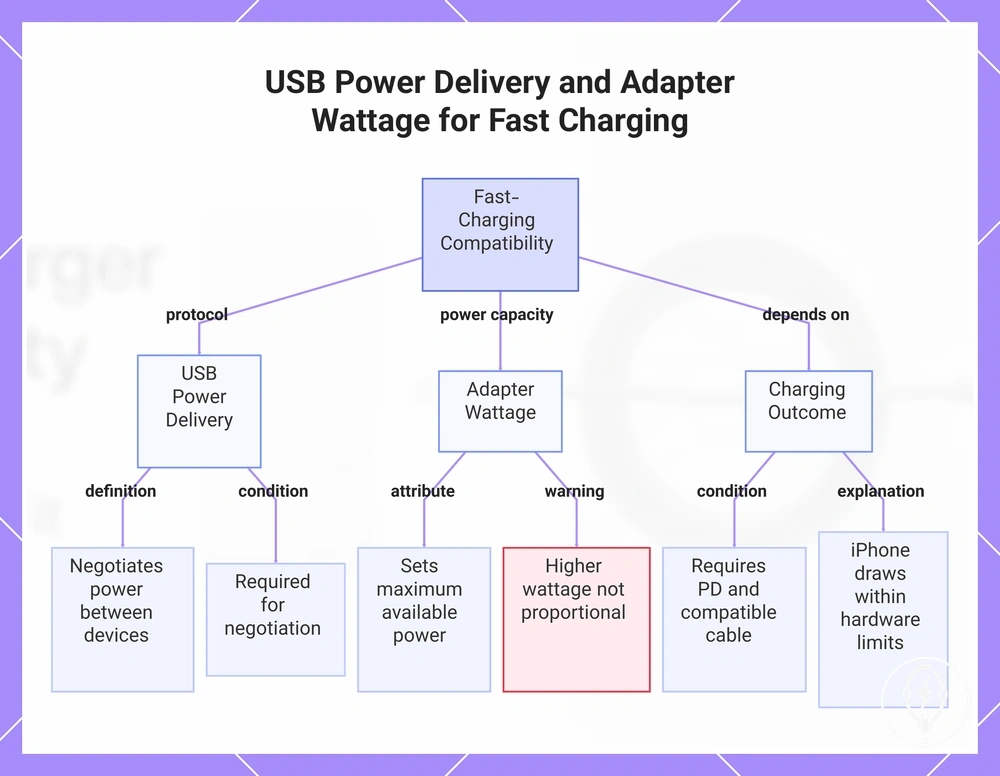
USB Power Delivery (USB PD) and adapter wattage are separate attributes that determine fast-charging compatibility. According to the USB Implementers Forum (USB-IF), USB Power Delivery is the charging protocol that negotiates power between compatible devices, while Apple specifies that supported iPhone models require a compatible USB-C power adapter rated at 20 W or higher for fast charging. Protocol support enables the charging negotiation, whereas adapter wattage sets the maximum available power for that compatible charging session. :contentReference[oaicite:0]{index=0}
USB Power Delivery (USB PD) and adapter wattage are separate attributes that determine fast-charging compatibility.
Fast-charging speed outcome depends on USB Power Delivery support, adapter wattage, cable capability, and iPhone condition together rather than on a single specification. For example, according to Apple, a supported iPhone connected with a compatible USB-C cable to a 20 W USB Power Delivery adapter satisfies the documented fast-charging configuration, while replacing that charger with a 20 W adapter that does not support USB Power Delivery prevents the same fast-charging negotiation despite having the same wattage. Higher adapter wattage alone also does not ensure proportionally faster charging because the iPhone draws power only within the limits supported by its charging hardware and charging protocol. :contentReference[oaicite:1]{index=1}
This chart explains how USB Power Delivery and adapter wattage work together to enable fast charging on supported iPhones.
This chart explains how USB Power Delivery and adapter wattage work together to enable fast charging on supported iPhones.
Wireless Charger Compatibility Boundaries
Wireless charger compatibility depends on the iPhone supporting wireless charging, the charger using a compatible Qi wireless standard, correct alignment, any required magnetic support, and the case condition. According to Apple, iPhone models that support wireless charging work with Qi-certified chargers, while MagSafe-compatible iPhone models also support magnetic alignment for compatible MagSafe accessories. Wireless compatibility therefore establishes whether charging can occur, not whether every wireless method provides the same charging outcome. :contentReference[oaicite:0]{index=0}
The comparison below defines the compatibility boundaries before charging performance is considered.
The comparison below defines the compatibility boundaries before charging performance is considered.
| Compatibility criterion | Qi wireless charging | MagSafe charging |
|---|---|---|
| Wireless standard | Requires an iPhone that supports Qi wireless charging. | Requires a MagSafe-compatible iPhone that also supports Qi charging. |
| Alignment | Correct placement on the charging pad is required. | Magnetic alignment automatically helps position compatible iPhone models. |
| Magnetic support | Not required for charging. | Required for magnetic attachment and alignment. |
| Case condition | Charging can be reduced or interrupted if the case prevents effective coil alignment. | Magnetic attachment and alignment can be reduced by incompatible or excessively thick cases. |
| Charging outcome | Wireless charging operates when the Qi standard, alignment, and case condition remain compatible. | Wireless charging operates with magnetic alignment on supported iPhone models when charger compatibility and case condition are maintained. |
A wireless charger can therefore be compatible without delivering the same charging behaviour as another wireless method. For example, according to Apple, a Qi charger can charge a compatible iPhone through the Qi standard, while a MagSafe charger can additionally provide magnetic alignment and supports wireless charging of up to 25 W on compatible iPhone models when used with Apple's compatible power adapter and operating conditions; if magnetic alignment or case condition interferes, charging can still occur but attachment stability or charging outcome may differ. :contentReference[oaicite:1]{index=1}
A wireless charger can therefore be compatible without delivering the same charging behaviour as another wireless method.
For detailed compatibility criteria covering supported wireless standards, charger types, and model-specific behaviour, continue to wireless charger compatibility. :contentReference[oaicite:2]{index=2}
Qi and MagSafe Compatibility Differences
Qi and MagSafe differ in wireless charger compatibility because Qi is the wireless charging standard used by compatible iPhones, while MagSafe combines Qi charging with Apple's magnetic alignment system for supported iPhone models. According to Apple, MagSafe is supported on iPhone 12 and later models, whereas Qi-certified wireless chargers can charge compatible iPhones without requiring magnetic attachment. The distinction is therefore based on charger standard, alignment method, and supported iPhone behavior rather than on whether wireless charging is possible. :contentReference[oaicite:0]{index=0}
The comparison below focuses on the local wireless compatibility differences.
The comparison below focuses on the local wireless compatibility differences. Magnetic alignment can improve charging consistency on supported iPhone models, while correct positioning remains important for both charging systems and incompatible or thick cases can interfere with alignment or charging stability. :contentReference[oaicite:1]{index=1}
| Wireless type | Compatibility basis | Alignment behavior | Practical note |
|---|---|---|---|
| Qi | Uses the Qi wireless charger standard supported by compatible iPhones. | Requires manual placement so the charging coils align correctly. | Charging experience depends on correct alignment, and case interference can reduce charging stability. |
| MagSafe | Uses Qi charging together with Apple's magnetic alignment system on iPhone 12 and later supported models. | Built-in magnets automatically align the charger with compatible iPhones. | Magnetic alignment can provide a more consistent charging experience, although incompatible or excessively thick cases can reduce magnetic attachment and charging stability. |
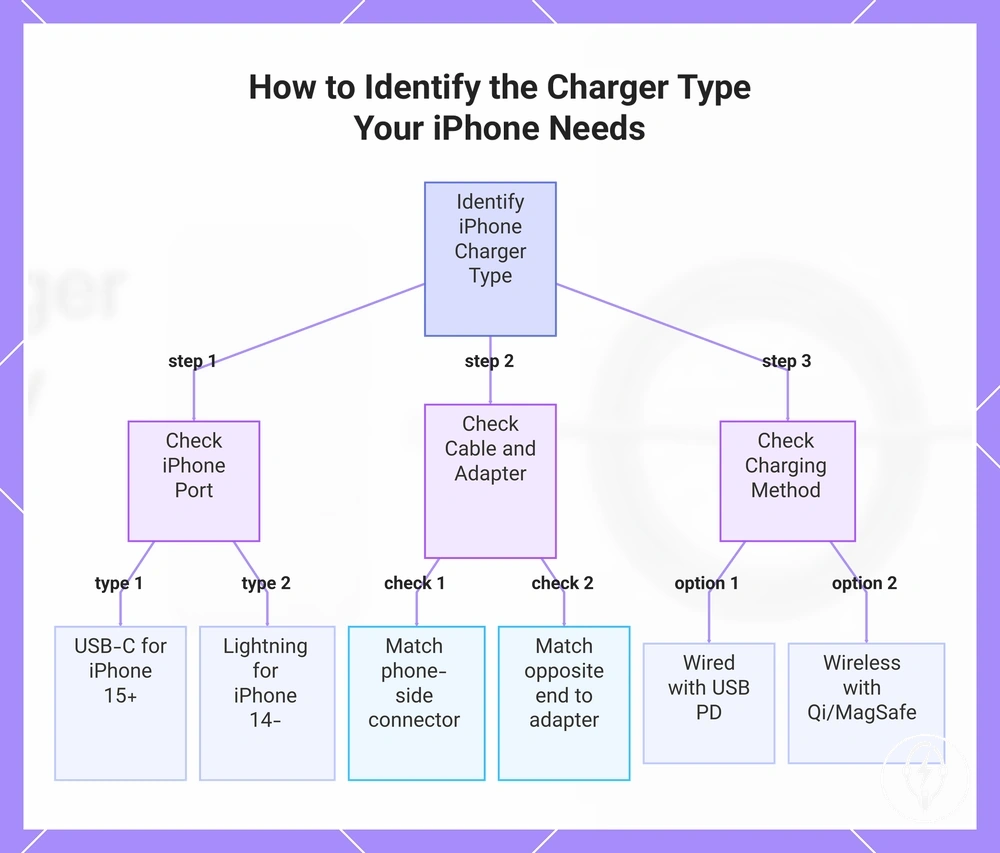
How to Identify the Charger Type Your iPhone Needs
You can identify the charger type your iPhone needs by checking the iPhone charging port, the cable ends, and the adapter port before considering charging speed or wireless support. According to Apple, iPhone 15 and later models use a USB-C port, while iPhone 14 and earlier models use a Lightning port, making the charging port the first compatibility check. After identifying the port, verify the cable ends and adapter port to complete the visible compatibility check. :contentReference[oaicite:0]{index=0}
After identifying the port, verify the cable ends and adapter port to complete the visible compatibility check.
Follow this short compatibility check before deciding whether your existing charger is suitable or whether a replacement accessory is needed.
- Identify whether the iPhone charging port is USB-C or Lightning.
- Inspect the cable connector that plugs into the iPhone and confirm it matches the charging port.
- Inspect the opposite cable end and identify whether it is USB-C or USB-A.
- Match the cable end to the correct adapter port, then determine whether you will use a wired method or wireless support.
- After the physical fit is confirmed, check charging-standard support, such as USB Power Delivery for supported fast charging, and decide whether replacement or selection help is needed.
The iPhone charging port determines the required phone-side cable connector. For example, according to Apple, an iPhone 15 uses a USB-C charging port, while an iPhone 14 uses a Lightning charging port, so the cable connector must match the specific iPhone model before the charging setup can work. :contentReference[oaicite:1]{index=1}
Next, verify the adapter port and charging method.
Next, verify the adapter port and charging method. A USB-C cable end fits a USB-C adapter port, while a USB-A cable end fits a USB-A adapter port. If you plan to use wireless support, confirm that the iPhone supports Qi charging or MagSafe before selecting the suitable charger type because wireless compatibility is evaluated separately from the wired method. :contentReference[oaicite:2]{index=2}
A USB-C cable end fits a USB-C adapter port, while a USB-A cable end fits a USB-A adapter port.
Once these compatibility checks are complete, continue to choosing compatible accessories to compare compatible charging setups without repeating the identification process. :contentReference[oaicite:3]{index=3}
Once these compatibility checks are complete, continue to choosing compatible accessories to compare compatible charging setups without repeating the identification process.
If you are moving from a Lightning iPhone to a USB-C iPhone, the power adapter may remain suitable when it already has a USB-C output, but the cable usually changes from Lightning-to-USB-C to USB-C-to-USB-C. This single compatibility check helps identify the suitable charger type without assuming that connector fit alone confirms charging speed or overall performance.:contentReference[oaicite:4]{index=4}
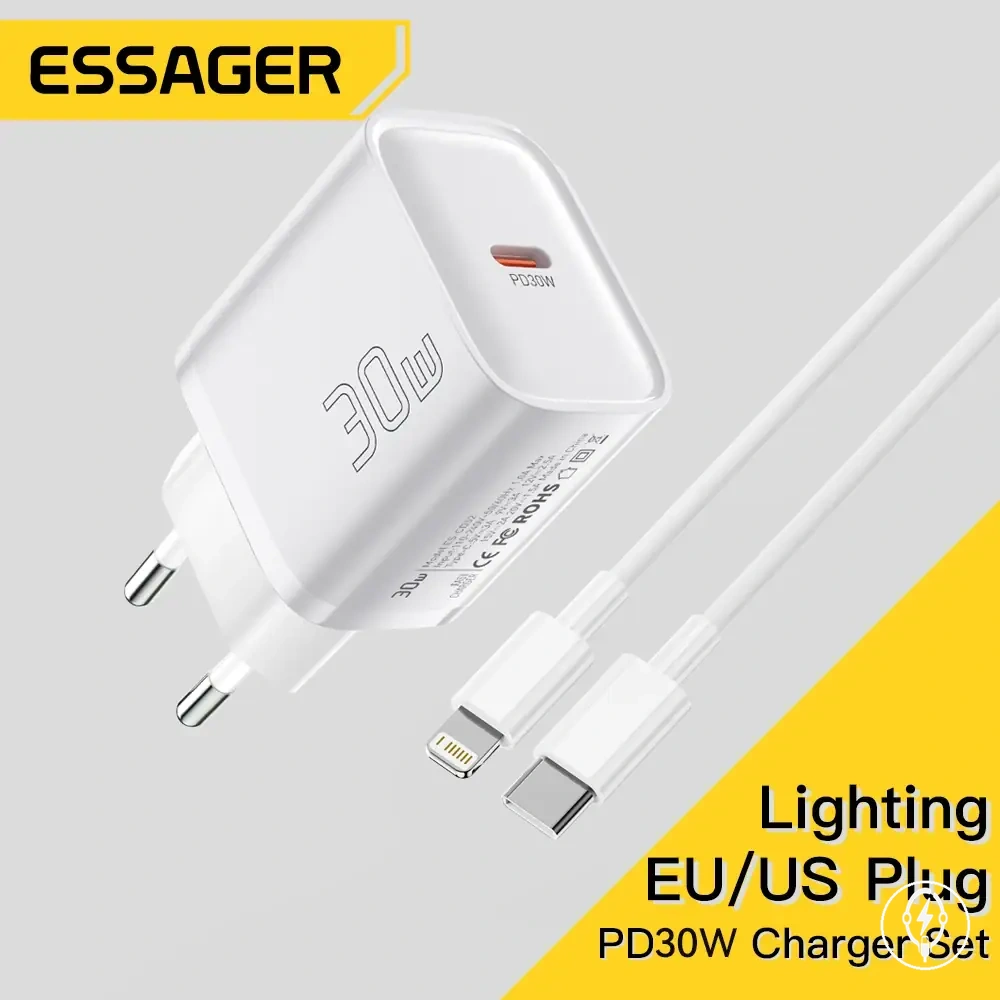
The products below are useful examples for comparing available options.
The products below are useful examples for comparing available options. Before buying, check that the compatibility criteria, key features, and product details match your needs.
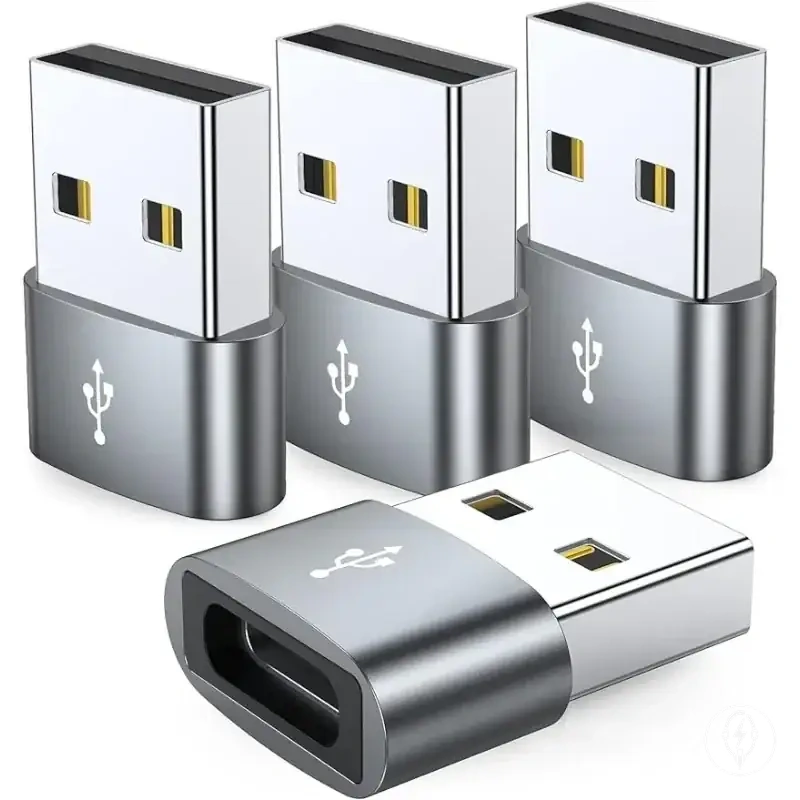
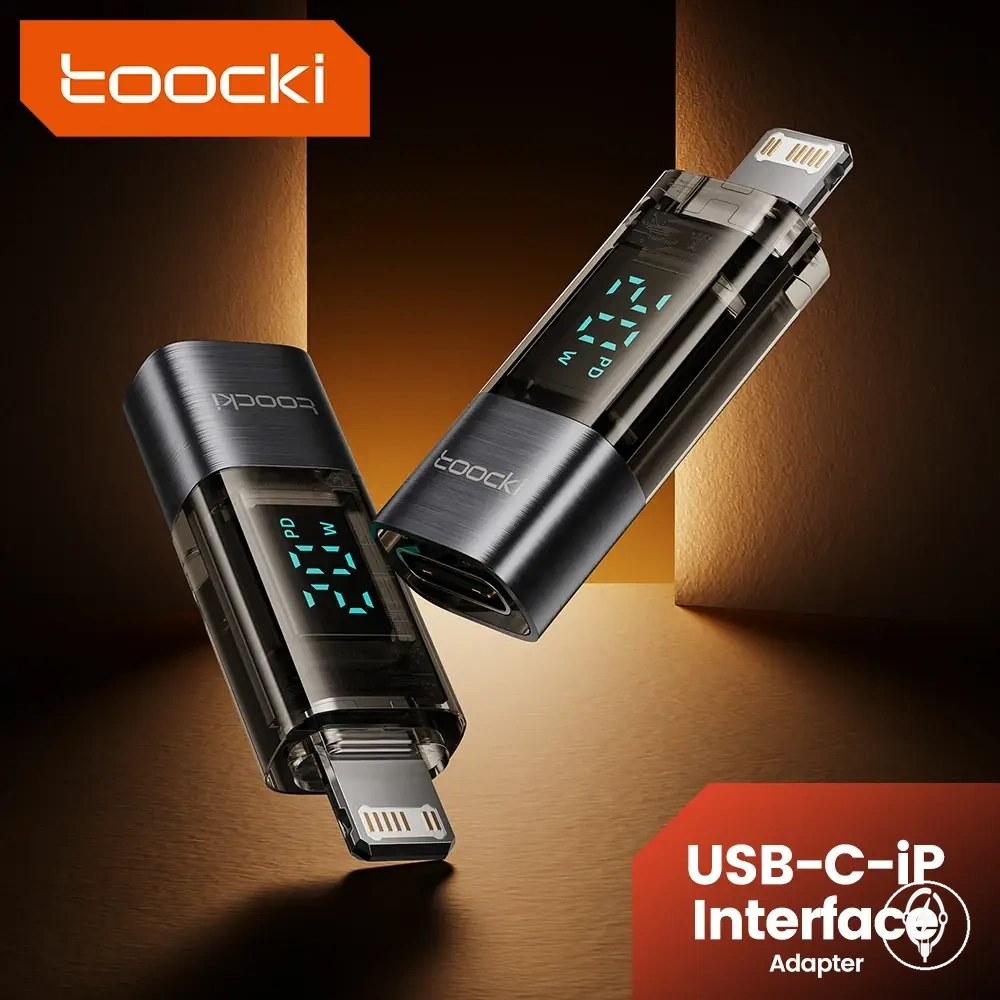
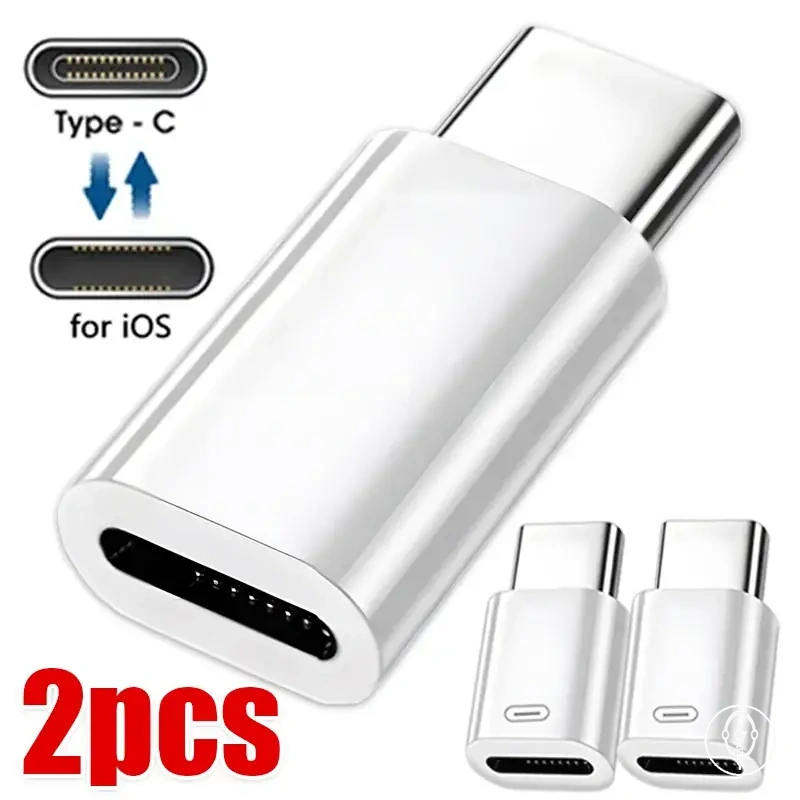
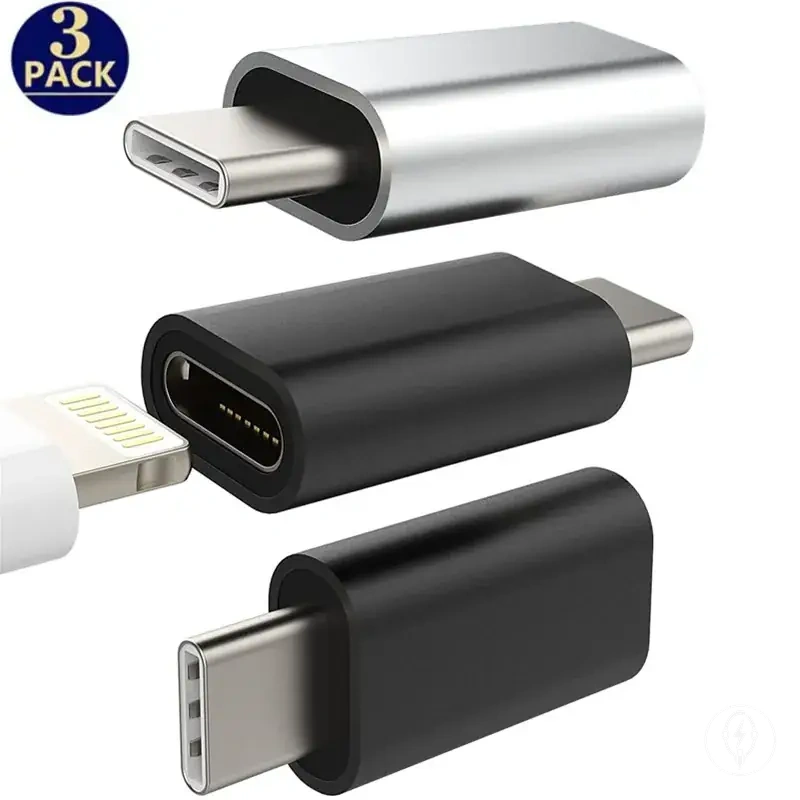
This chart shows the three-step process to identify the correct charger type for your iPhone, from checking the port to verifying the charging method.
Compatibility Checks Before Using an iPhone Charger
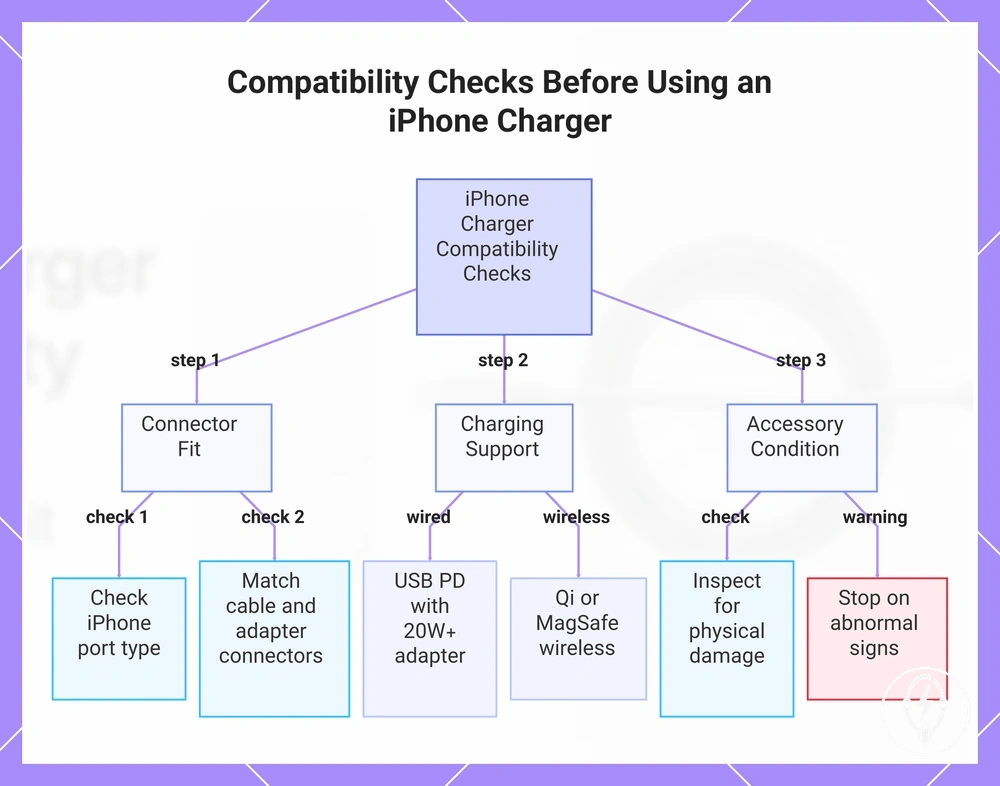
Compatibility checks before using an iPhone charger require verifying the iPhone port, cable ends, adapter port, charging support, and accessory condition before connecting power. According to Apple, iPhone 15 and later models use USB-C, while earlier iPhone models use Lightning, making the charging port the first compatibility check. Completing these compatibility checks reduces connector mismatches and helps identify unsafe charging setups before use. :contentReference[oaicite:0]{index=0}
Use this mini-checklist to confirm charger compatibility before connecting the iPhone.
Use this mini-checklist to confirm charger compatibility before connecting the iPhone.
- Verify the iPhone port is USB-C or Lightning.
- Confirm the cable ends match both the iPhone port and the charger.
- Check the adapter port matches the cable connector without forcing the connection.
- For supported fast charging, verify the charger supports USB Power Delivery (USB PD) and, according to Apple, uses a compatible USB-C power adapter rated at 20 W or higher.
- If charging wirelessly, verify the wireless standard matches the iPhone, such as Qi or MagSafe on supported models.
- Inspect the accessory condition for frayed cables, bent pins, cracked housings, exposed conductors, or corrosion.
- Stop using the setup if heat, a burning smell, sparking, intermittent charging, or other visible damage signals appear during use.
Connector fit is the first practical verification step. A USB-C cable must connect to a USB-C iPhone port and a USB-C adapter port, while a Lightning cable must connect to a Lightning iPhone and the correct USB-C or USB-A adapter-side connector. For example, according to Apple, an iPhone 15 requires a USB-C connector, whereas an iPhone 14 requires a Lightning connector, so the correct cable depends on the iPhone model. :contentReference[oaicite:1]{index=1}
Connector fit is the first practical verification step.
After connector fit is confirmed, verify charging support. According to Apple, supported iPhone models require a compatible USB-C power adapter rated at 20 W or higher together with USB Power Delivery for documented fast charging, while compatible wireless charging requires a supported Qi charger or MagSafe charger. Correct connector fit alone confirms physical compatibility but does not confirm charging capability or charging speed. :contentReference[oaicite:2]{index=2}
After connector fit is confirmed, verify charging support.
Accessory condition is part of the final compatibility decision because physical damage and repeated overheating can indicate that the charger should not continue to be used. For additional guidance on recognising unsafe charging accessories and reducing charging risks, see safe charger selection. :contentReference[oaicite:3]{index=3}
For additional guidance on recognising unsafe charging accessories and reducing charging risks, see safe charger selection .
Use the charger only when the compatibility checks confirm correct connector fit, supported charging standard, suitable accessory condition, and normal operating behaviour. If new heat, exposed conductors, loose connectors, or visible damage develop after charging begins, stop using the setup until the affected accessory is inspected or replaced.:contentReference[oaicite:4]{index=4}
Before buying, check that the compatibility criteria, key features, and product details match your needs.
The products below are useful examples for comparing available options. Before buying, check that the compatibility criteria, key features, and product details match your needs.
This chart shows the three main compatibility checks to perform before connecting an iPhone charger: connector fit, charging support, and accessory condition.